

Training Modules: What They Are, 5 Types and How to Build One
A training module is a defined unit of learning within a course or programme. The five types, and how to build one step by step, with a template.

A training module is a defined unit within a course or programme, organised around a related objective or set of objectives.
- Type a training module by what the learner must do afterwards, not by whether it is a video or an interactive.
- Keep a coherent scope with related outcomes. Split separate tasks when that helps learning, rather than counting conjunctions.
- Write the practice and the check before the content, then cut any content the practice does not need.
- Judge a module by behaviour on the job about 30 days after launch, not by completions.

Go from storyboard to an interactive course in minutes
A customer brings back a working stick blender they no longer want, has no receipt and asks for cash. The team member on shift has a few seconds to decide what to do, and whatever they learned about refunds has to work right then.
A training module is a defined unit of learning within a course or programme, usually organised around a related objective or set of objectives. In this guide I plan modules with explanation, practice and an appropriate check. I group them by five purposes: knowledge, procedure, judgement, compliance and assessment. These purposes can overlap; they are a design aid rather than a standard classification.
I'm an instructional designer at Coursebox, where we make an AI course builder for employee training, and I test most of what we ship, so I'll say where I used our product and what it got wrong. In this guide I define a training module, set out the five types, then build one module step by step: the no-receipt refund above, for a hypothetical homewares retailer. You get the objective, the practice cases, a full check question, the evaluation measure, a real case study on sequencing modules, and a one-page design sheet to download.
What is a training module?
A training module is a defined unit within a course or programme, with a clear scope and intended learning outcomes. It may be completed in one sitting or over several sessions. Explanation, practice and checks should fit what learners need to know or do.
The terms around it are often used loosely, so here is how I use them. The examples come from the running case in this guide: a hypothetical homewares retailer training its store team members to handle returns without a receipt.
| Unit | What it covers | Example from the refund case |
|---|---|---|
| Lesson | One topic or set of screens inside a module | The four point-of-sale (POS) screens for a no-receipt return |
| Module | One objective, with practice and a check | Refunds without a receipt |
| Course | Several modules toward a role outcome | Returns and exchanges |
| Programme | Several courses plus live elements over weeks or months | New store team member onboarding |
People also call a module a unit, a learning unit, a lesson block or a microcourse. A module is also different from the materials inside it: a job aid, a slide deck or a video is a component a module uses, and our guide to employee training materials covers those.
The 5 types of training modules (by the job they do)
You could sort modules by media: video, interactive, assessment, blended. Media tells you how the content arrives, but not what the learner must be able to do when the module ends, and that is what decides the module's structure and its check. Here are the five jobs a module can do.
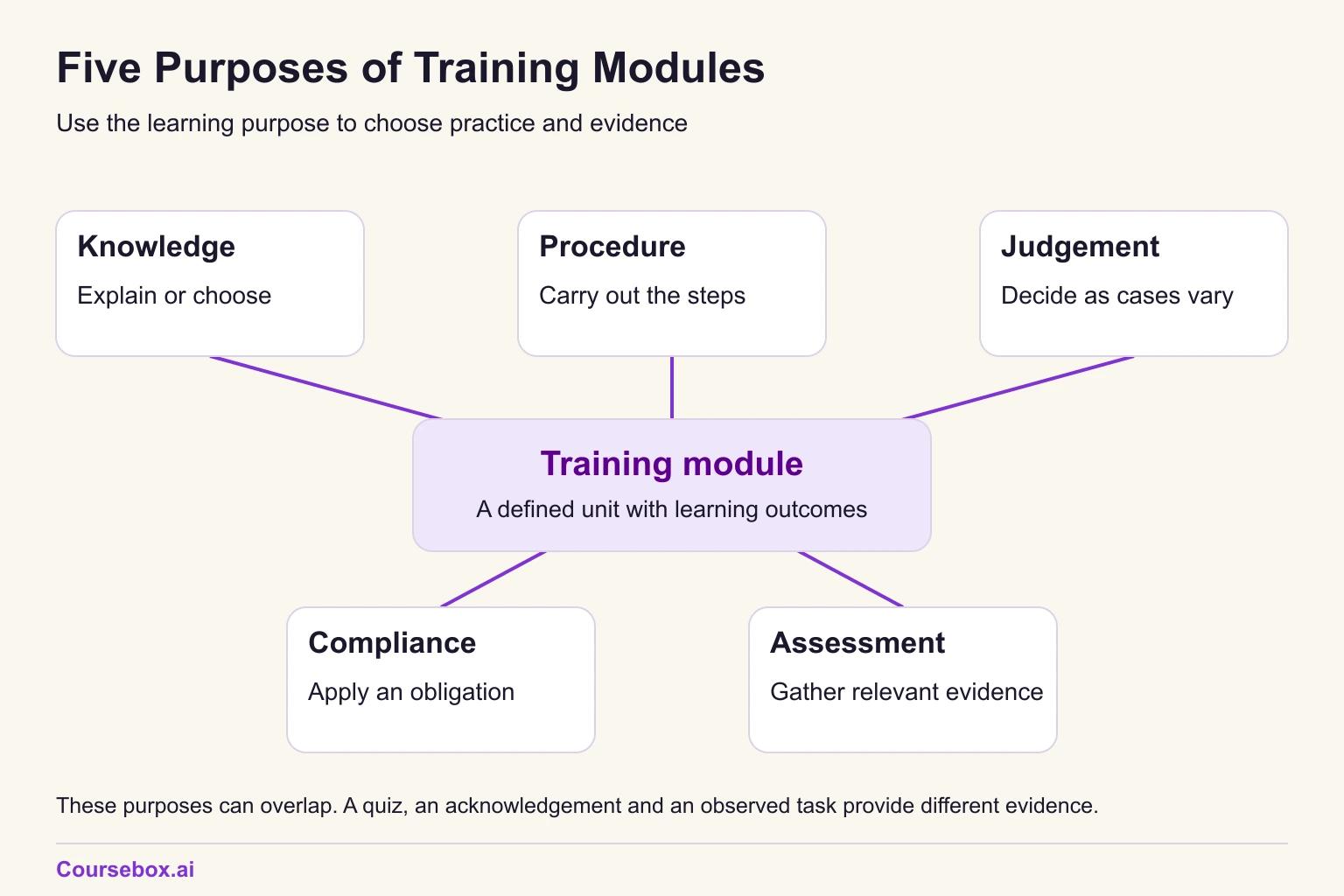
Knowledge modules
- After the module, the learner can: explain a concept, product or rule set, or pick the right option from it.
- Structure that fits: short explanation, worked comparisons, then questions that ask the learner to explain or choose.
- The check that provides evidence of it: explain-or-choose questions set in a realistic situation, not recall of wording.
- Example: "How our three membership tiers differ", for call-centre staff who must recommend a tier on a call.
Procedure modules
- After the module, the learner can: carry out a set of steps in the right order.
- Structure that fits: demonstration of the steps, guided practice, then unaided practice.
- Evidence to collect: an ordering question can check sequence knowledge; a realistic simulation or observed task is needed to judge performance of the procedure.
- Example: "Forklift pre-start check", or "Raising a purchase order in the finance system".
A procedure taught only by watching someone else do it rarely sticks. The learner needs to do the steps at least once before the check.
Judgement (scenario) modules
- After the module, the learner can: decide what to do when the situation varies.
- Structure that fits: a few contrasting cases, the rule of thumb behind them, then new cases to decide.
- The check that provides evidence of it: a branching scenario or scenario questions with plausible wrong answers.
- Example: "De-escalating a caller who wants a manager".
Compliance modules
- After the module, the learner can: state an obligation, apply it to their own work, and record that they accept it.
- Structure that fits: the rule in plain words, cases from the learner's own job, then the attestation.
- Evidence to collect: relevant scenario answers and, where required, an acknowledgement record. A signed attestation records acknowledgement; it does not establish compliant behaviour on the job.
- Example: "Privacy and customer data for store staff".
Assessment-only modules
- After assessment, the learner receives a judgement against specified criteria for the capability being assessed. Further evidence or training may still be required.
- Structure that fits: instructions, the assessment, and a route to further training for anyone who fails.
- The check that provides evidence of it: the module is the check, with the pass mark and retake rule stated up front.
- Example: a refresher assessment against an approved standard, or an assessment pathway for recognition of prior learning. Regulated recognition requires the relevant assessor, evidence and conditions; a challenge quiz alone may be insufficient.
Format is a separate choice
Once you know the type, choose the format: video, interactive, microlearning, live virtual or blended. Some formats suit a type and some fail it.
| Type | Formats that suit | Format that usually fails |
|---|---|---|
| Knowledge | Short video, interactive comparison, microlearning | A long talking-head video with no questions |
| Procedure | Screen or task demo plus hands-on practice, simulation | Video alone, with no chance to do the steps |
| Judgement | Branching scenario, live role play, case discussion | A slide deck that states the right answer |
| Compliance | Interactive scenarios with an attestation step | A policy PDF with a tick box at the end |
| Assessment-only | Online test, observed task, simulation | A quiz that tests recall of definitions |
If you are choosing between short formats, our microlearning examples show the format in practice. Training programme types, such as onboarding, compliance and leadership programmes, are a different thing again, covered in our guide to employee training programme types.
The refund module in this guide is a procedure module with one judgement branch: whether to call the duty manager. Name the dominant type, because it decides the check, and build the branch into the practice.
How to create a training module, step by step
The eight steps below build one module from start to finish. The example is hypothetical, but I have kept it to a problem retailers deal with all the time.
A homewares retailer runs stores with mostly casual and part-time team members. An audit of stock losses (shrink) has found cash refunds paid on no-receipt returns at three stores, and store managers report arguments at the counter when staff get the rule wrong. The retailer's no-receipt policy is clear: store credit only, never cash; value at the lowest selling price in the last 30 days; photo ID recorded (type and last four characters); a call to the duty manager, who gives an approval code, when the item is over $150 or the POS shows a red return-flag banner; no photo ID means the return cannot be processed today, so staff offer to hold the item for 7 days; and staff explain the policy once and do not argue. The module has to get every team member applying that policy at the counter. Every step below ends with what the step produces for this module.
These invented rules cover the retailer's voluntary change-of-mind process only. Faults, consumer guarantees and alternative proof of purchase go through the approved consumer-remedies process. A missing receipt does not itself remove a consumer right. The ACCC explains the difference. Any ID collection must also follow the organisation's approved privacy process.
Step 1: Identify the learning need and the audience
Start with what people are doing now and what they should be doing instead. Then ask whether the gap is a skill gap at all. If the POS hides the return flag below the fold, or the policy contradicts what managers tell staff, no module will fix it.
Questions I ask at this stage:
- What are people doing now, and what should they be doing?
- Who does the task, how often, and on what device?
- Is the gap knowledge, skill, motivation, or a process or tool problem?
- What would show us the problem has gone?
I've been in enough kickoff meetings with L&D managers to recognise the request for "a module on refunds" that is really three modules: receipted returns, no-receipt returns and faulty goods. Asking these questions is how you find that out before you build anything. Our training needs analysis questionnaire has a fuller set, and action mapping is a good method for separating training problems from everything else.
Refund module: the audience is casual and part-time store staff on rostered shifts. The observed gaps are cash refunds and missed manager approvals. Check whether staff can find and interpret the POS flag, apply the policy in a sample task, and obtain manager support. The flag existing on screen does not rule out a tool or process problem.
Step 2: Write one clear learning objective
A clear learning objective names the condition, the behaviour and the standard. "Understand the returns policy" has none of those. "Given a customer with no receipt, process the return under the no-receipt policy" has a condition and a behaviour, and adding a standard makes it checkable.
Keep the objective coherent and small enough to teach and assess. A connected task can include several actions; the number of times you write "and" does not decide the module count. Our guide to Bloom's taxonomy can help match the verb to the required thinking.
Refund module objective: "Given a customer returning an item without a receipt, the team member processes the return under the no-receipt policy: store credit at the lowest selling price in the last 30 days, photo ID recorded, and a call to the duty manager when the item is over $150 or the POS shows a return flag; with no photo ID, no return today and a 7-day hold offered; the policy explained once, without argument. Standard: 4 of 5 scenario questions, including both manager calls, followed by correction of every miss and a supervised full-task check before independent processing."
Step 3: Choose the module type and format
Use the five types above. Ask what the learner must do at the end, then pick the format that lets them practise it where they will use it.
Refund module: a procedure module with one judgement branch (escalate or not). Format: a short self-paced interactive module on a phone or the back-room tablet, built around POS screenshots, with no long video.
Step 4: Structure the content
When a slide deck needs restructuring, I start with six useful parts: hook, explain, show, practise, check and job aid. Adapt that outline to the objective rather than keeping every part by rule. Plan the parts now, then write the explanation after the practice and check in Step 5.
Size the module to the objective and to the learner's working day, not to a set number of minutes. For store staff the working day is the constraint. In Australia's latest survey of work-related training, the barrier people named most often was time.
The same ABS release found that 49% of participants did their most recent work-related training online or virtually. Here the manager reserves about 12 minutes during the rostered shift, on a suitable phone or back-room tablet. Our guide to training duration covers sizing; cognitive load theory helps with manageable presentation.
Refund module sections (about 12 minutes):
- Hook (1 minute): a counter scene: a customer with a toaster and no receipt asks for cash.
- Explain (2 minutes): the five rules: store credit only, lowest selling price in the last 30 days, photo ID recorded, duty manager call over $150 or on a red flag, and no ID means no return today.
- Show (3 minutes): a POS walkthrough in four screenshots, including where the red return-flag banner appears.
- Practise (4 minutes): five counter cases with feedback.
- Check (2 minutes): five scenario questions.
- Job aid: one card for the register.
Step 5: Build the practice and the check
Write the practice first and the check second, and map every check question to the objective. Use scenarios that make the learner decide, not questions that ask them to recall the policy wording. A question that names the trigger ("The item is over $150. What must you do?") only tests whether they remember the matching action.
The check does more than measure. In Roediger and Karpicke's 2006 study of test-enhanced learning, students who were tested on a passage remembered far more of it a week later than students who spent the same time restudying it.
That was a lab study with university students and prose passages, not a workplace task. But it is a good reason to put practice questions inside the module rather than leaving all the questions to the end. Our guide to formative vs summative assessment explains how the practice (formative) and the check (summative) differ.
Writing the questions is the part many authors now hand to AI. Among Coursebox users who add quiz questions, more generate them with AI than write them by hand.
Generating questions is the fast part. The work is checking each one against the objective and the source policy, which I come back to in my own test below. If you generate questions, an AI quiz generator gives you a first draft to edit, not a finished check.
The five practice cases:
- A $40 kettle, photo ID shown, no flag: issue store credit at the lowest selling price in the last 30 days.
- A $210 coffee machine: call the duty manager and wait for the approval code before processing.
- A customer insists on cash for a $25 item: explain once that this change-of-mind policy offers store credit only.
- An $18 set of tea towels, and the POS shows a red return-flag banner: call the duty manager.
- The customer has no photo ID: the return cannot be processed today; explain why and offer to hold the item for 7 days.
The five check questions change the items and include boundary decisions. New item names alone do not prevent memorisation; check that learners must apply the policy, then observe the full task.
- A $189 stick blender, customer asks for cash.
- A $25 travel mug, and the POS shows a red return-flag banner.
- A salad bowl set with a $32 shelf tag, where the POS shows a lowest selling price of $24 in the last 30 days.
- A $42 serving bowl, photo ID shown, no flag.
- A customer who argues about store credit on a $58 lantern.
One check question in full: "A customer has no receipt for a $189 stick blender and asks for cash. What do you do first? A) Refund $189 cash. B) Issue $189 store credit. C) Call the duty manager before processing. D) Decline the return." The answer is C. Feedback for anyone who picks B: "Store credit is right for items up to $150; above that, the manager approves first."
Illustrative progression rule: 4 of 5 questions, including both escalation cases, prompts a supervised task check. Correct every missed requirement and demonstrate the complete approved POS procedure, including the no-ID route, before independent processing. Record failed, not observed and not applicable separately. Required manager approval remains in force. The five-question score is not competence sign-off.
"The item is over $150. What must you do?" tests recall of a rule. "A customer has no receipt for a $189 stick blender" makes the learner notice the price and decide. Check every question for this before you publish, especially AI-generated ones.
Step 6: Make it accessible, then pilot it
Build to the Web Content Accessibility Guidelines (WCAG), with WCAG 2.2 level AA as the usual target. In practice that means captions on any video, alt text on every screenshot, enough colour contrast, and a module that works with a keyboard alone.
Then pilot it with 3 to 5 people from the real audience, plus one review by a subject matter expert (SME). Watch where they hesitate rather than asking whether they liked it.
Refund module: pilot at one store with four team members and the store manager as SME. What I would watch for: whether people find the red flag on the screenshot, whether anyone reads the $150 rule as "$150 or more", and whether the job aid card is readable at arm's length on the register.
Step 7: Publish and launch in your LMS
Most learning management systems (LMSs) import a module as a SCORM package, a standard format that lets the LMS launch it and record completion and score. xAPI is a newer standard that can record activity outside a course as well. The SCORM explainer from Rustici Software covers both. A direct link may be another delivery option. Check whether that hosting route records named learner attempts and completions; tracking depends on its setup.
Before launch, open the module on the devices people will use. Then assign it by role, set a due date, and tell the managers what the module asks staff to do, so they can back it up on the floor.
Refund module: SCORM 1.2 export to the retailer's LMS, assigned to all store team members, due within 14 days, and a job aid card printed for every register.
Step 8: Evaluate and follow up
Check scores tell you whether people could do it in the module. That is level 2 in the Kirkpatrick model. Level 3, behaviour, checks application on the job, although a change there alone does not establish that the module caused it: Kirkpatrick Partners define it as the degree to which people perform the critical behaviours in their environment. Our guide to the Kirkpatrick evaluation model explains why planning starts from that end.
Add a couple of spaced follow-up questions after launch too. A large review of distributed practice by Cepeda and colleagues found that spacing out practice generally improves how much people retain compared with cramming it.
Refund module: 30 days after launch, the store operations lead pulls the POS report for two numbers: no-receipt refunds paid in cash (target: zero), and the share of no-receipt returns over $150 or with a red flag that carry a manager approval code. Two follow-up questions go to every team member at day 7 and day 30.
Training module template: the Module Design Sheet
The Module Design Sheet puts the whole module on one page before anyone builds a screen. It has 13 fields, plus three sign-off lines at the foot: owner, SME reviewer and review date. Here it is filled in for the refund module.
| Field | Refund module |
|---|---|
| Module title | Refunds without a receipt |
| Performance problem | Cash refunds paid on no-receipt returns at three stores; counter arguments when staff get the rule wrong |
| Audience | Casual and part-time store team members on 4 to 8 hour shifts |
| Module type | Procedure, with one judgement branch (escalate or not) |
| Learning objective | Given a no-receipt return, process it under the policy: store credit at the lowest 30-day price, photo ID recorded, duty manager call over $150 or on a red flag, 7-day hold when there is no ID, policy explained once. Progression: 4 of 5 with both escalation questions correct, then correct every miss and observe the complete task before independent work |
| Prerequisites | Can process a standard receipted return in the POS |
| Sections and minutes | Hook 1, Explain 2, Show 3, Practise 4, Check 2, plus a job aid card |
| Practice items | Five counter cases: $40 kettle, $210 coffee machine, cash request on a $25 item, $18 flagged tea towels, no photo ID |
| Check and pass rule | Five new scenario questions; 4 of 5 with both escalation cases correct prompts supervised checking. Correct every miss, verify the full task including no ID, and keep required approvals. |
| Format and device | Self-paced interactive module on a phone or the back-room tablet |
| Accessibility checks | Captions, alt text on POS screenshots, colour contrast, keyboard path; WCAG 2.2 AA |
| Publish target | SCORM 1.2 to the retailer's LMS; due within 14 days; job aid printed for every register |
| Evaluation measure and date | POS report at day 30: cash refunds on no-receipt returns (target zero) and manager approval codes on returns over $150 or with a red flag; follow-up questions at day 7 and day 30 |
A one-page Word template with the 13 fields above and sign-off lines for the owner, SME reviewer and review date. Page one is blank for your module; page two is the refund module filled in as an example. It is a planning sheet, not a scored instrument. No email required.
The sheet plans one module. For the course these modules sit in, use our course outline template.
How to sequence modules into a course
Order modules by dependency: what must a learner already be able to do before this module makes sense? A topic list in alphabetical or org-chart order sends people into modules they are not ready for.
For the refund module, the course is "Returns and exchanges", in this order:
- Standard returns and exchanges: processing a receipted return in the POS.
- Refunds without a receipt: the module built above.
- Faulty items and warranty claims: a different policy with its own checks.
- Handling a returns dispute: a judgement module that assumes the first three.
The no-receipt module comes second because its POS walkthrough assumes the learner can already run a standard return, which is why "Prerequisites" is a field on the design sheet. The Secure Meters case study shows the same ordering logic at the scale of a whole onboarding curriculum.

Case study: Sequencing onboarding modules at Secure Meters
Secure Meters, an electricity metering company founded in 1987 in Udaipur, India, employs more than 7,200 people across 10 countries. Every new joiner needs the same layered foundation before they can contribute, and for decades that foundation was taught in classroom sessions run by the company's own engineers. People who were travelling or in meetings missed sessions, so the same sessions were repeated across time zones.
- What they did: Secure Meters adopted Coursebox as its LMS and trained its subject matter experts to build the courses themselves, with the general manager for global learning reviewing every course before it was published. The curriculum was sequenced on purpose: electricity fundamentals first, then metering parameters, then Secure's own products and solutions, then soft skills, tools and organisational processes.
- Evidence and result: In the Secure Meters case study, the company reports 40 courses published, more than 500 employees who have completed at least one course, and new joiners completing foundational onboarding within their first month on the job.
- Limitation: This is our own case study, written with the customer, and its figures are completions and timing reported by the company. It gives no measure of on-the-job performance and no comparison with the classroom version, and classroom sessions continue alongside the courses for advanced topics.
- Lesson: The sequence came from how a new engineer has to think: "Once they know those parameters and the significance of those parameters, they will correlate and build on higher knowledge," as the general manager put it. Ask what each module assumes the learner can already do, and let that set the order.
Our guide to how to design and deliver training programs covers the steps above the course level, from the programme goal to delivery.
Building a training module with an AI course builder
I wanted to see how an AI course builder would handle the refund module, so I ran it through the Coursebox course agent in a test workspace. I pasted in a two-page store policy for a fictional retailer, "Returns Without a Receipt" (policy SP-14), with the same rules as the worked example.
What I asked for. "Build one training module, about 12 minutes, for store team members on handling a return without a receipt. One objective, a POS walkthrough, five practice cases, a five-question scenario quiz with a 4 of 5 pass mark, and a one-card job aid. Use only the attached policy." I had pasted the policy rather than attaching it as a file, and the agent noted that it could not cite the document for that reason.
What it produced. It asked no clarifying questions and planned one section of four pages at about 12 minutes: a walkthrough, a practice page with five counter decisions, a scenario quiz and a job aid. It stayed as one module with one objective, stated on the walkthrough page: "Process a no-receipt return in the POS in line with SP-14, including value, identification, escalation, refund or exchange outcome, and customer conduct requirements." I checked every rule on the walkthrough and the job aid against the policy and found nothing invented: store credit only, the lowest 30-day price, ID type and last four characters, the manager's approval code over $150 or on a red flag, and the 7-day hold. The job aid was a single nine-step card. The agent also said plainly that its walkthrough was generic rather than a simulation of the retailer's POS. That was true: without real screens, the "walkthrough" was a list of policy steps, not screenshots.
What was wrong. The quiz was called a scenario quiz, but most question stems gave the answer away. One read: "During a no-receipt return, the item is valued at over $150, or a red return-flag banner appears. What must you do before processing?" When the stem names the trigger, the learner only has to recall the matching action. The escalation rule I cared most about got one question, and that question merged both triggers, where I wanted at least two. The quiz also repeated the practice page topic for topic, in the same order, and the practice cases were equally generic ("The item's value is over $150, and the customer has current photo ID.").
The fix, and how I checked it. I sent the AI editor on the quiz page one message: replace all five questions with concrete counter scenarios, each with a named item and a price; do not state the rule in the stem; include at least two on the duty manager call, one for a $189 stick blender and one for a $25 item with a red flag; include one where the shelf price differs from the lowest 30-day price; do not reuse the practice cases; keep the 4 of 5 pass mark. It replied that it had replaced all five. After reloading the page I counted exactly five questions, so the edit had replaced the old ones rather than adding to them. The new stems included "A customer brings back a $189 Northstar stick blender without a receipt. What should you do before processing the return?", a $25 travel mug with a red flag, and a $32 shelf tag against a $24 lowest price.
Three things are still open. The practice page is still generic, and I would rewrite it by hand so practice and quiz use different items. I also did not preview the module on a phone or export the SCORM package in this run. And nothing in the course shows that staff now process returns correctly. That shows up in the POS report 30 days after launch.
The test retained an 80% overall quiz grade. I did not verify a rule requiring both escalation items to be correct or a complete observed POS check. Its pasted policy also lacked the consumer-remedies scope clarified above. Those are further changes before learner use, not fixes tested in this run.
Where to start with your next training module
A training module works when it is built around one thing the learner must do. Decide what that is, type the module by it, and the structure and the check follow: a procedure needs practice of the steps, a judgement needs varied cases, and a compliance module needs its record.
For your next module, fill in the Module Design Sheet before you open any authoring tool. Write the objective with a standard, write the practice cases and the check questions, and only then write the content they need. If you generate questions with AI, read each one against the objective and the source policy, and rewrite any stem that gives the answer away. Then put a date in your calendar 30 days after launch to look at the behaviour the module was meant to change.
Frequently Asked Questions
A training module is a defined unit within a course or programme, organised around a related objective or set of objectives. Several modules make up a course.
This guide uses five overlapping purposes: knowledge modules (explain or choose), procedure modules (do steps in order), judgement or scenario modules (decide when things vary), compliance modules (apply an obligation and record acceptance) and assessment-only modules (assess a specified existing capability). Format, such as video or microlearning, is a separate choice.
A knowledge module on how three membership tiers differ, a procedure module on a forklift pre-start check, a judgement module on de-escalating a caller who wants a manager, a compliance module on privacy and customer data for store staff, and an assessment-only annual fire warden refresher check.
Long enough for one objective with practice and a check, with a manageable scope and suitable opportunities to pause or continue. The refund module in this guide runs about 12 minutes. Size it to the objective and the learner's day rather than a fixed rule; our guide on how long employee training should be goes further.
That question is usually about types of training programmes, such as onboarding, compliance or leadership training, not types of modules, and different sources list different sets of seven. Our guide to employee training programme types covers them.
Carolina Martin
Carolina is a highly experienced learning designer with tech start-up experience. She is based in Sydney and previously designed courses alongside Coursebox founder Travis in a previous job. She is passionate about delivering engaging learning experiences and brings the same perspective to customer experience too. She manages our customer support documentation and product testing processes.

