

Multimodal Learning: What It Is, How It Works and Examples
Multimodal learning teaches one idea through words, pictures, sound and practice. Why it works, why learning styles are not the reason, and examples.

Multimodal learning uses more than one way of representing or engaging with material, such as written words, speech, pictures and physical action. A useful design connects those modes to the learning task.
- Learning theories describe connected verbal and nonverbal representations, limited processing capacity and benefits from suitable action. Combining modes helps under particular conditions, not automatically.
- Matching modes to a learner's preferred learning style has no adequate evidence behind it, so choose modes by the content instead.
- Avoid compulsory duplicate presentations that add no useful explanation or practice. Keep captions, transcripts and other access alternatives.

Go from storyboard to an interactive course in minutes
A new starter at a warehouse watches a four-minute video on fire extinguishers, then listens to the same script as a podcast, reads it again as a PDF and answers a quiz on it. That is four formats, but almost all of it is the same words, and nobody has yet put an extinguisher in the starter's hands.
Multimodal learning uses more than one way of representing or engaging with material, such as written words, speech, pictures and physical action. A useful design connects those modes to the learning task. In artificial intelligence the same phrase means something else: models that process text, images and audio together, which the survey of multimodal machine learning by Baltrušaitis, Ahuja and Morency defines and classifies. This guide is about how people learn.
I'm a cofounder of Coursebox, where we make an AI course builder for employee training, so weigh what I say about it with that in mind. Before Coursebox I was lead learning designer on three edX courses at the University of Adelaide. Every course I design still comes down to three kinds of page: a lesson, a practice activity and an assessment, and most courses have far too much of the first. In this guide I explain why multimodal learning works, why learning styles are not the reason, which mode should do which job, and how to design a lesson that way. One running example, a fire extinguisher module, carries through to a product test and a template you can download.
What is multimodal learning?
Multimodal learning uses more than one way of representing or engaging with material, such as written words, speech, pictures and physical action. A useful design connects those modes to the learning task.
A mode is a way meaning is represented or experienced, such as written language, speech, images, gesture or movement. A format is a container, such as a video, slide deck or PDF. A narrated demonstration combines modes within one format. A talking-head video also combines speech and visual information, though the picture may add little to an explanation. Count what learners can understand and do, rather than counting media files.
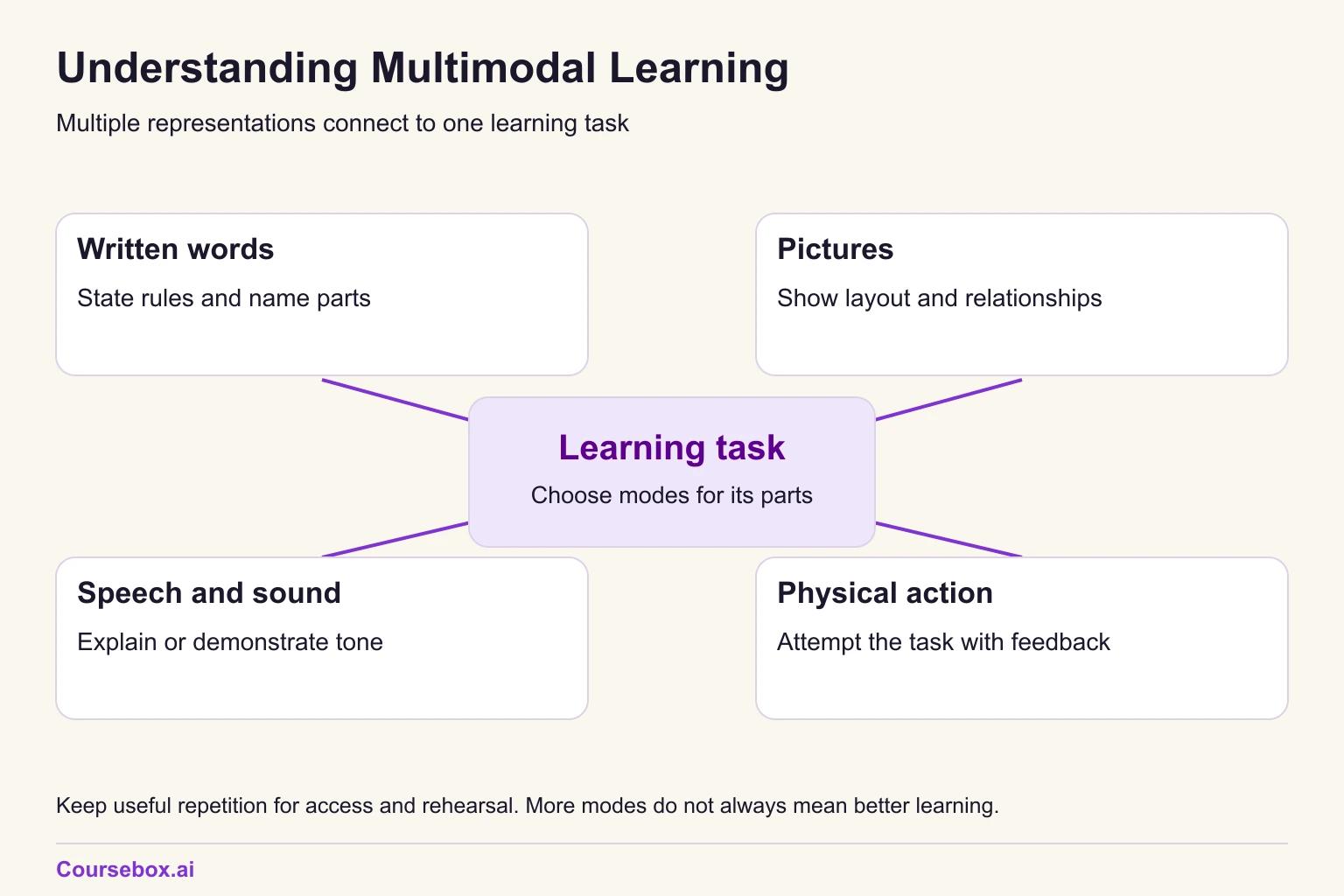
Take a 15-minute module that teaches new warehouse starters to use a portable fire extinguisher, worked through in full below. Its modes look like this:
- Words: a one-line rule on when to fight a fire at all.
- Picture: a diagram of the extinguisher with four labels.
- Hands: each starter handles a training extinguisher at a supervised drill.
The word "multimodal" also turns up as a result on the VARK questionnaire, where it means a person scored about evenly across the four VARK preferences. That is a label for a person's preferences, not a way of designing teaching, and our guide to the Fleming VARK model covers it.
How multimodal learning works
Three research ideas help explain when combining modes can help. They do not mean that adding another mode always improves a lesson.
Dual coding: linked verbal and nonverbal representations
Dual coding theory holds that the mind keeps two kinds of representation, verbal and nonverbal (imagery), linked in one associative network. Clark and Paivio's 1991 review of dual coding in education sets out what that means for teaching: a concrete idea that is both described and pictured gets two connected memory traces instead of one, so there are two ways back to it.
A labelled diagram can make the pin and gauge easier to locate than a description alone. Words name the parts; the picture shows their positions and relationships. Whether it helps depends on the diagram, the task and the learner.
Two channels, limited room
Richard Mayer's cognitive theory of multimedia learning has three core assumptions: visual/pictorial and auditory/verbal processing channels, limited capacity, and active processing to select, organise and connect information. Printed words enter through vision and can be represented verbally; this is not a simple pictures-versus-all-words split. His 2024 review summarises conditions in which words and pictures support learning better than words alone.
Several principles guide how modes work together: place labels near the parts they name, remove irrelevant detail, and avoid forcing a learner to read a dense paragraph while listening to it over a busy picture. Keep captions and transcripts available, with learner control where possible. The redundancy principle is conditional, not a ban on accessible alternatives or useful repetition. Our guide to Mayer's multimedia principles explains the design choices.
Performing actions: the enactment effect
Physically performing an action produces a stronger memory than reading or hearing about it. Memory researchers call this the enactment effect. Roberts, MacLeod and Fernandes reviewed the evidence in 2022 across behavioural, neuroimaging and neurological patient studies, and found a large average effect.
The large average concerns memory for actions, mostly simple laboratory tasks. It does not rank every teaching method or predict how much a workplace skill will improve. For a physical task, relevant supervised practice still supplies something a description cannot: an attempt with feedback. We also classified a sample of Coursebox course-building requests to see how often briefs asked for that practice.
The classification identified 62 requests for a quiz or test and 47 for practice. In 188 of the 304, none of the six coded requests appeared: practice, scenarios, visuals, video, narration or quizzes. These are estimates from sampled briefs, not a census of every mode or an inspection of finished courses. The practical question remains: where will the learner attempt the task?
Multimodal learning and learning styles: the VARK confusion
Multimodal learning is often sold as a way to serve every learning style: visuals for visual learners, audio for auditory learners. Matching a fixed style label is not a dependable basis for choosing instruction. Choose modes for the content and the learner's access needs, prior knowledge and task instead.
- Pashler, McDaniel, Rohrer and Bjork reviewed the learning styles research in 2008 and found virtually no evidence that matching teaching to a learner's style improves learning. They concluded there was no adequate evidence base for using learning-styles assessments in general education.
- Rogowsky, Calhoun and Tallal tested US primary school students in 2020, repeating a design they had first used with adults, and again found no significant link between an auditory or visual preference and comprehension.
- Husmann and O'Loughlin compared anatomy students' VARK scores and study habits with their course results, and found no link between the two.
The reason to combine modes is that they can make different aspects of a task easier to learn. A diagram can show where a gauge is; guided practice lets someone try the sequence. Adapt the representation and support when a learner needs it. Our guide to types of learning styles explains the models and their evidence.
The worked example: teaching new warehouse staff to use a fire extinguisher
This is a hypothetical module, built to show the design method. The learners are new warehouse starters in their first week, with no fire training beyond what they may have had at school. The setting is a 15-minute online module followed by a supervised drill day on site. The problem is a familiar one: induction teaches the PASS acronym (Pull, Aim, Squeeze, Sweep), starters can recite it, and then they hesitate or stand too close when they hold a real extinguisher.
The objective is to use the designated training extinguisher correctly in a controlled exercise, under a qualified facilitator and the approved site procedure. The online lesson prepares for that exercise; it does not qualify someone to tackle a real fire.
This module shows a design method. Your site's emergency procedure and your local fire authority's guidance come before anything in it, including when staff should fight a fire at all.
Each part of the task gets one mode:
- Rule (words): raise the alarm and evacuate under the site plan. Only staff trained and authorised for the situation consider using the correct extinguisher when the approved procedure says it is safe. A small fire and a clear exit alone are not sufficient permission.
- Where things are (picture): a labelled diagram with four labels: pin, handle, hose or nozzle, pressure gauge if fitted.
- Explanation (narration over the picture): "Pull the pin. Aim the hose at the base of the fire. Squeeze the handle. Sweep side to side." The screen shows only the four labels, not a paragraph.
- Procedure (practice): the online part ends with a sequencing activity of the four steps in shuffled order, and each starter handles a training extinguisher on the drill day.
- Judgement (scenario): "Smoke is coming from a pallet beside the only exit. Do you fight it?" The answer is no: leave and raise the alarm.
The assessment combines the scenario with a supervised demonstration against the approved exercise criteria. Each representation serves a purpose, and some steps recur in the explanation, accessible text and practice. That repetition is useful when it supports access or a new attempt.
Which mode does which job
Give each part of the task a representation that helps learners understand it. Repetition can support access, rehearsal and checking; remove duplication that adds effort without serving one of those purposes.
- Words: the rule and the reason behind it.
- Pictures: where things are and how the parts relate.
- Narration: the explanation, spoken over the picture.
- Hands-on practice: the procedure itself.
- Discussion or a scenario: the judgement call.
For each mode, ask: "What does this help the learner understand, practise or access?" Keep useful alternatives and rehearsal. Revise a second presentation when it only adds work without helping the task.
Multimodal learning examples
Each example below names the idea, the modes and the job each mode does, so you can copy the pattern to your own topic.
1. Software walkthrough
- The idea: how to raise a purchase order in a new finance system.
- The modes: a narrated screen recording, then the same task in a practice sandbox.
- The job each mode does: the recording shows where each field is while the narration says why it is filled in that way; the sandbox makes the learner do it.
Provide accurate captions and an accessible transcript alongside the recording. Let learners control the display where possible, and avoid crowding a detailed screen recording with unnecessary text.
2. Customer complaint call
- The idea: calming an upset caller and agreeing a next step.
- The modes: an audio clip of a realistic call, a scenario with choices, then a role play with a colleague.
- The job each mode does: the audio gives tone of voice, which text cannot; the scenario practises the decision; the role play practises saying it.
Our guide to scenario-based learning shows how to write the branching choices.
3. Safety induction walk
- The idea: where the exits, assembly point and first aid kits are on a site.
- The modes: a site map, then a walk of the route with a supervisor.
- The job each mode does: the map gives the whole layout at once; the walk ties each point on the map to the real place.
4. A compliance policy
- The idea: when a gift from a supplier must be declared.
- The modes: a two-line rule in text, one picture of a typical gift, and a decision scenario.
- The job each mode does: the text states the threshold, the picture makes the case concrete, and the scenario tests the grey areas.
5. A unit of competency for a training provider
A unit of competency is the standard a vocational training provider must train and assess against, such as a unit on operating a forklift.
- The idea: running a pre-start check on a forklift.
- The modes: a short lesson page with a labelled photo, a practice checklist the learner fills in on a real forklift, and an observed assessment.
- The photo locates the check points; supervised practice lets the learner attempt the approved checks; assessment collects evidence against the unit requirements. A qualified assessor must judge all required evidence, not infer competence from a generic checklist alone.
This is the lesson, practice and assessment split I use on every course. When I help a training provider convert a unit, the lesson content is usually there already and the practice is thin, so the practice page is where I start.
6. A gamified product quiz
- The idea: knowing the features of a new product range well enough to answer customer questions.
- The modes: product images, short spoken explanations, and a timed matching game.
- The images show appearance, narration explains use, and the matching game rehearses associations. A timer may measure speed in that game; it does not establish accurate advice to a customer. Include a customer decision when that is the objective.
Our guide to elearning gamification covers which game mechanics help recall and which only add noise. If you are mixing online modules with in-person sessions, the benefits of blended learning guide covers how to split the two.
Benefits of multimodal learning
The evidence supports three benefits, and they are enough on their own.
- Fuller memory from complementary modes. Mathias and von Kriegstein's 2023 review of enriched learning describes multimodal enrichment as the presence of complementary information across senses or movement during learning, and reports that it can markedly benefit outcomes. The key word is complementary: each mode adds something the others lack.
- Doing beats reading. The enactment research above shows that performing an action is remembered far better than reading about it, which makes practice the first mode I add to a course.
- Better access. Captions and transcripts serve deaf and hard-of-hearing learners, people working in a second language and anyone on a noisy shop floor. Keep them, for those reasons, rather than as a nod to "reading learners".
You will also see claims that learners remember a fixed percentage more from multimodal lessons, often credited to a university with no study attached. I could not find a source for any of them, so I have left them out.
Disadvantages: when more modes make learning worse
More modes can make a course worse when they compete for the same channel or repeat each other. These are the five problems I see most:
- The same script assigned four times. Alternative formats can improve access, but requiring everyone to consume all four can add time without useful practice or explanation.
- Dense text read aloud over a detailed graphic. This can compete for attention. Use concise labels, clear narration and controllable captions rather than treating all repeated wording as a defect.
- Decorative video. A stock clip of people in hard hats under a voice-over carries nothing the voice does not already say.
- Too many inputs at once. Music, animation, captions and a busy diagram on one screen overload a channel that holds very little. Our guide to cognitive load theory explains why.
- Production cost. Every mode costs time to make and to keep up to date. A narrated diagram you update once a year is cheaper than a filmed scene you must reshoot.
Here is the fire extinguisher page before and after:
- Before: a 400-word script about extinguishers, delivered as a video, a podcast, a PDF and a ten-question quiz.
- After: one rule in text, a diagram with four labels, narration over the diagram, a sequencing activity, a scenario and an observed drill.
How to design a multimodal lesson
These seven steps turn a topic into a multimodal lesson. They follow the lesson, practice and assessment split, with the modes assigned inside it.
- Write the objective as a task. "Discharge a training extinguisher at the base of a practice fire", not "understand fire extinguishers".
- Split the task into its parts. Most workplace tasks have a rule, a location, a procedure and a judgement call, though not every task has all four. Add the explanation of how the parts fit together as its own row.
- Assign one mode to each part. Use the five jobs above: words for the rule, a picture for the location, narration for the explanation, practice for the procedure, a scenario for the judgement.
- Put words and their picture together. Labels go on the diagram, and narration explains the visual, with captions and a transcript available.
- Add the practice before the assessment. Learners should try the procedure, with feedback, before anything counts.
- Review repetition by purpose. Keep captions, transcripts and repeated practice; cut duplicate presentations that only add effort.
- Check with one learner doing the task. Watch one person go through it, and fix whatever they hesitate on.
Step 1 is the one I see skipped most. Our guide to adult learning theory explains why adults engage more with a task they will use at work, and Kolb's experiential learning theory gives a cycle for building reflection in after the practice. If your modes include short videos, the guide to making microlearning videos in 10 steps covers the production side.
A planner with one row per part of the task: the rule, where things are, the explanation, the procedure, the judgement and the assessment. For each row you choose a mode, write the actual artefact (the label text, the narration line, the practice task) and record whether any repetition supports access or practice. The fire extinguisher example is filled in, with a blank page for your lesson. It is a planning aid, not a validated instrument, and it gives no score. It is an editable Word file, and no email is required.

Case study: Fire extinguisher training in VR, AR and video in New Zealand
Researchers working with Massey University in Auckland taught the same PASS procedure (Pull, Aim, Squeeze, Sweep) in three ways and tracked what people remembered. In Lovreglio and colleagues' 2021 study, one group trained in an immersive virtual reality simulation where they performed each step, and another watched a non-interactive training video. A later study tested a third version on a tablet, using augmented reality to show a virtual fire in the real room.
- What they did: In Domgue and colleagues' 2025 study, 60 university students and staff trained with the tablet version, and 54 returned for the retention test. Everyone answered two open questions about the extinguisher steps before training, straight after and 3 to 4 weeks later, scored by how many distinct actions they named. The results were compared with the earlier VR and video groups, who had followed the same procedure.
- Evidence and result: In the paper's comparison tables, the tablet group named fewer steps straight after training than either the VR or the video group (its abstract summarises this more favourably). Three to four weeks later it was ahead of the video group and behind the VR group. In the 2021 study, the VR group kept its confidence in using an extinguisher 3 to 4 weeks on, while the video group's confidence dropped significantly. Few in the tablet group remembered the PASS acronym itself, which the authors put down to the acronym appearing only on screen rather than being practised.
- Limitation: Domgue and colleagues note that they did not test whether anyone could operate a real extinguisher, and both studies measured knowledge and confidence by questionnaire. The groups were compared across two studies rather than randomised together, and the 2025 sample was university volunteers.
- Lesson: The studies suggest active simulations are useful candidates for preparing for this procedure, but the comparison across studies does not isolate the effect of action. The authors suggested that limited rehearsal contributed to poor acronym recall; that was not a separately tested cause. Include an appropriate supervised task check rather than infer real extinguisher skill from a questionnaire.
Building a multimodal course with an AI course builder
I wanted to see whether an AI course builder would follow the mode rules or fall back on the four-formats habit, so I ran the fire extinguisher brief through the Coursebox course agent in a test workspace.
What I asked for. I gave the course agent this brief: "A 15-minute course for new warehouse staff on using a portable fire extinguisher. Teach PASS with a labelled diagram of the extinguisher, narration over the diagram instead of on-screen paragraphs, a sequencing practice activity, a scenario about a fire beside the only exit, and a short assessment."
What it produced. Before planning anything, the agent said plainly that it cannot create or embed audio narration, and asked how to handle that. It offered three substitutes: tap-to-reveal explanations plus an audio-ready narration script on a trainer page, visible captions plus a script, or tap-to-reveal alone. I took the first. The plan came back as one section of five pages, at about 15 minutes:
- Before You Use It: Check, Identify, PASS
- Put PASS in Order
- Scenario: Fire at the Only Exit
- Check Your Fire Extinguisher Decisions
- Trainer Script: Extinguisher Diagram Narration
The first page had a properly labelled diagram (safety pin and tamper seal, carrying handle, operating lever, pressure gauge if fitted, hose or nozzle, cylinder, instruction label) with a four-panel PASS strip and a six-point check on whether to fight the fire at all. The scenario was a three-turn decision about packaging on fire beside the only exit, not a recall question, and the assessment was a four-question quiz with an 80% pass mark. The agent's own summary flagged two gaps: the diagram used icon cards rather than tap-to-reveal hotspots, and the scenario ran long, so the estimate was about 17 minutes rather than 15.
What was wrong. The practice page, "Put PASS in Order", did not test the order. It listed the four actions already in the right sequence and asked learners to match each action to its effect. A learner could pass it without knowing the sequence, which was the whole point of the page. The narration is the other limit: the course agent said it cannot create audio narration, so "narration over the picture" holds only if a trainer records the script on page 5. Until then the explanation sits on screen as text.
The fix, and how I checked it. I sent the AI editor one message asking it to replace the matching activity with a true ordering activity, with the actions shuffled and ungraded. It replied that it had done so. After reloading the page, the ordering activity was there, starting shuffled with "Sweep side to side" first and "Pull the pin" second, with buttons to submit the order or reset and try again. The edit had also left the old matching activity in place below the new one, so the page held both until I removed the old one by hand. After any AI edit, check the page itself, not the confirmation message. And none of this shows a starter can use an extinguisher; that is what the drill is for.
The reload confirmed the shuffled labels and buttons. I did not submit correct and incorrect orders, test reset, enrol a learner or check reporting. The visible activity is not a verified end-to-end learner workflow.
What to do next
A useful multimodal lesson connects its representations to the task: words can explain a rule, a picture can show layout, and supported practice lets someone attempt a procedure. Access needs and prior knowledge help determine the design too. Repeating one script in several compulsory files is a different choice from providing useful alternatives.
Pick one lesson and list what each representation helps someone understand, practise or access. Keep useful alternatives and rehearsal; revise duplication that adds effort without a purpose. Add an appropriate attempt before assessment where the objective requires performance, then pilot with learners and inspect the task. The mode map gives you a place to plan it.
Frequently Asked Questions
Multimodal learning uses more than one way of representing or engaging with material, such as written words, speech, pictures and physical action. A useful design connects those modes to the learning task. A fire safety module might give the rule in text, show the extinguisher in a labelled diagram and have learners practise the steps.
Examples include a narrated screen recording followed by practice in a software sandbox, a recorded customer call followed by a scenario and a role play, a site map followed by a walk of the route, and a labelled diagram of equipment followed by hands-on use at a drill.
No. A "multimodal" result on a VARK questionnaire describes a person's stated preferences. Multimodal learning is a design choice for everyone, and research has found no adequate evidence that matching teaching to a person's preferred style improves learning.
Additional modes can compete for attention, add unnecessary production work or repeat material without a learning purpose. Keep accessible alternatives and useful rehearsal, and remove irrelevant decoration or compulsory duplication.
In artificial intelligence, multimodal learning means building models that process and relate information from several modalities, such as text, images and audio, together. It is a separate field from multimodal learning in education, which is about how people learn.
Travis Clapp
Travis Clapp is the original founder and CEO of Coursebox. As an experienced instructional designer, he has lived through the process of building high quality courses. These experiences brought about his idea to upload all your documents and ideas into a virtual box that could convert those magically into a course. Prior to Coursebox, he successfully founded and built a social based LMS. Travis has 15+ years of experience designing courses and EdTech platforms from university MOOCs to enterprise LMS. Travis has built training for reputable companies like Johnson & Johnson, Electrolux, Michael Hill and SA Health. One of his courses reached 20,000+ learners which was a flagship edX course. He is based in the Adelaide, South Australia office and passionately works on customer support, sales and bringing the original product vision to life every day.

