

Knowt vs Quizlet: I Tested the Switch (2026)
I moved my Quizlet deck into Knowt and studied on both. Knowt wins on uncapped free studying and spaced repetition, Quizlet on AI cards and its library.

Knowt suits switchers fed up with Quizlet's free-tier caps: every study mode ran uncapped in my test and the import moved all 5 cards intact. Quizlet suits anyone who wants AI-made cards and the biggest public library.
- Knowt wins on memory science too. Its spaced repetition schedules each card across days with Again, Hard, Good and Easy buttons, at intervals from 1 minute to 13 days in my session; Quizlet only adapts inside a session.
- Quizlet wins at making the cards. Its AI builds sets from PDFs, slides, Drive files or a recorded lecture inside the free product; Knowt's AI features run on a monthly allowance of 20 uses.
- Which caps hurt depends on how you study. Quizlet's free tier stops tests at 5 questions and Learn at 20 rounds a month; Knowt's free tier limits AI use and file creation instead.
- Knowt wins for teachers on a $0 budget, with free per-student tracking and five class-game types; Quizlet puts class progress tracking behind its paid teacher plans.
- Neither Knowt nor Quizlet proves a team learned anything. Both are self-study apps at heart, so training 20 staff with completion evidence needs a course platform with reporting.
Answer 3 quick questions to figure out in seconds

Convert anything into flashcards instantly
Knowt calls itself the "#1 Free Quizlet Alternative" in its own page title, so I tested that claim the direct way. I built a five-card warehouse safety deck on Quizlet and put it through Quizlet's own study modes first. Then I moved the deck into Knowt with Knowt's import tool and ran the full circuit again on that side, mode by mode.
On the surface the two apps do the same job: you type terms and definitions, flip through cards, and play a matching game against the clock. The real differences are in the free tiers and the study modes. Quizlet has the bigger library and the more polished card creation, and it limits free studying month by month. Knowt gives away what Quizlet charges for, including unlimited study rounds and real spaced repetition, and pays for that with a smaller library, a pushier interface and AI features on a monthly allowance.
By the end you will know which app fits how you study, and whether switching is worth it for you.
The short version
Pick Knowt if:
- Quizlet's caps are why you are leaving. Learn-style rounds, practice tests and the match game all ran without limits on my free Knowt account.
- You want spaced repetition without running Anki. Knowt schedules cards across days with Again, Hard, Good and Easy buttons, and lets you edit the intervals.
- Your sets already live on Quizlet. The import tool moved my whole deck in one paste.
- You teach. Per-student progress tracking and five class-game modes came free on my account.
- You like game mechanics. XP, levels and streaks wrap every study session.
Pick Quizlet if:
- You want AI to write the cards. Its generator builds sets from PDFs, slides, Drive files or a recorded lecture, with a review step.
- You study from other people's sets. Quizlet's public library dwarfs Knowt's; my "biology" search returned about 20,000 results on Knowt against Quizlet's millions of sets.
- Everyone around you uses Quizlet. Teachers' class codes and classmates' shared sets only work on the platform they are posted on, and that platform is usually Quizlet.
- Upsell popups wear you down. One Knowt session showed me an extension ad, a rate-this-app request and a pleading mascot; Quizlet's free tier has ads but fewer interruptions.
- You study from textbooks. Quizlet's Expert Solutions walks through textbook problems step by step; Knowt has nothing like it.
How I compared Knowt and Quizlet
- how cards get in, typed, generated or imported from the other app
- whether the app schedules your memory across days or only inside a session
- what studying looks like on each, mode by mode
- what the free tiers really allow before they stop you
- what each one costs when you do pay
- what happens when the learners are a class or a team rather than one student
I tested the free version of both apps thoroughly, with the same five cards on each. One note: my Knowt account is registered as a teacher, and I flag the screens only teachers see.
We build in this space as well. Coursebox is an AI-powered learning management system (LMS) whose AI flashcard maker turns documents into flashcards, and it generates courses, quizzes and assessments the same way. It is not one of the two tools here and it is not what I recommend below, so treat that as a disclosure rather than a pitch.
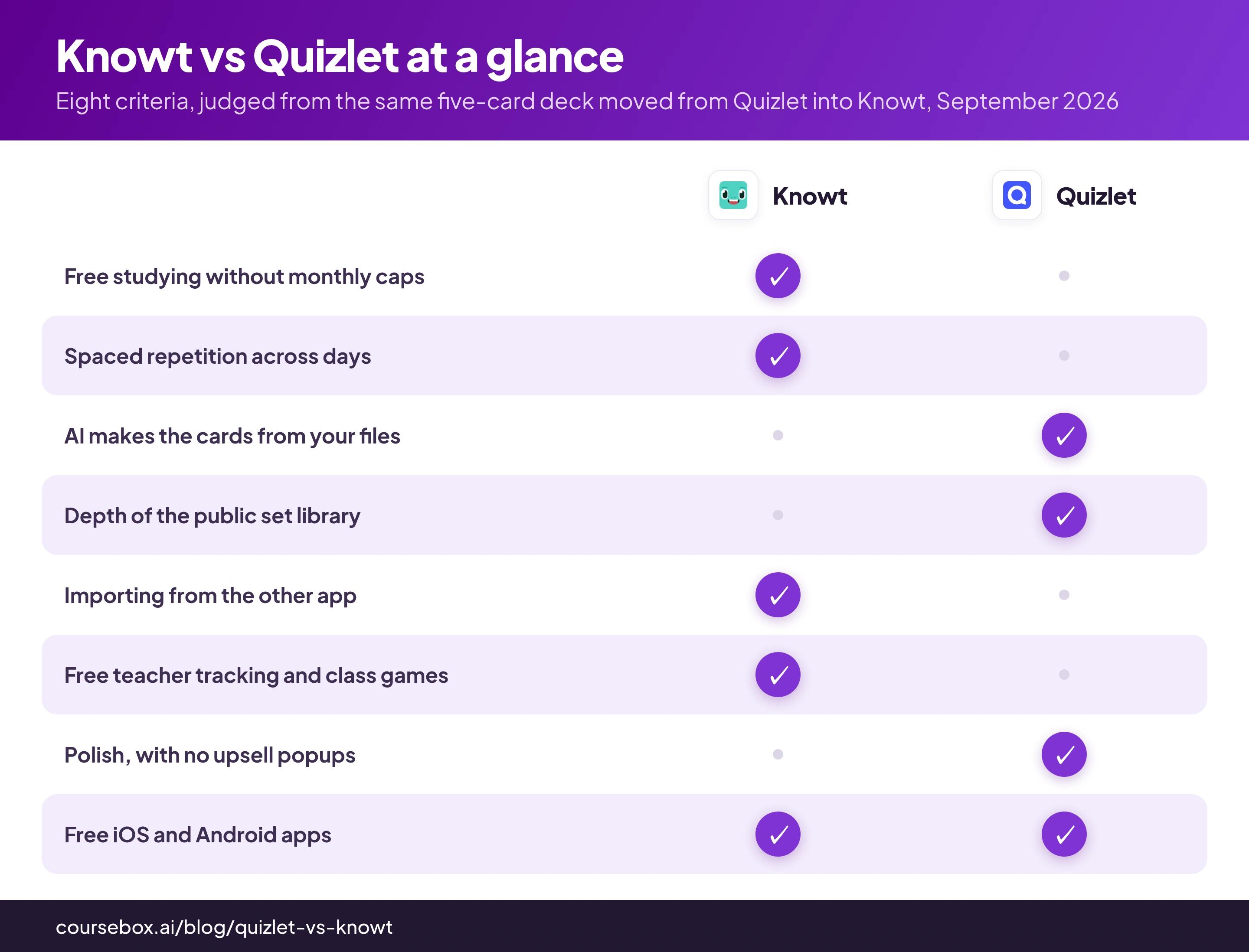
Knowt vs Quizlet at a glance
| Knowt | Quizlet | |
|---|---|---|
| What it is | A free flashcard, notes and AI study app | The biggest flashcard platform, with AI creation and a paid tier |
| Price | Free plan; Ultra $12.49/mo billed at $149.99/yr, or $24.99 monthly | Free tier with monthly caps; Plus $35.99/yr, Plus Unlimited $44.99/yr |
| Free-tier limits | Study modes ran uncapped for me; AI features on a monthly allowance; my teacher account showed a 20-file cap | 5-question tests, 20 Learn rounds and 3 practice tests per month, with ads |
| Making the cards | Type, paste-import from Quizlet, or AI from files and recordings (allowance applies) | Type, or AI from PDFs, slides, Drive files and recorded lectures |
| Memory scheduling | A real spaced repetition mode with editable Again/Hard/Good/Easy intervals | Learn adapts inside a session; no per-card schedule across days |
| Study modes | Flashcards, Learn, Practice Test, Spaced Repetition, Match, voice calls with an AI tutor, podcasts | Flashcards, Learn, Test, Match |
| Class games | Knowt Play: Classic, Race, Clash, Blitz and Survival, joined by code or QR | Quizlet Live, joined by code |
| Public library | About 20,000 results for my "biology" search; Knowt claims 5 million resources overall | Millions of sets; the deepest public study library there is |
| Teacher tools | Per-student stats across every mode, classes and assignments, free on my account | Class progress sits behind paid teacher plans |
| Getting data out | Free text export with your choice of separators, plus PDF | Export exists per set; sets are public by default |
| App Store rating, checked 1 September 2026 | 4.7 from 10,398 ratings | 4.8 from 1,107,324 ratings |
| Best for | Free unlimited studying and teachers on no budget | AI card creation and the biggest set library |
What you get on Quizlet: polished studying until the caps land
The test itself was simple. I wrote five flashcards of warehouse safety rules (lifting limits, what to do about a chemical spill, where the fire assembly point is), studied them on Quizlet's free plan, then moved the identical cards to Knowt and repeated every study mode there. Whatever each app did well or badly, it did it with the same material.
Quizlet's side began with a free account, no card details required. Typing the five cards in took a few minutes: the editor saves as you type and lets any card carry an image or extra answer choices, and it is the best editor I have used on any study tool. New sets are public by default, so switch them to private before you paste anything sensitive.
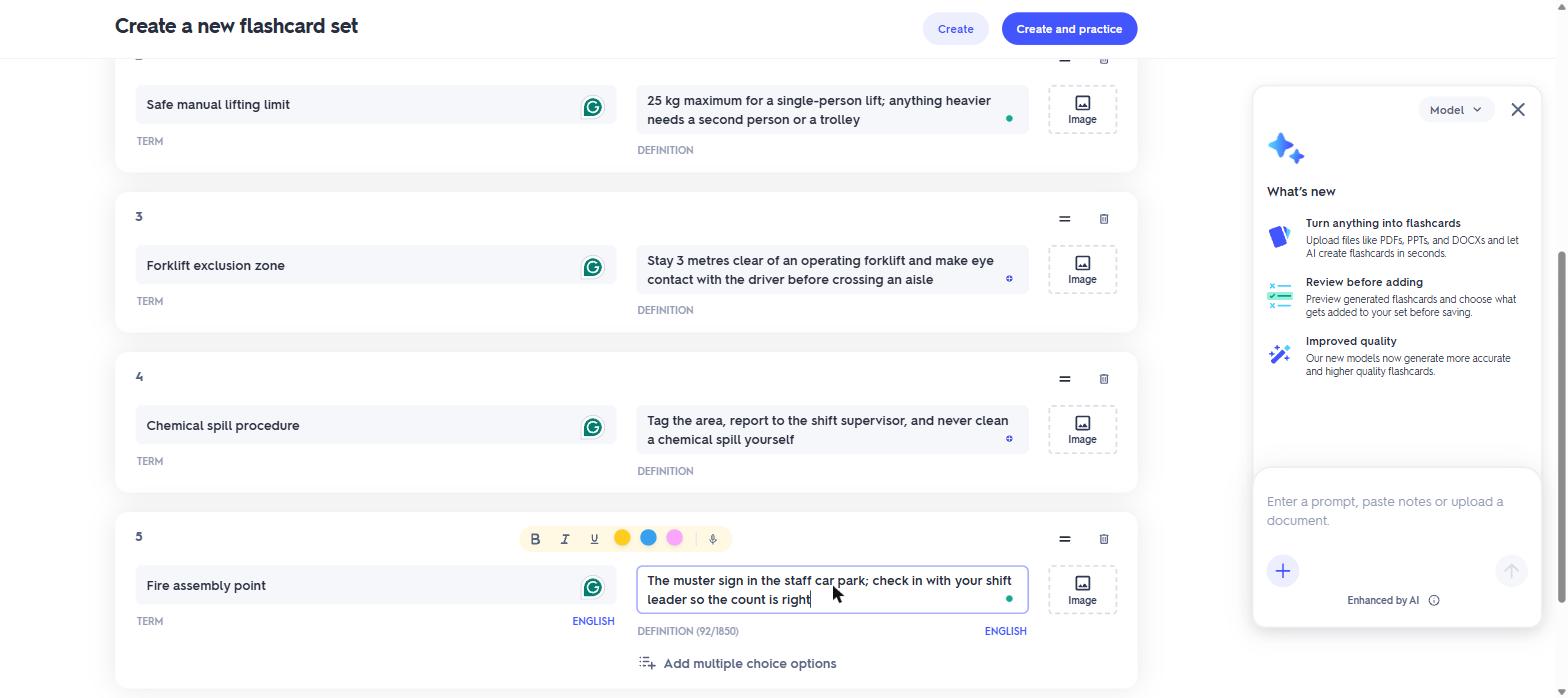
My five warehouse-safety cards typed into Quizlet's editor, which saves as you go.
Quizlet's AI can also write the cards for you. The create screen offers to build a set from uploaded PDFs, PowerPoints and Word files, Google Drive documents, pasted notes up to 100,000 characters, or a recorded lecture, and it shows you the generated cards for review before they join the set. The same generator turns those inputs into study guides and practice tests too. Keep this feature in mind: it is the clearest thing Quizlet includes that Knowt limits.
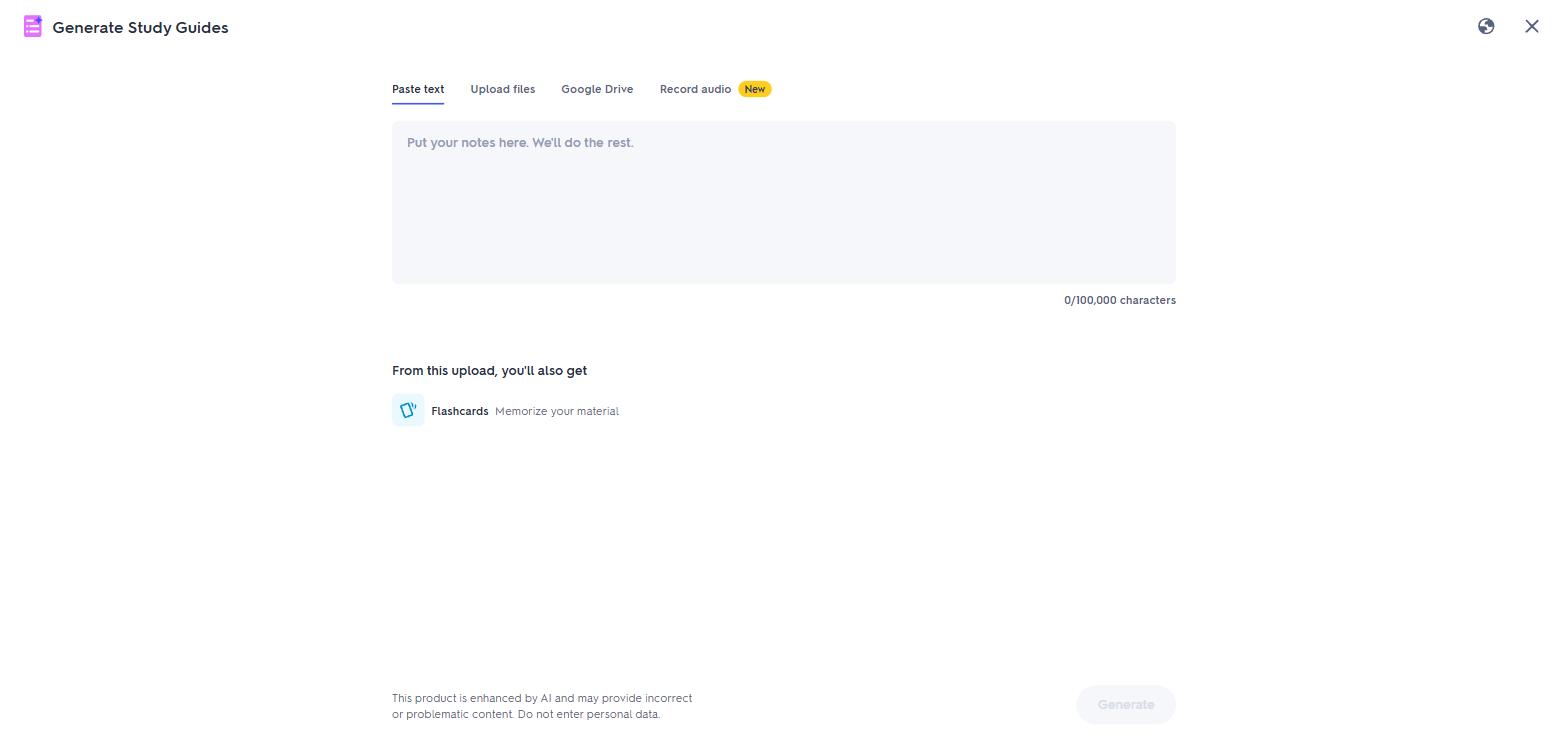
Quizlet's AI generator takes pasted notes, uploaded files, Google Drive documents or a recorded lecture.
Studying happens in four modes, and each has a clear job:
- Flashcards flips through the deck one card at a time.
- Learn quizzes you in adaptive multiple-choice rounds and repeats what you miss.
- Test builds an exam-style paper with up to four question types.
- Match is a race to pair terms and definitions on a timed grid.
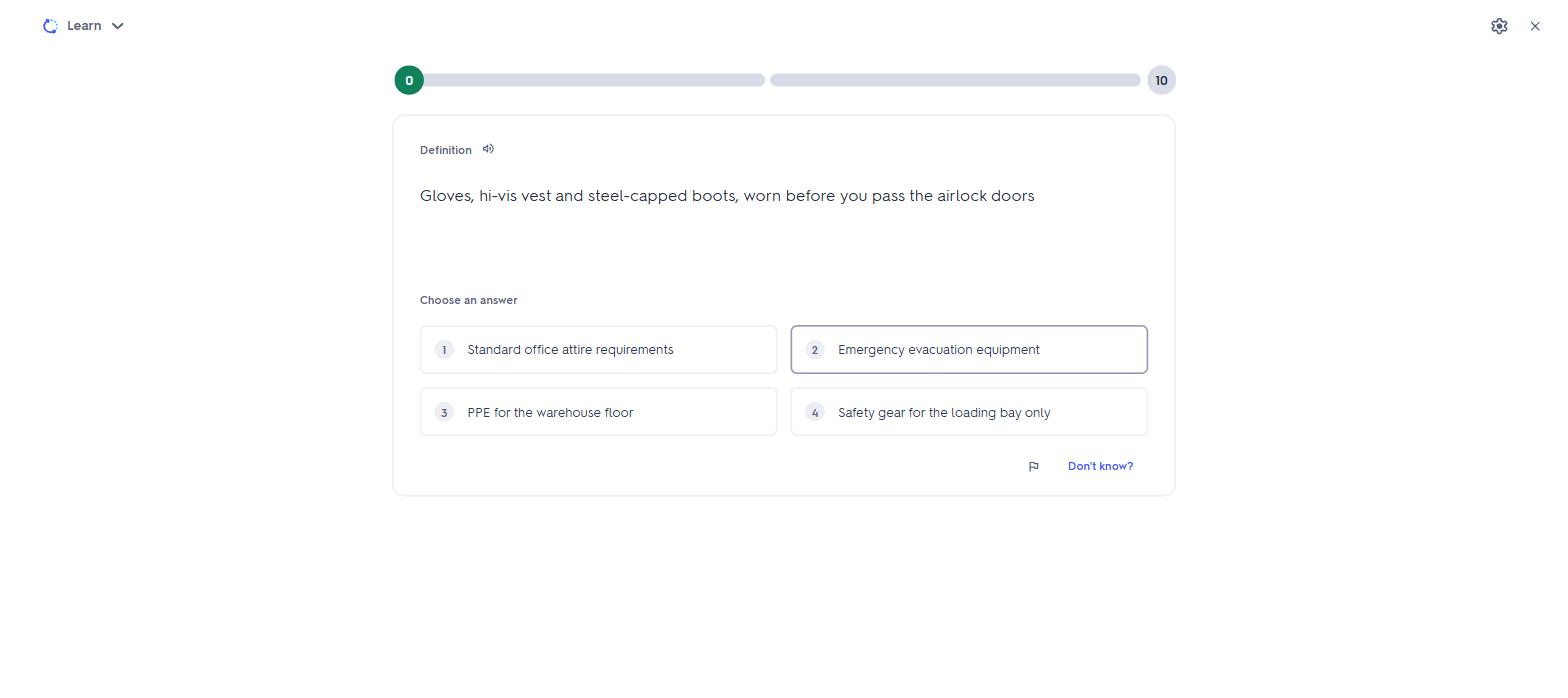
A Learn round on our set: multiple choice, with the round progress across the top.
The free tier caps most of that. When I tried to build a test from my deck, the setup screen would not go past 5 questions. Learn stops at 20 rounds a month, practice tests at 3 a month, and ads run throughout. Study every day and you meet a cap in the first week. Those caps are a reason people look for Quizlet alternatives.
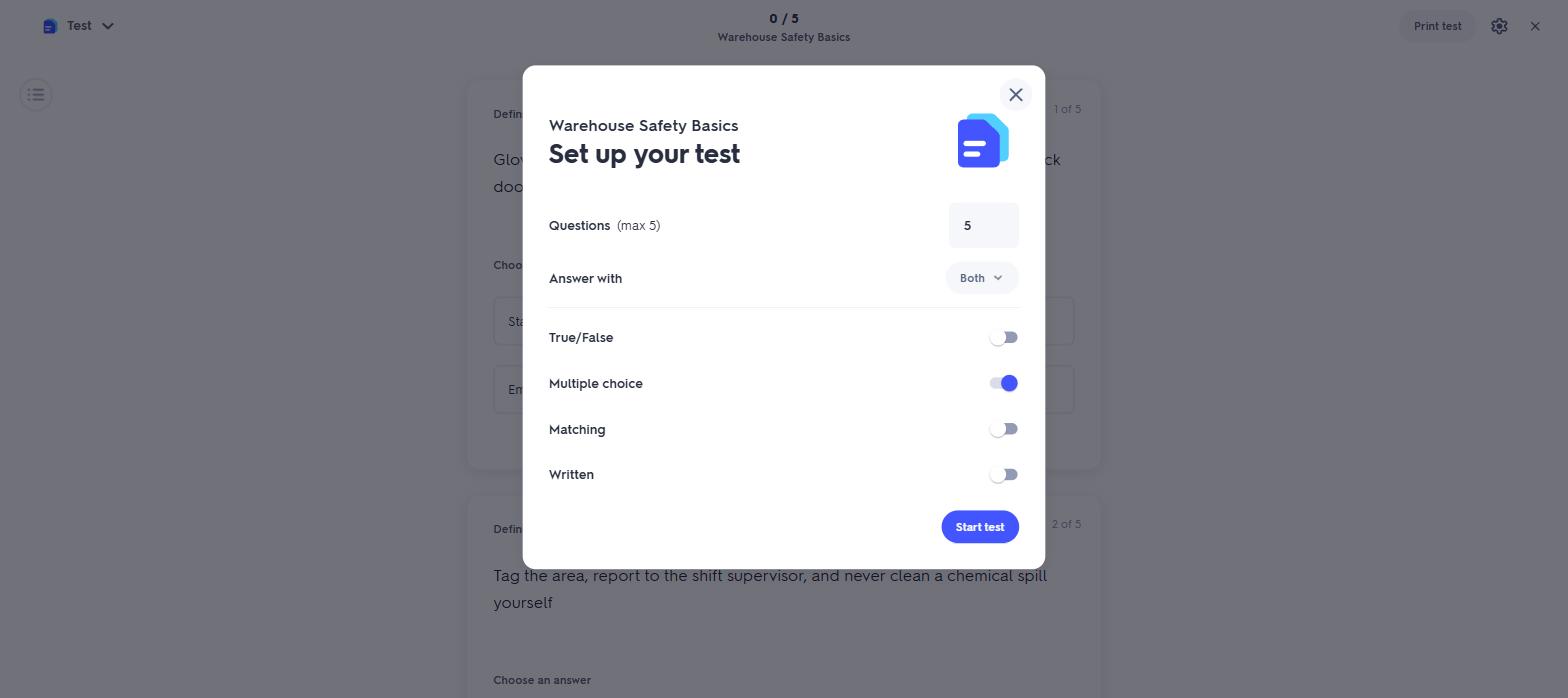
The Test setup modal on a free account. The question counter stops at 5.
What the caps pay for is scale. Quizlet's public library is the largest study collection on the internet, so for most courses someone has already made your set, and Expert Solutions adds step-by-step textbook answers on top. The app holds 4.8 stars across 1.1 million ratings on the US App Store, checked 1 September 2026. In classrooms, Quizlet Live turns any set into a team game that students join with a code.
The one thing Quizlet never did in my testing is schedule a card beyond today. Learn adapts inside a session, then the session ends and nothing tells you when to review next. What is missing here has a name, and the further away your exam is, the bigger the difference it makes.
You forget new facts fast, and each successful recall slows the forgetting. Spaced repetition uses this: an app re-shows a card just before you would forget it, at longer and longer gaps, minutes at first, then days, then weeks. Your rating on each card sets its next gap, so hard cards come back often and easy cards get out of your way. That is what turns cramming into remembering, and Quizlet has no mode that does it. Knowt does, covered in the next section.
Where Quizlet is better
- AI card creation. Files, Drive documents, long pasted notes or a recorded lecture become a reviewed set inside the free product; Knowt meters its AI equivalent monthly.
- The library. Millions of public sets and textbook solutions against Knowt's far smaller catalogue.
- Polish. No upsell popups and no guilt screens; the editor and modes feel finished.
- The network. Classmates' sets and teachers' class codes are already on Quizlet, which holds 1.1 million App Store ratings to Knowt's ten thousand.
- Textbook answers. Expert Solutions walks through textbook problems step by step; Knowt has no equivalent.
What you get on Knowt: the caps removed, with strings attached
Then came the switch. Rather than retype the five cards, I used the tool Knowt built for people leaving Quizlet: an "Import from Quizlet" option in its create menu. It offers two routes. Knowt advertises its Chrome extension first; the alternative is a paste box. For the paste route you open your set on Quizlet, choose Export, copy the text it produces, and paste that into Knowt.
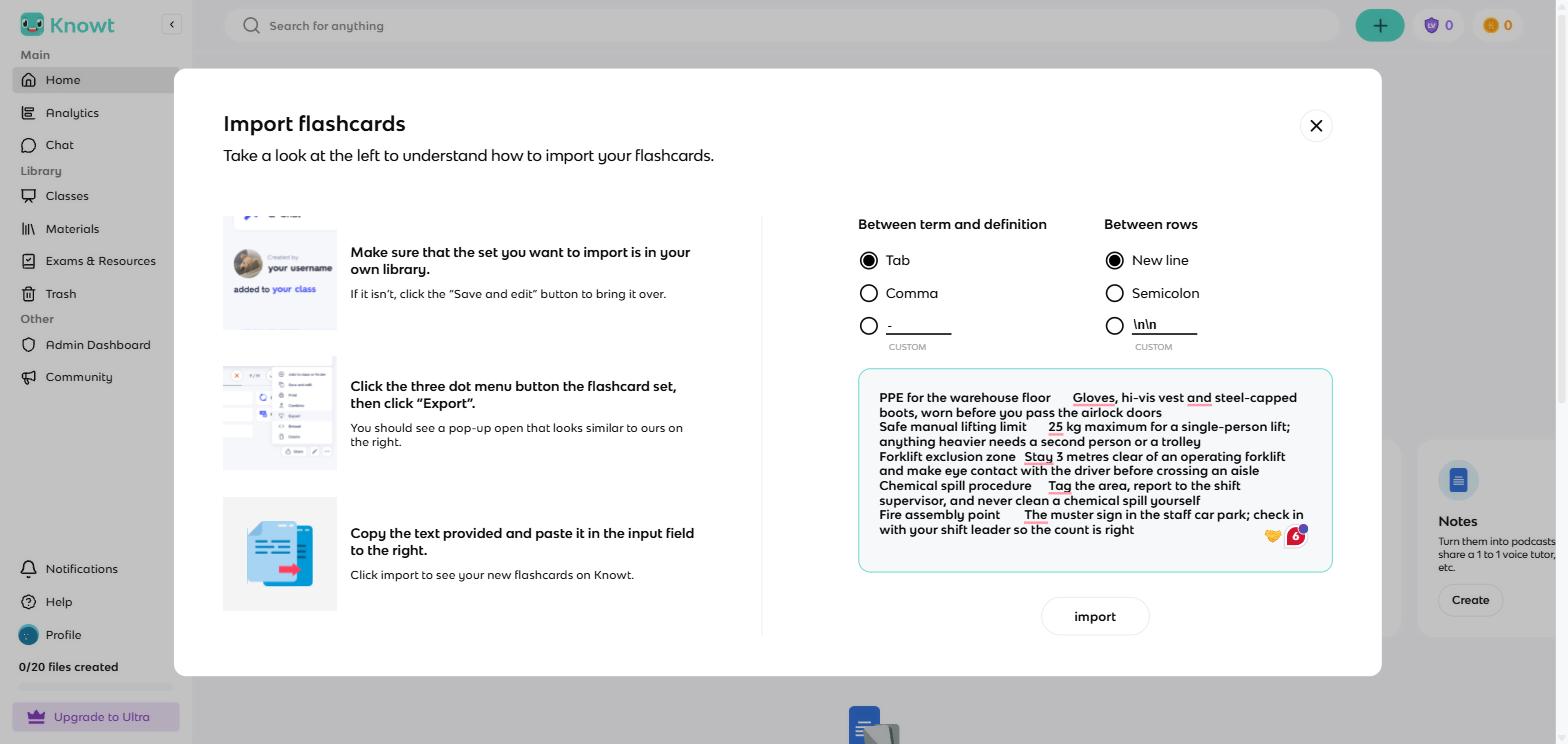
Knowt's paste import: my Quizlet export dropped in as tab-separated text, all five cards ready.
My five cards arrived intact on the first paste. Two rough edges: the import drops the set title, so the deck landed as "Untitled", and on opening it Knowt asked me to rate a Chrome extension I never installed.
The editor is close to Quizlet's: rich text on every card, image and audio-recording buttons on both sides, and autosave. An AI sidebar called Kai offers to rewrite cards or add new ones. I left Kai alone; the reason is in the AI paragraph below.
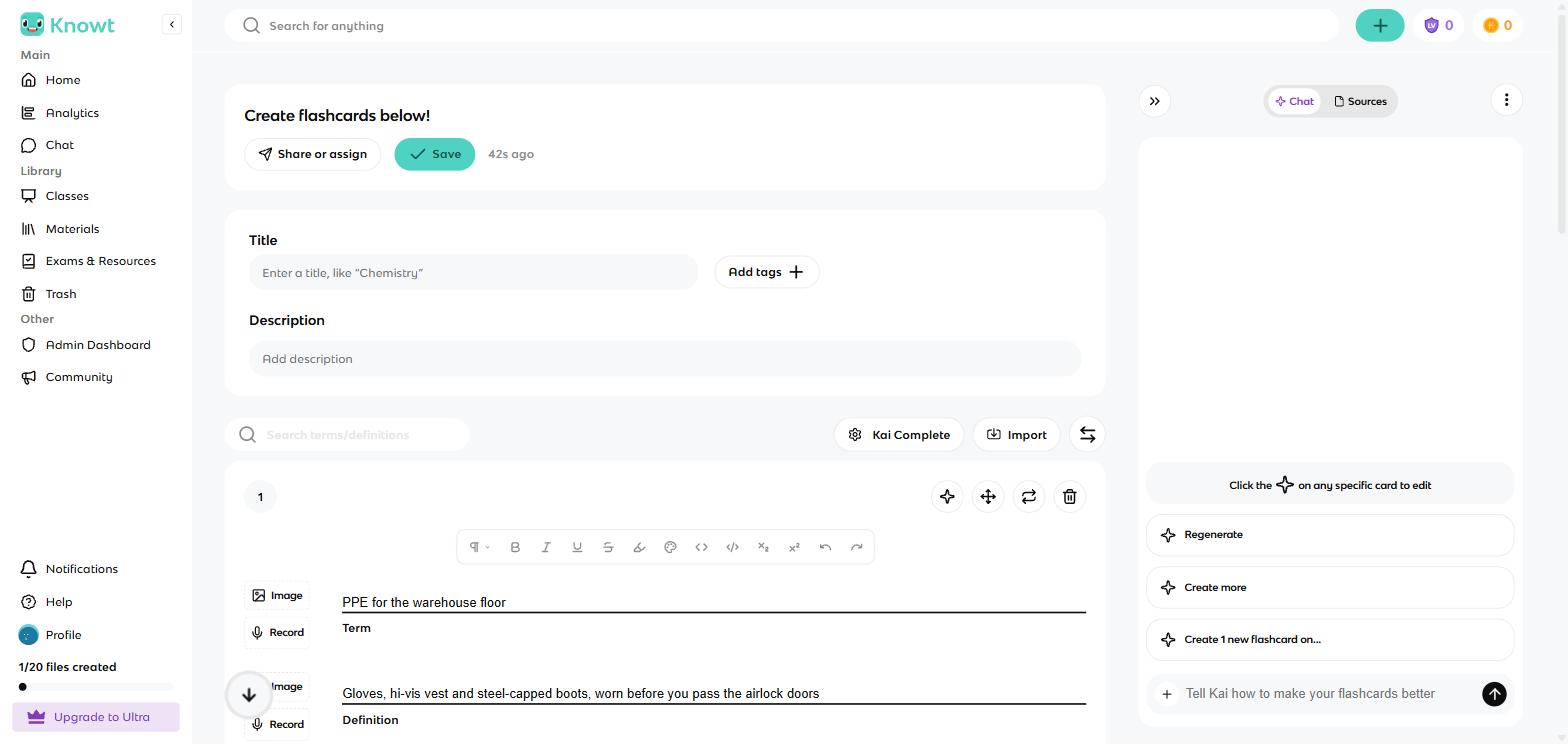
Card one of the imported deck in Knowt's editor, with the Kai AI sidebar offering to rewrite it.
Knowt's advantage starts on the set page, where one deck feeds eight study modes: Flashcards, Learn, Practice Test, Spaced Repetition, Match, the Knowt Play class game, a voice call with an AI tutor, and a generated podcast. The same deck on Quizlet feeds four.
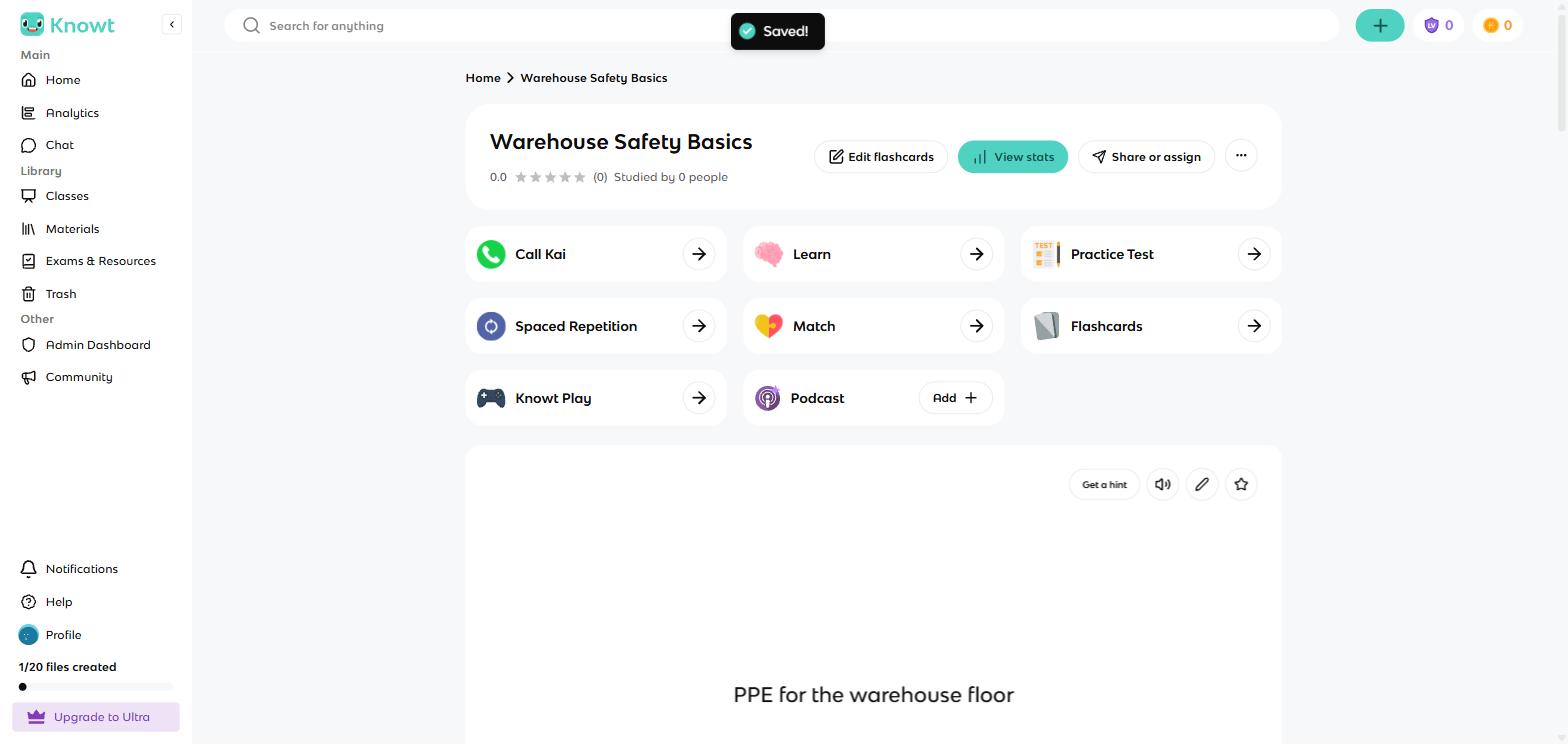
One deck, eight ways to study it. This grid is Knowt's whole pitch.
The flashcard view holds no surprises. The term fills the card, a click flips it, and a hint button, audio and a star for hard cards sit in the corner.
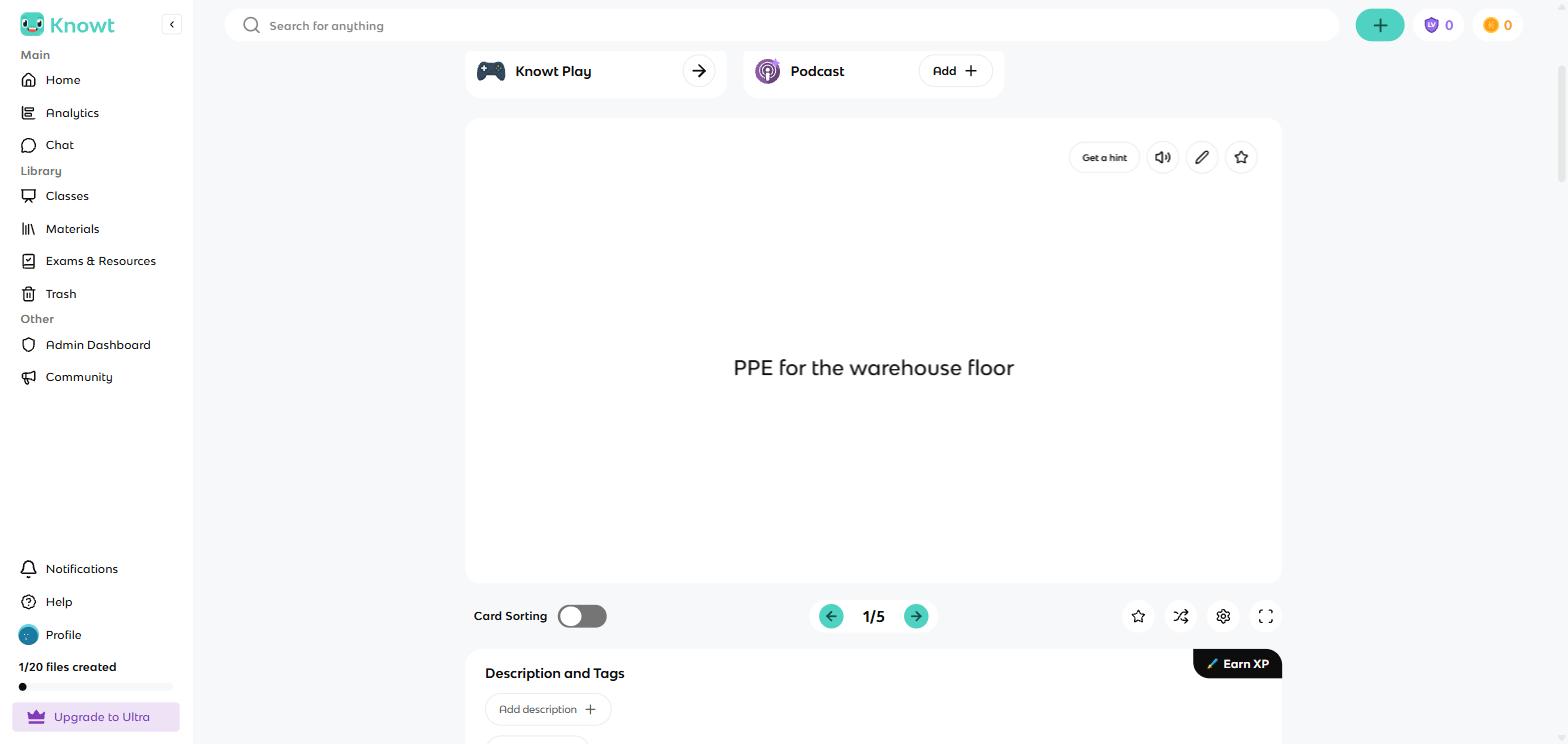
The Knowt flashcard a learner sees: the term fills the card.
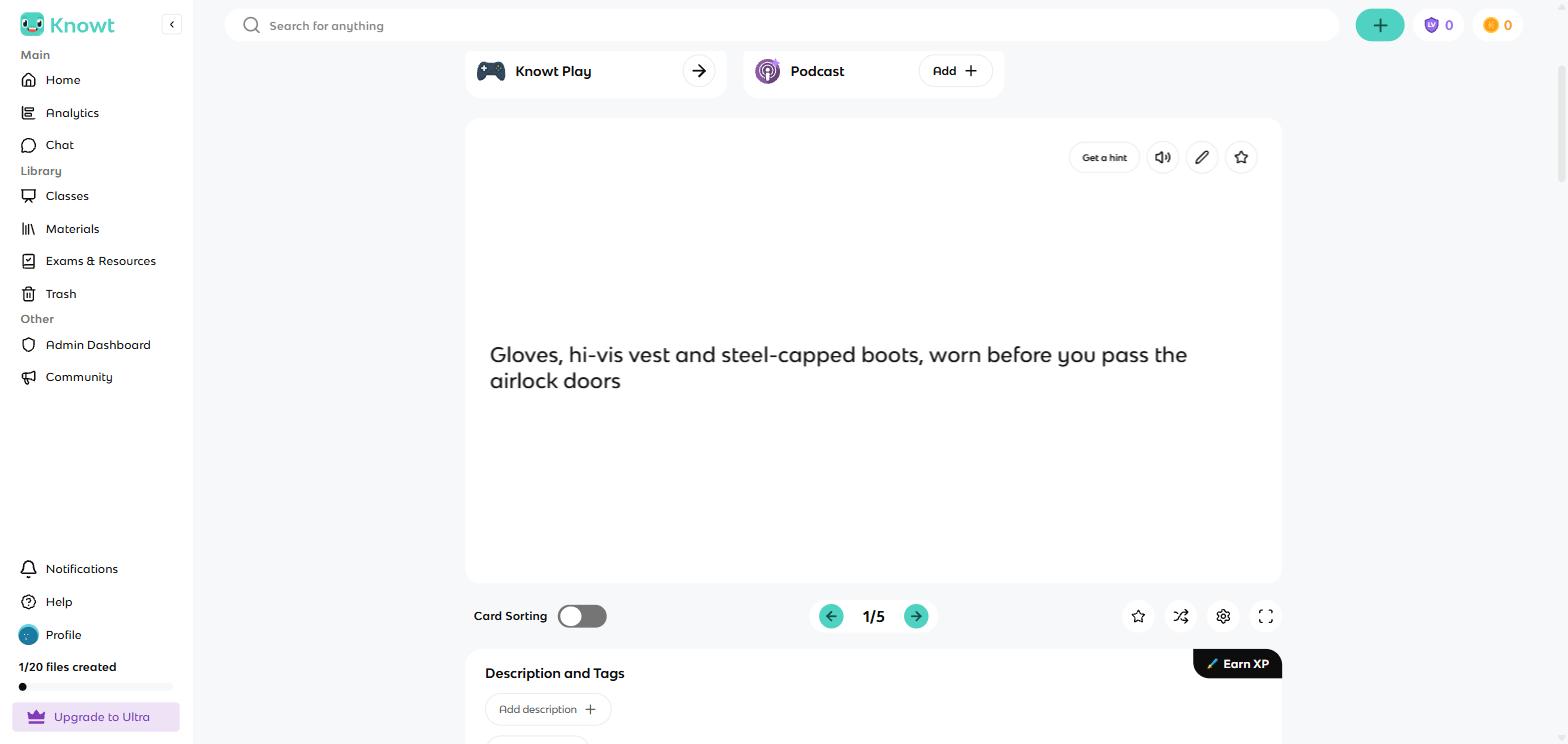
One click flips it to the definition.
Learn works like Quizlet's: rounds of questions in four types you can toggle (flashcards, multiple choice, written answers, true or false). I cleared a multiple-choice round, then the next round switched to typed answers and accepted my exact wording. The difference is that nothing stopped me. No counter mentioned a monthly limit at any point, where Quizlet stops free Learn at 20 rounds a month.
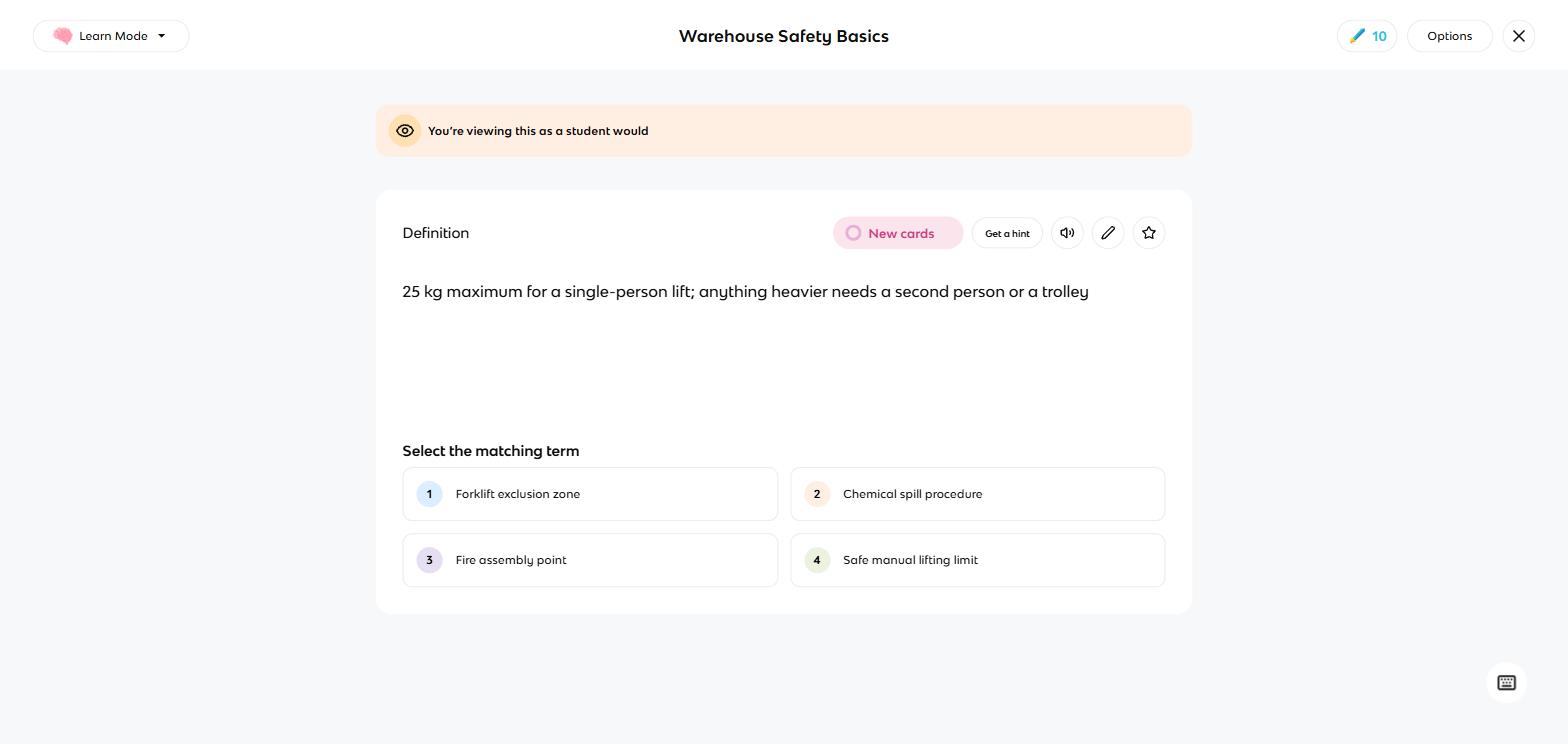
A Learn question in the student view: the definition shown, four terms to pick from.
In place of caps, Knowt uses game rewards. Finishing a round paid 20 XP (experience points, as in a video game) into a level bar, and closing a round early raised a popup with a crying mascot warning me the points would be lost. I met that modal in four different modes. It never blocks you, but it sets the tone: Knowt works hard to keep you in the app, and to get you rating it and installing its extension.
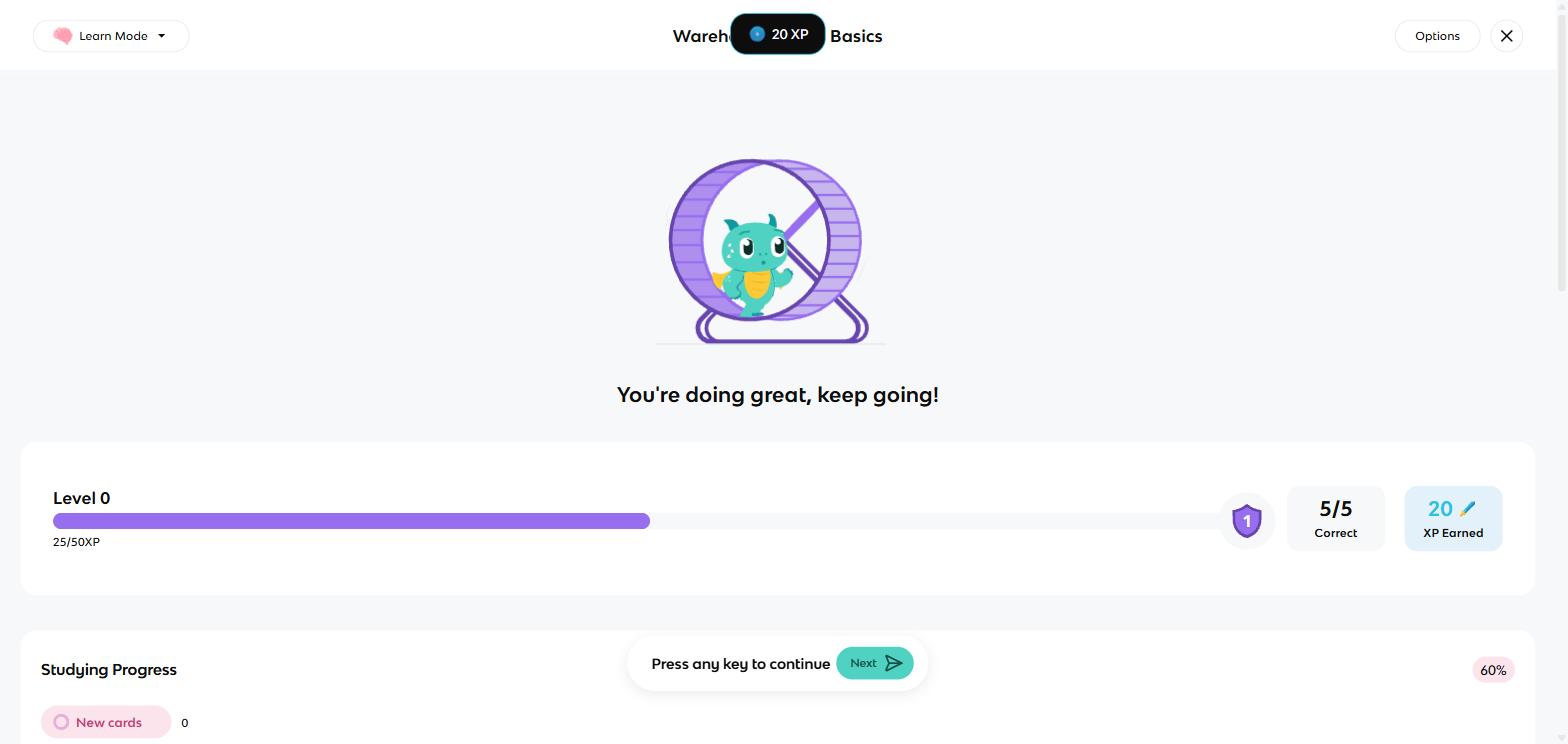
Round done: 5 of 5 correct, 20 XP, and a level bar that wants me back.
Knowt also has a Spaced Repetition mode, the card-scheduling system Quizlet lacks, and its version is the real thing, not a label. After each typed answer, the app offered four buttons, Again, Hard, Good and Easy, each printing when that card would come back: 1 minute, 18 minutes, 2 days or 13 days. The settings let me choose how many new cards appear per day and change how long each button waits.
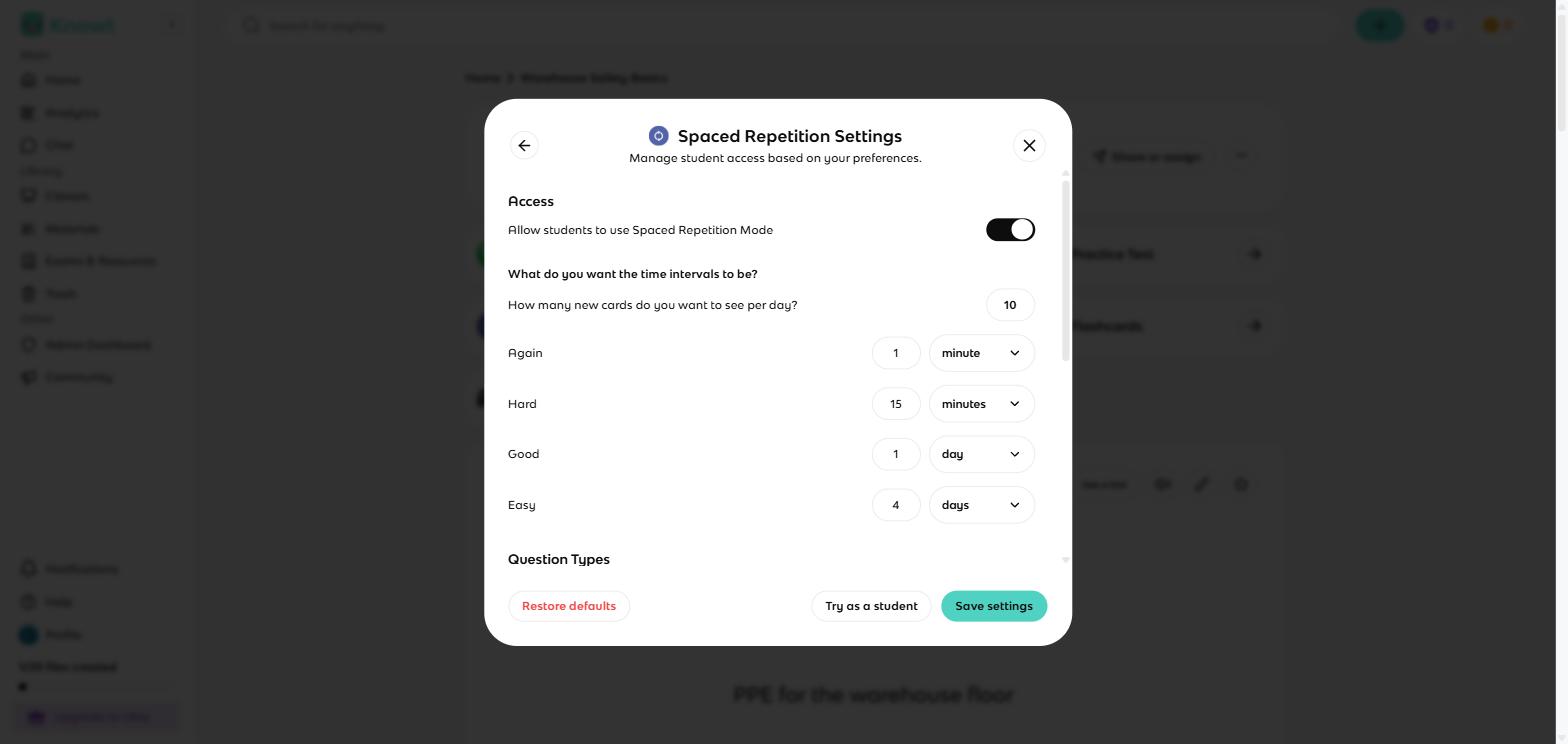
The spaced repetition knobs: new cards per day and all four intervals, editable on a free account.
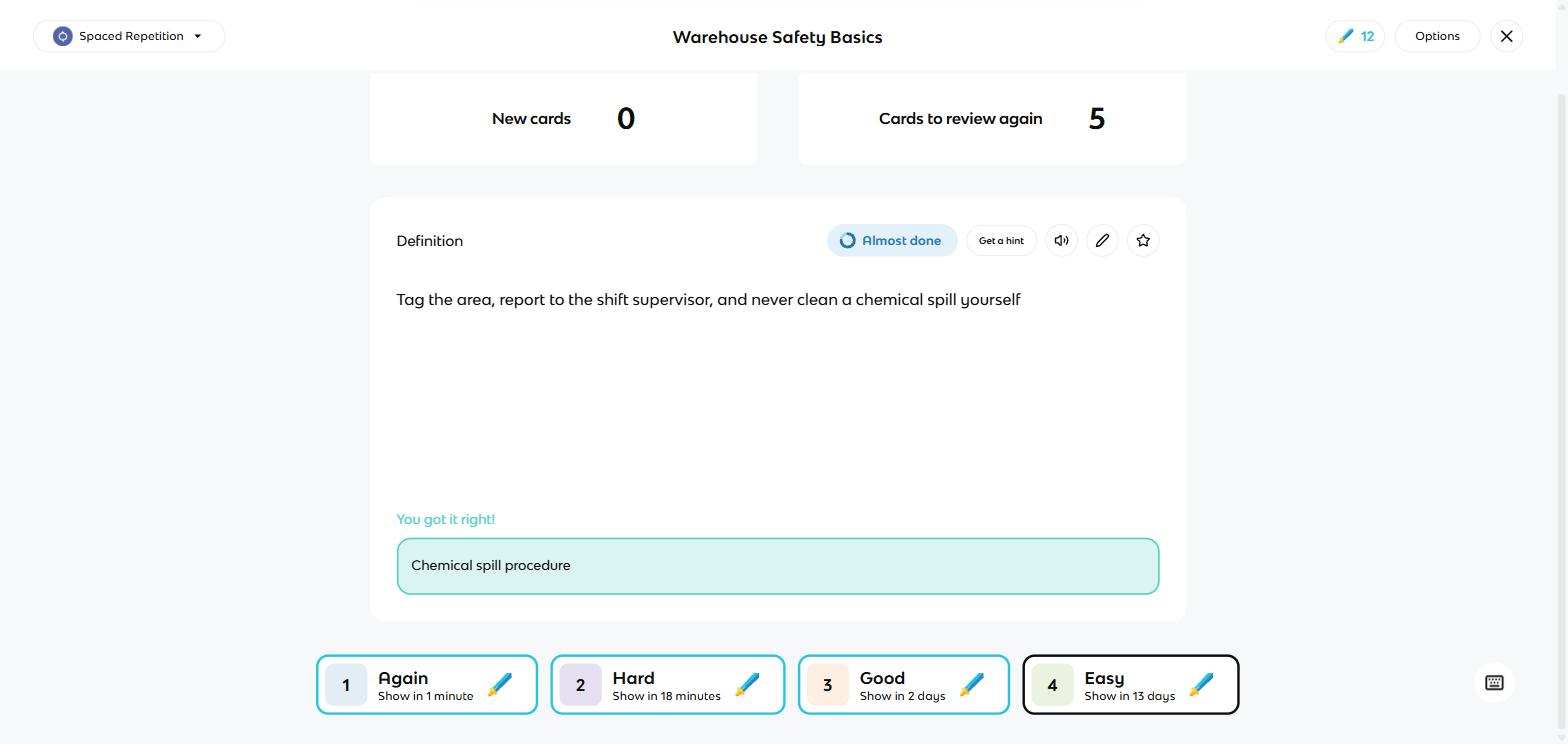
After a correct answer: Again, Hard, Good or Easy, each printing when the card returns.
While testing, I saw that typed answers are graded automatically against the card text; mine passed because I typed them word for word. A Trustpilot reviewer in April 2026 described Knowt marking "Kinetic" wrong because the card said "Kinetic Energy", so expect the grading to be strict.
For classrooms, Knowt Play answers Quizlet Live with five game types (Classic, Race, Clash, Blitz and Survival), a join code and a QR code, free on my account.
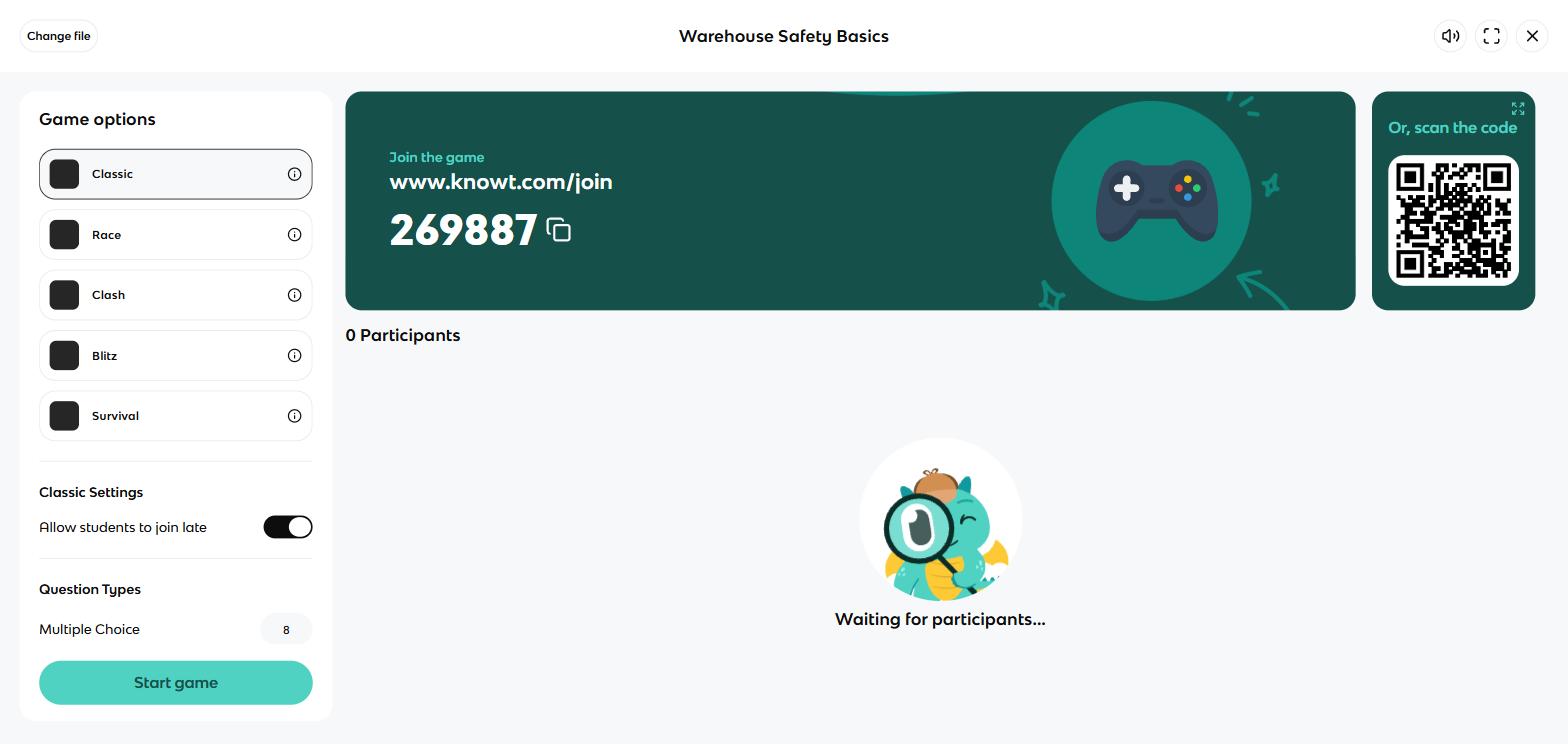
The Knowt Play lobby: one join code, a QR code and five game types, free.
Because my account is registered as a teacher, I also saw the management layer: per-mode access controls for students, a stats page tracking each student across every mode, and classes with assignments, all free. Quizlet sells its class tracking; Knowt gives it away.
The AI features are the one part I deliberately did not run. Starting a Kai call, chat or podcast raises a consent screen first: entered text is shared with Gemini, OpenAI and Anthropic, and continuing confirms you are over 18 or have parental permission. A school should read that screen before rolling Knowt out.
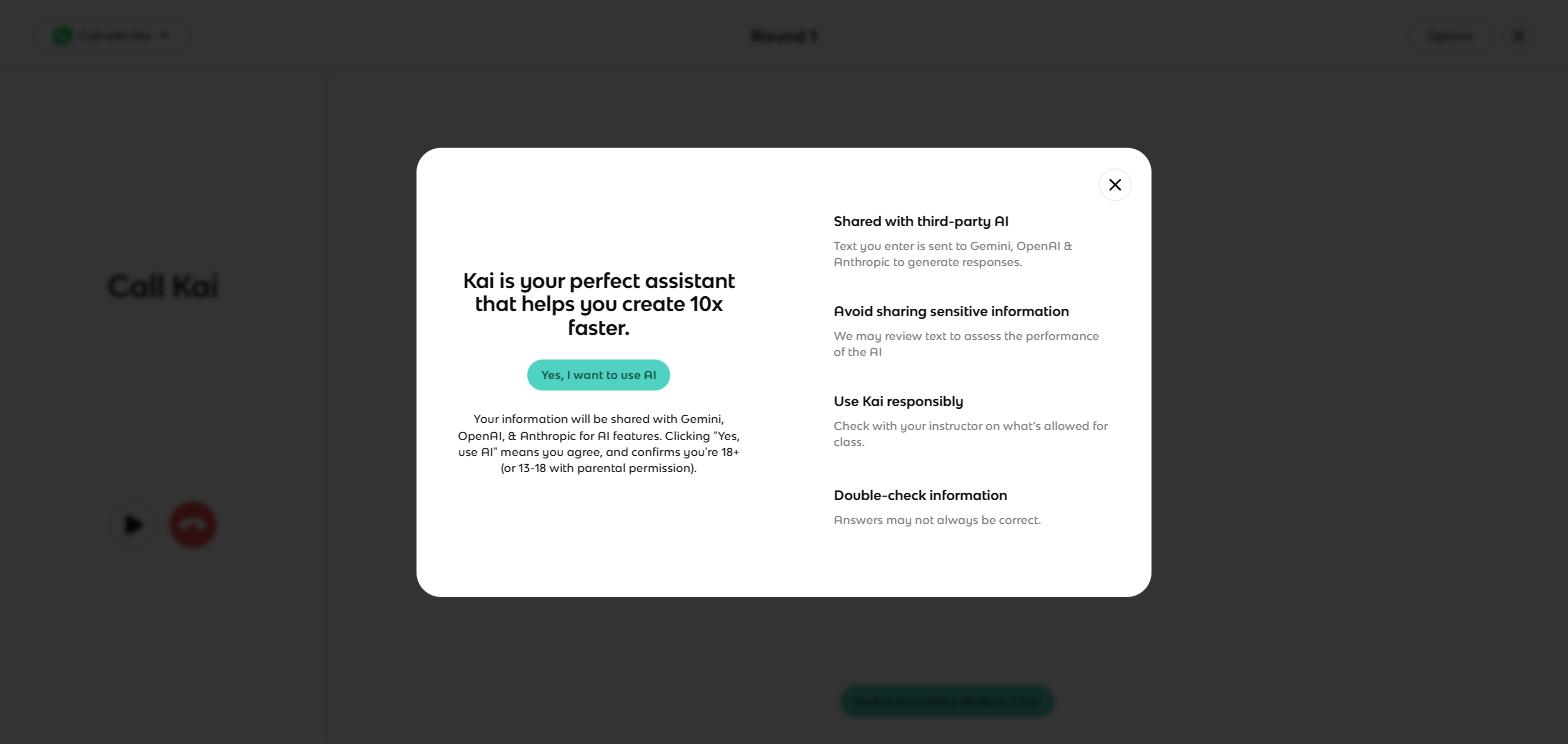
The screen to read before a class uses Kai: entered text goes to Gemini, OpenAI and Anthropic.
To Knowt's credit, leaving is as easy as arriving. Every set exports as plain text or a PDF, free.
Where Knowt is better
- The free tier. Study modes ran without monthly caps on my account; Quizlet's free tier caps tests at 5 questions, Learn at 20 rounds a month and practice tests at 3.
- Spaced repetition. Editable per-card scheduling with Again, Hard, Good and Easy; Quizlet has no cross-day scheduling at all.
- Moving in from Quizlet. The import tool took my whole set in one paste.
- Teacher tools on no budget. Per-student stats, mode controls, classes and five class-game types came free.
- More modes per set. Eight study surfaces against Quizlet's four.
- Data freedom. Text and PDF export on every set, free.
What they cost
The two price studying in opposite directions: Quizlet meters the free tier and sells the caps back for $35.99 a year, while Knowt gives studying away and charges $149.99 a year for its AI workspace. Two examples cover most people:
- Studying your own typed or imported decks daily: Knowt $0 with no round caps. Quizlet $0 until a cap lands, then $35.99/yr for Plus.
- Wanting AI to do the making: on Quizlet that is part of the product, $0 inside its monthly caps. On Knowt heavy AI use means Ultra at $149.99/yr, roughly four times Quizlet Plus.
- Teaching a class on nothing: Knowt $0, including per-student tracking. On Quizlet, class progress sits behind paid teacher plans.
Prices checked 31 August 2026 for Quizlet, from the upgrade page inside my account, and 1 September 2026 for Knowt, from knowt.com/plans.
Knowt pricing
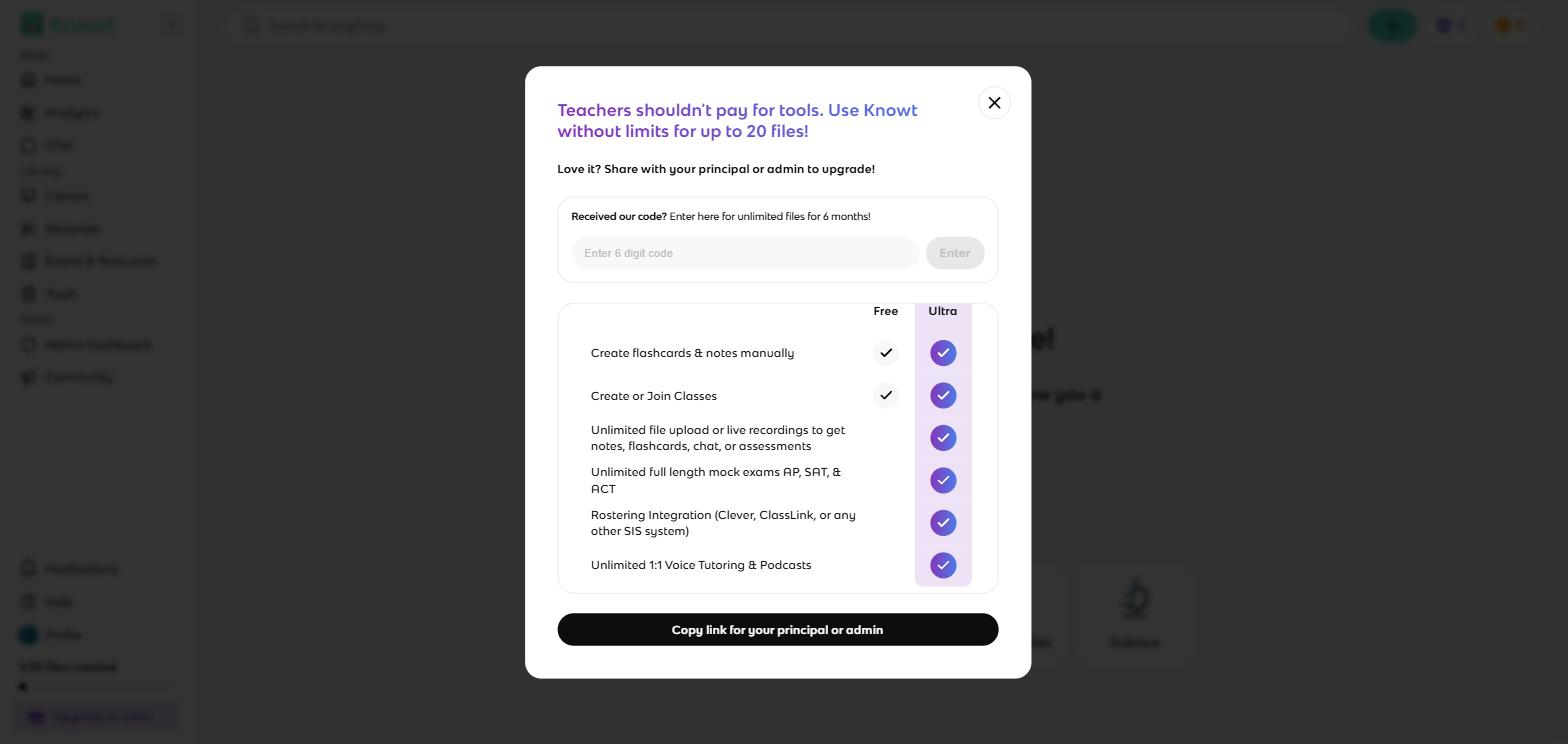
Knowt's teacher paywall is barely a paywall: a school-code box and a link to send the principal.
| Plan | Price | What it allows |
|---|---|---|
| Basic (free) | $0 | Creating and studying flashcards and notes in every mode; AI features on a monthly allowance; my teacher account showed a 20-file cap |
| Ultra annual | $12.49/mo billed at $149.99/yr | Unlimited AI generation, chats and calls with Kai, auto-graded assessments, mock exams |
| Ultra monthly | $24.99 for one month | The same, month by month |
Two Knowt-specific wrinkles. First, teachers are not really meant to pay: my upgrade screen led with "Teachers shouldn't pay for tools", a code box for a school licence and a button to copy a link for the principal. Second, the pricing page is odd to find, because knowt.com/pricing is a dead page; the real one lives at knowt.com/plans. Cancellation is self-serve under Settings, and a refund policy is published on the plans page, though a Trustpilot reviewer in May 2026 reported a post-cancellation charge where the only support reachable was the AI bot.
Quizlet pricing
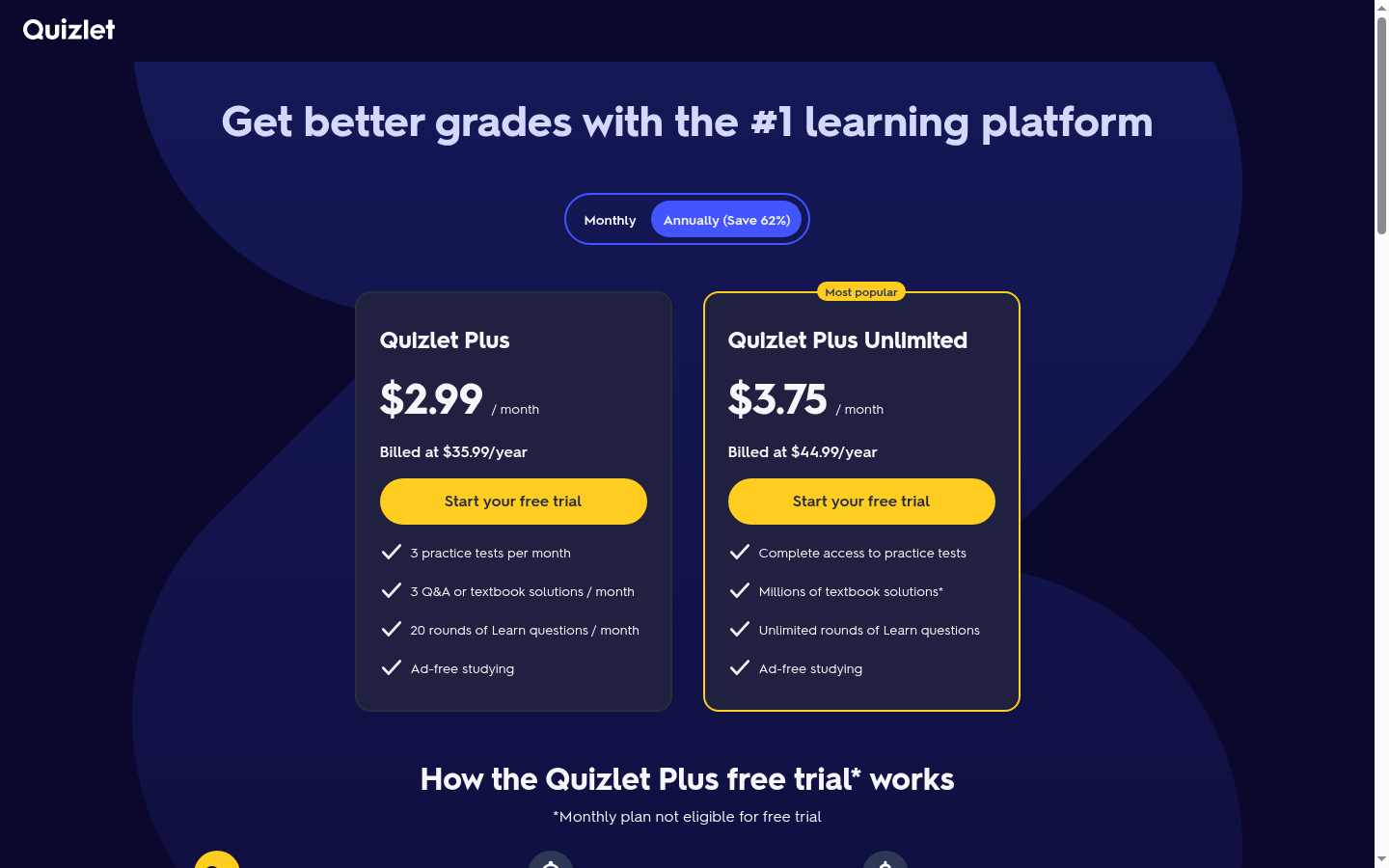
Quizlet's upgrade page inside my account: Plus at $35.99 a year, Plus Unlimited at $44.99.
| Plan | Price | What it allows |
|---|---|---|
| Free | $0 | Full card creation and all four study modes, with the caps below |
| Quizlet Plus | $2.99/mo billed at $35.99/yr | 3 practice tests, 3 textbook solutions and 20 Learn rounds per month, ad-free |
| Quizlet Plus Unlimited | $3.75/mo billed at $44.99/yr | Unlimited Learn rounds, full practice-test access, millions of textbook solutions, ad-free |
On Quizlet's free tier the limits are on studying: 5-question tests, 20 Learn rounds a month, 3 practice tests a month, ads throughout. On Knowt's free tier the limits are on AI: study as much as you like, but generation, tutor chats and podcasts draw on a monthly allowance. Decide which limit you would actually hit.
What I wish I'd known before starting
- Quizlet's free Test mode stops at 5 questions. The setup screen looks configurable, and then the question counter will not go higher.
- Knowt's import wants Quizlet's export text, not a link. The five-second version needs the Chrome extension; the paste version needs Quizlet's Export screen first, and the set title does not come across, so rename the deck after it lands.
- Quizlet's Learn cap runs out fast. 20 free rounds a month covers less than a round a day; daily studiers meet the wall in the first week.
- Knowt's upsells are constant. In one session I met an extension ad, a rate-us popup, a crying-mascot exit screen and an upgrade banner. None of them block you, all of them recur.
- Quizlet sets are public by default. Fine for course notes; switch to private for anything internal.
- Knowt's AI features phone three companies. Text you enter is shared with Gemini, OpenAI and Anthropic once you accept the AI consent screen, and under-13s are excluded. Schools should read that screen before rollout.
- Offline studying is a paid extra on Quizlet. Downloading sets for offline use in the phone apps is a Plus feature, and only Flashcards and Match run offline. Knowt's export at least gives you the raw text free.
- My Knowt account showed a 20-file ceiling. That was a teacher account; either way, files, not study rounds, are what Knowt counts on the free tier.
- Both apps' phone stories are fine. Both are free on iOS and Android, so neither charges you for studying on the bus.
Where both apps stop, and what Coursebox does
Knowt and Quizlet are built for a student studying their own material, and that shape breaks once the learning is a job requirement. Put an induction, a compliance refresher or a product rollout through either app and you hit the same wall: a stack of cards is not a course, recall quizzing is not assessment, and nobody can show a manager or an auditor who actually finished. Knowt logs study activity for teachers, Quizlet charges for its tracking, and neither produces completion evidence.
That job is ours, and it starts where this article started: with flashcards. Coursebox has its own AI flashcard maker that turns your source material (a safety manual, an onboarding pack, a slide deck) into a deck, and because Coursebox is a learning management system, the cards do not stop there. The same material becomes a structured course, complete with pages, activities and auto-generated quiz questions, and the platform reports completions and scores for every learner. Generation is not a side feature we bolted on. It is the way most people first use Coursebox, and a year of our own usage data shows the scale.
For a personal deck, though, these two beat us. Solo memorisation belongs in a flashcard app, not an LMS; use Knowt's scheduler or let Quizlet write your cards, and get studying.
The verdict, split by who is asking
Leaving Quizlet over the caps: switch to Knowt. The import takes minutes, the study modes are uncapped, and spaced repetition comes with the move. You trade polish for freedom.
Happy on Quizlet, tempted by "free": stay. If the caps have never landed on you, Knowt's pitch solves a problem you do not have, and the library you rely on is on the other side.
Studying for something months away: Knowt, of the two. Its Again, Hard, Good and Easy scheduling is a real memory system; Quizlet has nothing that plans past today. A dedicated tool like Anki goes deeper still.
Wanting cards made from your notes and slides: Quizlet. Its generator is built into the free product with a review step, while heavy AI use on Knowt means the $149.99 Ultra plan.
Teaching on a school budget of zero: Knowt, decisively. Free per-student tracking and five class-game types against Quizlet's paid teacher tier. Read the AI consent screen before rolling it out to a class.
Training a team: neither; this is the job we built Coursebox for. Study activity is not completion evidence, so you want the flashcards inside a real course with reporting, which is what Coursebox generates from your documents.
If neither one fits
If the flashcard format itself is the problem, the AI flashcard generators list covers tools that build decks from your material, and the sites like Quizlet list ranks the wider field of study platforms.
Last updated 1 September 2026. Knowt was driven hands-on that day with the deck imported from my own Quizlet set, Quizlet on 31 August 2026 with the same five cards, prices were read from both vendors' pages on those dates, and the App Store ratings were checked 1 September 2026.
Frequently Asked Questions
Yes, Knowt's free plan covers creating flashcards and notes and every study mode, including spaced repetition and the Knowt Play class games, with no monthly round caps. What the free plan limits is AI: summaries, tutor chats and podcasts draw on a monthly allowance, and my account showed a 20-file creation cap.
Knowt is better if Quizlet's free-tier caps are your problem: its study modes are uncapped and it adds real spaced repetition. Quizlet is better at making cards with AI and has a far larger public library, with 1.1 million App Store ratings to Knowt's ten thousand. Most switchers are buying freedom from caps, not a better product outright.
Open your set on Quizlet, choose Export from the three-dot menu, and copy the text. In Knowt, choose Import from Quizlet, decline the Chrome extension if you prefer, paste the text and set the separators. My five-card set moved intact in one paste; the set title does not come across, so rename it after import.
Yes, Knowt has spaced repetition as a standard mode on every flashcard set. It asks for typed answers, then schedules each card with Again, Hard, Good and Easy buttons that print the return time, and the intervals and daily new-card count are editable. Quizlet has no equivalent; its Learn mode adapts only inside a session.
Quizlet Plus costs $2.99 a month billed annually at $35.99 a year, and removes ads while keeping monthly caps of 3 practice tests, 3 textbook solutions and 20 Learn rounds. Quizlet Plus Unlimited, at $3.75 a month billed at $44.99 a year, removes those caps. Prices are from the upgrade page in my account on 31 August 2026.
Knowt's study features are ordinary web-app fare. Its AI features are the part to review: the consent screen states that entered text is shared with Gemini, OpenAI and Anthropic, requires users to be 18 or have parental permission from 13 to 17, and warns that answers may be wrong. Schools get admin controls that can switch AI features off per site.
Parshad Desai
Driving growth and marketing strategy at Coursebox AI

