

LMS Buying Guide: Requirements, Costs and a Free Checklist
Choose an LMS with clear requirements, comparable costs, workflow tests and a migration plan. Includes a free Excel checklist and a worked vendor comparison.

Choose an LMS around the people, training and records it must support. A staff-training system, paid academy and university can need different capabilities.
- Define must-haves as acceptance tests, then ask every vendor to provide comparable evidence on the quoted plan. A roadmap promise is not an available feature.
- Compare subscription, implementation, integrations, internal work, growth and exit costs over the same period. A lower licence fee may not mean a lower total cost.
- Run a pilot with your content and difficult workflows, including role changes, historical records and required access needs. Record unresolved issues before approving a purchase.
- Use scores to organise evidence. Do not let a high total hide an unverified must-have, a failed migration test or an unacceptable contract term.

Run your own branded LMS with unlimited learners
An LMS buying decision covers more than where your courses will live. You are choosing how people get access, how training is assigned and assessed, who can see the records, and how your team will run it after launch. The right requirements turn those decisions into things a vendor can demonstrate.
This guide takes you from the reason for buying through requirements, full costs, demos, a pilot, contract review and migration. The free Excel checklist gives you 52 starting requirements, space for ten of your own, a demo script and a comparison of up to three vendors. Use the guide to decide what belongs on your list, then use the file to keep the evidence together.
I'm the CEO of Coursebox. Before that I founded Opentute, an LMS, so I've spent a long time on the vendor side of these checklists, answering them. Coursebox makes an enterprise LMS, and I've kept this checklist neutral: it's the list I'd want a buyer to hold us to.
Another 14 organisations asked about course packages, connections between learning systems or keeping content portable. These are overlapping themes from a limited support search, not a survey of all LMS buyers. They are a reason to bring IT, security and exit requirements into the decision early.
Download the blank Excel checklist or a fictional completed comparison. Set priorities, capture vendor evidence and check unresolved must-haves before comparing scores. The PDF is a static reference. No sign-up is required.
Open the example comparison at full size
Start with the reason you are buying an LMS
A learning management system, or LMS, delivers training, manages access and assignments, and records participation and results. Some also include course authoring, content libraries, classroom scheduling or tools for selling courses. Those capabilities vary. An LMS that suits an internal compliance programme may be a poor fit for a paid academy.
Write a short buying brief before booking demos: who needs training, what they need to do, what is failing today, the systems involved, the budget owner and the deadline. If you are replacing an LMS, include the renewal notice date as well as the subscription end date. A new system will not fix an unclear training process or missing course content by itself.
| Your main use | What to test closely |
|---|---|
| Employee onboarding and compliance | Assignment by role, renewals, manager access, retained records and audit exports |
| Customer or partner training | External sign-in, client separation, branded portals, customer-management connections and customer reporting |
| Selling courses or member education | Checkout, payments, refunds, enrolment, member pricing, tax handling and continuing-education records |
| Schools, universities or accredited training | Student-system links, academic roles, grade workflows, assessment records and the applicable institutional requirements |
| Frontline or blended training | Access without work email, shared devices, phone and low-bandwidth use, classroom attendance and practical assessment |
These uses can overlap. The downloadable checklist starts with staff training; use its custom rows for commercial, academic or industry-specific requirements. A university procurement specification or an accredited assessment system needs more than a generic workplace checklist.
Check whether you need to replace the platform
Separate the delivery problem from the content problem. If the LMS already enrols learners and produces the reports you need, a better authoring tool or integration may solve the gap. If the issue is manual enrolment, unreliable records or poor learner access, test whether a configuration change can solve it before committing to migration.
Lloyds Metals: keep the LMS and improve course creation
Lloyds Metals & Energy needed to turn written procedures into courses in English, Hindi and Marathi. Its existing platform could host courses but did not help the team build them. It used Coursebox to create courses and exported SCORM packages to the existing platform. The lesson for a buyer is to identify the missing job before replacing a system; this case does not establish that keeping the old LMS is always cheaper.
At Lloyds Metals & Energy, Coursebox was used to create training in three languages for delivery through the existing learning platform.
Choose who will operate the system
With a cloud subscription, the vendor operates the infrastructure, while your team still manages content, people, permissions and approved settings. With self-hosted software, your team or service partner also needs to own hosting, patching, upgrades, backups and recovery. Open-source software may remove a licence fee without removing these responsibilities. Compare the full operating cost and the control you actually need.
If you are considering a custom build, identify who will maintain security, integrations, accessibility and reporting after the launch team moves on. Choose this route for a specific requirement or operating model you can support, not simply to avoid a subscription.
Agree the requirements and who will approve them
Bring the people who will use, operate, connect and approve the system into the same brief. Give each requirement an owner who can say what acceptable looks like. A learner can test whether the sign-in journey is usable; IT can verify the identity connection; procurement can confirm that it is included in the quoted plan.
| Person or team | Decision they need to make |
|---|---|
| Training owner and administrators | Assignments, content updates, records, reports and ongoing workload |
| Learners and line managers | Access, usability, accessibility and the actions expected of managers |
| IT, security and privacy | Identity, integrations, data flows, permissions and required assurance |
| Finance and procurement | Full cost, pricing assumptions, contract and renewal terms |
| Project sponsor | Scope, trade-offs, funding and the final decision |
Write an acceptance test, not just a feature name
“Reporting” gives a vendor too much room to say yes. “A team manager can export overdue privacy training for their own team, including due dates, without seeing other teams” describes a result you can inspect. Add the evidence you need, the quoted plan and the person who will confirm it.
| Vague request | Requirement you can verify |
|---|---|
| HR integration | A new hire in our HR test system receives the correct training; a role change updates assignments; a leaver loses access while required records remain |
| Compliance automation | A certificate expiry triggers the agreed reassignment and reminders, with the previous completion still available |
| Accessible learning | A learner can sign in, navigate, complete our course and submit the assessment using the agreed assistive technology |
| Content portability | Export our course and learner records, open them outside the platform and identify anything that still depends on the vendor |
Separate must-haves from preferences
A Must is a condition you will not accept the purchase without. A Should improves the fit but permits a trade-off. A Could is useful if it does not displace more important work or cost. Mark a requirement Not needed when it does not apply. There is no universal limit of 20 must-haves: every must needs a reason, an owner and evidence.
Agree these priorities before comparing products. If someone adds a new must after the demos, ask every shortlisted vendor for the same evidence. If the team decides a manual process is acceptable, rewrite the requirement openly; do not treat it as meeting an automation requirement.
Functional, technical and commercial requirements
Functional requirements describe actions, such as assigning a course or exporting a completion record. Non-functional requirements describe qualities or constraints, such as response time, availability, accessibility or protection of data. An integration has functional behaviour as well as reliability and security requirements. Prices, support arrangements and contract terms are commercial requirements. For each requirement, specify the result and how you will verify it. Define the LMS features you need in terms of what learners and administrators must be able to do.
Compare the full cost over the same period
Ask each vendor to price the same learner numbers, administrators, content volumes, integrations, support and implementation scope. Find out what counts as a billable user: a registered account, an active learner in a month, an administrator or another unit. Ask how seasonal peaks, archived users, external learners and overages are charged. Different LMS pricing models count usage differently, so ask vendors to show the calculation for your expected activity.
| Cost to include | What to establish |
|---|---|
| Subscription and growth | Quoted tier, billing unit, minimum commitment, renewal increases and a higher-volume scenario |
| Setup and migration | Configuration, historical records, certificates, content conversion and any repeat import |
| Connections and add-ons | Work-account sign-in, HR/customer-system connections, API limits, mobile/offline access, extra portals and paid plugins |
| Content and AI | Authoring tools, library licences, storage, video/translation usage and AI credits |
| People and support | Internal project time, ongoing administration, admin training and paid support |
| Transition and exit | Overlap with the old contract, export assistance and future retrieval costs |
A lower licence price can still cost more
Here is a fictional three-year comparison in Australian dollars (AUD) for the same 400-learner scope. It illustrates the calculation, not typical market prices. Assume flat annual prices, no growth, and exclude tax and financing; use actual quotes and your own assumptions for a purchase.
| Three-year cost item | Option A | Option B |
|---|---|---|
| Subscription | 24,000 × 3 = 72,000 | 30,000 × 3 = 90,000 |
| One-off setup and migration | 8,000 | 4,000 |
| Required integration | 6,000 × 3 = 18,000 | Included |
| Internal administration | 6 hours/week × 48 weeks × 60/hour × 3 = 51,840 | 2 hours/week × 48 weeks × 60/hour × 3 = 17,280 |
| Total | 149,840 | 111,280 |
Option B costs 18,000 more in subscription fees but 38,560 less overall under these assumptions. The largest uncertainty is the administration estimate. Test the actual workflow in the pilot, then recalculate. Time released is staff capacity; it is not automatically a cash saving unless spending actually falls.
Ask for a second quote at a realistic growth scenario, such as 600 learners, and identify what changes. A paid add-on is not automatically a defect: include its full price and test whether the combined system meets the requirement. Do not count an unknown fee as zero.
Shortlist vendors before committing to full demos
Use your must-haves to screen the field. Send a short written request asking which requirements are available now, in which plan, with what dependencies and at what price. A request for information helps establish fit; a request for proposal, or RFP, asks vendors to respond to a defined scope and commercial process. Use the formal process your procurement team requires. For a formal tender, an LMS RFP turns that brief into a consistent set of questions for each vendor.
Keep a shortlist small enough to test properly. There is no magic vendor count. Remove a vendor with a confirmed failed must, and keep an unanswered must visibly unresolved. “Coming soon” is not evidence that a requirement is available for your launch.
Use demos to test your work, then run a pilot
Send the same scenarios and success criteria to every vendor. Ask them to demonstrate your workflow on the quoted configuration, and distinguish a live product from slides or a prototype. Have an administrator and a learner perform the tasks themselves in a trial. A presenter completing a straightforward example does not show how your team will handle exceptions.
| Test scenario | What to inspect |
|---|---|
| Hire, move and leave | Correct assignment for a new hire, changed access after a transfer, blocked leaver access and retained history |
| Annual refresher | Reassignment timing, reminders, manager escalation and the earlier certificate record |
| Overdue training report | Correct people and due dates, role restrictions and an export that opens outside the LMS |
| Existing content | Launch, resume, quiz/pass status, completion and reporting using your own files |
| Administrator maintenance | Update a policy course, preserve required history and check what happens to in-progress learners |
| Support request | Who handles a blocked learner, the escalation route and the response available in your working hours |
Choose a pilot that represents difficult as well as ordinary use: an existing content package, the required integration, a manager permission boundary, a mobile learner and an access need relevant to your audience. Agree success criteria, owners and unresolved issues before the pilot. Use fictional test data or data you are authorised to share. A pilot is not a reason to bypass privacy review. Include the LMS integrations your team relies on, using the actual fields and permissions they need.
Record the requirement ID, test setup, result, evidence, plan/add-on, price and reviewer. “Vendor showed reporting” is weak evidence. “Manager test account exported the overdue list for its own team; another team was inaccessible” tells the decision-maker what was checked.
Understand the standards and limits before you score them
| Term | What it is for | What the buyer should test |
|---|---|---|
| SCORM | A packaged course communicating with an LMS about progress, score and completion | The versions and editions you use, launch/resume, pass/completion rules, updates and any continuing vendor dependency |
| xAPI and a learning record store | Statements describing learning experiences, stored in a learning record store | Which statements are produced, where they are stored, access/export and how they support the report you need |
| LTI | A standard for connecting a learning platform with remote learning tools | The required version, which system is the platform or tool, sign-in and any required grade or role services |
| API or connector | A route for applications to exchange information | Exact fields, direction, frequency, failure alerts, retries, limits and who maintains it |
Do not require every standard because it appears on a checklist. If your course catalogue is SCORM, test those packages. If you only deliver native courses, another export format may fit. A learning platform supporting a standard does not guarantee that your specific content and reporting behave as expected. If you need external tools to pass grades or roles back to the LMS, check which LTI services the vendor supports and test the ones you need.
That is 303 of 1,177 people in the 180 days to 21 October 2026. Over the same period, 165 used Zapier and 49 used LTI; people could use more than one route. Events without a recorded export method or outcome are excluded. These figures describe Coursebox export use, not the proportion of LMS buyers who need each standard.
Security, privacy and accessibility need evidence
Ask your IT and privacy reviewers what they must approve before the purchase, and get the vendor’s supporting documents early. Check where primary data, backups, support access and AI processing occur; a chosen hosting region alone does not describe every data flow. Ask about encryption, role permissions, logs, recovery, incident notification, retention and deletion. Include these checks in your LMS security review before a vendor reaches final approval.
A hosting provider’s certification does not by itself establish the LMS vendor’s controls. Have the responsible reviewer inspect the scope, service, date and exceptions of the assurance provided. A SOC 2 report and an ISO certification are different kinds of evidence; do not reduce either to a sales-page badge. The UK National Cyber Security Centre’s cloud security principles can help your team organise that review.
For Australian organisations covered by the Australian Privacy Principles, APP 8 concerns overseas disclosures and APP 11 concerns protecting personal information. They do not create a blanket rule that every LMS must be hosted in Australia. Determine the applicable obligations and contractual restrictions with your privacy reviewer.
For accessibility, specify the applicable target and request a current conformance report with its scope and known exceptions. The Web Content Accessibility Guidelines (WCAG) 2.2 at level AA are a useful procurement target to discuss with your accessibility team. Test the actual learner and administrator journeys, including your own course content; a report about the platform alone does not cover every uploaded resource.
Test AI as a specific capability
If you need AI authoring, give the vendor an approved sample document and inspect the generated facts, omitted content, assessments and editing workflow. If you need an AI tutor or automated feedback, test the answers and escalation when the source is missing or ambiguous. Identify who reviews output and what learners see when the system is wrong.
Ask which data reaches which AI services, whether it is retained or used for model training, which settings apply to your account and whether you can disable the feature. Price any usage limits and review what changes if the provider switches models. Avoid treating an AI label as evidence of training quality.
Compare scores without letting them decide for you
The workbook uses illustrative weights: Must 3, Should 2 and Could 1. They are a practical aid, not a validated procurement method. Agree priorities before evaluating vendors, use the same requirements and keep the commercial comparison beside the feature scores.
| Score | Meaning in version 1.1 |
|---|---|
| Blank | Not evaluated; it remains unresolved |
| 0 | Does not meet the requirement, including a roadmap-only promise |
| 1 | Partly meets it or requires an unresolved workaround |
| 2 | Vendor says it meets the requirement; your required evidence is still missing |
| 3 | Meets the agreed acceptance test with evidence reviewed, including the quoted plan, dependencies and cost |
A fully tested add-on can score 3 if it meets your agreed requirement and its cost and maintenance are accepted. A manual yearly task cannot score 3 against an automatic-reassignment requirement. Technical documents or contract evidence may verify a requirement that cannot sensibly be shown on screen; record what the appropriate reviewer accepted.
The weighted percentage is points earned divided by the maximum for all requirements in use. Unscored items earn no points, so partial comparisons remain provisional. A vendor only receives a rank once the inputs are valid, every included item is scored and all must-haves score 3. Eligibility to compare is not a purchase approval.
Worked example: the highest percentage is not an approval
The fictional example is a professional services organisation with 400 staff in four offices. It needs automatic annual privacy-training reassignment, historical records and a manager report for an audit. It has selected 47 requirements, including 19 must-haves. Its three vendors are fictional, not disguised ratings of products.
Three priorities in the fictional example
Example: Fictional 400-staff organisation and vendors. These are illustrative priorities and scores.
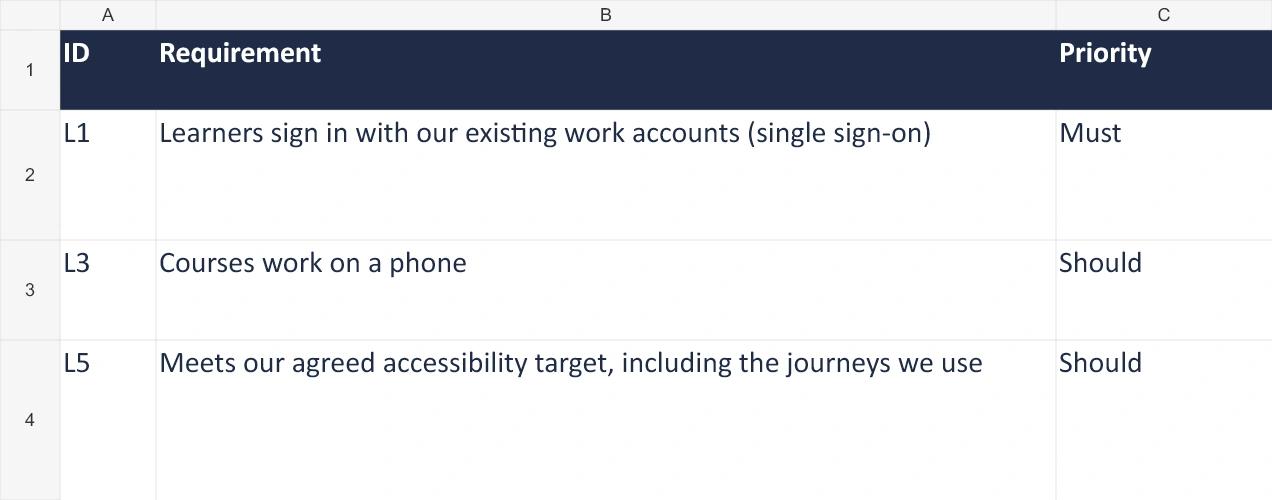
- 1. What this shows: The fictional buyer marks single sign-on as Must, phone access as Should and its agreed accessibility target as Should. These are example priorities to replace with your own.
Open this workbook preview at full size
Two requirements to test in the demo
Example: Fictional 400-staff organisation and vendors. These are illustrative priorities and scores.
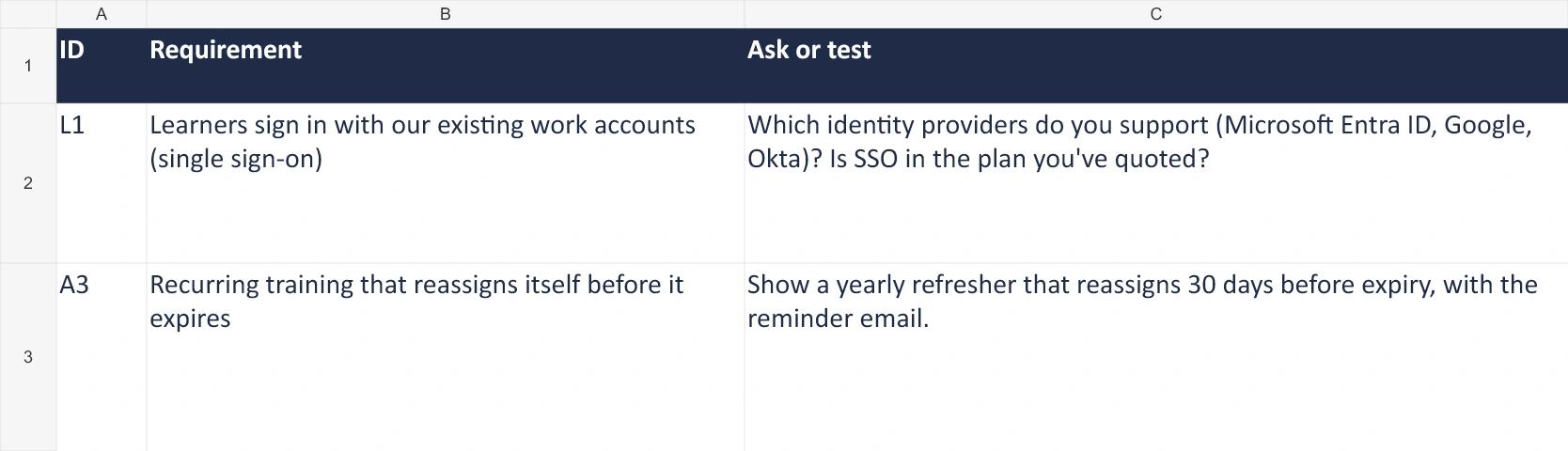
- 1. What this shows: The fictional demo script requests evidence for single sign-on and automatic refresher reassignment.
Open this workbook preview at full size
Comparing assessment and refresher evidence
Example: Fictional 400-staff organisation and vendors. These are illustrative priorities and scores.
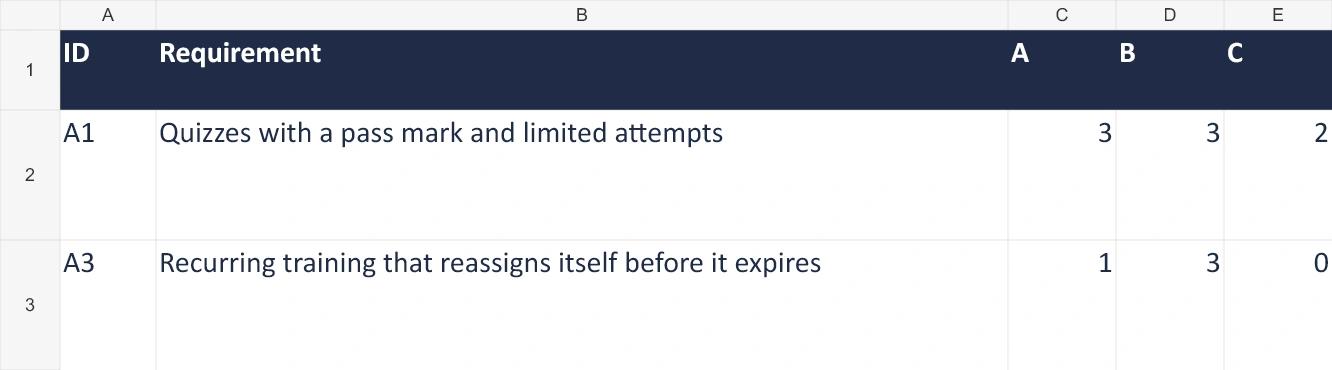
- 1. What this shows: Fictional vendor scores: quiz controls A 3, B 3, C 2; automatic refresher A 1, B 3, C 0. A partial or claimed result does not verify a must-have.
Open this workbook preview at full size
Why none of the three vendors receives a rank
Example: Fictional 400-staff organisation and vendors. These are illustrative priorities and scores.
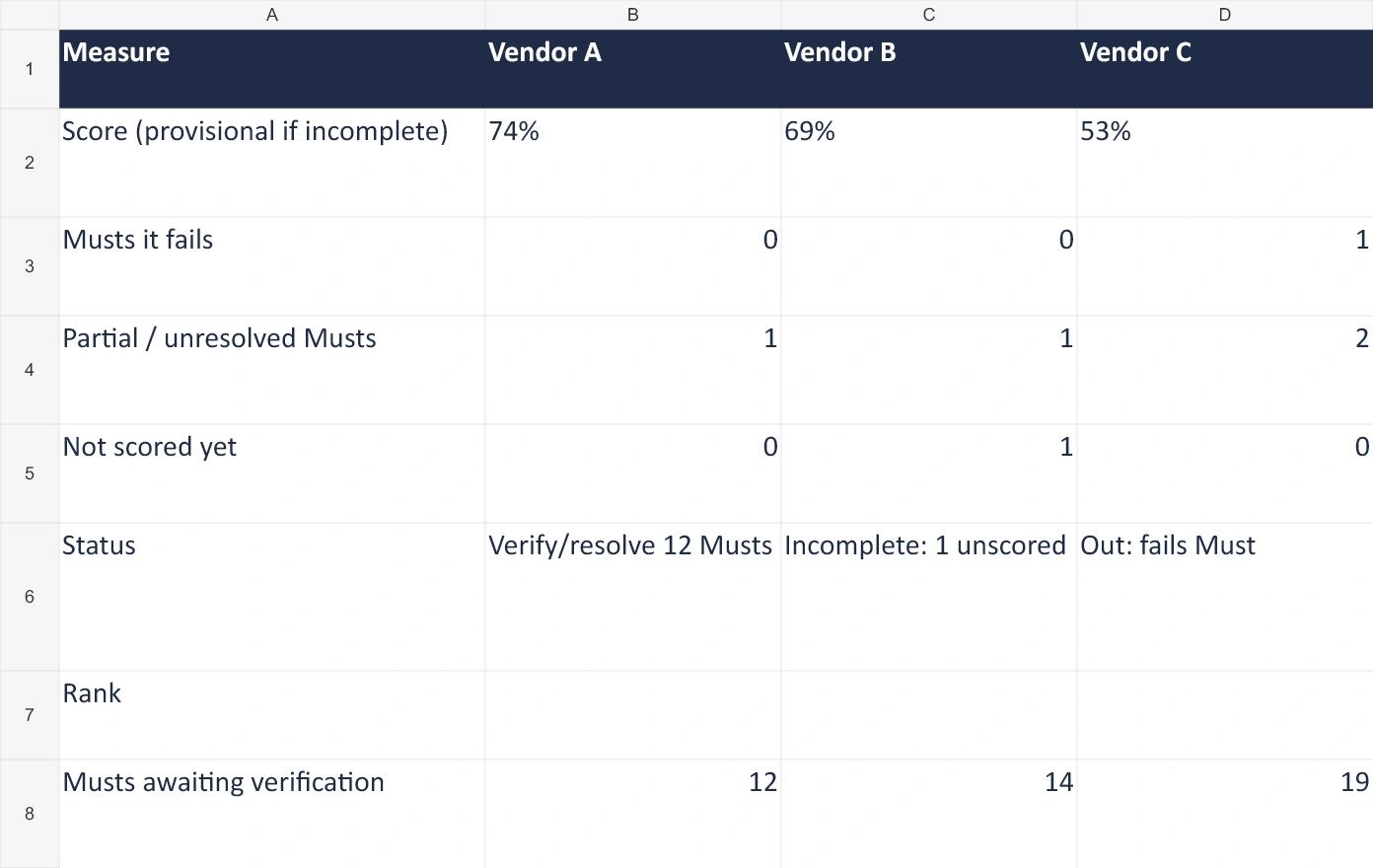
- 1. What this shows: Version 1.1 fictional comparison: A 74 percent with 12 must-haves to verify or resolve; B 69 percent with one item unscored and 14 must-haves unverified; C 53 percent and out for a failed must-have.
Open this workbook preview at full size
Vendor A’s unresolved manual reassignment conflicts with the automatic refresher requirement. Vendor B still needs to prove historical-record import and resolve its higher-volume quote. Vendor C fails the refresher requirement. None is ready for approval just because a percentage looks attractive. The next actions are specific tests and commercial answers, not a vote for the top number.
Keep evidence and notes against stable requirement IDs. The workbook supports 62 rows and three vendors. Freeze the priorities before taking notes on the generated demo script: changing the selection can move rows without moving handwritten evidence with them. Save a separate demo copy for each vendor and revisit earlier evidence if requirements change.
Check the contract, migration and exit before signing
Put the accepted requirements, quoted plan, necessary add-ons and implementation scope in the agreed documents. Ask procurement and the relevant specialists to review the terms. A demonstration establishes observed behaviour; the agreement needs to establish what you are buying and what happens if the service changes.
| Area | Questions to resolve |
|---|---|
| Price and renewal | Billing unit, minimums, overages, increase limits, renewal notice and cancellation dates |
| Service and support | Service hours, outage measurement and exclusions, response versus resolution, escalation and remedies |
| Data and AI | Ownership, processing purposes, subprocessors, security obligations, incident terms, retention and deletion |
| Implementation | Deliverables, responsible people, dependencies, acceptance criteria and when billing starts |
| Changes and exit | Export formats, readable records, media/source assets, assistance fees, retrieval window and continuing dependencies |
Prove that migration preserves the records you need
Inventory users, courses, versions, enrolments, completions, attempts, certificates and attachments before agreeing the migration scope. Decide what must move into the new LMS and what can stay in an accessible archive. Map identifiers, dates, pass rules and retention requirements so old records do not become misleading new completions.
Run a sample import, compare expected and imported record counts, and inspect individual histories, including a leaver, a failed attempt and an expired certificate. Test reporting, permissions and integrations after import. Agree when to switch from the old system, a fallback route, administrator training and the old system’s read-only or archive period before the launch date. Give each task an owner in your LMS implementation plan so the switch has a clear sequence and someone responsible for each check.
Export a sample before purchase as well. A SCORM package, an editable authoring project and a learner-history CSV solve different exit needs. Check licensed content rights and any links to hosted media, AI services or update servers. A file you can download is not necessarily a course you can maintain independently.
Write the decision and the remaining conditions
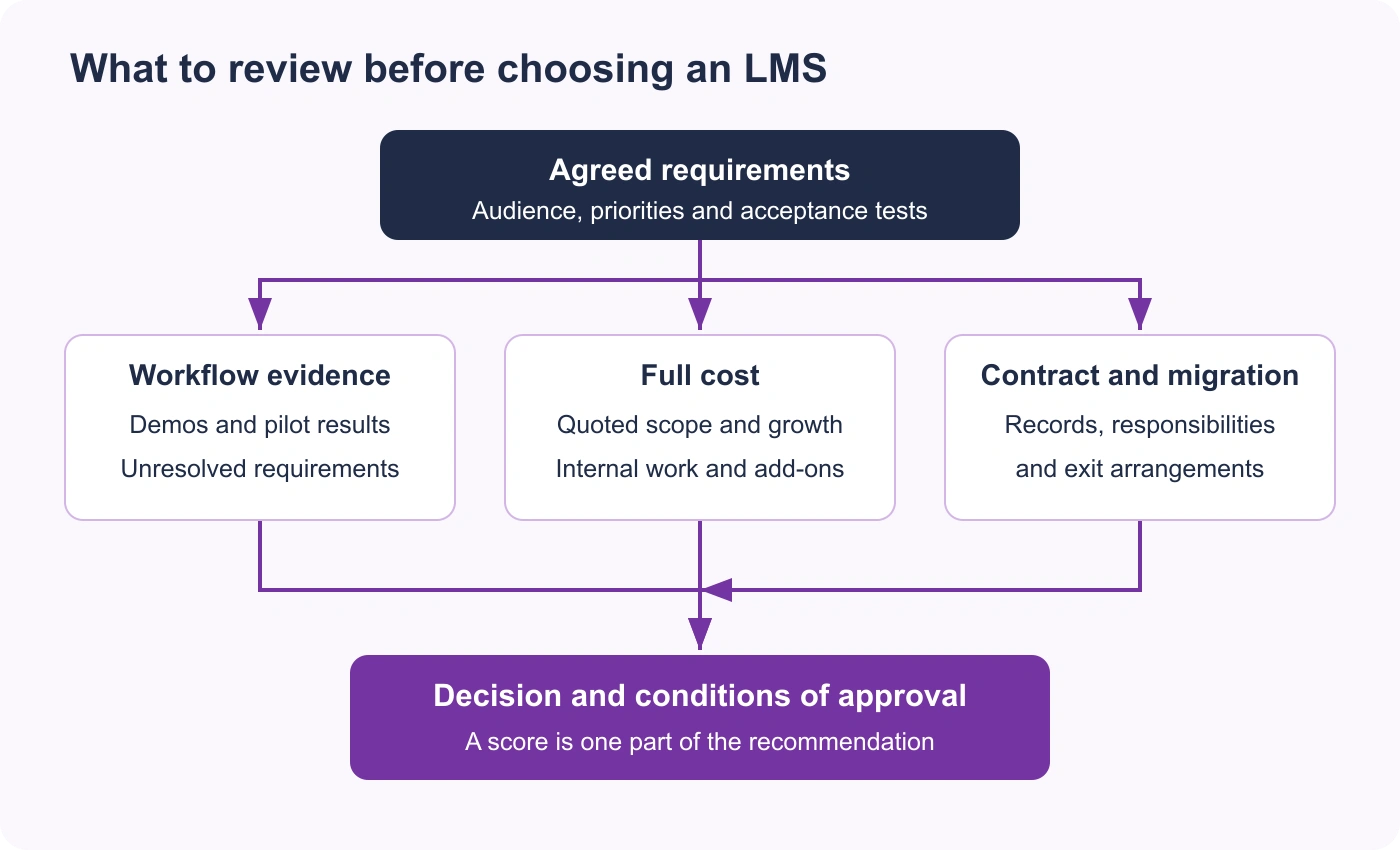
Open the LMS buying decision diagram at full size
Give the sponsor a short recommendation covering the problem, options considered, requirements evidence, full cost, pilot findings, unresolved risks, implementation owner and conditions of approval. Include keeping or improving the current system where it is a credible option. Ask reference customers about setup, upgrades, support and data export, not only whether they like the product.
After launch, check the outcomes that justified the purchase: time to assign training, learner access problems, accuracy of records and the effort needed to prepare the required report. Completion rates alone do not demonstrate a change in job performance.
The 52-item LMS requirements checklist
Use these eight groups as a starting bank, not a demand that every LMS must include all 52. Define your actual workflow, priority and evidence for each applicable line. The example timings, scores, certificate periods and user counts in demo questions are test settings to replace with your own.
Learners and access
| ID | Requirement | What to ask or see |
|---|---|---|
| L1 | Learners sign in with our existing work accounts (single sign-on) | Which identity providers do you support (Microsoft Entra ID, Google, Okta)? Is SSO in the plan you've quoted? |
| L2 | Staff without a work email can still sign in | How do frontline or casual staff without an email get access? |
| L3 | Courses work on a phone | Show a learner finishing a course on a phone, including the quiz. |
| L4 | Learners see what's assigned and due when they sign in | Show the learner's home screen with an overdue course. |
| L5 | Meets our agreed accessibility target, including the journeys we use | Provide a current report for the agreed WCAG level, scope and exceptions; test our content and assistive technology. |
| L6 | The learner side is available in the languages our staff use | Which interface languages are there, and can course content be translated? |
| L7 | Our logo, colours and domain on the learner side | Can we use our own domain and branding on the plan you've quoted? |
| L8 | Courses work offline | Show a course downloaded on a phone and finished without a connection. |
| L9 | Badges, points or leaderboards | Can we turn them off for some courses? |
Courses and content
| ID | Requirement | What to ask or see |
|---|---|---|
| C1 | Imports our existing SCORM 1.2 and 2004 packages | Upload one of our SCORM packages during the trial and check the completion comes back. |
| C2 | Supports xAPI | Which xAPI statements do you record, and is a learning record store included? |
| C3 | Build courses inside the LMS without another tool | Show building a short course with text, video and a quiz. |
| C4 | Drafts courses from our own policies and documents with AI | Show a course drafted from one of our documents, and how we check and edit it. |
| C5 | Upload video, PDF and slides | What file types and sizes are supported? |
| C6 | Update a live course without losing learners' progress | What happens to completions when we publish a new version? |
| C7 | Learning paths with courses in a set order | Show a path where course 2 opens only after course 1 is finished. |
| C8 | Track face-to-face sessions and attendance | How do we record attendance for an in-person session? |
Assessment and compliance
| ID | Requirement | What to ask or see |
|---|---|---|
| A1 | Quizzes with a pass mark and limited attempts | Show setting a pass mark of 80% and two attempts. |
| A2 | Certificates issued automatically, with an expiry date | Show a certificate that expires after 12 months. |
| A3 | Recurring training that reassigns itself before it expires | Show a yearly refresher that reassigns 30 days before expiry, with the reminder email. |
| A4 | Learners acknowledge a policy and the date is kept | How is a policy acknowledgement recorded and exported? |
| A5 | A completion record that can't be changed without a trace | Can an admin change a completion date, and is the change logged? |
| A6 | Assessors sign off practical tasks | Show a supervisor marking an observed task as competent. |
Administration
| ID | Requirement | What to ask or see |
|---|---|---|
| D1 | Assign training by role, team or location automatically | Show a new starter being enrolled in their role's training without anyone doing it. |
| D2 | Bulk-add and update users from a spreadsheet | Show importing 50 users from a CSV. |
| D3 | Managers see and manage only their own team | Show what a team manager can and can't see. |
| D4 | Reminder emails before and after a due date | Can we change the reminder wording and timing? |
| D5 | Several admins with different permissions | What admin roles are there, and can we make our own? |
| D6 | Separate areas for business units or clients | Can each one have its own courses, admins and branding? |
Reporting
| ID | Requirement | What to ask or see |
|---|---|---|
| R1 | Completion and overdue reports by team and course | Show the overdue report for one team, filtered by course. |
| R2 | Scheduled reports emailed to managers | Can a manager get a weekly overdue list without signing in? |
| R3 | Export any report, or every completion at once, to Excel or CSV | During the demo, export every completion of one course for the last two years and open it. |
| R4 | Quiz results by question | Show which question most learners got wrong. |
| R5 | A compliance view: who's current, due soon and expired | Show the expiry view for one certificate. |
Integrations and data
| ID | Requirement | What to ask or see |
|---|---|---|
| I1 | Users sync from our HR system | Which HR systems do you connect to, and how often does the sync run? |
| I2 | Leavers lose access, but their records are kept | What happens to a leaver's account and training history? |
| I3 | An API for our own integrations | Is the API documented publicly, and is it in our plan? |
| I4 | Assignments and reminders in Teams or Slack | Show a reminder arriving in Teams or Slack. |
| I5 | We can export all our data and content if we leave | In what format, at what cost, and how long does it take? Does our SCORM content keep working? |
| I6 | Imports our existing training records | Can you load our past completions and certificate dates, and who does the work? |
Security and privacy
| ID | Requirement | What to ask or see |
|---|---|---|
| S1 | Data stored in our country or region | Where is our data hosted, and can we choose the region? |
| S2 | Provides the data-processing terms and controls our privacy review requires | Which terms apply to our data, support access, subprocessors and international transfers? |
| S3 | Independent security certification | Is the certification for your company or only your hosting provider? Can we see the report? |
| S4 | Completes our security questionnaire | How long do you take to return a security questionnaire, and do you have a security pack? |
| S5 | Our content isn't used to train AI models | Which AI services process our content, and is any of it used for training? Is that in the contract? |
| S6 | Admins sign in with multi-factor authentication | Is MFA available for admin accounts, and can we enforce it? |
Vendor, support and contract
| ID | Requirement | What to ask or see |
|---|---|---|
| V1 | Support hours that cover our working hours | What are your support hours and response times in our time zone? |
| V2 | Setup help and admin training included | What does onboarding include, who runs it, and how long until we're live? |
| V3 | Published uptime and a service level | What uptime do you commit to in the contract, and where's the history? |
| V4 | Pricing that fits our size for three years | What will it cost at our size now and at 50% more learners? What rises at renewal? |
| V5 | Contract terms we can live with | What are the minimum term, the notice period and the cap on renewal increases? |
| V6 | A trial or pilot with our own content | Can we run one real course with real staff before we sign? |
Where Coursebox fits the decision
I'd rather you score us accurately. Coursebox exports SCORM 1.2 and 2004 and LTI 1.3, has an open API and Zapier, and SCORM you host yourself keeps working if you cancel. SAML single sign-on, a signed data agreement and a chosen hosting region are on the Enterprise plan only. We don't support xAPI, and recurring training doesn't reassign itself automatically.
These are product details to verify in your quote and trial, not reasons to reduce your requirements. If automatic recurring reassignment is a must and the offered setup does not provide it, choose a solution that does or explicitly change the process and acceptance criteria.
Workbook version 1.1, independently reviewed in Excel for Windows. Other spreadsheet applications are untested. The PDF is static. Keep cost assumptions, security approval and contractual decisions alongside the comparison; the worksheet does not make those approvals for you.
Frequently Asked Questions
Define the audience and jobs it must support, agree requirements and budget, shortlist against confirmed must-haves, then test the same workflows in demos and a pilot. Compare full costs and resolve contract, migration and exit questions before approval.
They depend on the use. Staff training may prioritise assignments, renewals and audit records; a paid academy may need checkout and commercial reporting; education may need student-system and grade workflows. Access, usability, security and records should be tested in the context you will use.
Functional requirements describe what the LMS does, such as assigning a course. Non-functional requirements describe qualities such as availability, accessibility and response time. Integration work can have both. Prices, support and contract commitments are commercial requirements.
Request comparable quotes for your scope and growth assumptions. Include subscription, implementation, migration, connections, content tools, internal project and administration time, support, overlap and exit. The worked cost figures in this guide are fictional examples, not market price estimates.
Only where they serve your content or data flows. SCORM packages communicate with an LMS about progress and results. xAPI describes learning experiences recorded in a learning record store. LTI connects remote learning tools with a platform. Test the specific versions, services and behaviour you need.
Only if the actual solution meets your agreed requirement and its cost and maintenance are accepted. Do not pass a manual workaround against an automation must-have. Change the requirement openly if the team accepts a different process, then reassess every shortlisted vendor consistently.
Compare the same required outcomes and full cost. Software as a service (SaaS) includes vendor-operated infrastructure; a self-hosted or open-source setup still needs people or a service partner to manage hosting, upgrades, security and integrations. Improving the current system or adding an authoring tool may be sufficient when delivery already works.
Travis Clapp
Travis Clapp is the original founder and CEO of Coursebox. As an experienced instructional designer, he has lived through the process of building high quality courses. These experiences brought about his idea to upload all your documents and ideas into a virtual box that could convert those magically into a course. Prior to Coursebox, he successfully founded and built a social based LMS. Travis has 15+ years of experience designing courses and EdTech platforms from university MOOCs to enterprise LMS. Travis has built training for reputable companies like Johnson & Johnson, Electrolux, Michael Hill and SA Health. One of his courses reached 20,000+ learners which was a flagship edX course. He is based in the Adelaide, South Australia office and passionately works on customer support, sales and bringing the original product vision to life every day.

