

Canvas vs Brightspace: What’s the Difference and Which One Should You Choose?
A well-rounded LMS platform makes training and learning a breeze. Check out this Canvas vs Brightspace comparison to choose the best platform for your needs.


Run your own branded LMS with unlimited learners
A lot of LMS comparisons start with feature lists, but they rarely influence how teams actually make decisions. Most organizations compare Canvas vs Brightspace when scaling training or improving learner engagement across departments. Both LMS platforms can create and deliver full courses, but they differ in how structured, data-driven, and customizable the learning experience becomes over time.
Many teams today use an AI LMS to design course structures and content more quickly, rather than starting with blank modules in Canvas or Brightspace. Once the course framework is developed, the LMS becomes the delivery engine rather than the starting point.
Let’s break down Canvas vs Brightspace across course creation, customization, pricing, and more aspects to pick the LMS that fits your needs.
What is Canvas?
Canvas is a widely used cloud-based learning management system designed for educational institutions, training providers, and organizations. It is ideal for those who need an intuitive environment for building and delivering courses.
One of Canvas’s biggest strengths is its usability. Instructors can create structured courses using modules, assignments, quizzes, and multimedia content without extensive technical knowledge.
Course creation happens directly within Canvas. Educators organize content into modules, add lesson pages, upload videos and resources, create discussions, and design assessments. The platform also includes grading tools, analytics dashboards, and mobile access, making it easy for both instructors and learners to stay engaged.
Universities and schools often favor Canvas because of its clean interface and accessibility features. However, it’s also used in corporate training environments where ease of use and rapid course deployment are priorities.
What is Brightspace?
Brightspace, developed by D2L, is another full-featured LMS built for higher education, enterprise learning, and professional training programs. Like Canvas, Brightspace allows instructors to create and manage complete courses directly within the platform. It supports assessments, learning paths, and learner communication.
Where Brightspace stands out is in its focus on personalization and analytics. Instructors can design adaptive learning experiences, set conditional release rules, and automate engagement through intelligent notifications. This makes it especially appealing for organizations that rely on competency-based training or data-driven learning programs.
While this LMS platform may feel more advanced initially, Brightspace offers deep customization and reporting capabilities that help organizations scale training initiatives and monitor learner performance in detail.
Canvas vs Brightspace: 6 Key Differences Explained
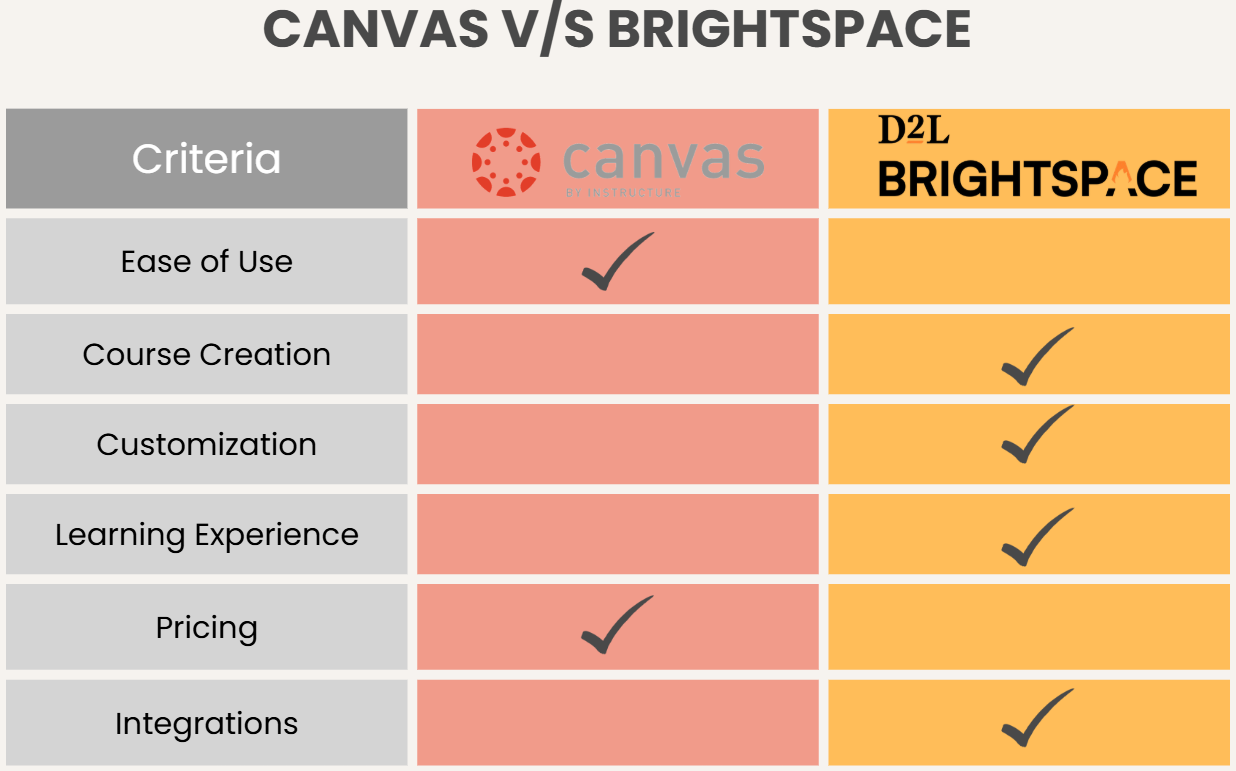
Canvas and Brightspace both support full course creation and delivery, but each has a distinct approach to learning design, customization, and administration.
1. Ease of Use & User Interface (UI)
When comparing Canvas vs Brightspace, both platforms aim to simplify digital learning. They approach usability differently depending on their primary audience and institutional goals.
Canvas UI
Canvas is widely known for its clean, modern interface and intuitive navigation. Most teachers can start building courses quickly without extensive training because the dashboard clearly separates modules, assignments, discussions, and grading tools. Students also tend to find Canvas easy to navigate, thanks to consistent layouts across courses and a mobile-friendly design.
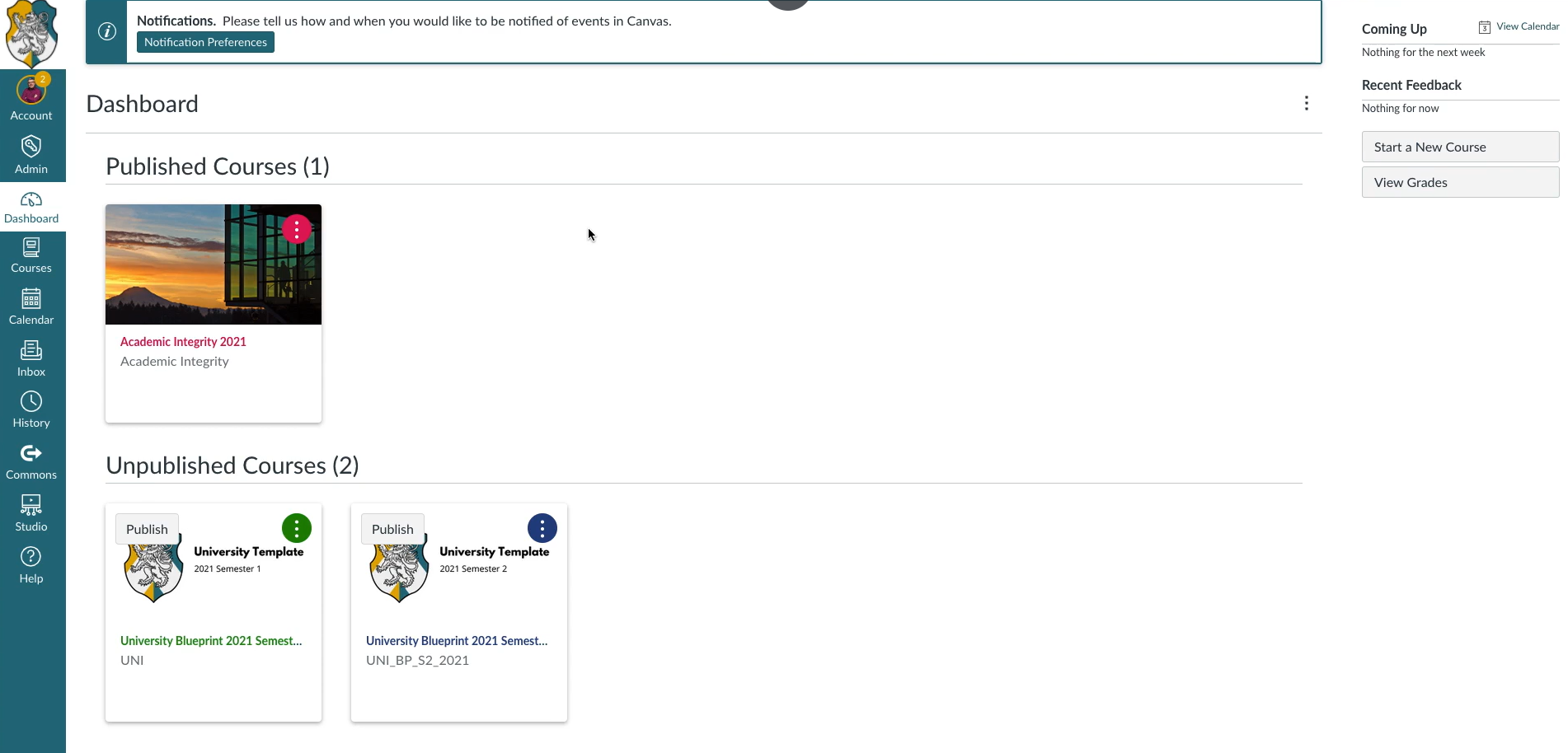
Source: Instructure
Brightspace UI
Brightspace offers a more structured and data-driven interface. However, it can feel more complex at first because it includes advanced analytics tools and deeper administrative controls.
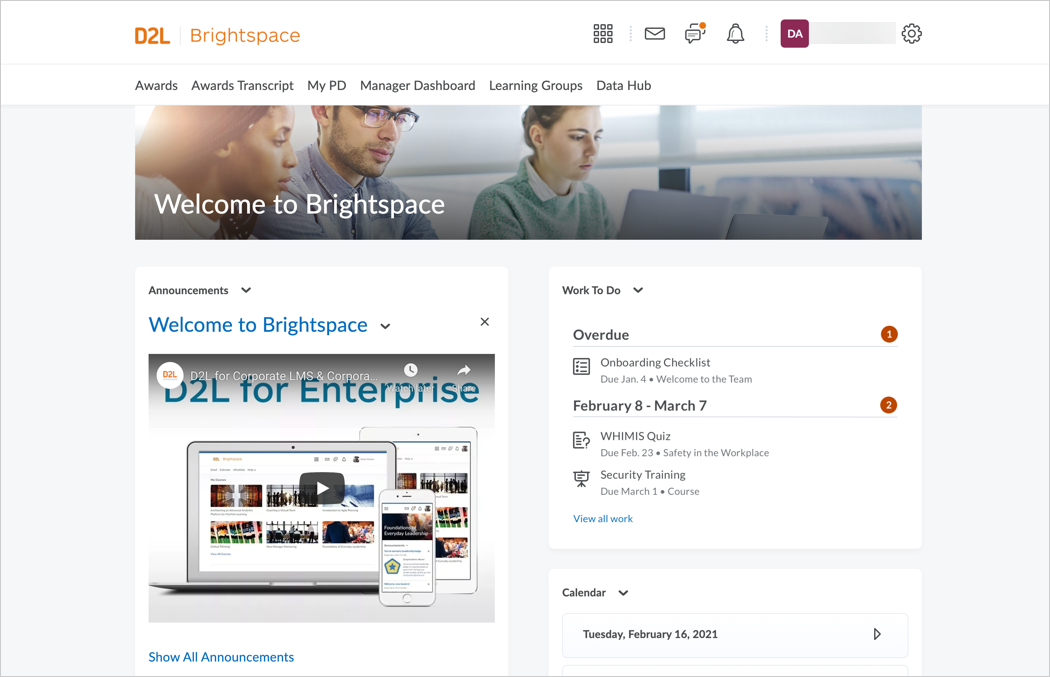
Source: D2L Brightspace Community
Institutions that invest in onboarding and training often benefit from its robust workflows, but new users may need more time to fully understand the platform.
2. Course Creation & Content Structure
Course creation processes on both platforms are quite different. While one offers simplicity, the other provides more advanced features.
Canvas Course Creation
Canvas emphasizes simplicity and speed in course building. Instructors can quickly create modules, add lesson pages, upload multimedia, and build quizzes or assignments using a straightforward editor. Content is typically organized in linear modules, which helps learners follow structured learning paths.
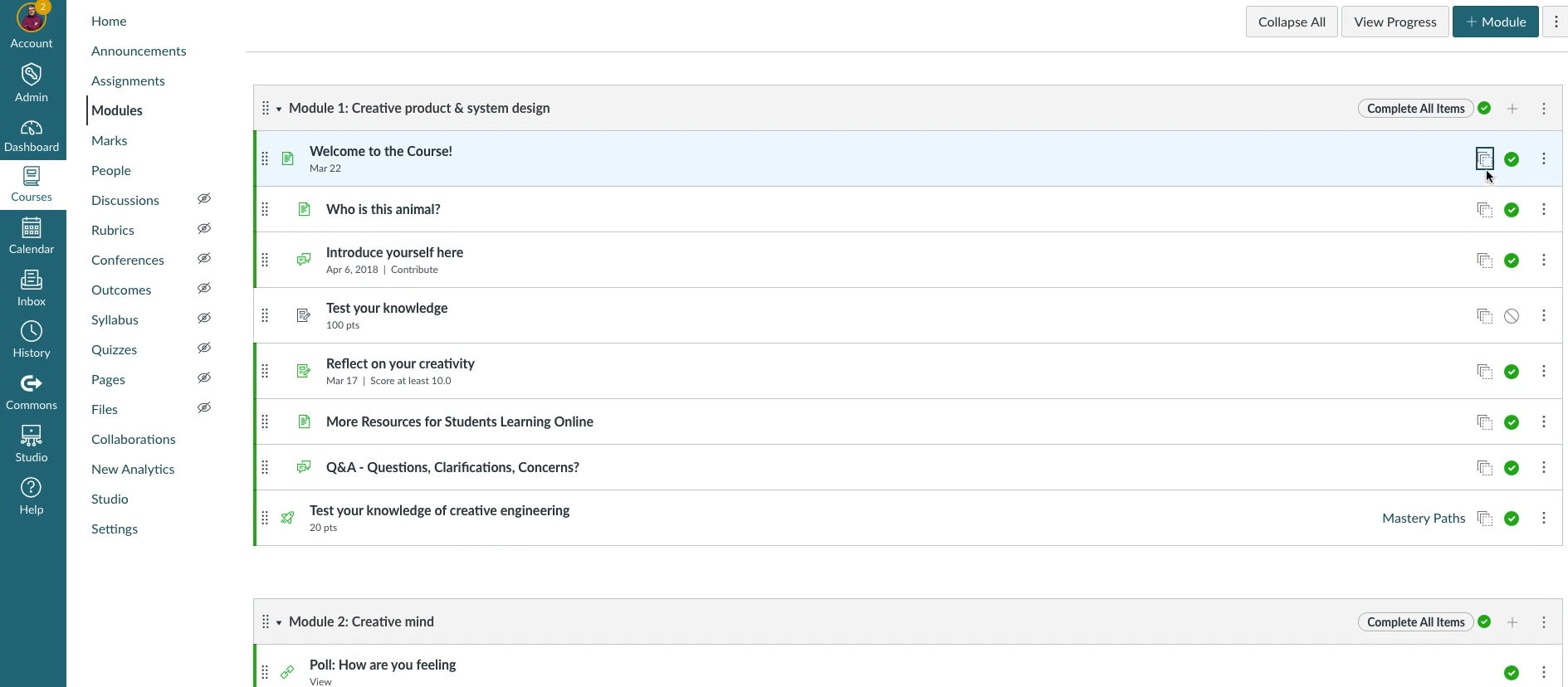
Source: Instructure
The platform works well for instructors who want flexibility without complexity. Courses can be built quickly, and reusable templates make it easier to maintain consistency across programs.
Brightspace Course Creation
Brightspace provides a more advanced course design environment with tools for adaptive learning and conditional content release. Instructors can create personalized learning paths based on learner performance, which is especially useful in competency-based training or professional certification programs.
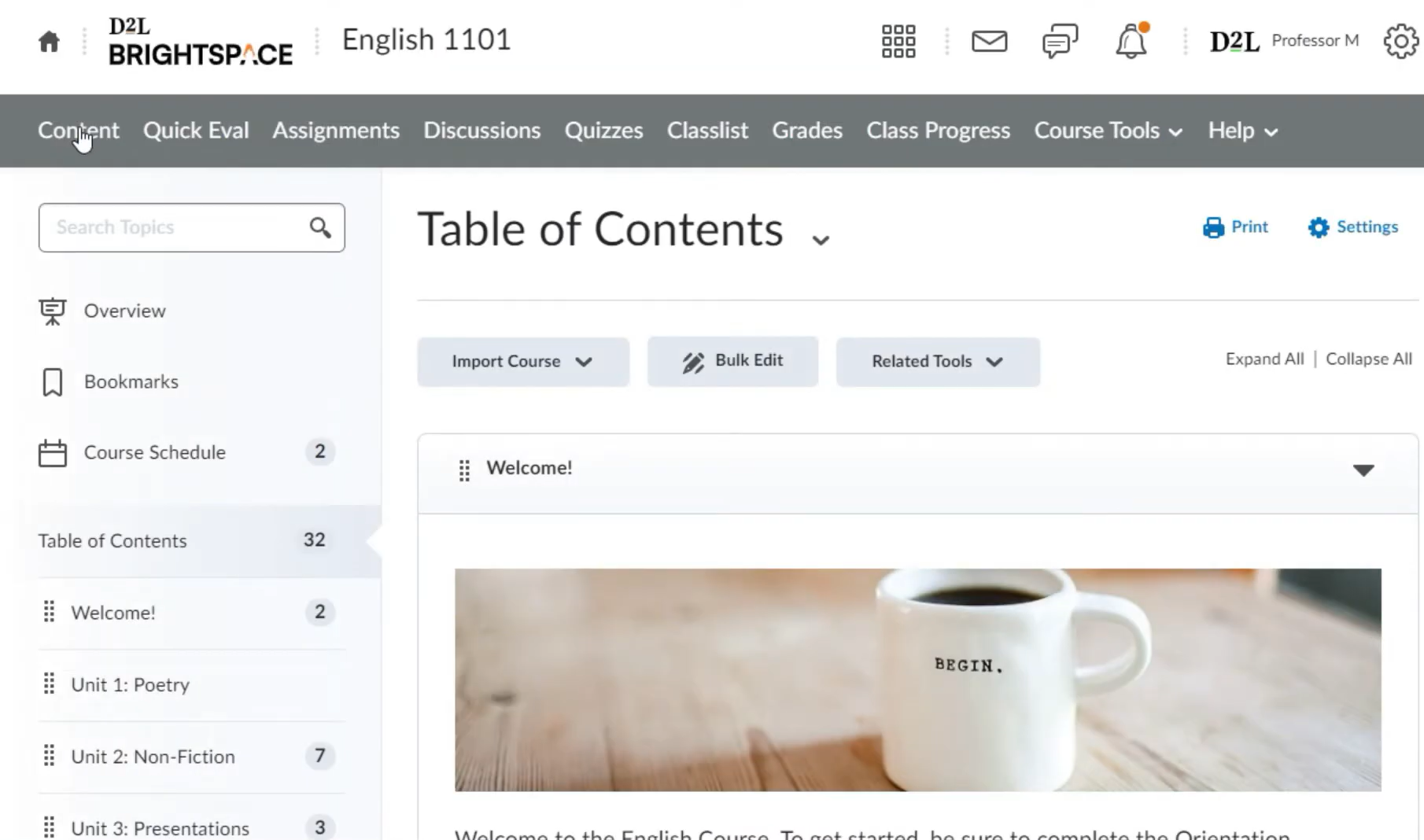
Source: Brightspace YouTube Tutorial
The course creation process is more structured and detailed than in Canvas. Moreover, the added control allows organizations to design sophisticated learning journeys that respond dynamically to learner progress.
3. Customization & Branding
Canvas allows institutions to apply themes, templates, and layout adjustments to maintain visual consistency. While branding options exist, you may not have deep interface customizations.
Brightspace offers more extensive customization tools, including role-based dashboards and flexible navigation structures. Administrators can tailor the platform experience for different learner groups, which is valuable in enterprise environments with varied training needs.
In short, Canvas prioritizes consistency and simplicity, while Brightspace emphasizes flexibility and customization at scale.
4. Learning Experience & Engagement
Canvas focuses on intuitive learner navigation. Students can easily find assignments, participate in discussions, and track progress through a centralized dashboard. Its clean design helps reduce confusion, which contributes to high adoption rates among educators and learners.
Brightspace emphasizes engagement through automation and analytics. Features like intelligent agents, adaptive release rules, and personalized notifications help instructors guide learners through complex programs. Detailed analytics also allow educators to monitor engagement patterns and intervene early when learners struggle.
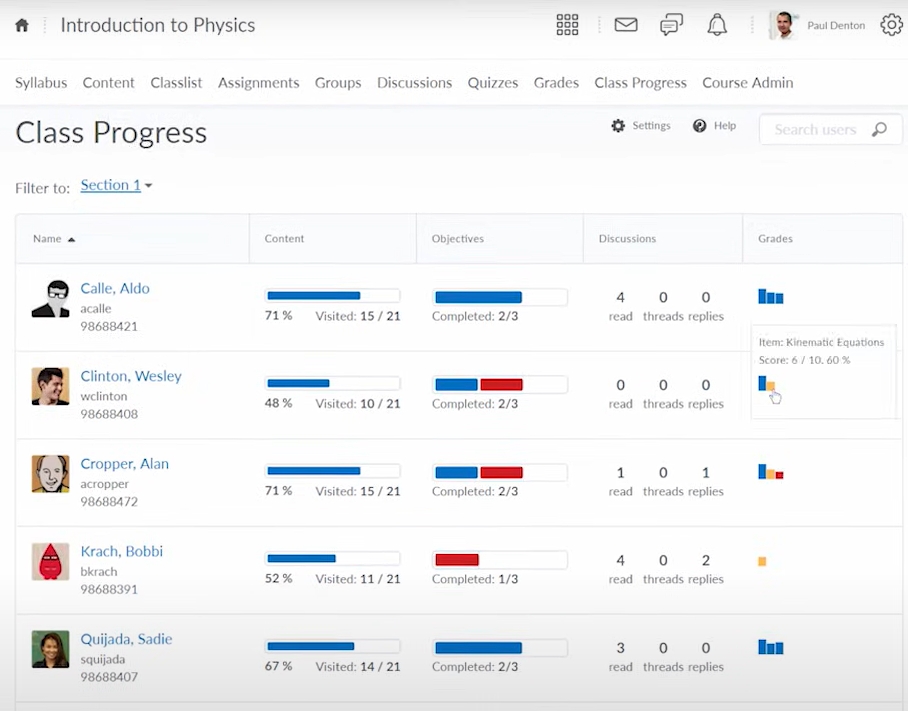
Source: D2L YouTube
Both platforms support multimedia learning, collaboration, and assessment, but Brightspace leans more heavily on data-driven engagement strategies.
5. Integrations & Ecosystem
Canvas has a strong integration ecosystem that includes video conferencing tools, content libraries, analytics platforms, and assessment systems. Its open architecture allows organizations to expand functionality easily without extensive customization.
Brightspace also supports a wide range of integrations and includes built-in automation features that reduce reliance on third-party tools. Intelligent workflows can automate learner communication and administrative tasks, which is especially useful for large training programs.
6. Pricing
Both Canvas and Brightspace use enterprise pricing models rather than fixed public plans. Costs vary depending on the number of learners, required integrations, implementation services, and support levels.
Canvas offers a free version for individual instructors, but institutional deployments require paid subscriptions. Brightspace pricing is also customized and often includes advanced analytics and onboarding support as part of enterprise packages.
To get pricing, you will have to contact both companies for a quote.
Canvas vs Brightspace: Which Is Better?
Both Canvas and Brightspace are efficient LMS platforms, but they are best suited to different environments. Here is a quick overview of each:
| Feature | Canvas | Brightspace |
|---|---|---|
| Best For | Educational institutions & fast course deployment | Corporate training & adaptive learning |
| Ease of Use | Very intuitive | Powerful but more advanced |
| Setup Time | Faster initial setup | Longer due to customization |
| Customization | Moderate branding & templates | Extensive customization options |
| Maintenance | Easier ongoing management | More advanced admin controls |
| Pricing | Custom enterprise pricing | Custom enterprise pricing |
- Choose Canvas if you want a highly intuitive LMS that instructors and learners can adopt quickly. Canvas works best for organizations prioritizing ease of use, accessibility, and fast course deployment.
- Choose Brightspace if you need advanced analytics, adaptive learning tools, and highly customizable learning environments. Brightspace is ideal for organizations running complex or data-driven training programs.
Where an AI LMS Like Coursebox Fits In
Canvas and Brightspace both allow instructors to create and deliver full courses. However, building structured learning content from scratch still requires significant time and planning. An AI LMS like Coursebox helps streamline this stage by generating course outlines, structuring lessons, and creating training materials before uploading them to an LMS.
Instead of starting with empty modules inside Canvas or Brightspace, teams can develop complete learning frameworks first and then use their chosen platform for delivery and learner management.
Coursebox also makes it easier to update courses regularly, maintain consistency across programs, and scale training initiatives without increasing instructional design workload. This AI LMS also reduces friction during course development and accelerates deployment.
Try Coursebox today to generate lessons, assessments, and learning paths in minutes.
FAQs About Canvas vs Brightspace
1. Can you create full courses in Canvas and Brightspace?
Yes, you can create complete courses directly within Canvas and Brightspace. You can also add lessons, multimedia content, assessments, and learning activities. Many organizations still use external tools to speed up content development, but course creation itself is fully supported.
2. Which LMS is easier for instructors to learn, Canvas vs Brightspace?
Canvas is generally considered more beginner-friendly because of its intuitive interface and streamlined workflow. Brightspace offers more advanced features, which may require additional onboarding. The best choice depends on how much customization and automation your organization needs.
3. Canvas or Brightspace, which platform has stronger analytics?
Brightspace is known for its advanced reporting and adaptive learning analytics. It provides detailed insights into learner engagement and performance. Canvas also includes analytics tools, but they focus more on usability than deep data modeling.
4. Are Canvas and Brightspace suitable for corporate training?
Yes, Canvas and Brightspace both support corporate learning programs. Brightspace is often preferred for competency-based or data-driven training, while Canvas works well for organizations prioritizing simplicity and quick course deployment.
5. How does an AI LMS work with Canvas or Brightspace?
An AI LMS like Coursebox typically supports course creation and design before content is uploaded into a delivery platform. Teams can generate structured lessons and training materials faster and then publish them in Canvas or Brightspace. This approach reduces development time while keeping existing LMS workflows intact.
Travis Clapp
Educational technologist and instructional designer

