

ChatGPT Prompts for Course Creation and Instructional Design
Ten course-design prompts, a recorded Claude outline with a human review, and a free Excel prompt pack for adapting them to your learners.

Course-creation prompts help draft objectives, outlines, lessons and assessments. They need a defined audience, relevant source material and a clear requested output.
- A learning objective states what learners should be able to demonstrate. Match it to suitable practice and evidence of achievement.
- Review every generated rule against the source. Asking a chatbot to use only your material does not guarantee it will comply.
- Add lesson timings and activity subtotals separately. In the recorded example, the 45-minute total was correct but the reading and quiz subtotals were wrong.
- Choose the prompts your course needs. Treat suggested durations, media formats and rubric scales as planning choices to check, rather than fixed standards.

Build, launch and sell quality courses in minutes
ChatGPT prompts for course creation are instructions for drafting the parts of a course: learning objectives, an outline, lessons, scripts, activities and assessments. A useful prompt gives the chatbot your source material, describes the learners and says what you need it to produce.
Below are ten prompts for different course-design tasks, plus a free Excel pack that adds your organisation and learner details to each one. The worked example includes an actual Claude response and a human review of what needs fixing. Choose the prompts your course needs; you do not need slides, video and a storyboard for every lesson.
I'm the COO of Coursebox, and I build a lot of my own tools with AI, so I don't trust a first draft from a chatbot until I've checked it. I ran the main prompt for real and went through the output line by line. Coursebox makes an AI course outline generator that drafts an outline from a topic or document for you to edit.
Of the 3,125 workplace or adult-training requests reviewed, 364 named objectives, activities and assessment together; 523 requested assessment without naming an objective. These counts describe the typed first request. People may have supplied more detail in attachments, settings or earlier planning.
The example uses a fictional clinic policy to plan a 45-minute course for new reception staff. The recorded outline totals 45 minutes, but its reading and quiz subtotals are wrong. The review also finds that knowing the reporting rule is not enough to show someone can complete a breach report.
Download the blank Excel prompt pack or the completed example. The example includes the fictional source policy, the prompt as sent, the unedited Claude response and a human review. The PDF is a static reference. No sign-up is required.
Open the example review at full size
What a course design prompt needs
Start with the work learners need to do. A learning objective describes what they should be able to demonstrate. An activity gives them a chance to practise it; an assessment gives you evidence of whether they can do it. An outline connects these to the lesson order and time available. For the clinic example, recognising when a breach must be reported and completing the report are different tasks. A quiz can check the first, while a reporting exercise can show the second.
| Part | Why | In the outline prompt |
|---|---|---|
| Who the learners are | A course for new starters and one for supervisors cover the same policy differently | New reception staff |
| Your source material | Gives the chatbot the approved facts and procedures to work from | The clinic's reception privacy policy, in full |
| "Use only this material" | Sets a source restriction; you still need to check whether the output follows it | Do not add facts, rules, names or numbers that are not in it |
| What to do about gaps | Asks for missing information to be raised for a decision | List it as a question for me at the end |
| The length and the shape | Gives you an outline you can build from | A 45-minute target, lessons linked to objectives, and an example practice-time allocation |
The main prompt: a course outline from your material
Replace ORGANISATION, LEARNERS and SPELLING, choose the target minutes, and paste the relevant approved source in the final space. The example uses 45 minutes and asks for at least a third of that time as practice. Those are planning choices to adapt, not universal course-design rules.
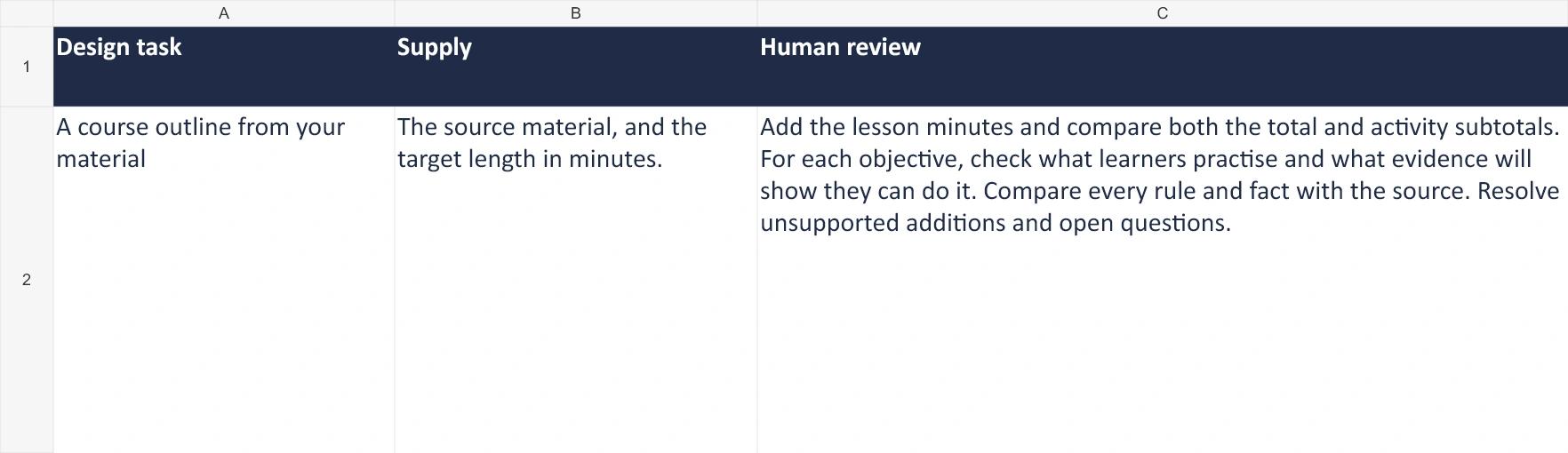
Draft an outline with objectives, lesson timings, activities and assessment.
- The source material, and the target length in minutes.
You are an experienced instructional designer at ORGANISATION. Design an online course outline for LEARNERS, based on the material below.

Use only the material below. Do not add facts, rules, names or numbers that are not in it. If the course needs something the material doesn't cover, list it as a question for me at the end instead of guessing.

The course should take about [45] minutes. Give:
- 3 or 4 learning objectives, each starting with a verb you could observe.
- Modules and lessons in order. For each lesson: the objective it serves, the minutes, the main activity (read, watch, practise or check) and how it's assessed, if at all.
- At least a third of the time on practice, not reading.
- A total of the minutes at the end.

Write in SPELLING.

Material:
"""
[paste the policy, procedure or notes the course is based on]
"""
- ORGANISATION
- : Your organisation, or a description of it (for example, a medical clinic group)
- LEARNERS
- : Who the course is for, in the words you'd use at work (for example, new reception staff)
- SPELLING
- : The spelling (for example, Australian English)
Output from Claude (claude-sonnet-5), Oct 22, 2026
Run in Claude (claude-sonnet-5) on 22 October 2026, with the example clinic reception privacy policy pasted in. Two parts of the output, word for word:

Learning objectives

By the end of this course, staff will be able to:

1. **Verify** a patient's identity using two identifiers before sharing any appointment, result or account information.
2. **Apply** the correct method for sharing patient information privately (screen or printed slip) instead of speaking aloud in the waiting room.
3. **Identify** who information can and can't be given to, including unverified phone callers.
4. **Follow** the correct procedure for screen locking, document disposal and reporting a suspected privacy breach.

Questions for you

1. Is there a pass mark or number of attempts expected for the quizzes and final check? The material doesn't specify one.
2. Does the incident form get completed online, on paper, or in a specific system? The material says to use it but doesn't describe it.
3. Should "authorised contact" be defined further (e.g., how reception staff can check who's listed), or is checking the patient record assumed to be self-explanatory for this audience?
4. Is there an existing induction module covering general reception systems (e.g., how to open the patient record) that this course should assume as a prerequisite, or should this course be fully stand-alone?
- Add the lesson minutes and compare both the total and activity subtotals.
- For each objective, check what learners practise and what evidence will show they can do it.
- Compare every rule and fact with the source. Resolve unsupported additions and open questions.
How to use the prompts
The following steps use the fictional clinic example. They show how to turn an initial outline into a plan worth developing, rather than treating a polished response as a finished course.
Step 1: Start with the objectives
Write what learners will be able to do before you ask for an outline. If you don't have them yet, the second prompt in the pack drafts them, and these SMART learning objectives examples show what good ones look like.
Carnegie Mellon University's teaching centre puts it this way: objectives, assessments and activities "need to be closely aligned so that they reinforce one another" (Carnegie Mellon Eberly Center). If the objective asks someone to carry out a procedure, give them a chance to practise it and assess that performance. A question about the rule alone may not be enough.
Step 2: Fill in the setup once
Enter your organisation, the learners, the tone and the spelling on the Setup tab. Every prompt in the pack picks them up.
What the outline prompt needs
Example: Fictional clinic example. The complete prompts are in the Excel file and on this page.
- 1. Source and review: The full prompt is copyable above. The workbook lists what to supply and what to review yourself.
Open this workbook preview at full size
Step 3: Paste your material and run it
Use an AI tool your organisation permits for the material. Paste the relevant approved procedure, including its exceptions, and set the target length. The recorded example was run once in Claude (claude-sonnet-5) on 22 October 2026; it was not a ChatGPT test.
It came back with four objectives, four modules of two to four lessons each, a minutes total, and four questions about things the policy doesn't say.
Step 4: Check the arithmetic and the alignment
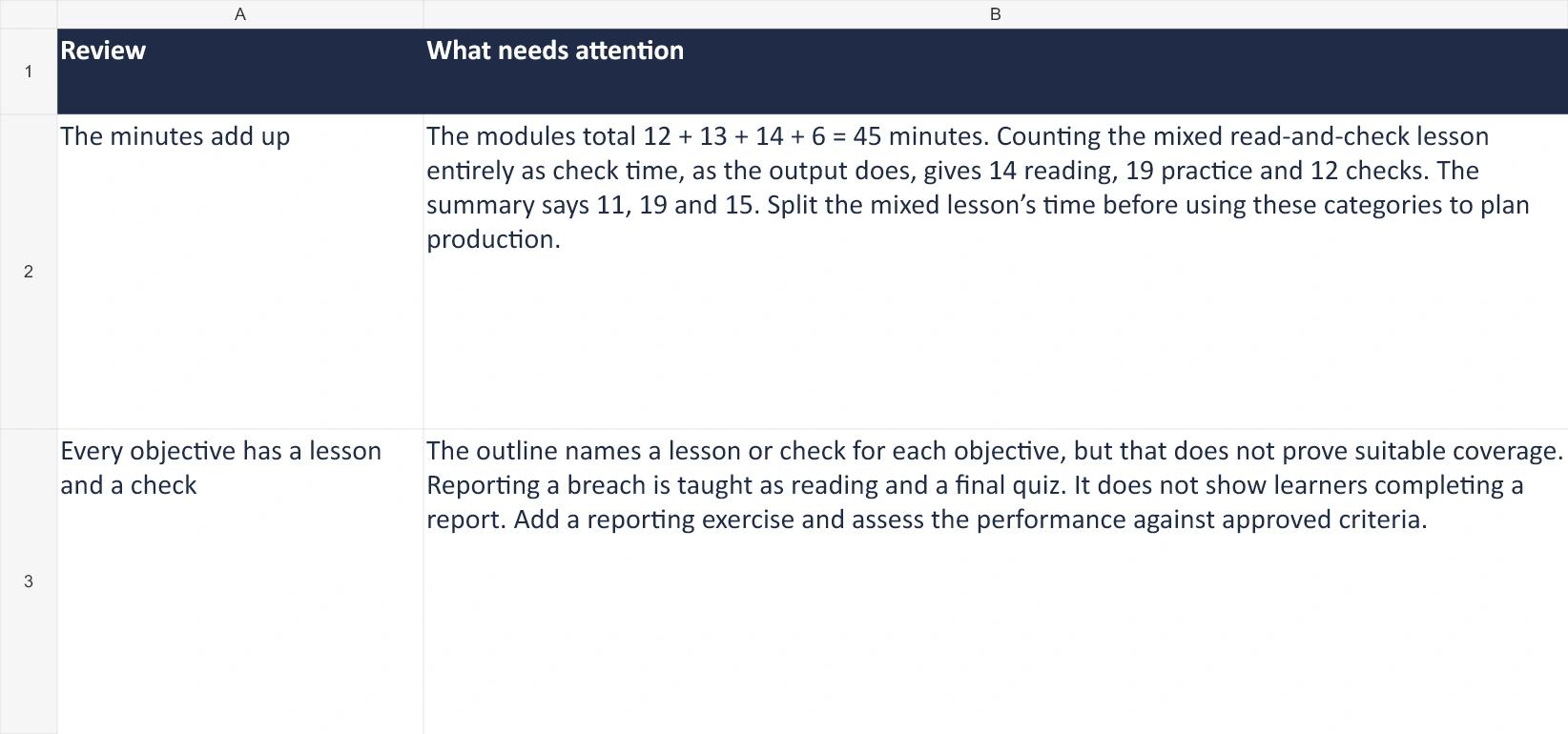
Check the outline in three ways: compare it with the source, add the lesson timings, and match each objective to practice and assessment. In the example, the modules total 12 + 13 + 14 + 6 = 45 minutes. Using the output’s choice to count the mixed reading-and-quiz lesson entirely as quiz time, the activities total 14 minutes reading, 19 practice and 12 checks. Its summary says 11, 19 and 15. The mixed lesson still needs its time split before those categories can guide production.
What the human review found
Example: One recorded Claude run on a fictional clinic policy, 22 October 2026.
- 1. Minutes: The total is 45. The activity subtotals need correction and the mixed lesson needs a time split.
- 2. Reporting: The outline names the reporting lesson, but does not show learners completing a report.
- 3. Source: The final-check pass requirement is a design proposal to confirm, not a rule in the policy.
Open this workbook preview at full size
A matching total can hide a planning error. Checking the categories separately shows how much time you have actually allowed for explanation, practice and assessment. Check the activity itself too: a page labelled “practice” still needs instructions, feedback and enough time for the learner to respond.
Step 5: Fix it and answer the questions
Correct the time breakdown and give reporting a separate objective and exercise. For example, learners could complete a fictional incident form from a scenario, using criteria approved by the policy owner. This is a proposed revision, not something the recorded model output already contains. Ask the practice manager about the reporting form, authorised-contact checks and assumed prior knowledge. Agree any assessment pass rule with the person responsible for training.
Reallocate the 45 minutes to fit the reporting exercise, or agree a longer course. Try the revised lesson with a representative learner before treating its duration as realistic. Then use the reviewed objectives and outline when drafting the lessons and activities.
Do not paste patient, staff or customer records into these prompts. Use fictional examples or remove identifying details, and check that you are authorised to share the source document with the chosen tool and account. Changing a name alone may leave someone identifiable.
Step 6: Build the course
Put the checked outline, lessons and activities into your course tool. For the quiz, use our ChatGPT prompts for quiz writing, which includes prompts and a human review checklist.
RP Global Training Network: agree the structure, then review
RP Global Training Network uses Claude to draft theological courses in a fixed structure of ten units with five lessons each. Vince Ward builds the content in Coursebox and reviews it against the source before publication. The useful lesson is to agree a structure and review the content; this case does not test this prompt pack or establish a suitable length for a workplace course. Read the original case study.
Coursebox builds the outline first, and you can edit the sections, pages and lesson titles before you generate the lessons. Setting page content to structure and titles only previews the outline without using AI credits. Change the structure before you generate, because restructuring afterwards is harder.
Nine more prompts for course design
Each prompt has a different job. Use the objectives prompt when the intended performance is unclear, the sequence prompt when you have modules to organise, and the media prompts only when that format helps teach the task. Carry approved objectives and source material into later prompts; carrying forward unchecked output can also carry forward its errors. Replace every bracketed field before running a prompt.
2. Learning objectives
“Apply” means using knowledge or a procedure to complete a task. A higher-level verb alone does not make an objective better: choose the performance your learners need. A quiz about the reporting deadline and an exercise completing the report require different evidence.
Learning objectives, from your own material.
- The material or the business need behind the course.
Write 3 to 5 learning objectives for a course for LEARNERS at ORGANISATION on [topic].

Use only the material below. Do not add facts, rules, names or numbers that are not in it. If the course needs something the material doesn't cover, list it as a question for me at the end instead of guessing.

Each objective names the learner, one verb you could observe (not understand, know or be aware of), what they do, the conditions and a standard, and when. Explain the level of thinking each objective requires. Identify where learners must apply a procedure or make a decision. Do not add a harder task just to reach a particular level. If the source does not supply a standard, label any suggested criterion as a proposal for approval.

Write in SPELLING.

Material:
"""
[paste the material or the business need]
"""
- ORGANISATION
- : Your organisation, or a description of it (for example, a medical clinic group)
- LEARNERS
- : Who the course is for, in the words you'd use at work (for example, new reception staff)
- SPELLING
- : The spelling (for example, Australian English)
- The task is specific enough to observe or assess.
- Any proposed standard is checked and approved by the responsible person.
- The cognitive demand fits the task learners need to perform.
3. The order of modules
The order of modules, from your own material.
- The module titles and what each covers.
Below is a list of modules for a course for LEARNERS at ORGANISATION. Put them in the order a learner should take them, so each module only needs what came before it.

For each module, say what it depends on. Flag any module that depends on something taught later, and any gap where a module assumes knowledge no module teaches. Don't add modules; list gaps as questions.

Write in SPELLING.

Modules:
"""
[paste the module titles and a line on what each covers]
"""
- ORGANISATION
- : Your organisation, or a description of it (for example, a medical clinic group)
- LEARNERS
- : Who the course is for, in the words you'd use at work (for example, new reception staff)
- SPELLING
- : The spelling (for example, Australian English)
- Nothing depends on a later module.
- The gaps it lists are real, and you decide how to fill them.
4. A lesson plan
A lesson plan, from your own material.
- The lesson's objective, its length and the part of the source it covers.
Write a lesson plan for one lesson in a course for LEARNERS at ORGANISATION.

Use only the material below. Do not add facts, rules, names or numbers that are not in it. If the course needs something the material doesn't cover, list it as a question for me at the end instead of guessing.

The lesson is [15] minutes and serves this objective: [objective]. Give a timed plan: a short opening that links to the learner's work, the explanation, a worked example, practice, and a quick check. Put the minutes against each part and the total at the end.

Write in a TONE tone, in SPELLING.

Material:
"""
[paste the part of the source this lesson covers]
"""
- ORGANISATION
- : Your organisation, or a description of it (for example, a medical clinic group)
- LEARNERS
- : Who the course is for, in the words you'd use at work (for example, new reception staff)
- TONE
- : The tone (for example, plain and friendly)
- SPELLING
- : The spelling (for example, Australian English)
- The minutes add up to the lesson length.
- The practice uses a real situation from the learner's job.
- The check tests the objective.
5. A video script
A video script, from your own material.
- The topic, the length and the material.
Write a [2]-minute video script for LEARNERS at ORGANISATION on [topic].

Use only the material below. Do not add facts, rules, names or numbers that are not in it. If the course needs something the material doesn't cover, list it as a question for me at the end instead of guessing.

Use two columns: what the narrator says, and what's on screen at the same time. Keep each spoken line short enough to say in one breath. Open with the situation the learner will face, not a welcome. End with the one thing to remember.

Write in a TONE tone, in SPELLING. Estimate a suitable narration length for the requested duration. The draft will be read aloud and timed before recording.

Material:
"""
[paste it]
"""
- ORGANISATION
- : Your organisation, or a description of it (for example, a medical clinic group)
- LEARNERS
- : Who the course is for, in the words you'd use at work (for example, new reception staff)
- TONE
- : The tone (for example, plain and friendly)
- SPELLING
- : The spelling (for example, Australian English)
- Read it aloud with a timer: it fits the length.
- The on-screen text supports the narration instead of repeating it.
6. Slides and speaker notes
Slides and speaker notes, from your own material.
- The material and the number of slides.
Turn the material below into [8] slides for a session with LEARNERS at ORGANISATION.

Use only the material below. Do not add facts, rules, names or numbers that are not in it. If the course needs something the material doesn't cover, list it as a question for me at the end instead of guessing.

For each slide give: a title that states the point, no more than 3 short lines or one image idea, and speaker notes of 2 to 4 sentences in the presenter's own words. Put one question to the group every 3 slides.

Write in a TONE tone, in SPELLING.

Material:
"""
[paste it]
"""
- ORGANISATION
- : Your organisation, or a description of it (for example, a medical clinic group)
- LEARNERS
- : Who the course is for, in the words you'd use at work (for example, new reception staff)
- TONE
- : The tone (for example, plain and friendly)
- SPELLING
- : The spelling (for example, Australian English)
- No slide carries more than 3 lines.
- The notes say what the slide doesn't.
- Every fact is in your material.
7. Practice activities and scenarios
Practice activities and scenarios, from your own material.
- The objective and the procedure or standard being practised.
Write [3] practice activities for LEARNERS at ORGANISATION that practise this objective: [objective].

Use only the material below. Do not add facts, rules, names or numbers that are not in it. If the course needs something the material doesn't cover, list it as a question for me at the end instead of guessing.

Each activity: a realistic situation from the job, what the learner does, what a good response looks like, and feedback on a mistake documented in the supplied material. If no mistake is documented, ask me for one instead of claiming it is common. Make them harder in order.

Write in SPELLING.

Material:
"""
[paste the procedure or standard being practised]
"""
- ORGANISATION
- : Your organisation, or a description of it (for example, a medical clinic group)
- LEARNERS
- : Who the course is for, in the words you'd use at work (for example, new reception staff)
- SPELLING
- : The spelling (for example, Australian English)
- Each activity needs your procedure to get right, not common sense.
- The good response matches the procedure.
8. A rubric for an assignment
A rubric describes what different levels of work look like for each assessment criterion. The prompt suggests a four-level format; adapt that to your approved assessment rules. Do not ask a chatbot to invent the pass standard.
A rubric for an assignment, from your own material.
- The assignment, the objectives and the standard.
Write a rubric for this assignment for LEARNERS at ORGANISATION: [the assignment].

Use only the material below. Do not add facts, rules, names or numbers that are not in it. If the course needs something the material doesn't cover, list it as a question for me at the end instead of guessing.

Use 3 to 5 criteria tied to the objectives, and 4 levels for each, with the top level called 'Exceeds the standard' and level 3 the pass. Describe each level in terms of what the assessor can see in the work. Use only the supplied must-pass criteria. If none are given, ask me to confirm them. Label the four-level scale as a proposed format, and flag any criterion that goes beyond the supplied standard for approval.

Write in SPELLING.

Objectives and standard:
"""
[paste the objectives and the procedure or standard]
"""
- ORGANISATION
- : Your organisation, or a description of it (for example, a medical clinic group)
- LEARNERS
- : Who the course is for, in the words you'd use at work (for example, new reception staff)
- SPELLING
- : The spelling (for example, Australian English)
- Each level describes observable work and matches the supplied standard.
- Have two assessors try the rubric on the same sample and discuss different ratings.
- The responsible person confirms the pass rule and any must-pass criteria.
9. A storyboard for an online lesson
A storyboard for an online lesson, from your own material.
- The lesson plan and the part of the source it covers.
Turn the lesson below into a storyboard for an online course for LEARNERS at ORGANISATION.

Use only the material below. Do not add facts, rules, names or numbers that are not in it. If the course needs something the material doesn't cover, list it as a question for me at the end instead of guessing.

For each screen give: the screen number, the on-screen text (no more than 40 words), the visual, what the learner does (read, click, choose or drag) and any narration. Put a question or a choice at least every 4 screens.

Write in a TONE tone, in SPELLING.

Lesson plan and material:
"""
[paste the lesson plan and the part of the source it covers]
"""
- ORGANISATION
- : Your organisation, or a description of it (for example, a medical clinic group)
- LEARNERS
- : Who the course is for, in the words you'd use at work (for example, new reception staff)
- TONE
- : The tone (for example, plain and friendly)
- SPELLING
- : The spelling (for example, Australian English)
- No more than 4 screens in a row without something for the learner to do.
- The on-screen text stays under 40 words a screen.
- Every fact is in your material.
10. A review of your course draft
A review of your course draft, from your own material.
- The objectives, the course draft and the source material.
Review this course draft for LEARNERS at ORGANISATION against its objectives and source material.

Tell me: which objectives have no lesson or no check; where the course says something the source doesn't; where the minutes don't add up; which lessons are only reading; and anything a new learner would find confusing. Quote the part of the draft for each point. Don't rewrite anything yet.

Write in SPELLING.

Objectives:
"""
[paste them]
"""

Draft:
"""
[paste the course draft]
"""

Source:
"""
[paste the source material]
"""
- ORGANISATION
- : Your organisation, or a description of it (for example, a medical clinic group)
- LEARNERS
- : Who the course is for, in the words you'd use at work (for example, new reception staff)
- SPELLING
- : The spelling (for example, Australian English)
- Treat it as a second opinion.
- Check each point it raises against the draft yourself.
Prompts for other training jobs
- Quiz questions: ChatGPT prompts for quiz writing, with a question review sheet.
- Running workplace training (onboarding guides, a module from a policy, announcements, course descriptions, enrolment emails): ChatGPT prompt templates for employee training.
- Feedback after the course: training survey questions.
Common mistakes with course design prompts
| Mistake | What happens | What to do |
|---|---|---|
| No source material | The chatbot may substitute general advice for your procedure | Paste the policy, procedure or notes |
| Outline before objectives | Lessons that don't add up to anything you can check | Write the objectives first |
| Trusting the minutes | A breakdown that looks right and isn't | Add them up yourself |
| Asking for the whole course in one prompt | The response can be difficult to inspect and revise | One prompt per design job |
| Skipping the questions at the end | Gaps filled with guesses later | Answer them before you build |
Where to go next
- For the structure, see this course outline template.
- For the levels in your objectives, read about Bloom's taxonomy in course design.
- For a single session, this guide to writing a lesson plan pairs with prompt 4.
- For marking, build a rubric to check prompt 8's output against.
The prompt pack is version 1.1, reviewed on 22 October 2026 and tested in Excel for Windows. Other spreadsheet applications are untested. The recorded example is one Claude run of the original outline prompt. The remaining prompts and other chatbot/model combinations have not been run as part of this review.
Designing a course with ChatGPT
Start with the task learners need to perform and the source they must follow. Review the objectives, use the outline to plan practice and assessment, and check the result before drafting the next part. Keep decisions about time, format and pass standards tied to the course you are building.
To go from a topic or document to an outline you can edit, try Coursebox's AI course outline generator.
Frequently Asked Questions
It can draft each part: objectives, an outline, lesson plans, scripts, slides and activities. Give it your material, the learners and the length, and check every output before you build.
One that names the learners, sets the length, pastes your source material, says "use only this material", asks for objectives with a lesson and a check for each, and asks for the minutes per lesson and in total.
For first drafts of the design jobs: objectives, outlines, sequencing, scripts, slides, activities and rubrics. The design decisions, and the check against the source and the objectives, stay with the designer.
It can help draft a course, but a long response still needs source review, suitable practice and assessment, and a place for learners to access it. Drafting and reviewing one part at a time makes those decisions easier to inspect. These ten prompts do not publish or deliver a course.
Compare every fact with your source, add up the minutes, check each objective has a lesson and a check, and answer the questions the chatbot lists before you build.
Alex Hey
Alex Hey is a technical marketer with 10 years of hands-on growth and digital marketing experience. He cofounded Coursebox together with Travis Clapp who he met online when looking for a cofounder to build a globally impactful software product. He works in the Perth, Western Australia office as the COO. He built the world's first automated funnel for patient recruitment before building Coursebox. After launching Coursebox in mid 2023, he drove +400k organic sign ups for Coursebox. Alex leads the marketing and digital growth of Coursebox and works with the product development team bringing a passion for data-driven product decision and exceptional user experience. Alex is determined to build the world's easiest way to build the perfect course.

