

Thinkific vs Teachable: I Built One Course on Both (2026)
I built the same warehouse safety course on Thinkific and Teachable: both AI builders, both admins and both learner apps, every price checked in-product.

Thinkific suits training businesses and creators running big audiences or many courses; Teachable suits solo sellers with a small catalogue who want sales tax and affiliate payouts handled for them.
- Thinkific wins on capacity. Every plan, including Basic at $40 a month, allows 10,000 students and unlimited courses, while Teachable starts at 100 students and 5 products and adds usage fees past each cap.
- Teachable beats Thinkific on selling admin. It remits sales tax everywhere and pays affiliates automatically, while Thinkific remits only US and Canadian tax for a 0.5% fee and leaves payouts to you.
- Neither Thinkific nor Teachable writes the course for you. Thinkific's AI turns one typed line into a sales page and lesson shells with writing prompts inside; Teachable's stops at the outline.
- Neither Thinkific nor Teachable makes leaving easy. Thinkific documents no course export and imports SCORM only on its contact-sales Plus plan; Teachable suggests copying text into Word.
- The learner experience splits too. Teachable ships student apps that download lessons for offline study, while Thinkific has no offline playback, and on its Basic plan a clicked lesson counts as complete.
Answer 3 quick questions to figure out in seconds

Build high quality courses that actually sell
I signed up for Thinkific and Teachable in the same week, put card details into both trials, and asked each one to build the same warehouse safety course. Thinkific generated a full sales page from one typed line, renamed my course twice along the way, which was a bit odd, and left every lesson as an instruction telling me to write it. Teachable stopped politely at the outline.
The teaching itself splits more than I expected. On Thinkific's $40 plan a lesson counts as complete the moment a learner clicks it, while Teachable ships a student app that downloads lessons for offline study.
In this article, I share my testing experience on both the platforms.
The short version
Pick Thinkific if:
- Your audience is bigger than a hundred people. Every Thinkific plan allows 10,000 current students. Teachable's entry plan allows 100.
- You run many courses. Thinkific allows unlimited courses on every plan. Teachable caps published products at 5, 10, 50 and 100 by tier.
- You want the selling machinery built in. Order bumps, bundles, funnels, coupons and memberships are standard parts of the admin.
Pick Teachable if:
- You never want to think about sales tax. Teachable calculates, charges and remits it for you. Thinkific charges a 0.5% fee per taxed transaction through its own payments system instead.
- Your learners expect a phone app included. Teachable ships iOS and Android student apps on paid plans. Thinkific sells a branded app as a $199 a month add-on that requires a D-U-N-S number, a business registration ID most solo creators do not have.
- You sell a handful of products rather than a catalogue. The product caps only hurt if you would ever hit them.
How I compared Thinkific and Teachable
- what each platform deducts from a sale, and what flips that number
- how many students and products the plan you can afford actually allows
- what the AI course builders produce when you push them all the way
- how much selling the platform does for you
- what happens to your content if you leave
- what the trial really costs to start
I ran the same build on both, on my own trials, in the last week of August 2026.
We build in this space as well. Coursebox is an AI-powered learning management system (LMS) that generates courses from documents you already have. It is not one of the two tools here and it is not what I recommend below, so treat that as a disclosure rather than a pitch.
Thinkific vs Teachable at a glance
| Thinkific | Teachable | |
|---|---|---|
| Starting price | Basic, $40/mo billed annually ($54 monthly) | Starter, $29/mo billed annually ($39 monthly) |
| Students and products on entry plan | 10,000 students (a hard cap, no overage fees), unlimited courses | 100 students (usage fees past the cap), 5 published products |
| AI features (2026) | Outline, landing page and lesson shells | Outline only |
| Review scores, 26 August 2026 | G2 4.5 (405 reviews), Capterra 4.4 (206) | G2 3.8 (52 reviews), Capterra 4.2 (185) |
| Best for | Bigger audiences and multi-course catalogues | Small catalogues sold simply, tax handled |
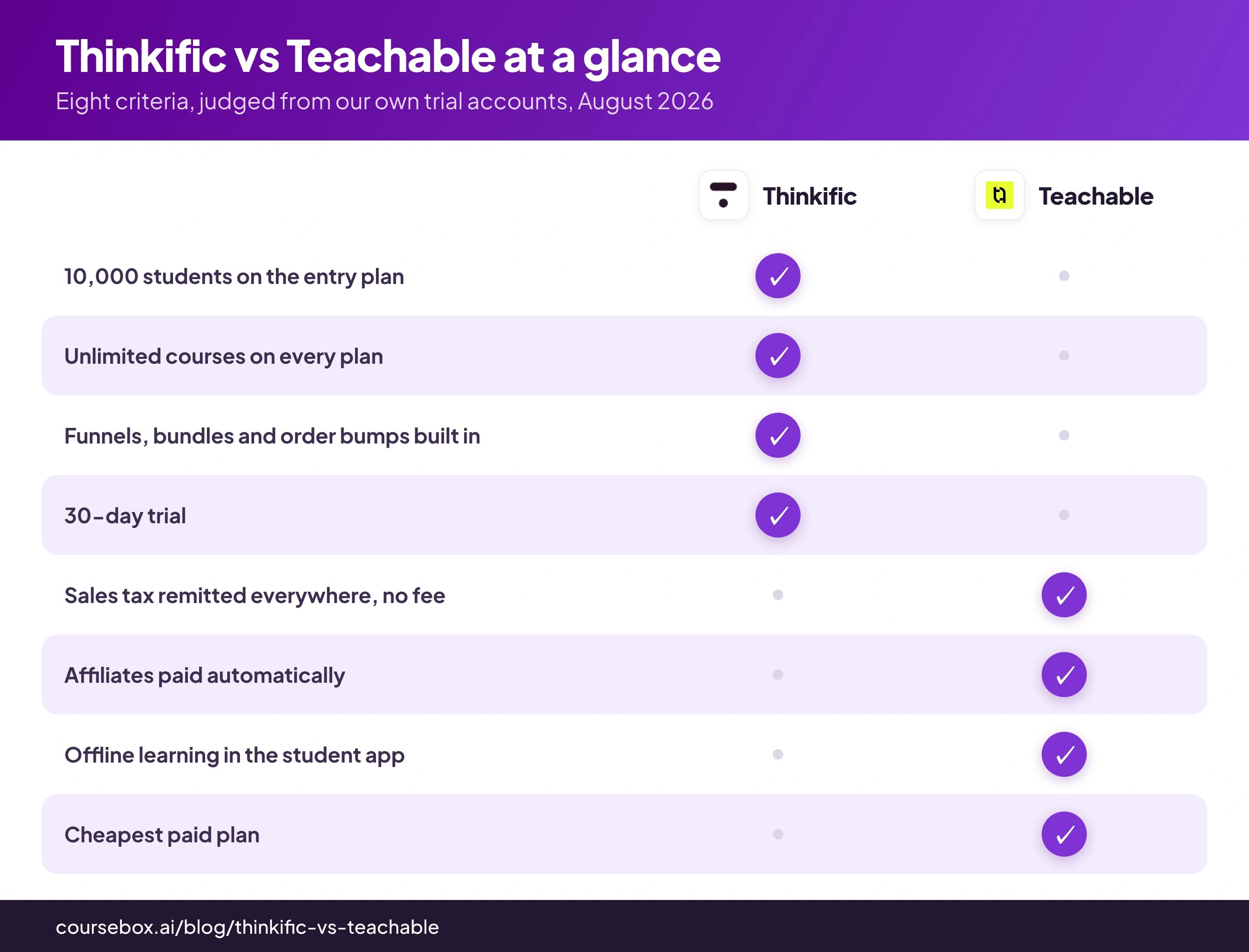
What you get on Thinkific: the bigger toolkit, with tax and payouts left to you
Here is how the test ran: I asked each platform's AI to build the same course, a warehouse safety induction for new staff, then spent the rest of the week in both admins with the course in place. Everything below comes from those two trials.
Thinkific asked for card details before it showed me an admin, and partway through it placed a small authorisation charge on my card, refunded later. In return I got thirty days, which is a proper trial. The new-course flow opened headed "Powered by AI" and asked me to describe my audience and what they'll learn. The screen promised only a course outline from that description; what came back was a lot more.
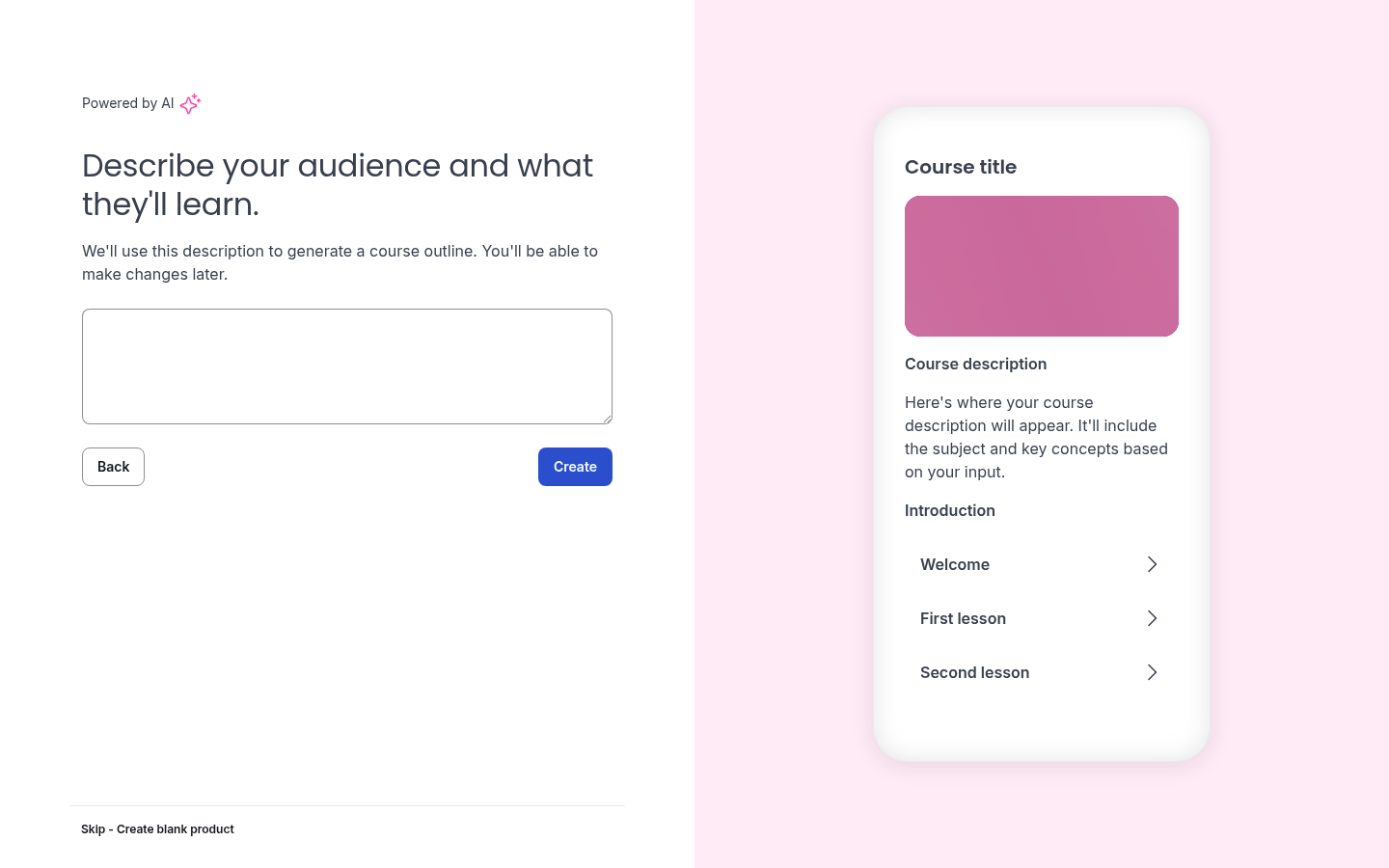
Thinkific's new-course flow. The AI path is the headline, the blank course is the small print.
I typed one line, new warehouse staff learning safety basics, and let it run. It generated more than I expected: a full sales landing page with the headline "Master Warehouse Safety Before Your First Shift", a stock hero image, and a chaptered curriculum. It also renamed the course twice; I typed Workplace Safety Induction and got back two different warehouse-safety titles.
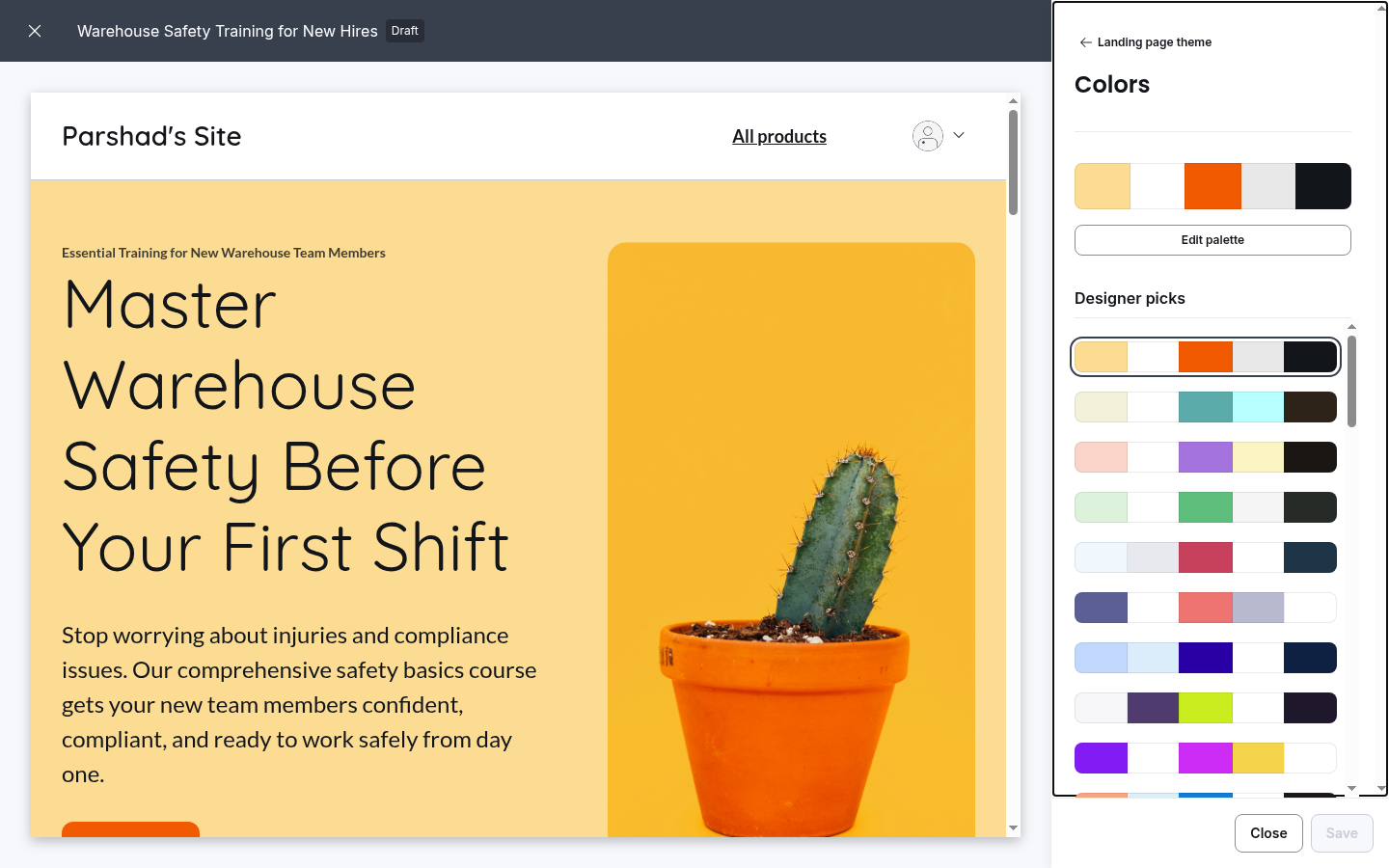
The sales page Thinkific's AI built from one typed line, already renamed once.
Then I opened the lessons, and the good impression fell apart. The video lesson was an empty slot with a Select a video file dropdown, and a tip about compressing files over 1GB with HandBrake before uploading, so the shooting is clearly on me. The text lesson's body was an instruction addressed to me: "Discuss the importance of safety in the warehouse, covering accidents and injuries statistics, and setting the stage for a culture of safety."
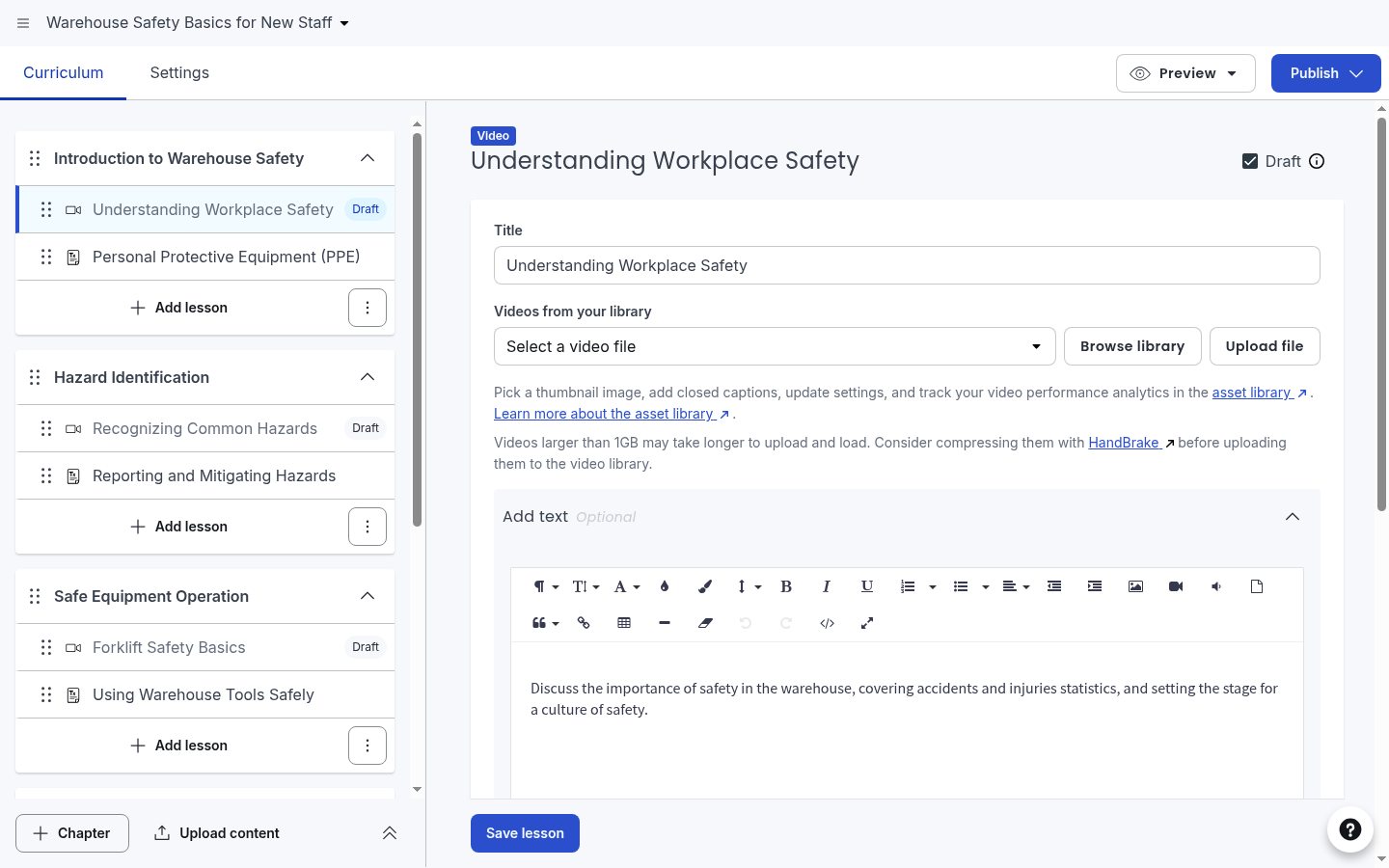
The generated curriculum. The video slot is empty and the text lesson is a writing prompt.
The outline seemed solid, sensible chapters for the course I asked for, each pairing a video lesson with a text lesson. But it was a bare outline with no page content, just shells: every video lesson arrived marked Draft, waiting for footage I would have to shoot myself.
The admin behind that flow was the part I liked most. All of these came standard in the navigation:
- order bumps, bundles, funnels and coupons on the checkout side
- memberships and communities as sellable products
- live webinars as a product type alongside courses and coaching
- a first-class Certifications area next to courses
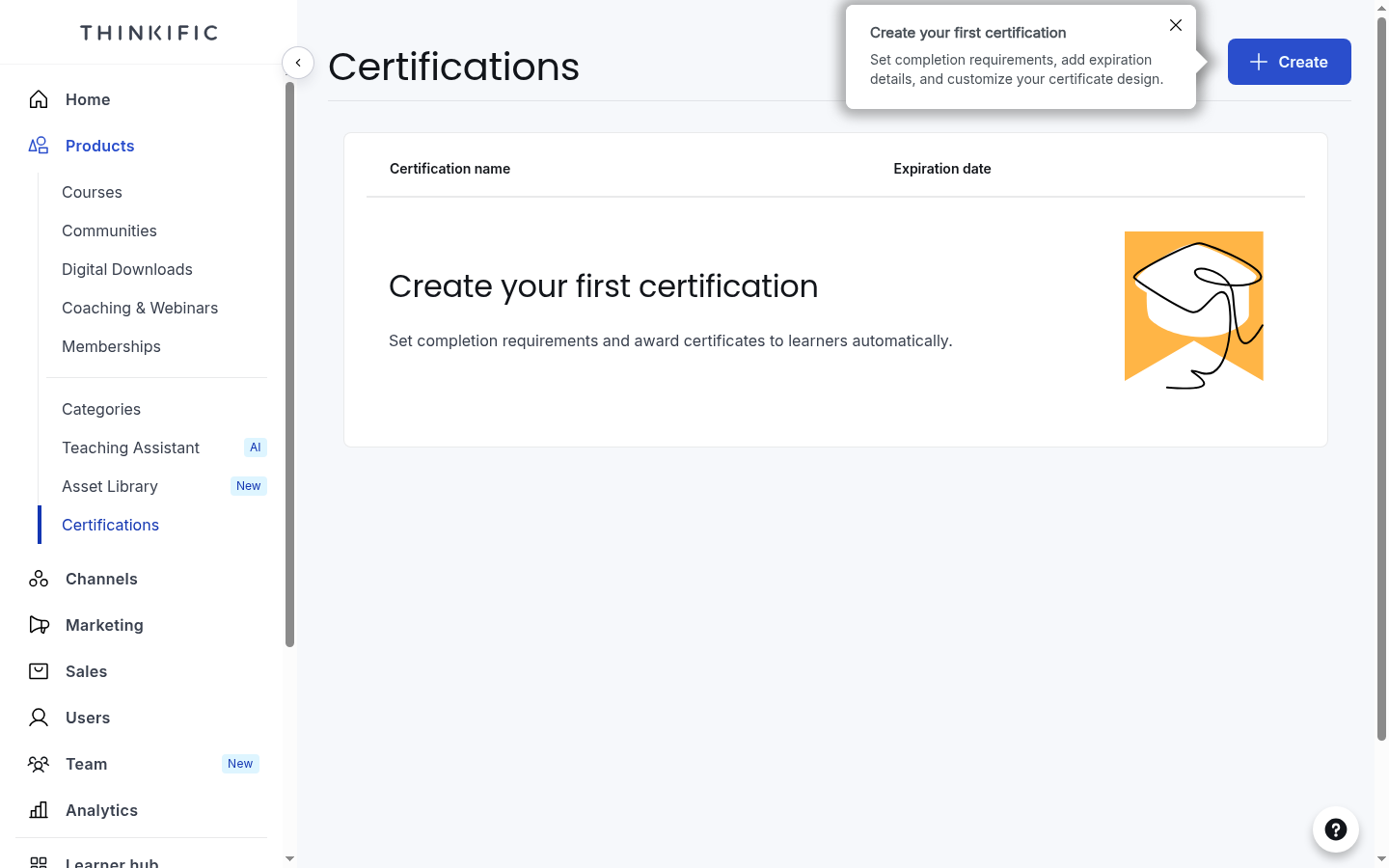
Certifications sit in Thinkific's admin as standard, next to courses and communities.
Every plan, even Basic at $40, gave me the full 10,000-student allowance and unlimited courses, which is honestly generous at this price.
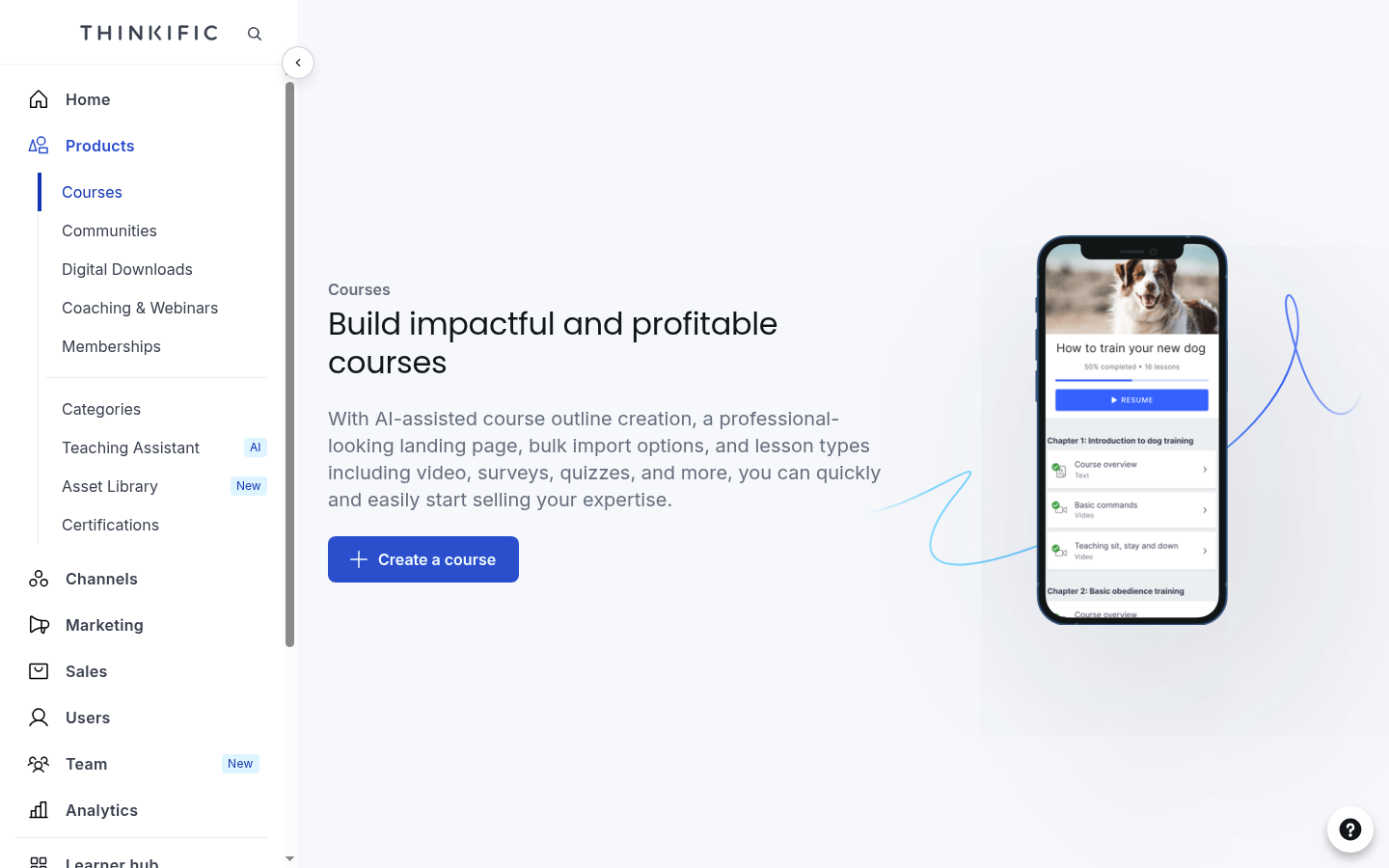
Thinkific's Courses area on the entry plan. No product counter, because there is no cap.
One thing surprised me on Basic: a lesson counts as complete the moment the learner clicks, whatever they actually watched. Requiring real watch time needs Start at $82 a month, and so do assignments and live lessons. Basic holds a big audience, and Start is where structured teaching begins.
Two more gates turned up in my trial, and both annoyed me. Opening the subscriptions area bounced me back to the dashboard with an error, because Thinkific Payments needed connecting first. And the affiliate area tracked partners without paying them: Thinkific's own documentation says payouts happen outside the platform, which means a spreadsheet and a bank session every month you owe someone money.
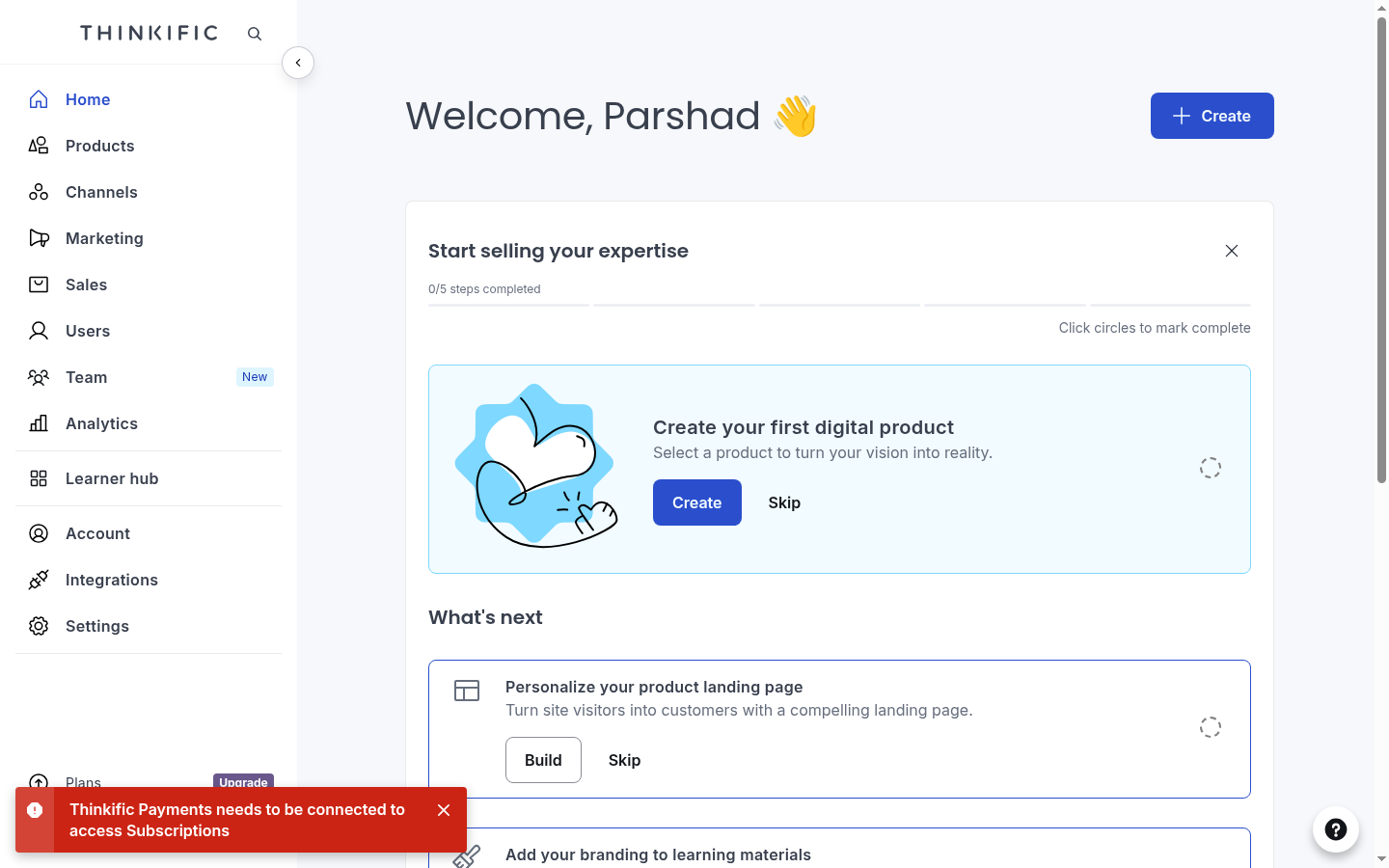
What Thinkific shows when you open Subscriptions without its payment system connected.
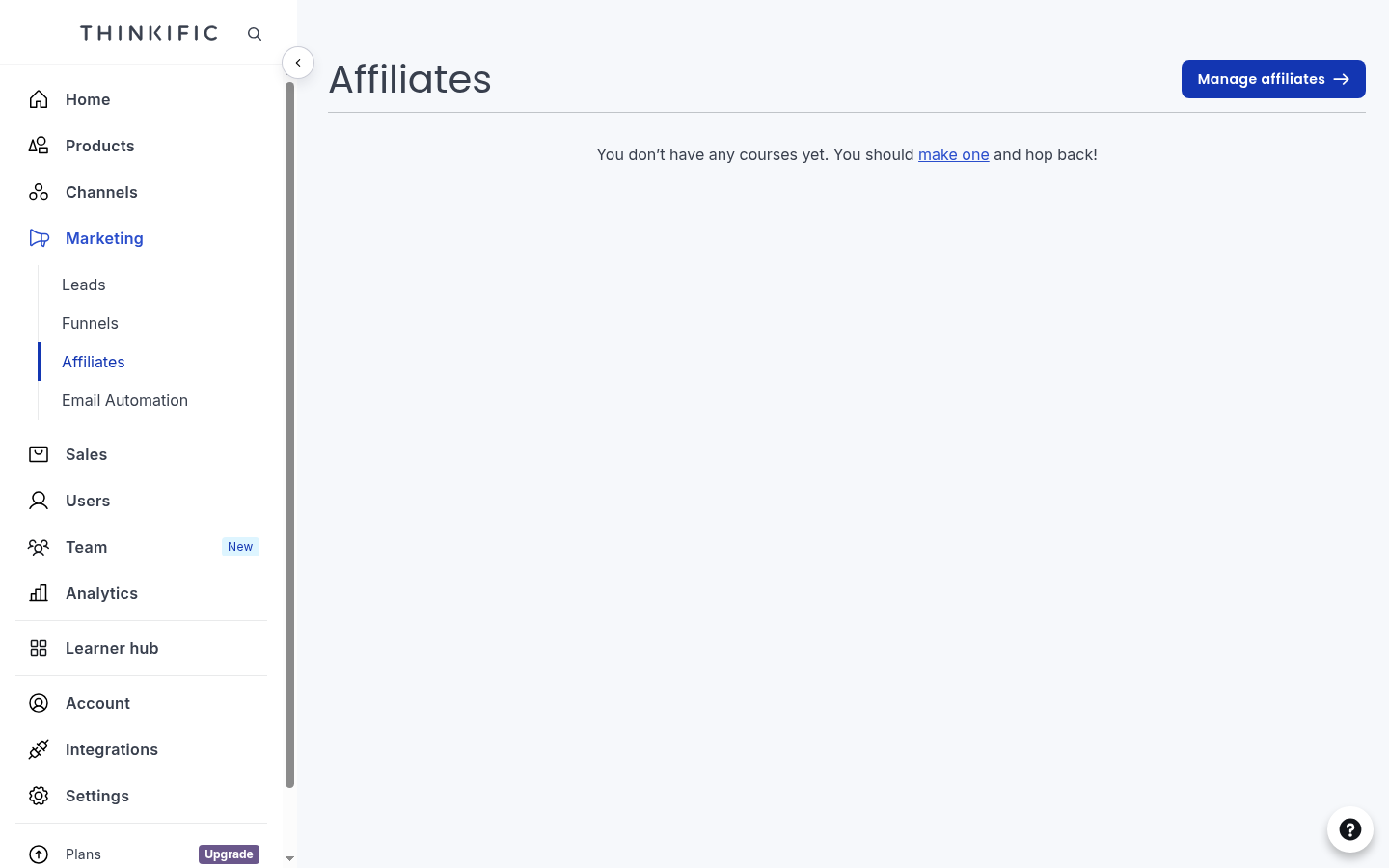
Thinkific tracks affiliates here, but paying them happens outside the platform.
The learner portal has a history: a membership operator left Thinkific because his team drowned in access questions from students lost in the old portal. Thinkific has since rebuilt it as the Learner Hub.
Where Thinkific is better
- Student capacity. Every plan allows 10,000 current students with no fees behind the cap; Teachable allows 100 on Starter and does not reach 10,000 until Advanced at $309 a month.
- Course count. Unlimited courses on every plan against Teachable's 5, 10, 50 and 100 by tier.
- Selling machinery. Order bumps, bundles, funnels, coupons, memberships and sellable webinars are standard admin items; Teachable covers order bumps and coupons.
- AI generation depth. A sales page, a chaptered outline and lesson shells from one typed line, against Teachable's outline alone.
- The trial. Thirty days against seven, both behind a card.
- Certifications. A first-class admin area on every plan, where Teachable adds course certificates only from Growth up.
What you get on Teachable: tax and payouts handled, students capped
Teachable's signup asked for card details too, plus a confirmation code from my inbox, and gave me seven days, which felt short. Its course wizard was three quick steps: name the course, add a 16:9 thumbnail or skip it, then outline the curriculum. The AI option's whole pitch on that last step was "Describe your course below and we'll generate an outline for you", and that sentence is the honest scope of Teachable's AI.
The generation is where Teachable does the least. An outline means names: chapters and lessons, each arriving empty for me to fill, with no sales page and no lesson text drafted at all. That is very little for a button labelled Generate with AI in 2026.
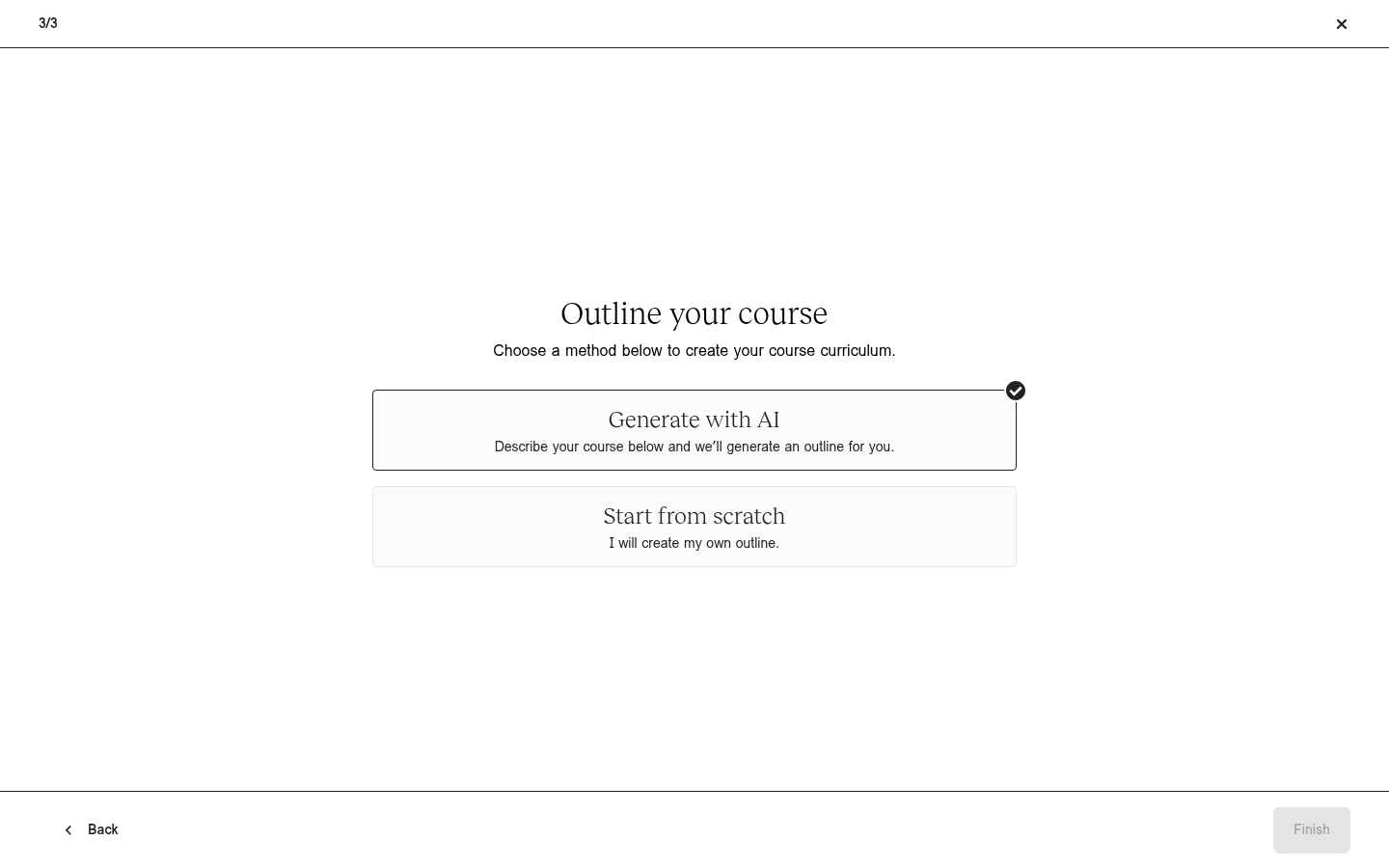
Teachable's outline step, with Generate with AI selected before you touch anything.
The builder past the wizard was pleasantly simple: one lesson held video, text and images as blocks I dragged into order, and there was very little to learn.
The caps showed up just as fast. Starter allows 100 active students and 5 published products, and the admin counted my usage against those numbers from day one.
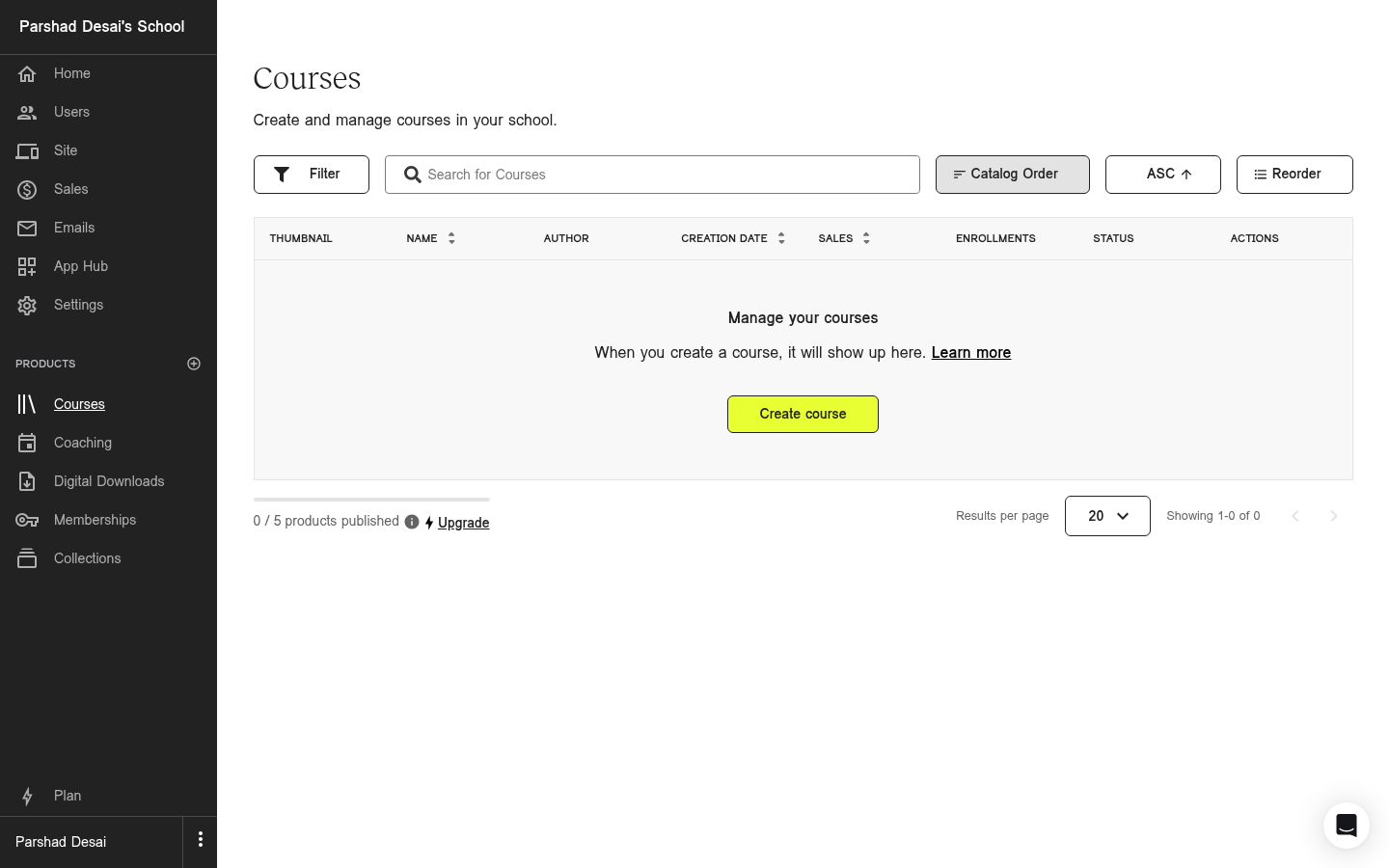
Teachable's Courses screen counting my five-product allowance before I had built anything.
The selling admin was where Teachable took work off me. Sales tax is calculated, charged and remitted for me. Affiliate partners get paid automatically, and subscriptions just sell on the normal checkout, nothing to connect first. After Thinkific's affiliate spreadsheet, this was the part I envied.
The learner side was plain in a good way: a lesson list with a complete-and-continue button, and a branded student app on iOS and Android that downloads lessons for offline viewing, one at a time. The complaint I kept seeing from operators is that learners in big libraries cannot search their way to a lesson; one membership owner ended up paying for a third-party search tool.
Where Teachable is better
- Sales tax. Calculated, charged and remitted everywhere as part of the plan; Thinkific remits only US and Canadian tax, for a 0.5% fee per assessed transaction, and in the UK and EU collects the VAT (value-added tax) then hands it to you to remit yourself.
- Affiliates. Tracked and paid automatically; Thinkific's docs say the payouts happen outside the platform.
- Offline learning. Its student app downloads lessons for offline viewing; Thinkific's app has no offline playback at all.
- The cheapest way in. Starter at $29 a month billed annually against Thinkific Basic at $40.
- Subscriptions on day one. They sell on the standard checkout, where Thinkific gates recurring selling behind connecting Thinkific Payments.
What they cost
On their entry plans, Thinkific and Teachable both charge a subscription plus something on every sale, and what that something is depends on the plan and on who processes the payment. Two examples cover most decisions:
- Selling a $100 course through the platform's own payments: Thinkific takes $0 in platform fees. Teachable Starter takes $7.50.
- Selling the same $100 course through your own Stripe: Thinkific Basic takes a $5 gateway fee. Teachable Starter still takes $7.50.
- From Teachable Builder at $69 a month the base fee drops to 0%; on Thinkific the gateway fee falls by tier, 2% on Start and 1% on Grow.
Thinkific pricing
| Plan | Billed monthly | Billed annually | The catch |
|---|---|---|---|
| Basic | $54 | $40/mo ($475/yr) | 5% gateway fee on Stripe sales |
| Start | $109 | $82/mo ($978/yr) | 2% gateway fee on Stripe sales |
| Grow | $219 | $164/mo ($1,968/yr) | 1% gateway fee; branding removal starts here |
| Expand | $499 | $374/mo | Not on the public pricing page |
| Plus | Not published | Not published | SCORM import and the AI teaching assistant live here |
SCORM is the packaging format that lets a course move between learning systems and carry its tracking with it: completions, scores, attempts. If your courses have to plug into a company's LMS, SCORM support decides your shortlist, and on this pair only Thinkific has it, import-only, on Plus. If you sell to consumers on your own site, you can ignore it.
Teachable pricing
| Plan | Billed monthly | Billed annually | What you are capped at |
|---|---|---|---|
| Starter | $39 | $29/mo ($348) | 7.5% per sale, 5 products, 100 active students |
| Builder | $89 | $69/mo ($828) | 0% base fee, 10 products, 1,000 active students |
| Growth | $189 | $139/mo ($1,668) | 0% base fee, 50 products, 5,000 active students |
| Advanced | Not published | $309/mo ($3,708) | 0% base fee, 100 products, 10,000 active students |
The fee logic is simpler than the tables make it look. Teachable's cut depends on the plan you buy: 7.5% on Starter, 0% from Builder up. Thinkific's depends on who processes the payment: 0% through its own Thinkific Payments, 5% through your own Stripe on Basic. Both zeros pick up small extra percentages once subscriptions or sales tax get involved, so on real numbers the two land closer together than their pricing pages suggest.
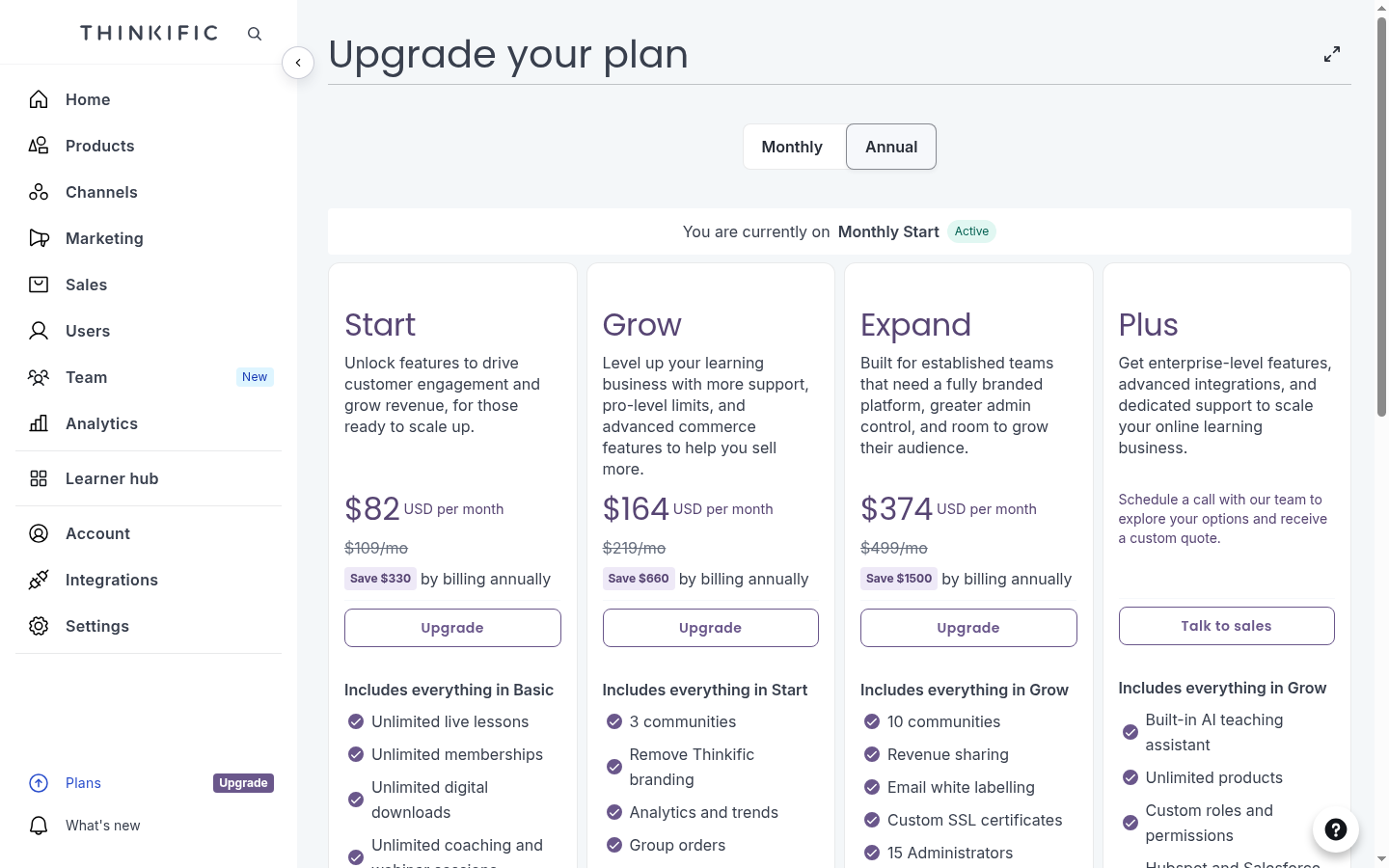
The upgrade screen held one more surprise: a fourth self-serve tier called Expand, $374 a month billed annually, missing from the public pricing page entirely. Removing Thinkific's branding needs Grow at $164 a month, and the AI teaching assistant sits on Plus, behind a sales call.
What I wish I'd known before starting
- Thinkific's and Teachable's AI builders stop at outlines. Thinkific's generated a sales page and lesson shells with writing prompts inside. Keep your source files; they are also your only export.
- Teachable has no SCORM path at all, and neither platform exports a course. Thinkific at least imports SCORM packages on its Plus plan; getting a finished course out of either is copy-paste.
- Teachable keeps selling past its student caps and bills you for it. Cross the 100 active students on Starter and per-student usage fees start, rather than enrolment stopping.
- Teachable's seven-day trial is not the real safety net. The trial takes card details and ends fast, but purchases carry a 30-day money-back guarantee, so the honest evaluation window is longer than it looks.
- Thinkific's prices changed on 13 August 2026. About 10% up, the first rise since 2022. If a figure you have seen says $36 or $49 for Basic, it predates the change.
What both platforms miss, and where Coursebox fits
Writing the course is the part we build for. Coursebox is an AI-powered learning management system that generates the lesson content itself from the documents you already have. Feed it a safety manual and it writes the lessons, then builds the quizzes, assignments and assessments around them, with AI grading on the answers that need marking. This is the main thing we build, and the numbers show how often it works end to end.
Coursebox also comes white-label. Your own domain and branding are part of the LMS plans, where Thinkific prices branding removal at Grow, $164 a month, and its white-label app at $199 a month on top.
On either platform, the warehouse safety course I asked for still needs a person to write every lesson, quiz and assignment. The outline is the easy step, and on this pair of platforms it is the only step the AI does.
Both platforms beat us at selling. Thinkific's funnels, bundles and sellable webinars are machinery we do not have, and Teachable remits sales tax that we leave with you. If your business is selling courses to consumers, both do more of the selling than we do.
The verdict, split by who is asking
Teaching a large audience, free courses or internal training: Thinkific. The 10,000-student allowance on a $40 plan is the whole argument, and unlimited courses seals it.
Selling a small catalogue internationally: Teachable. Remitted sales tax and automated affiliate payouts remove the two most tedious jobs in selling courses, and Starter is the cheapest plan of the two.
Selling subscriptions or memberships: Teachable if you want it to work on day one. On Thinkific, recurring selling is gated behind adopting Thinkific Payments, and each recurring charge then carries an extra 0.7%.
Building a big commerce operation around courses: Thinkific, priced at Grow. The funnel and bundle machinery is built in, branding removal starts there, and the gateway fee falls to 1% if you stay on Stripe.
The plan I would steer anyone away from is whichever one you chose using numbers from before 13 August 2026. Re-price your shortlist on the live pages.
If neither one fits
Beyond Thinkific and Teachable, two other names keep appearing in this decision. Kajabi bundles email marketing, websites and funnels into the same box as courses, for people who want one bill for the whole business. Podia plays the simple-selling game at the low end. Both are ranked in the list of Thinkific alternatives if you want more options, and the platforms for selling courses list covers the field if your real question is which platform sells best. If assessment depth is what decides it for you, we have run this same hands-on format on LearnWorlds vs Teachable.
Last updated 26 August 2026. Thinkific's pricing was read from its live pricing page and from the upgrade screen inside our own trial after the 13 August increase; Teachable's was verified in-product on 25 August 2026. Both help centres were read for fee, export and payout rules, and the G2 and Capterra scores were read on 26 August 2026.
Frequently Asked Questions
Teachable Starter at $29 a month billed annually is the cheapest paid plan of the two; Thinkific Basic is $40. The fees flip it: Starter takes 7.5% of every sale, while Thinkific Basic takes 0% through Thinkific Payments or 5% through Stripe. High-volume sellers usually land cheaper on Thinkific, small catalogues on Teachable Builder at $69 with its 0% base fee.
Yes, Thinkific and Teachable both schedule content release as a standard feature. Thinkific's Drip Schedule releases lessons by calendar date, by course start date or by each student's enrolment date, and can hold all content until a date you set. Teachable's Drip feature releases curriculum sections on a schedule and emails each student when a new section unlocks.
Neither Thinkific nor Teachable has a free plan any more. Thinkific's pricing FAQ says the platform is explored through a 30-day free trial instead. Teachable is a paid service with a 7-day trial and a 30-day money-back guarantee. Both trials require card details.
Thinkific imports SCORM 1.2 and 2004 packages, but only on its contact-sales Plus plan, and it cannot create or export SCORM. Teachable documents no SCORM support at all. Neither platform exports a course you built in any portable format.
Thinkific raised prices about 10% on 13 August 2026, its first increase since 2022. Basic moved to $54 monthly or $40 a month billed annually, Start to $109 and $82, and Grow to $219 and $164. Comparisons quoting the old $36, $74 and $149 figures predate the change.
Teachable, for the first course: its wizard is three short steps and its builder drags video, text and images into one lesson. Thinkific's AI flow generates more up front, a landing page and a chaptered outline, but drops you into a site editor and a deeper admin afterwards.
Parshad Desai
Driving growth and marketing strategy at Coursebox AI

