

LMS Reporting: 6 Key Metrics & Reports You Should Track
LMS reporting gives you a detailed overview of your L&D efforts and training progress. Learn about 6 key metrics and reports every trainer should track.


Run your own branded LMS with unlimited learners
You put time, budget, and energy into training, but without good reporting, it’s hard to know what’s actually working. You might see people “attend” a course or click through a module, but not whether they’re learning anything, applying it, or moving the needle for the business.
LMS reporting is what turns all that activity into clear, usable information. It helps you see who’s engaging, where they’re getting stuck, and which programs deserve more investment.
In simple terms, LMS reporting is the analytics layer behind your learning platform. It pulls together different types of data and presents it in dashboards and reports that stakeholders can easily understand.
With the right LMS reporting in place, training moves from “we hope it’s working” to “we know what’s working and what to fix.” Let’s explore 6 LMS reporting metrics and reports in this guide.
What Is LMS Reporting?
LMS reporting is the process of collecting, organizing, and presenting data from your learning platform to help you make decisions. At a basic level, it answers simple questions like “Who has completed this course?” and “What are the quiz scores?”
At a more advanced level, it can show patterns, such as which modules cause drop-off, how different teams are progressing, or how learning links to capabilities and performance.
Typical LMS reports include data on enrollments, completions, assessment scores, time spent in modules, activity logs, certificates, and learning paths. Many systems also provide summary dashboards for administrators and managers, as well as downloadable reports for audits or deeper analysis.
Why LMS Reporting Is Important for L&D and the Business
Without reporting, learning and development (L&D) is mostly guesswork. You can launch a course, send reminder emails, and hope people complete it. However, you won’t really know where they struggled or whether anything changed afterward.
LMS reporting gives L&D teams a clear view of which programs are popular, which content might be confusing, and where to focus improvements. It also helps show impact when stakeholders ask, “Is this training worth it?”
For managers, reporting is essential for tracking team progress and supporting performance conversations. They can see who is on track with mandatory or role-based training, who might need extra support, and where skill gaps are emerging.
For leadership, LMS reporting supports bigger decisions. For instance, where to invest, how to align training with strategic goals, and how to demonstrate compliance or readiness in audits and reviews. Instead of relying on anecdotal feedback, you have concrete data to guide your strategy.
6 Key LMS Metrics and Reports to Track
There are many LMS metrics and reports you can track, but here are the most valuable ones:
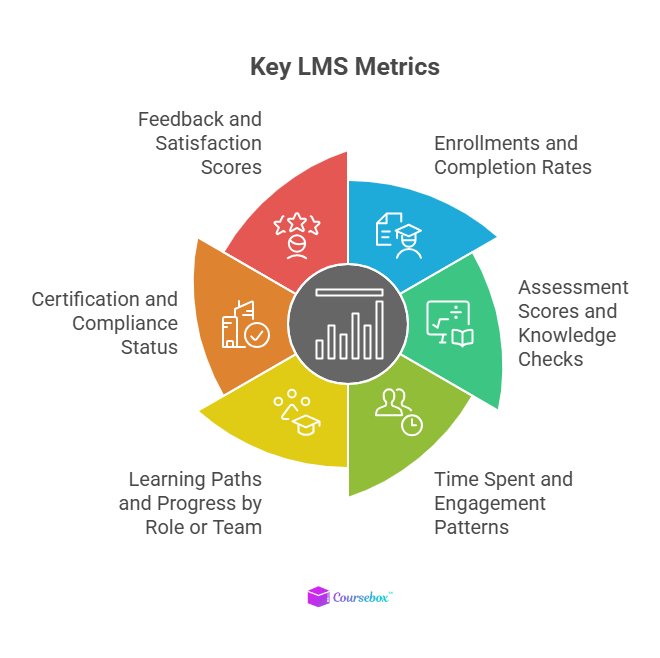
1. Enrollments and Completion Rates
Enrollment and completion data show whether people are accessing and finishing the training you provide. Low enrollment might signal communication or access issues, while low completion rates can indicate long, confusing, or irrelevant content.
By spotting patterns, such as most learners dropping off at a particular module, you can refine the design, simplify steps, or add more support where needed.
2. Assessment Scores and Knowledge Checks
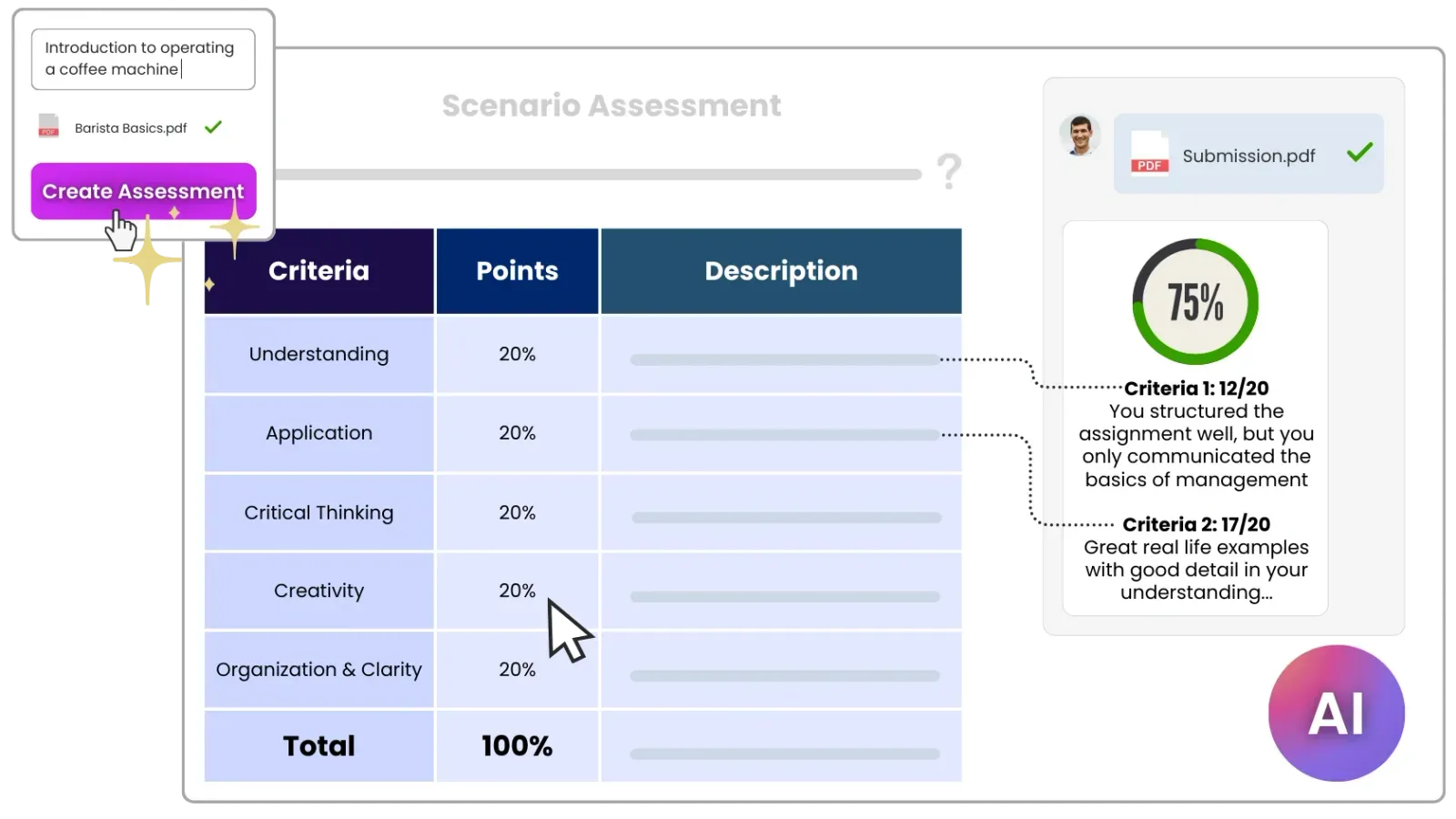
Assessment scores (quizzes, tests, and practical tasks) help you see whether learners understand the material, not just whether they clicked through. If average scores are consistently low on certain topics, it might indicate unclear explanations, too much content at once, or a genuine skill gap.
You can respond by revisiting those sections, adding examples, or offering follow-up coaching.
3. Time Spent and Engagement Patterns
Tracking time spent in courses and modules provides insight into how learners interact with content. Very short times might mean people are skimming or skipping, while very long times might indicate confusion or distraction.
Combining time, clicks, and interaction data helps you tweak pacing and add or remove activities to keep engagement balanced.
4. Learning Paths and Progress by Role or Team
If you use learning paths (e.g., onboarding journeys, leadership tracks, or role-based programs), progress reports show who is ahead, on track, or falling behind. These reports are particularly useful for managers who need to support their teams and ensure critical training is complete.
Segmenting by role or department helps you tailor interventions instead of using a one-size-fits-all approach.
5. Certification and Compliance Status
In regulated industries or for mandatory training (like safety, data protection, or ethics), certification reports are crucial. They show who is certified, when certificates expire, and which teams have upcoming deadlines.
This makes it much easier to avoid last-minute scrambles and failed audits, and to prove compliance when needed.
6. Feedback and Satisfaction Scores
Learner feedback is a powerful complement to quantitative data. Short post-course surveys or ratings help you understand how people felt about the experience. Was it relevant, practical, and well-delivered?
When you combine satisfaction scores with completion and performance data, you get a fuller picture of course quality and where to improve.
Must-Have LMS Reporting Features
To get real value from LMS reporting, look for a few key features.
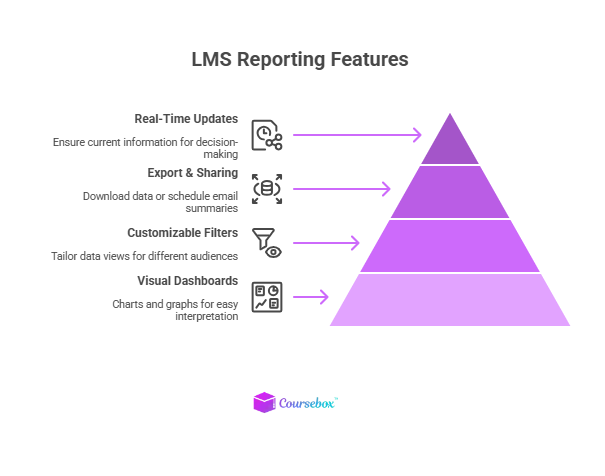
First, you need clear, visual dashboards. Charts, graphs, and simple summaries are much easier to interpret than raw tables, especially for busy managers and stakeholders. Being able to see completion rates, scores, and progress at a glance saves time and encourages people to use the data.
Second, customizable filters and views are essential. Different audiences care about different slices of data. For instance, an L&D lead might want organisation-wide trends, while a manager wants to see only their team. Good reporting lets you filter by course, team, role, date range, and more, so each person can focus on what matters most.
Third, it helps to have export and sharing options. For example, downloading CSVs for deeper analysis, exporting PDFs for leadership, or scheduling regular email summaries. Drill-down capabilities are also important. You should be able to go from a high-level dashboard into detailed records for specific courses or learners when needed. Finally, near real-time updates ensure you’re working with current information, not last month’s snapshot.
How to Use LMS Reporting for Better Decision Making?
Let’s take some real-world scenarios and see how we can apply LMS reporting to make better decisions.
Example 1: Fixing a Low-Completion Course
Suppose you’ve launched a new onboarding course, but only half of the new starters are finishing it. A quick look at your LMS reports shows most learners drop off at the same long, text-heavy module.
You decide to break that module into shorter, interactive lessons and add a few quiz questions and visuals. Over the next month, you track completion rates again and see a noticeable improvement, confirming that the redesign worked.
Example 2: Supporting a Team That’s Falling Behind
A manager wants to ensure their team completes the required product training before a major launch. LMS reporting makes it easy to see exactly who has completed the path and who is still partway through.
Instead of sending generic reminders to everyone, the manager can reach out to specific team members, schedule a quick group Q&A, or adjust workload so people have time to finish.
Example 3: Demonstrating Impact to Leadership
You’ve rolled out a customer service skills program and want to show whether it’s making a difference. LMS reports provide data on completion and assessment scores, which you can compare before and after the program.
Combined with business metrics like reduced complaints or improved customer ratings, this gives you a simple but compelling story: “We trained X people, their scores improved by Y, and we saw Z change in outcomes.” That’s much more persuasive than “we ran some training and people seemed to like it.”
How Coursebox Supports Powerful Yet Simple LMS Reporting
LMS reporting is the engine that turns training from a cost centre into a strategic tool. By tracking the right metrics and making them easy to understand, you empower L&D managers and leaders to make better decisions about how to design, deliver, and refine learning.
With a modern platform like Coursebox, you have the tools to collect and act on data quickly. It is an AI-powered training platform that acts as both a course authoring tool and an LMS, which means reporting is built on top of many automated activities.
When learners complete modules, take quizzes, submit open-answer questions, or earn certificates, Coursebox automatically logs this data. Instant AI grading and rubric-based feedback generate structured results without instructors manually marking every response.
As a result, Coursebox can present up-to-date views of completions, scores, attempts, and certifications at the learner, course, or organization level. Admins and trainers can see who has finished specific programs, where people are struggling, and which parts of a course might need redesign.
Integrations through API, SCORM export, or LTI allow data to flow to or from other systems, such as an existing LMS or HR tools, so reporting doesn’t sit in a silo. And because the platform makes editing courses and generating new content fast, you can act on reporting insights quickly rather than waiting for lengthy redevelopment cycles.
Sign up for free on Coursebox to explore more!
FAQs About LMS Reporting
1. What is LMS reporting?
LMS reporting is the analytics and dashboards that collect data from your learning platform, like completions, scores, and engagement. It helps you see who's learning what, where they're getting stuck, and how training impacts performance. Instead of guesswork, it gives clear insights to improve programs and prove value.
2. Why do I need LMS reporting for my training programs?
Without reporting, you can't tell if training is actually working or just being clicked through. It shows completion rates, skill gaps, and trends to help you refine content and better support learners. Managers and leaders also use it to track team progress and connect learning to business results.
3. What key metrics should I track in LMS reporting?
Focus on enrollments and completions to assess adoption, assessment scores for knowledge gains, and time spent to identify engagement patterns. Certification status is crucial for compliance, while feedback scores reveal learner satisfaction. Progress by team or role helps target support where it's needed most.
4. How often should I review LMS reports?
Check dashboards weekly for quick issues, such as drop-offs, and conduct deeper monthly reviews with managers. Use real-time data for urgent fixes, like low quiz scores, and quarterly summaries for leadership. Regular routines turn data into action without overwhelming your team.
5. How does Coursebox make LMS reporting easier?
Coursebox automatically tracks completions, quiz scores, certificates, and engagement from AI quizzes and chatbots. Dashboards show progress at the learner, course, or team level, with instant grading feeding rich data without manual work. Integrations let you export or connect data to other systems for even deeper insights.
Alex Hey
Digital marketing manager and growth expert

