

Anki vs Quizlet: I Built the Same Deck on Both (2026)
I built the same flashcard deck on both apps. Anki wins for long-term memory at $0, Quizlet for making the cards for you with AI. Every price checked hands-on.

Anki suits students grinding for long-horizon exams like medicine, law and languages on a $0 budget; Quizlet suits anyone who wants the cards made for them and games to study with.
- Anki wins on memory science. Every review prints its scheduling intervals on the grade buttons, from under a minute to 4 days on a new card, while Quizlet's Learn mode works in rounds per session.
- Quizlet beats Anki at making the cards. Its AI builds flashcards, study guides and practice tests from PDFs, slides or a recorded lecture; on Anki you type each card or import a shared deck.
- Quizlet is easier to start. My 5-card set was live in minutes with autosave; Anki's web app is a plain three-page form and its real power sits in the desktop program.
- Fees depend on your device. Anki is free on computer, Android and the web with a one-time $24.99 iOS app; Quizlet Plus is $35.99 a year once you hit free-tier caps like 5-question tests.
- Neither Anki nor Quizlet tracks a team. Both are self-study apps: no assignments, no completion reporting, no way to prove that 20 staff finished the deck.
Answer 3 quick questions to figure out in seconds

Convert anything into flashcards instantly
Anki and Quizlet both show you a card, hide the answer, and ask if you knew it. The resemblance ends there. I built the same five-card deck on both, a warehouse safety starter, and studied it on both, and the two apps turned out to be different species.
Anki is a memory engine. It is free almost everywhere, it schedules every single card based on how you answered last time, and it prints those schedules right on the buttons. It will not write a card for you, and it does not try to be pretty.
Quizlet is a study platform. Its AI builds the cards for you from your PDFs, slides or a recorded lecture, and it wraps them in games, tests and a huge public library. What it sells back is the depth: the free tier is metered, and the memory scheduling never goes as deep as Anki's.
Which one you want depends on whether your exam is next week or next year, and on who is doing the studying. By the end of this you will know exactly which side you are on.
The short version
Pick Anki if:
- Your exam is months away. Spaced repetition across days and weeks is the whole product, and every card carries its own schedule.
- You want to pay nothing. The computer app, the Android app and the web app are free, with no ads and no caps.
- You will do thousands of reviews. Nothing is metered; the only possible cost is $24.99 once for the iOS app.
- Someone already made your deck. The shared deck library covers the big exam subjects and costs nothing.
- You like control. Card types, scheduling behaviour and add-ons are all adjustable in the desktop program.
Pick Quizlet if:
- You do not want to type the cards. Its AI turns PDFs, slides, Drive files or a recorded lecture into flashcards, study guides and practice tests.
- You study better with variety. Flashcards, Learn, Test and the Match game all come built in.
- You want to start in minutes. My set was live, saved and studiable faster than I could have installed Anki.
- You are on a phone either way. The iOS and Android apps are free, where Anki's iOS app is paid.
- You want more than cards. Study guides and textbook solutions live in the same account.
How I compared Anki and Quizlet
- how the cards get made, and who does the typing
- whether the app schedules your memory or leaves that to you
- what studying looks like on each, mode by mode
- what the free tiers really allow before they stop you
- what each one costs on your devices
- what happens when the learners are a team rather than one student
Everything below comes from my own accounts on both apps, built and studied on the same day with the same five cards, and from both vendors' own pages for anything my accounts could not show.
We build in this space as well. Coursebox is an AI-powered learning management system (LMS) whose AI flashcard maker turns documents into flashcards, and it generates courses, quizzes and assessments the same way. It is not one of the two tools here and it is not what I recommend below, so treat that as a disclosure rather than a pitch.
Anki vs Quizlet at a glance
| Anki | Quizlet | |
|---|---|---|
| What it is | A free spaced-repetition memory engine | A study platform with AI card creation and games |
| Price | Free on computer, Android and the web; AnkiMobile is $24.99 one-time on iOS | Free tier with monthly caps; Plus $35.99/yr, Plus Unlimited $44.99/yr |
| Making the cards | You type each card, or import a shared deck | AI builds cards from PDFs, slides, Drive files or recorded lectures |
| Memory scheduling | Every card gets its own schedule; intervals shown on the grade buttons | Learn works in rounds inside a session; no per-card schedule shown |
| Study modes | Review with four graded answers; more in the desktop app | Flashcards, Learn, Test, Match |
| Building a test | No test mode on the web app | Test mode with four question types, capped at 5 questions on the free tier |
| Shared content | Free community deck library | Huge public set library plus Expert Solutions textbook answers |
| Ads | None | On the free tier |
| Phone apps | Android free; iOS is the one paid Anki product | iOS and Android free |
| Offline studying | The computer app keeps your whole deck on your machine | Downloading sets for offline is a Plus feature; Flashcards and Match work offline |
| Team tracking | None | Study groups exist; no admin reporting appeared anywhere in my account |
| G2, checked 31 August 2026 | 4.6 from 34 reviews | 4.5 from 291 reviews |
| Capterra, checked 31 August 2026 | 4.6 from 25 reviews | 4.6 from 146 reviews |
| Best for | Long-horizon exams on any budget | Fast card creation and varied studying |

What you get on Anki: free spaced repetition that shows you its schedule
Signing up for AnkiWeb asked for an email address and nothing else. The web app is small and plain: three menu items, named Decks, Add and Search, and it looks a decade older than Quizlet. Adding my five cards meant filling a short form for each one, a front, a back, and an Add button.

AnkiWeb's whole add-card form: type, deck, front, back, tags, Add. The card content here is our warehouse-safety test deck.
Then I studied the deck. Anki shows the front of a card and waits for you to recall the answer.

Beat one of studying on Anki: the question, alone on the screen.
Clicking Show Answer reveals the back, with four buttons under it: Again, Hard, Good and Easy. You press the one that matches how well you knew it. Above each button is a time, and that time is when Anki will show you this card again. When I pressed Again it came back in under a minute. Pressing Good would have parked it for about ten minutes, and Easy for four days.

Beats two and three: the answer, then a grade. The time above each button is when the card comes back.
You forget new facts fast, and each successful recall slows the forgetting. Spaced repetition uses this: the app re-shows a card just before you would forget it, at longer and longer gaps, minutes at first, then days, then weeks. Your grade on each card sets its next gap, so hard cards come back often and easy cards get out of your way. Study a deck daily and Anki runs this schedule for hundreds of cards at once, which is what makes it work for exams months away.
The web version I tested is the small version of Anki. The full program is the free computer app, which apps.ankiweb.net describes with media support for audio, images, videos and scientific markup, customisable card layouts and review timing, and community add-ons, all synced through the free AnkiWeb service. I did not drive the desktop program for this test, so I will only repeat what its own pages say: the advanced features live there. One of them deserves naming: since version 23.10 Anki makes image-occlusion cards natively, where you mask parts of a picture (an anatomy diagram, a map, a labelled chart) and the card quizzes you on the hidden pieces.
If you do not want to write cards at all, other people's decks are free. The shared deck library is browsable by subject, and for the classic Anki subjects, above all languages and medicine, it is the reason many people arrive.

AnkiWeb's shared deck library: community decks by subject, free to download.
Anki's approach also has published evidence behind it: a 2023 cohort study of 130 first-year medical students found that the students who used Anki outscored those who did not on all four of the year's exams.
Where Anki is better
- Memory scheduling. Every card is scheduled individually and the intervals are printed on the buttons; Quizlet's Learn mode works in rounds and shows no schedule.
- Price. Free on computer, Android and the web, with one $24.99 one-time purchase on iOS, against a yearly subscription.
- No meters. Nothing is capped or ad-supported; Quizlet's free tier caps tests at 5 questions and Learn at 20 rounds a month.
- Focus. Three menu items and no upsells anywhere in the product.
- Shared exam decks. The community library for big exam subjects costs nothing.
What you get on Quizlet: the cards made for you, the limits on the free plan
A Quizlet account is free and asked for no card details. The first thing the card editor showed me was an AI panel offering to do the work: "Upload files like PDFs, PPTs, and DOCXs and let AI create flashcards in seconds", with a review step before anything is added. On Anki, writing the cards is your job; on Quizlet it is optional.

Quizlet's create-set editor opens with an AI panel offering to build the cards from your uploaded files.
I typed my five cards in myself to keep the test fair, and the editor was the best I have used on any study tool. It saved automatically from the first keystroke, let me add an image or multiple-choice options to any card, and had my set live in minutes. One thing to know before you paste anything sensitive in: new sets are Public unless you change it.
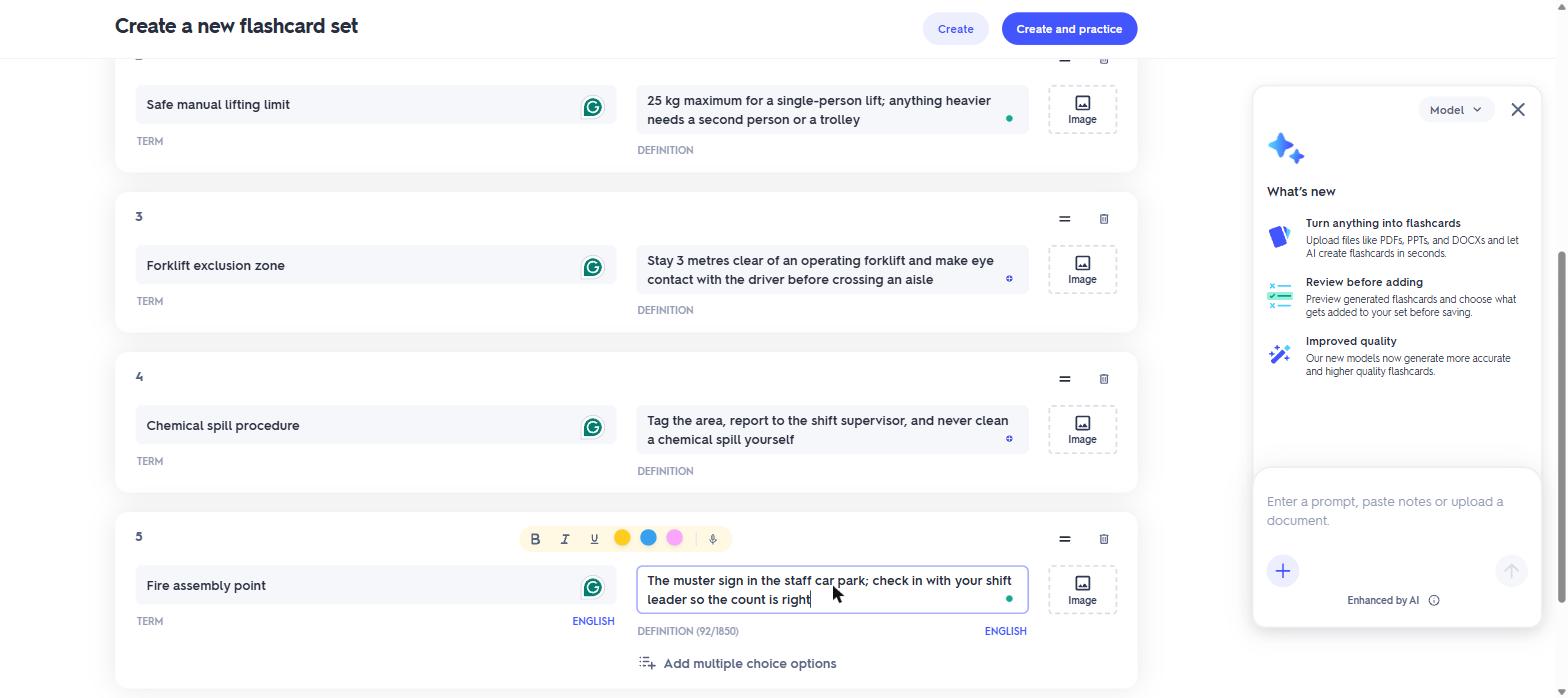
The same five warehouse-safety cards typed into Quizlet's editor, autosaved as I went.
The AI goes well past the editor. Study Guides turns pasted notes of up to 100,000 characters, uploaded files, Drive documents or a recorded lecture into study material, and Practice Tests offered to build a test straight from my flashcard set. Every AI surface carries the same line: "This product is enhanced by AI and may provide incorrect or problematic content."
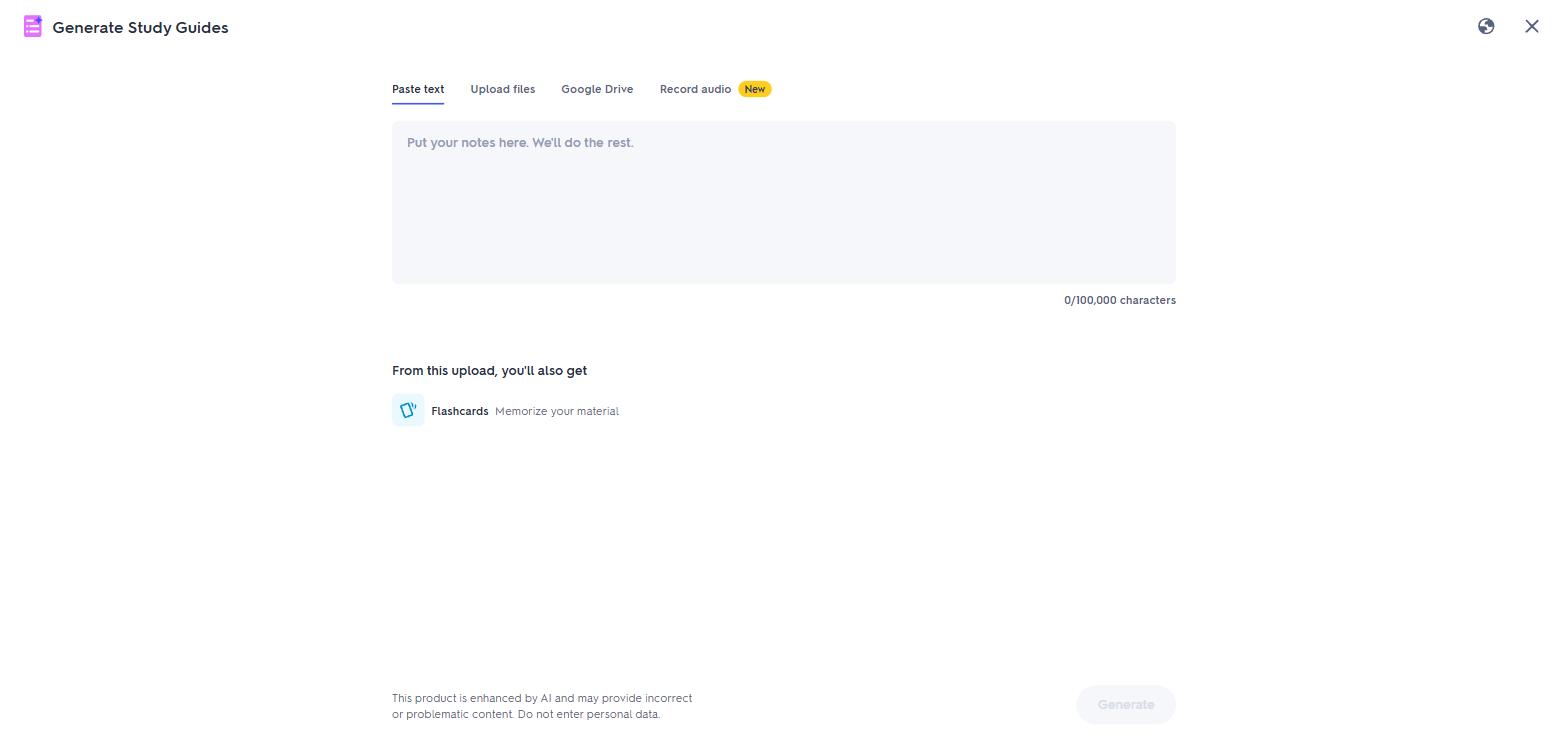
Quizlet's AI study-guide generator takes pasted notes, uploaded files, Google Drive documents or a recorded lecture.
Studying happens in four modes, and the first is the plain flashcard. The term fills a big card, a click flips it to the definition, and arrows move you through the deck.

The Quizlet flashcard a learner sees: the term fills the card.

One click flips it to the definition.
The other three modes turn the deck into practice, and each one does a different job.
Learn is guided practice. It started by asking what my goal was, cram for a test or memorise it all, and then quizzed me through the five cards as multiple-choice questions, with a progress bar counting off a ten-step round.
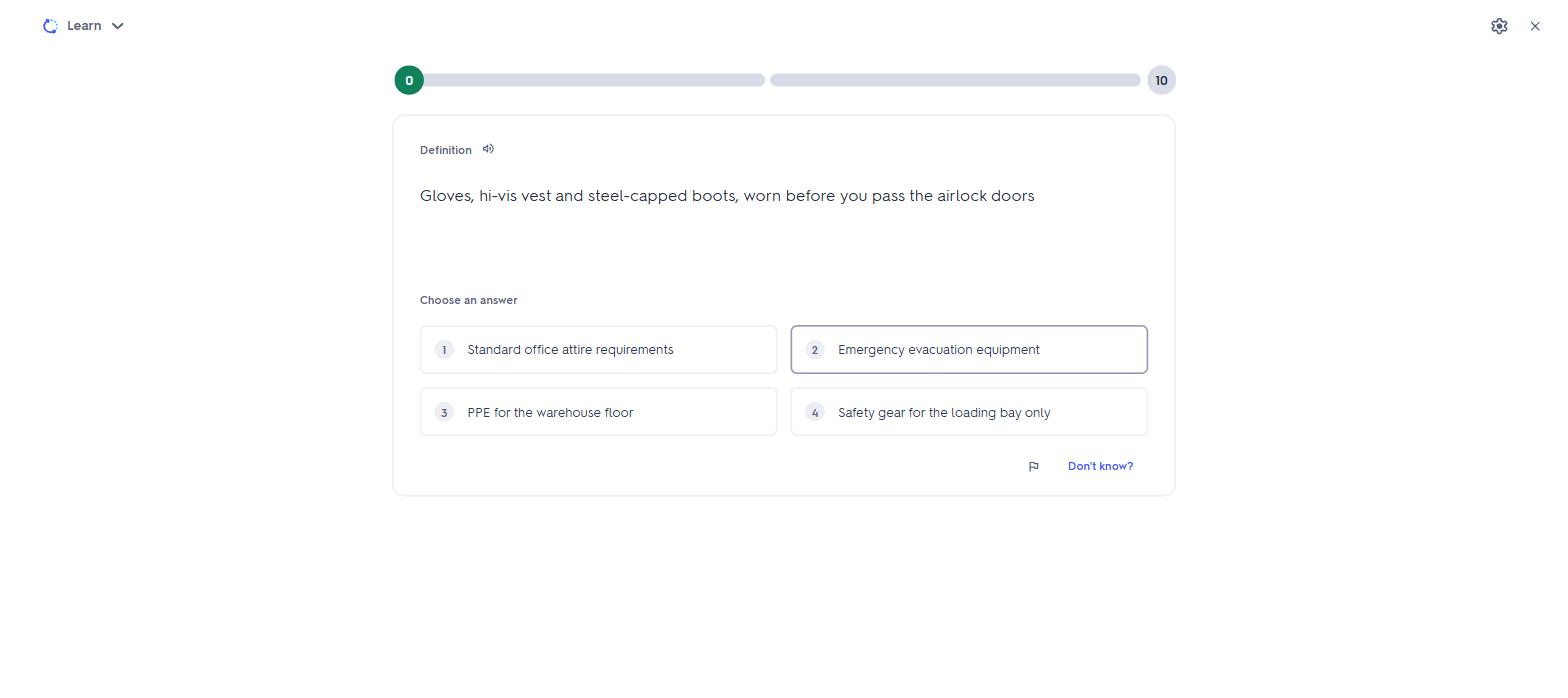
A Learn round on our set: multiple choice, with the round progress across the top.
Test acts like an exam. It builds a printable test paper from the deck, with four question types you can toggle on or off: true and false, multiple choice, matching, and written answers. The free account stopped me at 5 questions in the setup modal.
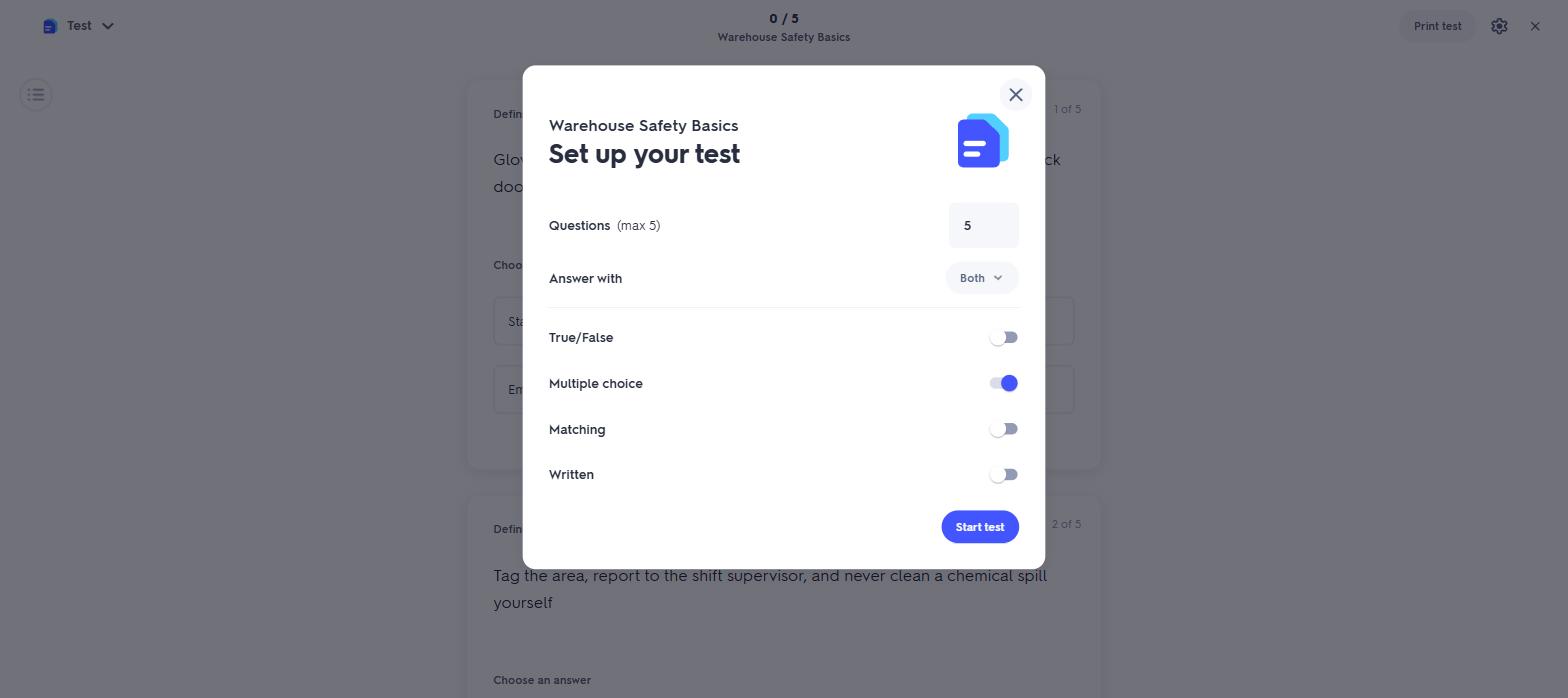
The Test setup modal on a free account. The question counter stops at 5.
Match is the game. The terms and definitions scatter across a grid, you click matching pairs as fast as you can, and every wrong pair adds seconds to the clock.

Our five terms and definitions scattered in the Match grid, clock running.
One mode I could not test with a solo account: Quizlet Live, the classroom game. A teacher runs it from any study set, students join with a code from any device without needing accounts, and randomly assigned teams race to answer. If you teach, this is a feature Anki simply does not have; if you study alone, it will never touch you.
What Quizlet never showed me is a return time on a card. Learn adapted inside the session, asking again what I got wrong, but nothing scheduled a card across days the way Anki's timed buttons do, and nothing told me when to come back tomorrow. For long-term retention, no other difference between the two apps counts for as much.
Where Quizlet is better
- Making the cards. AI builds them from PDFs, slides, Drive files or a recorded lecture; on Anki you type them or import someone else's deck.
- Speed to studying. My set was live in minutes, autosaved from the first keystroke.
- Study variety. Learn, Test and Match against Anki's single review mode on the web.
- The phone apps. iOS and Android are free, where Anki's iOS app is $24.99.
- Beyond flashcards. Study guides, practice tests and textbook solutions live in the same account.
- The classroom. Quizlet Live turns any set into a teacher-run team game students join with a code; Anki has no classroom mode.
What they cost
Anki and Quizlet price studying in opposite ways: one charges nothing unless you buy a phone app once, the other meters the free tier and sells the caps back yearly. Two examples cover most people:
- Studying on a laptop or Android phone: Anki $0. Quizlet $0 inside its caps, or $35.99/yr for Plus.
- Studying on an iPhone: Anki $24.99 once, then $0 every year after. Quizlet is the same $0 or $35.99/yr as anywhere else.
- Year two onward: Anki has nothing left to pay. Quizlet Plus renews at $35.99 a year.
Prices checked 31 August 2026: Quizlet's from the upgrade page inside my own account, Anki's from apps.ankiweb.net and the Apple App Store listing for AnkiMobile.
Anki pricing
| Platform | Price |
|---|---|
| Computer app (Windows, Mac, Linux) | Free |
| AnkiWeb (browser) and sync | Free |
| AnkiDroid (Android) | Free |
| AnkiMobile (iOS) | $24.99, one-time |
Quizlet pricing
| Plan | Price | What it allows |
|---|---|---|
| Free | $0 | Full card creation and all four study modes, with the caps below |
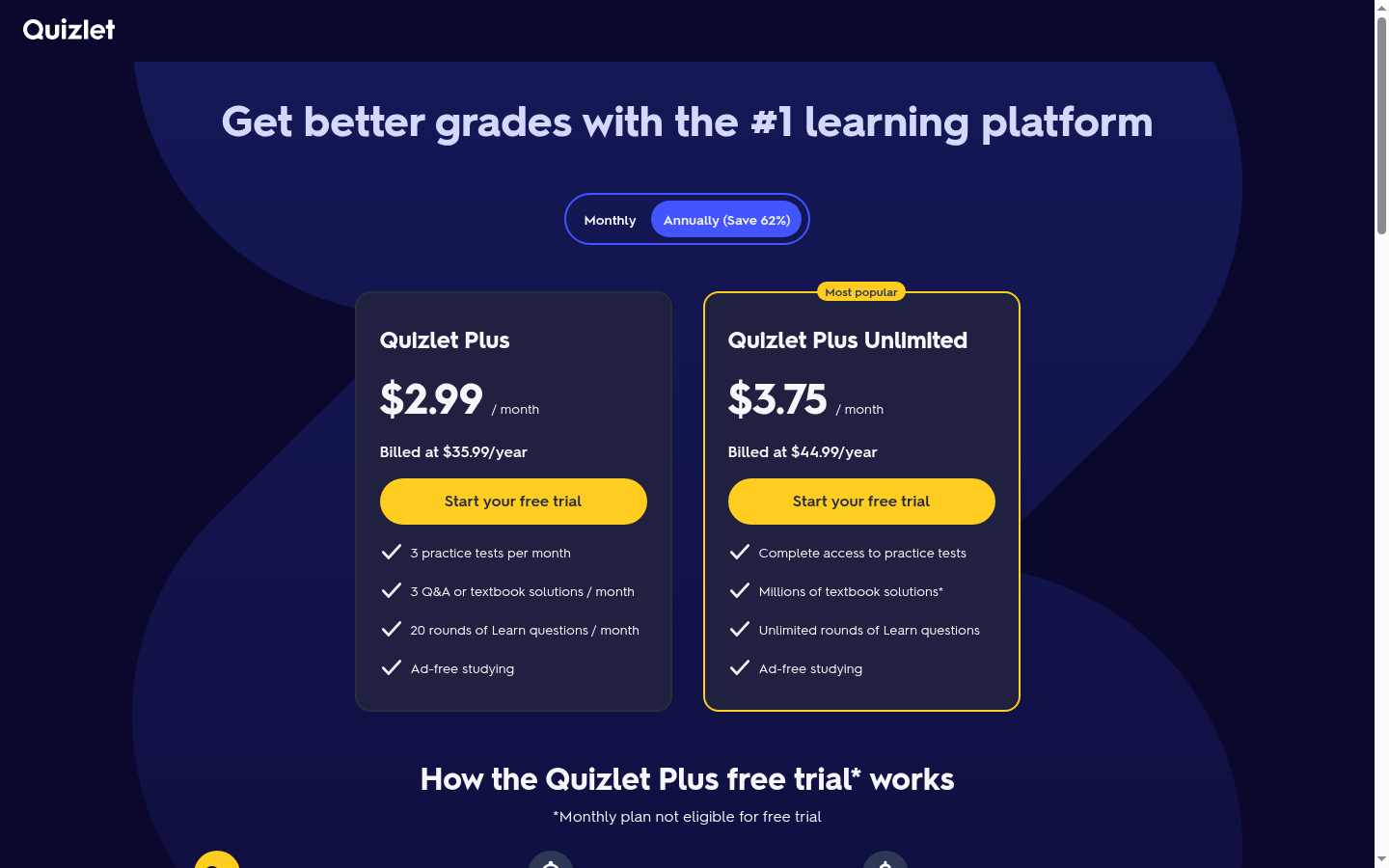
| Quizlet Plus | $2.99/mo billed at $35.99/yr | 3 practice tests, 3 textbook solutions and 20 Learn rounds per month, ad-free |
| Quizlet Plus Unlimited | $3.75/mo billed at $44.99/yr | Unlimited Learn rounds, full practice-test access, millions of textbook solutions, ad-free |
Quizlet's free tier is generous for making and flipping cards and limited for everything else: tests cap at 5 questions, Learn at 20 rounds a month, practice tests at 3 a month, with ads throughout. If you study daily, you will meet these caps in week one. Anki has no caps to meet.
The annual figures above are the billed-annually rates. A monthly billing option exists on Quizlet at a higher effective rate, and its own page notes the monthly plan is not eligible for the free trial.
What I wish I'd known before starting
- Quizlet's free Test mode stops at 5 questions. The toggle screen looks configurable, and then the question counter will not go higher.
- Quizlet sets are Public by default. Fine for study notes, worth changing for anything internal.
- Anki's web app is the thin end. If you judge Anki by ankiweb.net, you will underrate it; the desktop program is where the media support, custom layouts and add-ons live.
- The iOS asymmetry decides phone-first students. Anki on an iPhone costs $24.99 once; Quizlet on any phone is free with the same caps as the web.
- Anki shows its schedule, Quizlet does not. If you want to see when a card comes back, only one of these prints it.
- Offline is free on one and paid on the other. Anki's computer app keeps your whole deck on your machine. On Quizlet, downloading sets for offline study in the phone apps is a Plus feature, and only Flashcards and Match run offline.
- Both are single-player for studying, with one classroom exception. Neither has assignments or completion tracking, though Quizlet Live gives teachers a live team game.
What both apps miss, and where Coursebox fits
Flashcards are a study layer. The moment the learners are a team (staff, contractors, or students you are responsible for), both of these apps run out: there are no assignments, no completion reports, and no way to know who actually studied. That gap is what we built for.
We built Coursebox, an AI-powered learning management system. Feed it the documents the deck came from (a safety manual, a product guide, a slide pack) and it generates the whole course around the material, with pages, activities and AI-written quiz questions included, then tracks who completed it and how they scored. The card-making that Quizlet automates and Anki leaves to you is one step of that pipeline.
Phones shaped how we built it, because learners do not wait to be at a desk. Our own platform numbers say the same about phones.
Both tools beat us at pure personal memorisation. If all you need is a private deck for your own exam, a spaced-repetition app is the right species and an LMS is not; take Anki's scheduling or Quizlet's card-making and go study.
The verdict, split by who is asking
Cramming for something this month: Quizlet. The cards build themselves from your notes, Learn and Match make the reps bearable, and the free tier covers a short campaign if you stay inside the caps.
Studying for something enormous like boards, the MCAT or a language: Anki. The per-card scheduling is built for months-long retention, the shared decks cover the classic subjects, and the price of the whole campaign is $0 to $24.99.
iPhone-first and undecided: run the arithmetic. Anki costs $24.99 exactly once; Quizlet Plus costs $35.99 every year. One year in they have crossed.
Teaching a class: Quizlet. Live turns any set into a team game your students join with a code, and nothing on Anki's side is built for a room.
Training a team: neither. Flashcards without completion tracking cannot prove anyone learned anything; you want a course platform with reporting, whichever one you choose.
If neither one fits
If the flashcard format itself is the problem, the AI flashcard generators list covers tools that build decks from your material, and the sites like Quizlet list ranks the wider field of study platforms.
Last updated 31 August 2026. Both apps were driven hands-on with the same five-card deck on that date, Quizlet's prices were read from the upgrade page inside my account, Anki's from apps.ankiweb.net and the App Store listing, and the G2 and Capterra scores were read the same day.
Frequently Asked Questions
Anki is free on the computer, on Android and in the browser, including the AnkiWeb sync service. The one paid product is AnkiMobile for iOS at $24.99, a one-time purchase rather than a subscription.
Quizlet's free tier includes card creation and all four study modes, with monthly caps: 5-question tests, 20 Learn rounds, 3 practice tests, and ads. Quizlet Plus removes the ads and starts at $35.99 a year billed annually.
Quizlet's Learn mode adapts inside a study session, choosing what to ask next in rounds. Anki schedules every card across days and weeks and prints the interval on each answer button. For retention over months, Anki's system is the deeper one.
Yes, Quizlet's AI builds flashcards, study guides and practice tests from pasted text up to 100,000 characters, uploaded PDFs, PowerPoints and Word files, Google Drive documents, or a recorded lecture, with a review step before cards are added.
Yes, and the split is natural: Quizlet to generate and gather cards quickly, Anki to drill the ones that must survive until a distant exam. At small scale the card text moves between them by copy and paste, since a card is only a front and a back.
Anki, and it is not close. Multi-year retention is exactly what per-card scheduling exists for, and the shared deck library for medicine and languages is the deepest free study resource either app offers.
Parshad Desai
Parshad is a full stack technical marketer based in our Perth office. He began his Coursebox career as a marketing intern. After impressing the founders with his incredible work, he later transitioned into a full time position coordinating digital marketing. His focus lies in managing our website, product analytics, and email marketing. Recently he has taken a keen interest in applying AI to digital marketing and growth.

