

Synthesia vs Colossyan: I Built One Video on Both (2026)
I built the same training video on Synthesia and Colossyan from one script, then tried to add a quiz. Only one let me, and it changes the pick.

Colossyan suits L&D teams who need training that tests the learner, with in-video quizzes and SCORM export; Synthesia suits teams who need polished, heavily translated videos at scale.
- Colossyan wins on interactivity: I built a working multiple-choice quiz inside the video in about a minute, and Synthesia has no equivalent, its videos only play.
- Synthesia leads on reach with one-click translation into 140+ languages that reviewers rate the category best, against Colossyan 120+.
- Colossyan is stronger on the free plan, offering the full 300+ stock-avatar library, custom avatars and downloads with no card, while Synthesia free is 10 watermarked minutes with no download.
- Colossyan puts SCORM export on its $59 Professional plan, while Synthesia keeps SCORM on its custom-priced Enterprise tier.
- Depends on the job: buy Colossyan when training must prove completion, buy Synthesia when a clean video just needs to play and translate.
Three quick questions.

Create polished training videos instantly
I put one 135-word onboarding script through Synthesia and Colossyan and built the same video on each. Both gave me a polished presenter reading my exact words in under a minute of setup. The split showed up in what you can do next. Colossyan let me drop a multiple-choice question straight into the video; Synthesia does not.
Colossyan is built for training that checks whether people learned; Synthesia is built for videos that look broadcast-clean and translate into 140 languages.
In this article, I share my testing experience on both the platforms.
The short version
Colossyan is the pick when the video has to test people; Synthesia when it has to look broadcast-clean and translate into many languages.
Pick Colossyan if
- You want the video to test people and not simply entertain them. Its editor drops multiple-choice questions, branching paths and clickable buttons straight into the timeline. I built a working quiz in about a minute; Synthesia has no equivalent.
- You are building trackable training. SCORM export is on the $59 Professional plan, so a finished interactive video drops into your LMS and reports who passed.
- You want a free plan you can actually work on. The free Starter tier carries the full 300+ stock-avatar library, custom avatars and unlimited course creation, no card required.
Pick Synthesia if
- Polish and reach matter most. More avatars, a bigger voice range, and one-click translation into 140+ languages that reviewers rate the best in the category.
- You are a large, security-conscious buyer. SOC 2 Type II, ISO 27001 and ISO 42001 certification, plus SSO and years of corporate-training use; it is the name most L&D teams hear first.
- You publish, rather than assess. If the job is a clean explainer or announcement that does not need a quiz at the end, Synthesia's avatar quality is hard to beat.
How I compared Synthesia and Colossyan
- what each tool lets you do with a finished video, play it or test on it
- how faithfully each turned my script into a presenter
- what a trackable, LMS-ready training video takes on each
- what the same video costs, free and paid
- how the avatars, voices and translation compare
I ran the same 135-word onboarding script through both, on my own accounts, in September 2026. It was the same script I had already put through HeyGen and Synthesia, so the three outputs are directly comparable. Colossyan I built fresh on its free plan; the Synthesia findings come from my full hands-on test of its free and paid tiers.
We build in this space as well. Coursebox is an AI training video generator too, but it goes a step further than these two and turns your documents into a full course, quizzes and assessments included. It is not one of the tools I test here, and it is not what I recommend below.
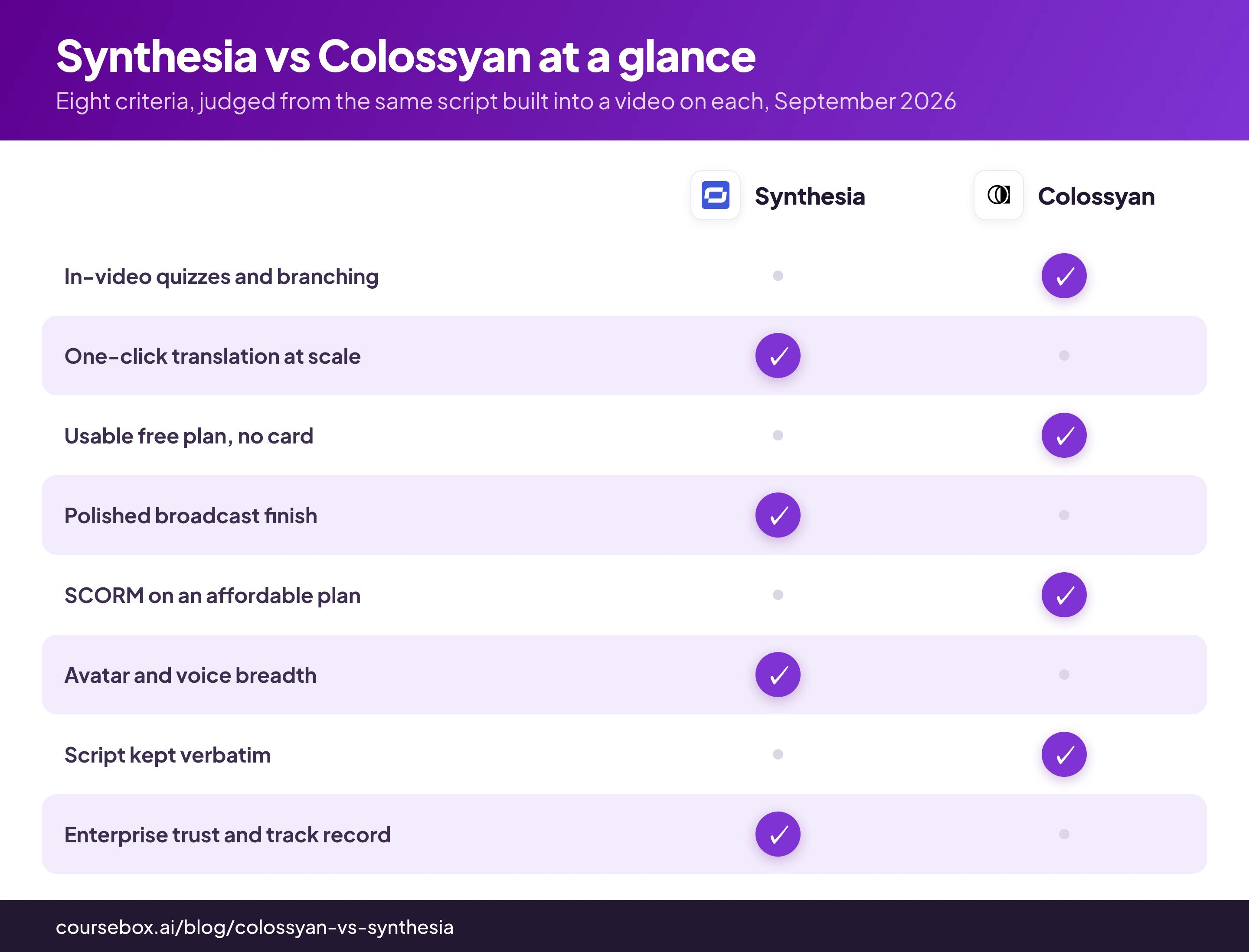
Synthesia vs Colossyan at a glance
| Synthesia | Colossyan | |
|---|---|---|
| Best for | Polished, translated training videos at scale | Trackable, interactive training that tests the learner |
| Interactivity | None; the video plays start to finish | Quizzes, branching and buttons built into the timeline |
| Free plan | 10 minutes a month, no downloads | Full avatar library, custom avatars, downloads; no card |
| Cheapest paid | Starter, $18/mo billed yearly, 120 min a YEAR | Professional, $59/mo billed yearly, 30 min a month |
| Translation | 1-click into 140+ languages, category-best | 120+ languages, combine into one multilingual player |
What you get on Colossyan: a video that can test the learner
Colossyan pitches itself as a tool for training rather than just talking-head clips, so I signed up on the free plan wanting to answer one thing. Could I build a video that actually tests the person watching it? I pasted my 135-word onboarding script and got going.
The script came through untouched, word for word, which is what I want when the video script is already perfect and approved. A pronunciation tooltip offered to fix how any tricky word is said, and I was glad to see it; compliance terms are exactly what these avatars tend to mangle.
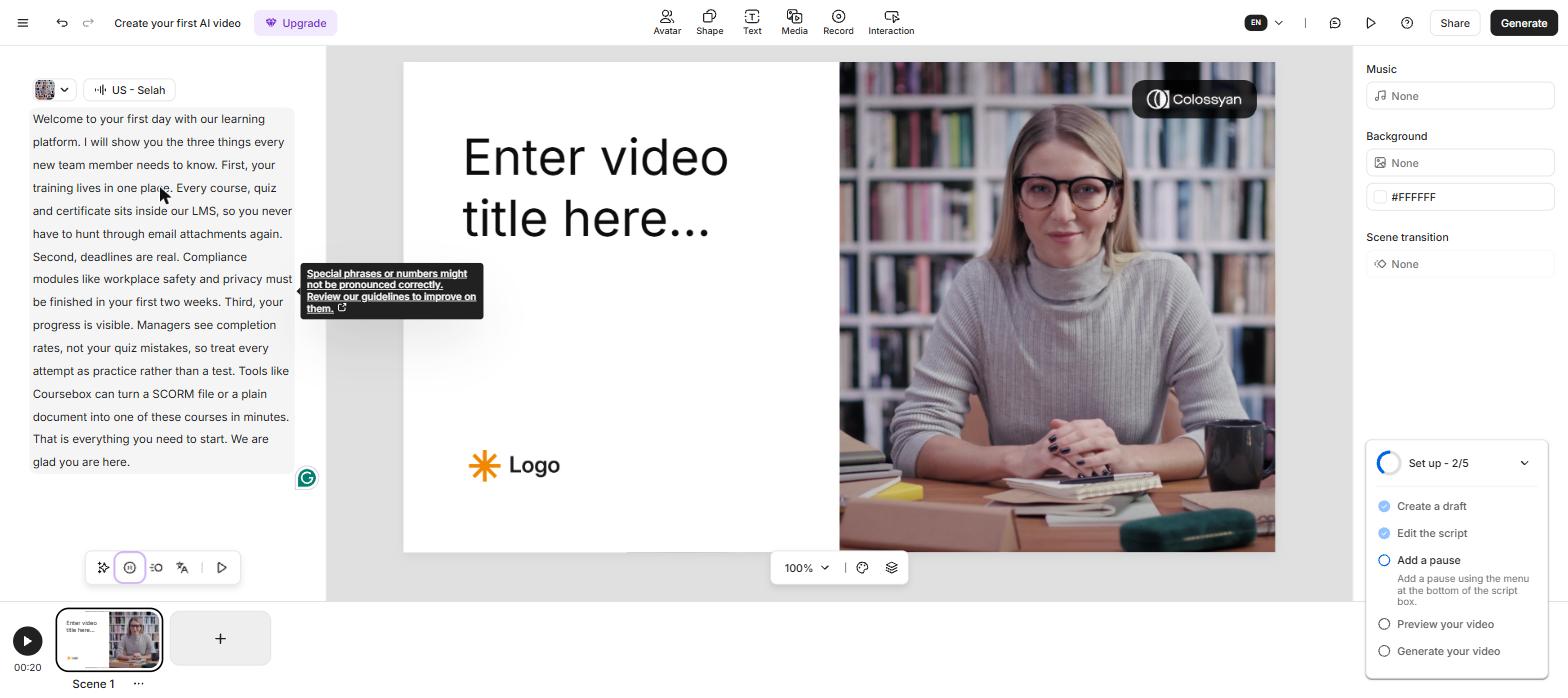
My script pasted into Colossyan verbatim, with the Interaction button in the toolbar.
The thing I actually came to test was one button, Interaction, so I clicked it. It offered four kinds: an action button, multiple choice, branching, and a conversation simulator in beta. This is the feature every review of Colossyan talks about, and I wanted to see whether it was real or a checkbox.
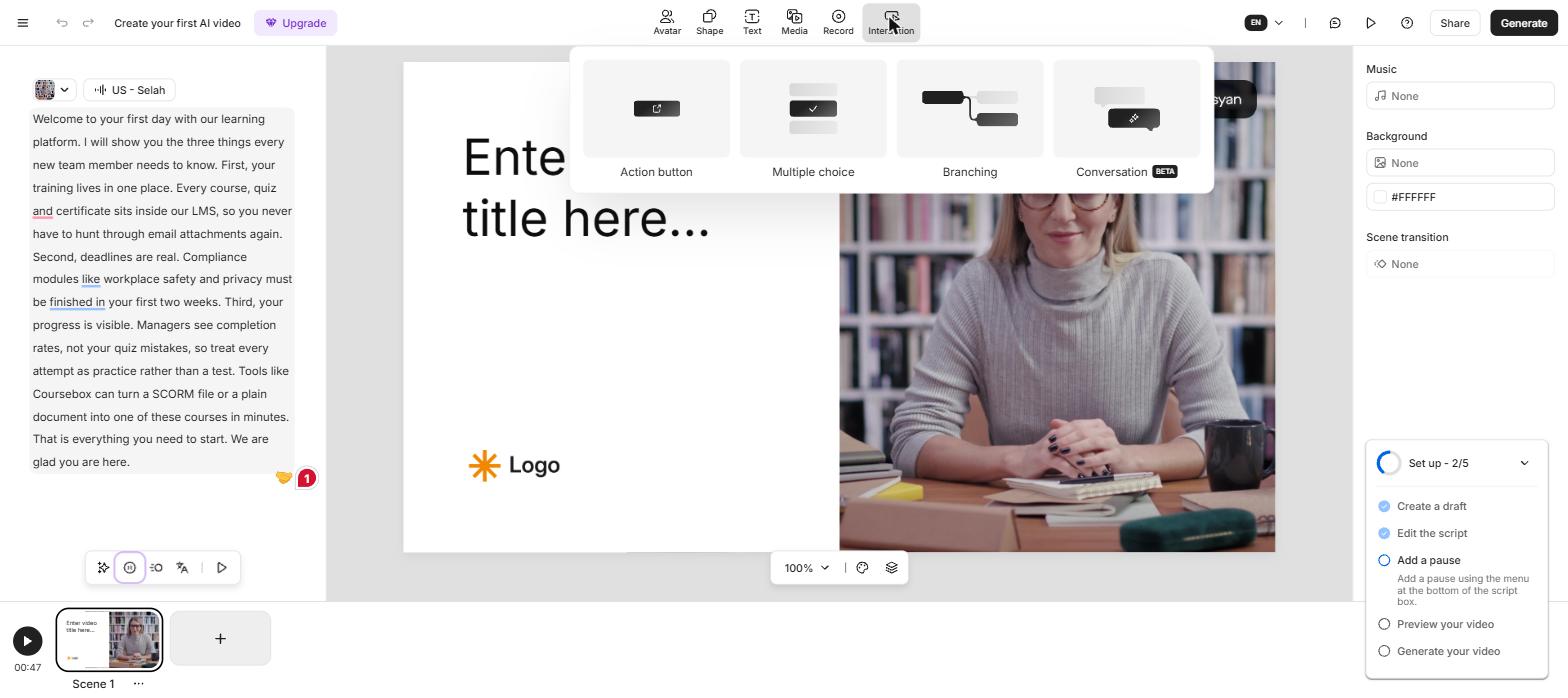
The Interaction menu: action button, multiple choice, branching, and a conversation simulator.
I picked multiple choice, and a quiz card dropped onto the video. I typed a real question from my script, "How soon must your compliance modules be finished?", ticked the right answer, and I was done in about a minute. That surprised me: I had just made a video that stops and checks whether someone was paying attention, and it took about as long as adding a caption.
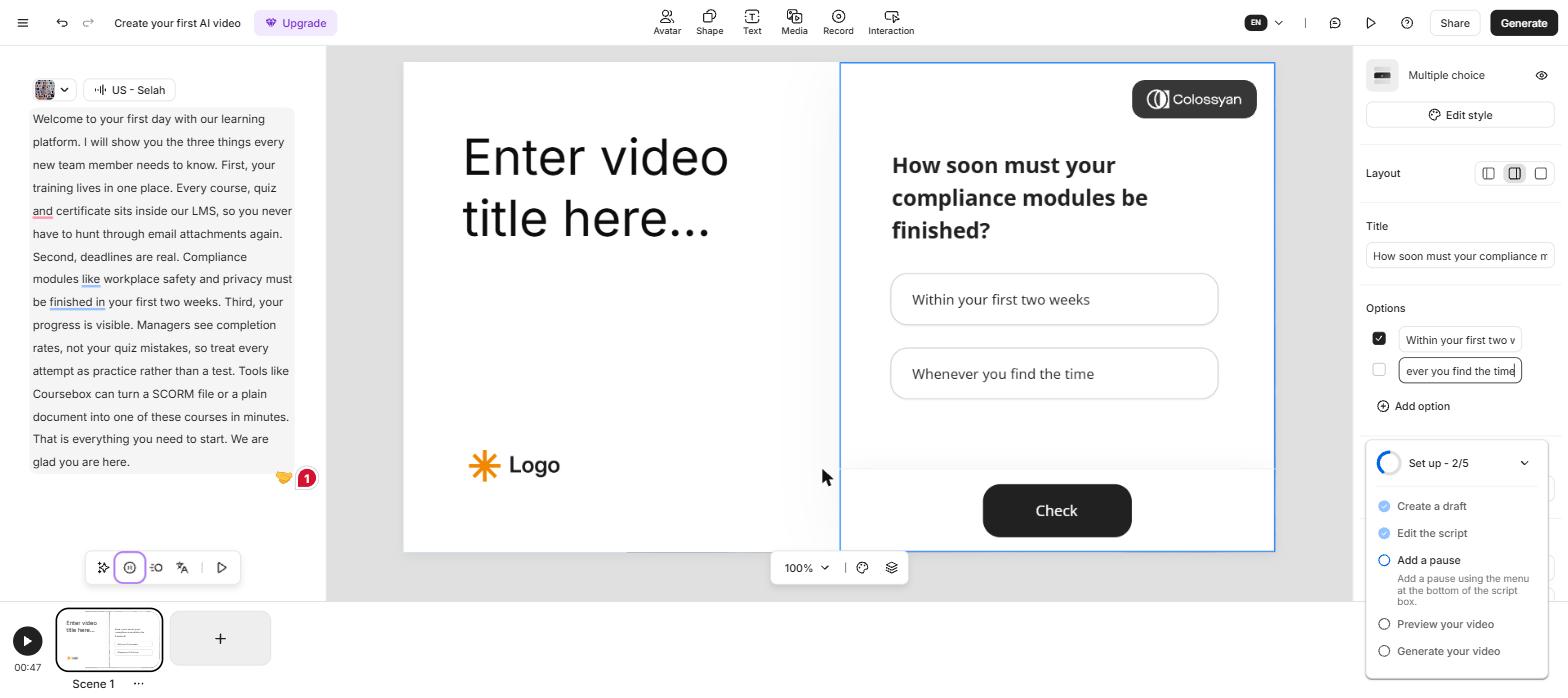
The quiz I built in about a minute: a compliance question with the correct answer ticked.
Then I hit the one catch, and Colossyan states it plainly. My quiz only survives if I share the video as a link or export it as SCORM; a plain MP4 download loses it. That annoyed me for about a second before I realised it is the right trade for training, and beside the point for a marketing clip.
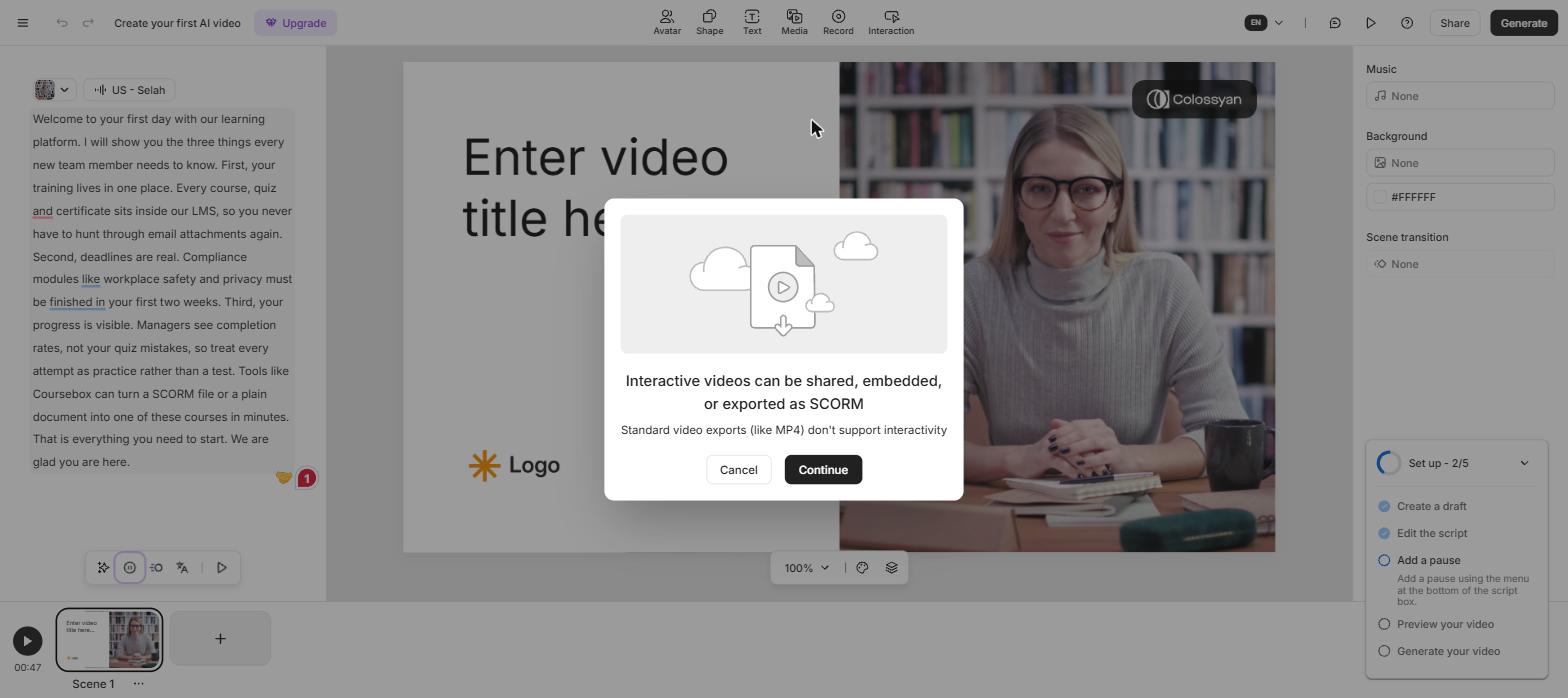
Colossyan spells out the trade-off: interactivity survives in SCORM and share links, but not in a downloaded MP4.
I generated the video and left it overnight; my 47-second render was waiting the next morning, clean and composed. What I liked most came after: a real download button that gave me the video, the audio, both caption formats and a PDF of the script, no upgrade wall in the way.
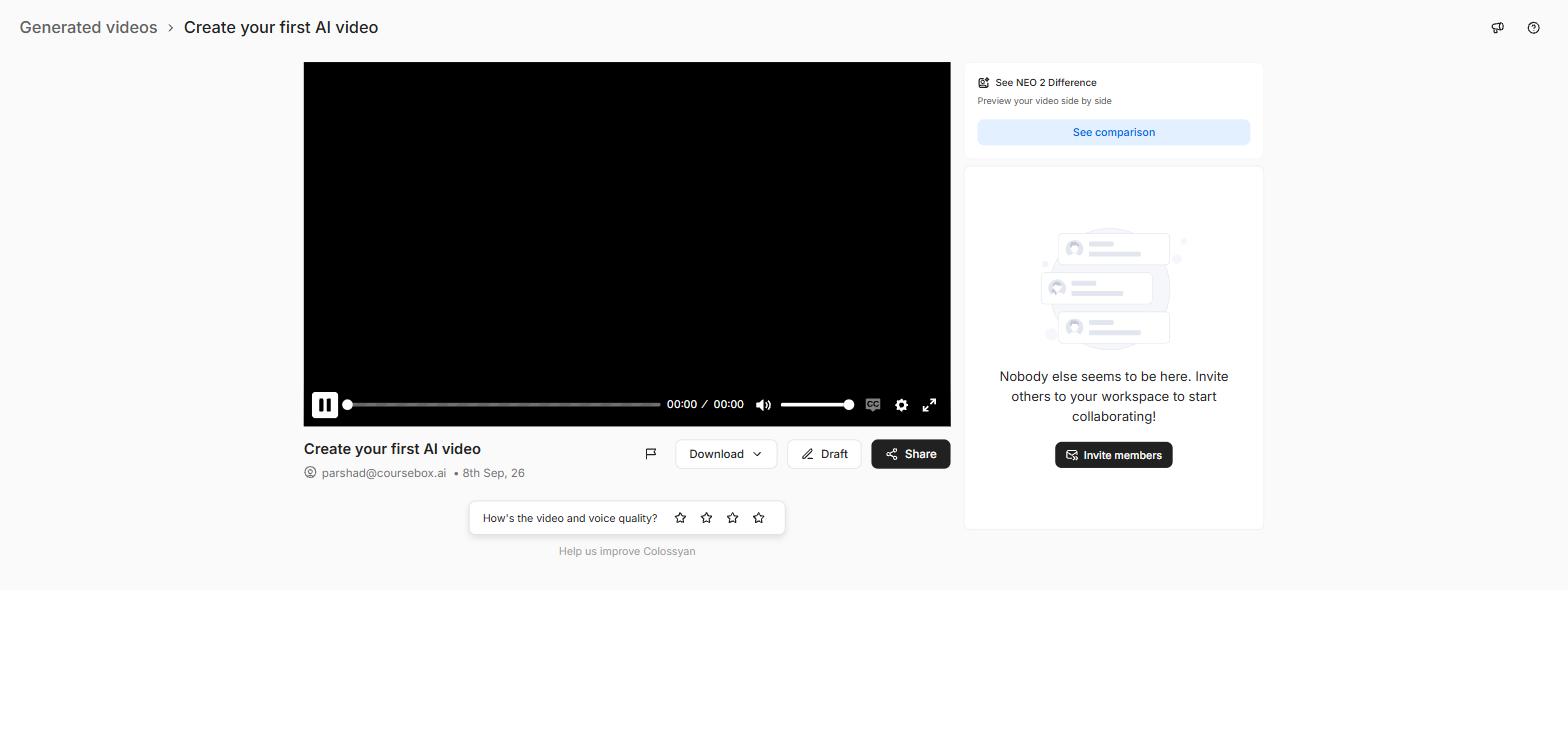
The finished video downloads in five formats, where Synthesia free paywalled the download.
I spent a while in the avatar library too, and it held up better than I expected on a free plan. There were 300-plus stock presenters, some set in real scenes like a podcast desk. The instant-avatar flow even offered to build a presenter from my own photo, without asking me to pay first.
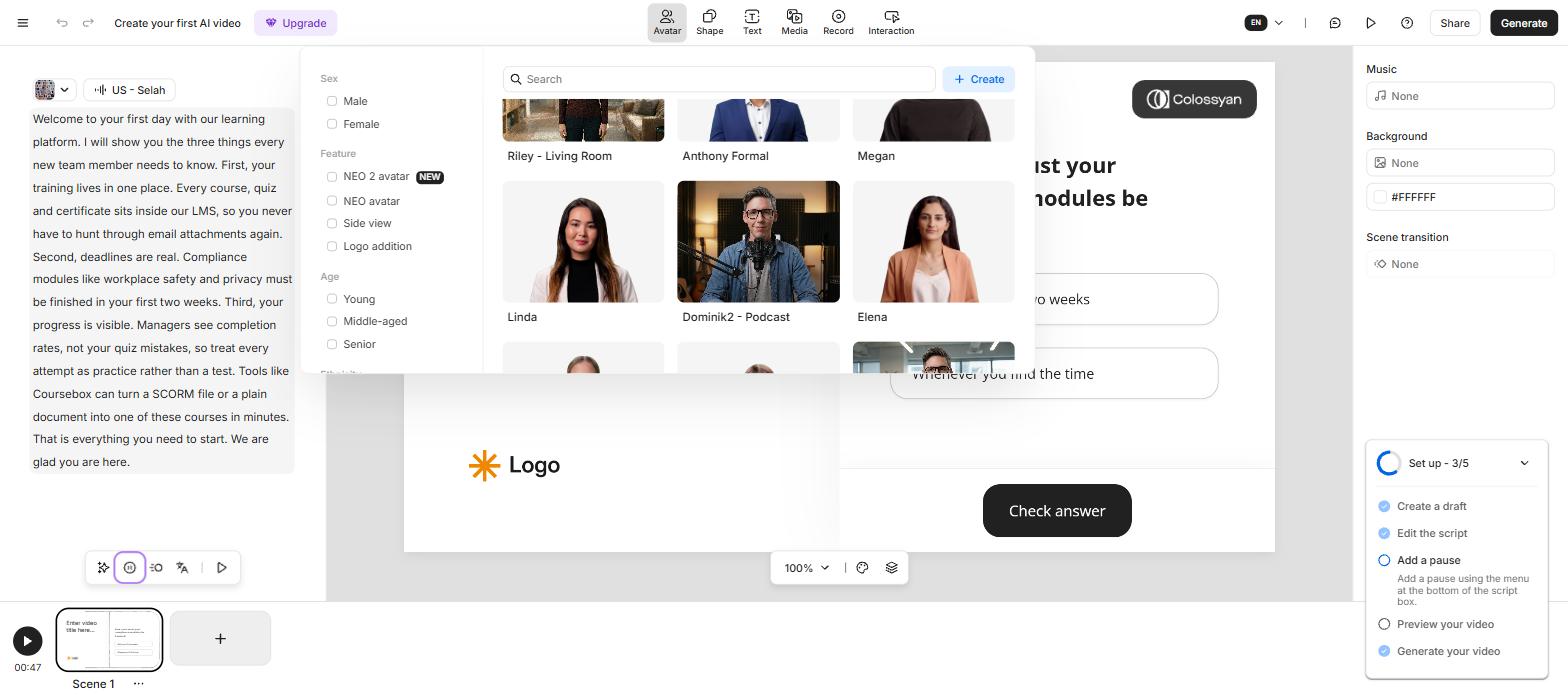
Colossyan free plan avatars, including scene-set presenters like a podcast desk.
Where Colossyan is better
- Interactivity built in. Quizzes, branching and buttons drop into the timeline; Synthesia videos only play, and that is the whole reason to choose it.
- A free plan you can actually work on. Full avatar library, custom avatars and downloads with no card, against Synthesia's 10 watermarked, undownloadable minutes.
- A course workspace beyond the clip editor. A course builder and the Cora outline agent sit beside the video tool, though you still write the lessons yourself.
- SCORM lower down the ladder. Trackable LMS export on the $59 Professional plan, where Synthesia keeps SCORM on its custom-priced Enterprise tier.
What you get on Synthesia: the polished, translated standard
Synthesia is the name most training teams hear first, and the avatars showed why. They came back the cleanest in the category, steady and broadcast-tidy. Its editor works like a slide deck, scene by scene, and if the job is a plain explainer, this is the finish to beat.
Its default "Assistant" flow rewrote my pasted script into its own outline rather than reading my words, so a locked, approved script needs the blank-project path instead. Colossyan never did that. Its free tier, by contrast, gives 10 minutes a month behind a watermark, playable only on Synthesia.
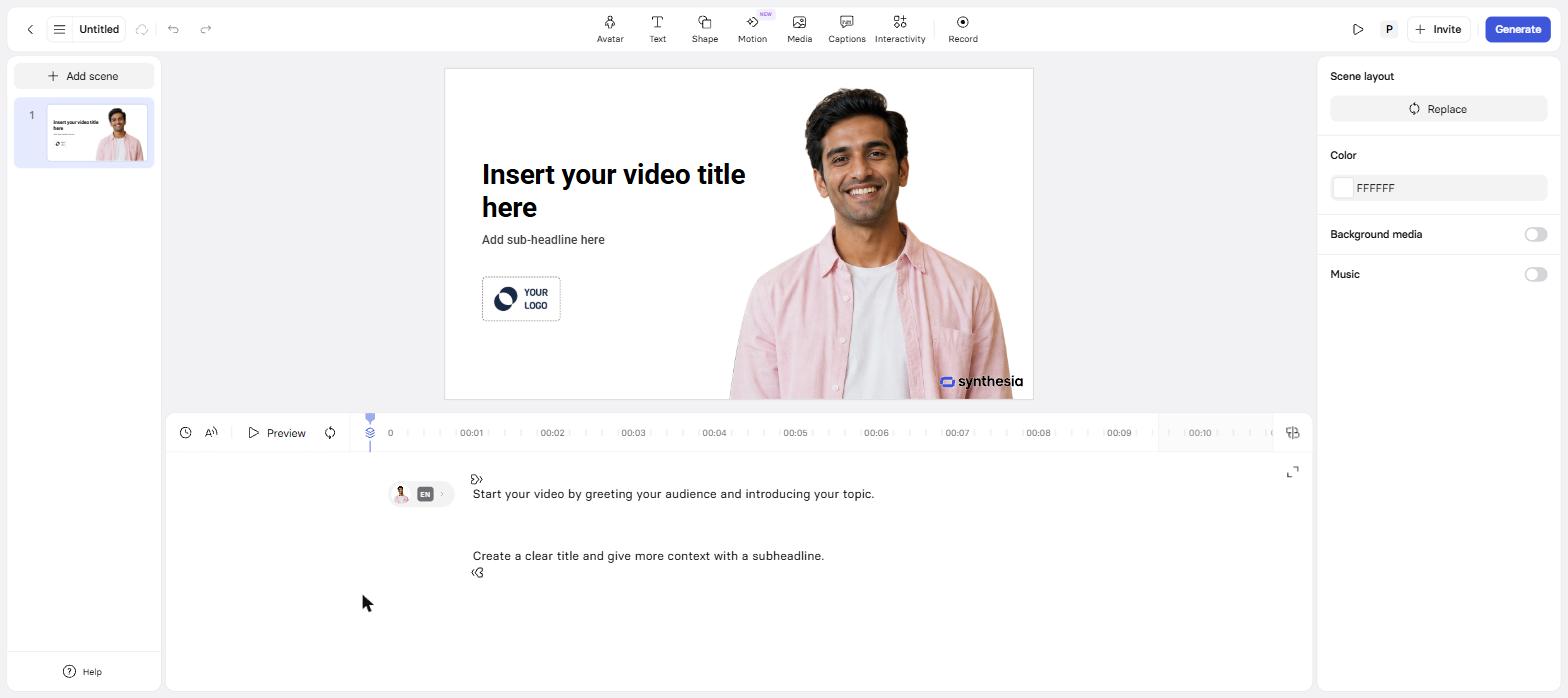
Synthesia edits like a slide deck, one scene at a time.
Where I felt Synthesia pull ahead was reach. When I generated my script, it offered a wider bench of avatars and voices than Colossyan gave me. Its one-click translation into 140+ languages is the piece I would lean on hardest; reviewers rate it best in the category, and I found no Colossyan equivalent that matched it. For a team shipping one training video to thirty countries, that is what settles it.
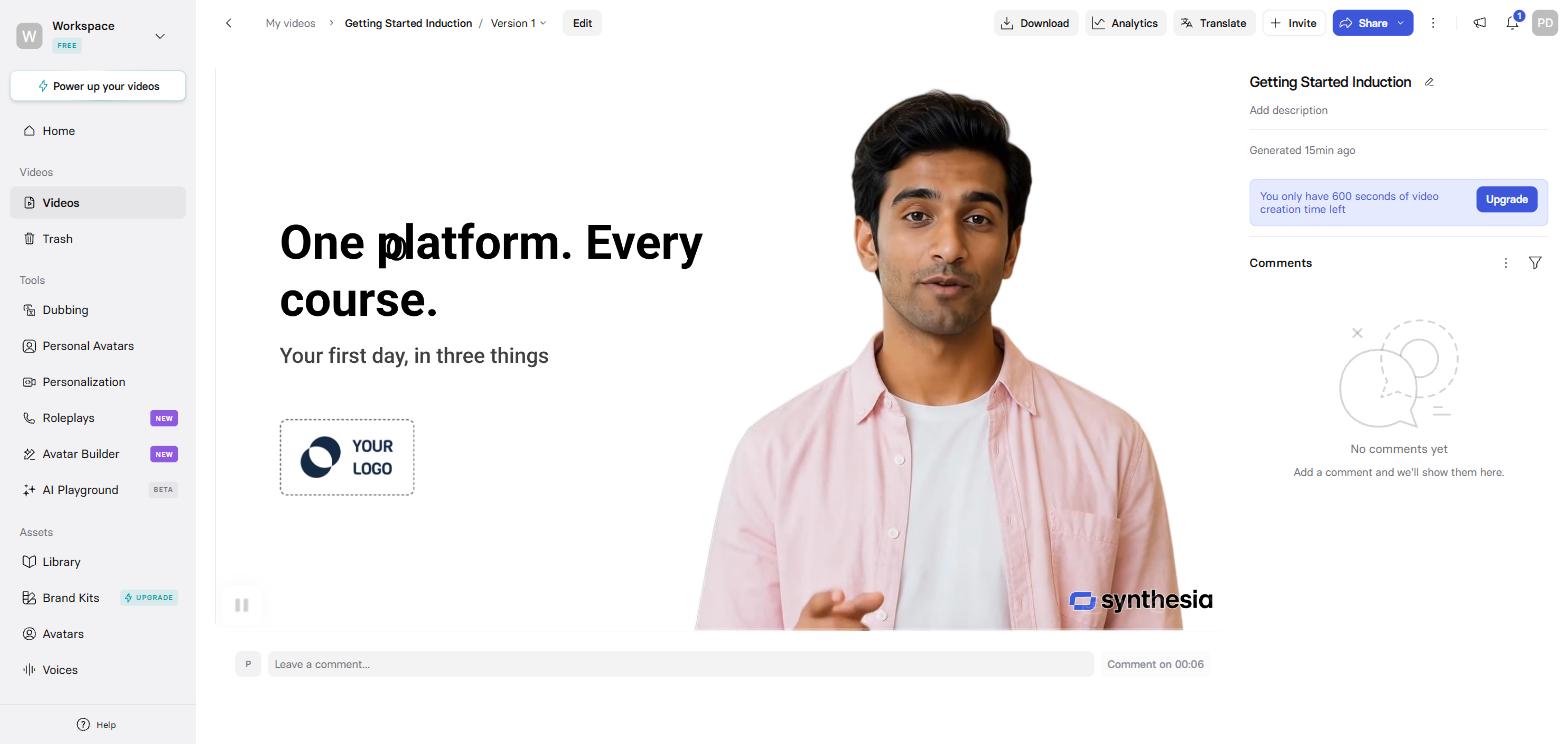
Synthesia free render: one corner watermark, composed and clean.
Where Synthesia is better
- Translation at scale. One-click into 140+ languages, rated the category's best; Colossyan translates too but does not match the polish.
- The bigger cast. More avatars and a wider voice range for teams that want variety.
- Enterprise trust. SOC 2 Type II, ISO 27001 and a world-first ISO 42001 AI certification, plus SSO and a long track record; the safe answer when procurement is watching.
- Sheer finish. For a video that only needs to play, cleanly, Synthesia's output is the benchmark.
What they cost
- Free: Colossyan gives you the full avatar library and downloads with no card. Synthesia gives 10 minutes a month, watermarked and undownloadable.
- Cheapest paid: Synthesia Starter is $18 a month billed yearly, but its minutes are annual (120 a year). Colossyan Professional is $59 a month billed yearly for 30 minutes a month plus SCORM.
- Interactive and trackable: Colossyan Professional at $59. On Synthesia, SCORM export is Enterprise-only, a sales call.
Colossyan pricing
| Plan | Price | What you get |
|---|---|---|
| Starter | Free, no card | 300+ stock avatars, custom avatars, 20 min/mo, unlimited courses |
| Professional | $59/mo billed yearly ($89 monthly) | 30 min/mo, SCORM export, watermark removal, downloads |
| Enterprise | Custom | Unlimited minutes, SSO, SOC 2, unlimited SCORM, data residency |
Synthesia pricing
| Plan | Price | What you get |
|---|---|---|
| Free | $0 | 10 min/mo, one watermark, no downloads |
| Starter | $18/mo billed yearly | 120 minutes a YEAR, no SCORM |
| Creator | $64/mo billed yearly | 360 minutes a year |
| Enterprise | Custom | SCORM, 1-click translation, SSO, SOC 2 |
Synthesia and Colossyan price so differently that the plans do not line up, and the mismatch tells you who each is for. Synthesia sells minutes by the year, so a busy month borrows from a quiet one; Colossyan sells by the month and puts SCORM within reach at $59, where Synthesia keeps it behind an Enterprise sales call. If your training has to report completions to an LMS, that one line moves the decision.
SCORM is the packaging format that lets a course or video drop into a learning management system and report back who watched, who passed and what they scored. An interactive Colossyan video exported as SCORM becomes trackable training. A plain video file, from either tool, just plays. If you need proof that people completed the training, SCORM is the feature that provides it, and it decides which plan you need.
What I wish I'd known before starting
- Colossyan's interactivity is real, but it has to be hosted. My one-minute quiz only survives as a share link or a SCORM package, so decide up front whether you are hosting the training or emailing a file.
- Synthesia's Assistant rewrites your script. If your wording is locked, use its blank-project path; Colossyan kept my words by default.
- Colossyan builds whole courses, beyond single clips. Its Cora agent turns documents into a full course outline, a job Synthesia does not attempt, so if you are assembling a curriculum the tools are not really the same category.
- Synthesia's translation is the real reason to pay more for it. The 140-language one-click translation is the feature that justifies its premium, and it is worth pricing against Colossyan's 120 before you decide.
- Synthesia's cheap plan counts minutes by the year. Starter's 120 minutes is annual, so heavy months run it dry early; Colossyan's minutes reset monthly.
Where both tools stop, and what Coursebox does
Synthesia makes the video; Colossyan makes the video and wraps a quiz around it, and its Cora agent will even draft a course outline. What both still leave to you is the actual course: writing every lesson, assessment and grade around that video. That is the job Coursebox does, generating the whole course from documents you already have, with an AI quiz generator and AI grading built in.
Quizzes are the part we see used most. On our own platform, teams ran AI quiz-question generation thousands of times this year, because a training video nobody is tested on is a video nobody remembers.
Colossyan is closest to us of the two, since it also builds courses and quizzes; Synthesia stays a video tool. If you only need a talking-head video, either tool above is the better buy. If you need the course around it, that is us.
The verdict, split by who is asking
L&D team that needs training people actually complete
Colossyan. The in-video quizzes and SCORM export at $59 mean your training tests the learner and reports to your LMS, which is the entire job.
Company shipping one video to many countries
Synthesia. The 140-language one-click translation is the best in the category, and the finish is broadcast-clean.
Solo creator or small team on no budget
Colossyan, for the free plan alone. The full avatar library, custom avatars and real downloads with no card beat Synthesia's 10 watermarked minutes.
Building the whole course, not just the video
Neither is that tool on its own. A video is one asset inside a lesson; the course around it still has to be built.
The mistake to avoid is buying Synthesia's polish when your training needs to prove completion, or reaching for Colossyan when all you actually ship is a clean explainer in one language.
If neither one fits
Beyond these two, HeyGen is the name that comes up most for marketing and social video, faster and cheaper for short clips, and I put it head to head with Synthesia in a separate hands-on test. The wider field of avatar and training-video tools is ranked in our best AI training video generators list.
Last updated 9 September 2026. Both tools were tested on my own accounts that month, with the same script, and every price was read from the live pricing pages and in-product. G2 scores were read on 9 September 2026.
Frequently Asked Questions
Colossyan, if the training needs to test people: it builds quizzes and branching straight into the video and exports SCORM to your LMS on the $59 plan. Synthesia is better when the video only needs to play and translate cleanly, where its finish and 140-language translation lead the category.
Synthesia has no interactive video; its videos play start to finish. Colossyan adds multiple-choice questions, branching paths and clickable buttons inside the video, which is its main reason to exist for training teams.
Colossyan. Its free Starter plan gives you the full 300+ stock-avatar library, custom avatars and real downloads with no card. Synthesia's free tier is 10 minutes a month, watermarked, with no downloads at all.
Colossyan and Synthesia both export SCORM, but at different prices: Colossyan includes it on the $59 Professional plan, while Synthesia keeps it on its custom-priced Enterprise tier, a sales call.
Synthesia Starter is cheaper on paper at $18 a month billed yearly, but its 120 minutes are annual and it has no SCORM. Colossyan Professional is $59 a month for 30 minutes a month plus interactivity and SCORM. For trackable training, Colossyan is the real-value pick; for cheap plain video, Synthesia.
Parshad Desai
Parshad is a full stack technical marketer based in our Perth office. He began his Coursebox career as a marketing intern. After impressing the founders with his incredible work, he later transitioned into a full time position coordinating digital marketing. His focus lies in managing our website, product analytics, and email marketing. Recently he has taken a keen interest in applying AI to digital marketing and growth.

