

Hybrid Learning: What It Is and How to Run It at Work
Hybrid learning is one live session with some people in the room and some joining remotely. See how it differs from blended and how to run one at work.

Hybrid learning is a live training session in which some participants are in the room with the facilitator and others join remotely at the same time, taking part in the same activities through video, audio and chat, so one session serves people in two places at once.
- Some sources treat "hybrid" and "blended" as the same thing, so agree on what the word means before you plan a session.
- In a small sample of Coursebox course requests, all 8 that defined "hybrid" described a blended programme, not one shared session.
- Research on hybrid sessions keeps finding the same problem: remote participants slide into watching, especially when the audio fails or nobody notices their questions.
- A hybrid session works best with a second person running the call, the chat and the breakout rooms, so the facilitator can teach both groups.
- Hands-on practice with equipment usually belongs outside the hybrid session, where every learner can do it instead of watching it.
Five questions, about a minute. Answer for one live training session you are planning where some people will be in the room and some will join on video. This is an unvalidated planning check, not a prediction of participation or learning. Read each answer individually; a high total cannot cancel an important omission.

Go from storyboard to an interactive course in minutes
Picture a 90-minute training session on a Tuesday morning. Eight people sit around a table at head office, and thirteen more join on laptops from branches hours away. The facilitator asks, "Any questions?" Two people at the table answer, and the thirteen faces on the screen say nothing. Nobody decided to leave the remote group out. The room had the microphone, the eye contact and the flipchart, and the people on the screen had a view of all three.
That is hybrid learning, and the gap in that room is what this guide is about. I'm an instructional designer at Coursebox, where we make training management software for the online parts of training and the records around them. I'll say where our product fits and where it does not. The live session itself runs on your own video tool. In this guide I explain what hybrid learning is, how it differs from blended learning, what the research says goes wrong, and when not to use it. Then I walk through one hybrid training session from planning to follow-up, with a run sheet you can download, two real health-care cases and a product test.
What is hybrid learning?
Hybrid learning is a live training session in which some participants are in the room with the facilitator and others join remotely at the same time, taking part in the same activities through video, audio and chat.
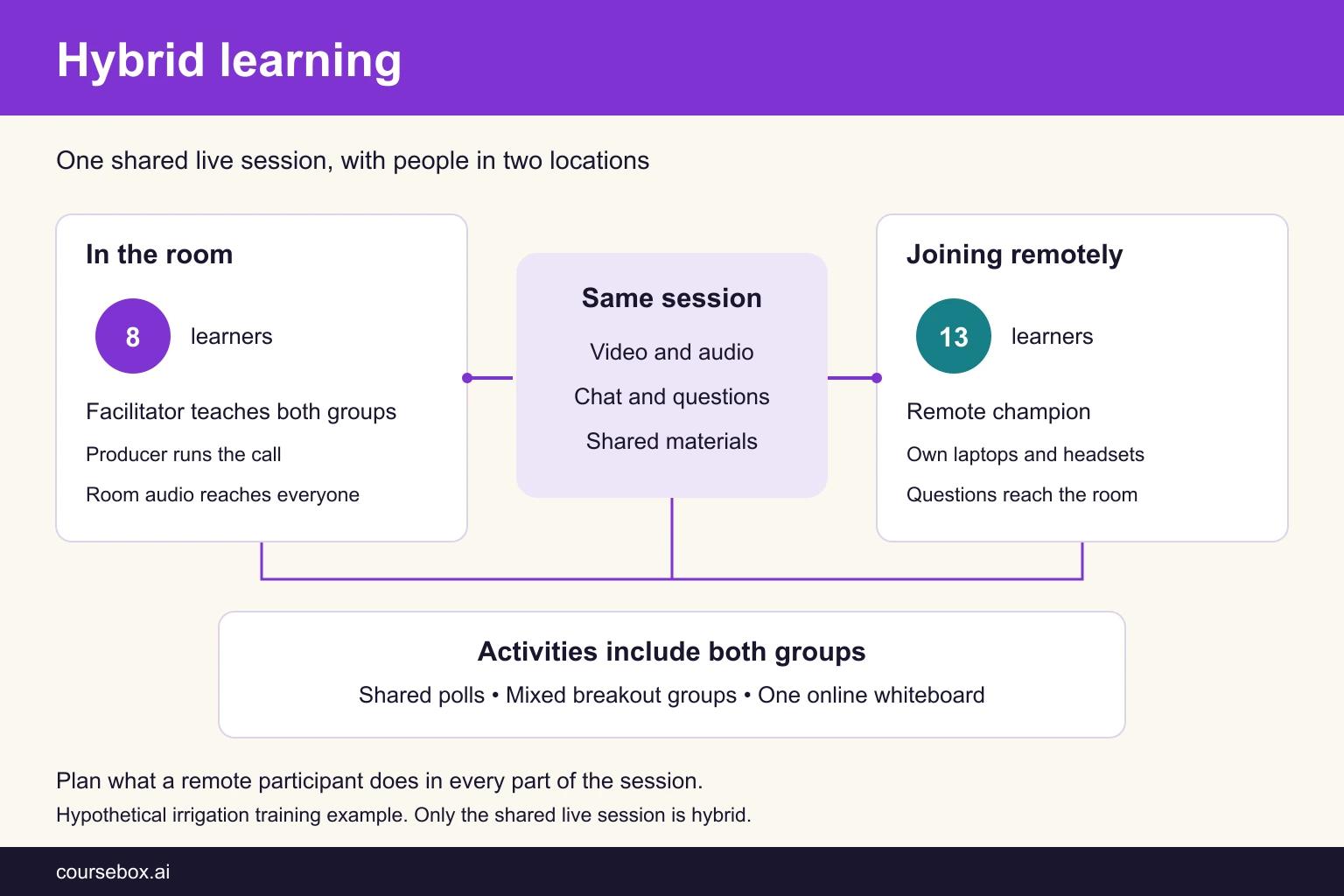
The defining feature is time. Everyone is in the same session, at the same moment, but not in the same place. Researchers who study this format often give it a longer name. Raes and colleagues' 2020 systematic review calls it "the synchronous hybrid or blended learning environment in which both on-site and remote students can simultaneously attend learning activities". Wang, Quek and Hu say the same set-up "is often labelled with synchronous hybrid learning", synchronous blended learning, or "multi-access learning". In schools and universities you will also see "hybrid classroom" and "hybrid teaching" for the same idea: a teacher with some students in the room and some on a screen.
The word is used loosely, and it helps to know that before you plan anything. Some sources use "hybrid" to mean blended: a course that mixes online work and face-to-face classes over a term. Charles Graham's 2006 chapter in The Handbook of Blended Learning quotes a prediction about "hybrid (i.e., blended) courses", and Brian Beatty's book on hybrid-flexible course design treats "the blended/hybrid literature" as one body of work. In this guide, hybrid means one shared live session with some people in the room and some remote. The research on these sessions usually calls them "synchronous hybrid" or "blended synchronous" learning.
Hybrid learning is also different from fully online learning. In online learning everyone is remote, whether the session is live or self-paced. A hybrid session has a physical room as well, and that room is what makes it hard: the people in it have advantages the remote group does not. If everyone joins from their own desk, you are running a virtual session, which has its own design rules (see our guide to virtual instructor-led training).
Benefits of hybrid learning
Organisations choose hybrid for practical reasons. It replaces two sessions with one, it includes people who cannot travel, and it gives a spread-out team the same message at the same time. Those benefits only arrive when the session works for the people on the screen, and that depends on five things working together:
| What a hybrid session needs | What it covers | What goes wrong without it |
|---|---|---|
| A room set up for the screen | Camera, microphones and a display showing the remote faces | Remote people cannot hear the room or see who is talking |
| A video call everyone can use | Joining, chat, polls, breakout rooms and shared slides | Remote people watch a camera pointed at a projector |
| Staffing for the session | A facilitator who teaches and a second person who runs the call | Remote questions or technical problems can be missed |
| Activities both groups can do | Shared online boards, materials sent ahead, mixed small groups | Remote people sit out the group work and the flipchart |
| Work before and after | Pre-work, follow-up practice and records for both groups | Remote people arrive behind and leave without a task |
Here is what that looks like in a real course where most of the trainees chose the screen.

Case study: Simulation facilitator training in Macau, with most trainees on screen
In July 2023, Kiang Wu Nursing College of Macau trained nurses and doctors who teach nursing to run simulation-based education. It ran the same live course for people in the room and people online at once, because trainees from outside Macau faced high travel costs and mainland residents needed visas with annual limits.
- What they did: 3.5 days of training plus a half-day sharing session two weeks later, broadcast live by a professional crew with dedicated camera and audio equipment. Trainees chose their mode. Mornings were theory in one classroom; afternoons were manikin scenarios in two labs, where the in-room trainees took the hands-on roles and the online trainees watched, and on day 3 also served as examiners. Three instructors and three teaching assistants ran it.
- Evidence and result: Of 219 people who expressed interest, 100 completed the course and the assessments: 78 online and 22 in the room. In Tong and colleagues' 2026 report in Frontiers in Medicine, both groups' self-rated facilitator competency rose (online from a median of 3.8 to 4.0, in the room from 3.9 to 4.0), and after adjusting for differences between the groups, the change did not differ between them (p = 0.811). The in-room group's willingness to use simulation fell, from 4.3 to 4.0.
- Limitation: People chose their own mode, the groups were unequal (22 against 78), and every measure was self-rated straight after the course, with nothing on later teaching practice. The online trainees mostly watched the hands-on work, and a professional broadcast team ran the audio and video. The college evaluated its own course, and the authors say the findings "cannot be generalized beyond the study sample."
- Lesson: Self-ratings increased in both groups, with no detected adjusted difference in competency change. That does not establish equal effectiveness, and self-selected modes do not isolate the effect of location. Remote observation or examining can serve some objectives. If every learner must perform the hands-on skill, provide supervised practice and assessment for each person in an appropriate location. Do not assume the room is the better seat.
Hybrid vs blended learning
In this guide, hybrid means one live session with room and remote participants, while blended means a programme combining online and face-to-face learning. These labels overlap in other sources, so the plan should specify who attends where and when.
Wang, Quek and Hu draw the line clearly. Blended learning is "usually blended in a rotated manner", where one session happens in the classroom "and another is delivered online". The alternative is "a concurrent way, where a lesson is delivered to both classroom and online students simultaneously", which is the hybrid session this guide is about.
| Format | Who is where | When | What the designer plans | Example at work |
|---|---|---|---|---|
| Hybrid | Some people in the room, some remote | One live session, at the same time | One session that works for both groups | A product update with head office in the room and branch staff on video |
| Blended | Everyone moves between online and in person | Parts spread across days or weeks | A sequence of online and face-to-face parts | Online modules, then a workshop, then an online assessment |
| HyFlex | Each learner chooses between supported participation modes | Learner choice, as the course offers | Equivalent ways to meet the learning objectives | A course where people pick their mode each week |
| Fully online, live | Everyone remote | One live session, at the same time | A virtual session with no physical room | A webinar or virtual classroom session |
A hybrid session often sits inside a blended programme. Online pre-work before the day and practice afterwards make the programme blended; the live session in the middle, with some people in the room and some remote, is the hybrid part. Our guide to the benefits of blended learning covers how to design that wider programme.
The two words get mixed up at work too. In the course requests people type into Coursebox, every request that said what "hybrid" meant described what the research calls blended.
I read every request from English-language browsers in the last 180 days that used the word, one per person: 122 people. Most were about something else, such as hybrid work as a course topic, hybrid cars or hybrid cloud. Twenty-six used "hybrid" for how training is delivered. Thirteen of those listed it as an option without defining it, two treated hybrid delivery as a course topic, and three were unclear. The eight that said what they meant all described online parts plus separate live or in-person parts over time, such as online pre-work "before participants attend a two-day, in-person weekend". None described one session with some people in the room and some remote. Eight is a small number, and people may run mixed-attendance sessions without mentioning them in a course request. What it does show is that you should agree on the word before you agree on a plan.
Where HyFlex fits
HyFlex, short for hybrid flexible, adds learner choice between supported participation modes. Brian Beatty's HyFlex guidance emphasises learner choice, equivalent learning opportunities, reusability and access. The alternatives may include the room, live online and asynchronous participation; an asynchronous path needs learning activities, not just a recording. State which modes your course offers. Our guide to HyFlex learning covers the model in depth.
When does hybrid learning make sense?
Hybrid learning makes sense when one live session for everyone does more than two separate sessions would. That usually means the content needs discussion or questions in real time, the people who need it are spread out, and getting them all into one room costs too much travel or time.
The research is encouraging but thin. Raes and colleagues' review found "cautious optimism about synchronous hybrid learning", and noted that "most of the existing literature is exploratory and qualitative in nature".
The review reported similar outcomes, often test scores, in the few available comparisons. Those findings do not establish that the formats are equivalent, and they come largely from university settings. Use them to guide a trial of your own design, then check participation and learning in both groups.
Almost all of the 47 studies in the review come from universities and adult education, not workplaces. The published cases of hybrid training at work that I could verify are all in health care, and they measure satisfaction or self-rated confidence, not what people did on the job afterwards. Treat the research as a guide to what goes wrong, not as proof that hybrid training works for your team.
Downsides of hybrid learning
The downsides of hybrid learning come back to one pattern: the room gets the session and the screen gets a view of it. The research describes the same few failures again and again.
Remote participants become spectators
In one study summarised by Raes and colleagues, students and teachers said remote students "learned less, were generally more passive and often behaved like they were watching TV and not attending a lesson", and the reason given was "more monologue-based teaching strategies". Remote learners in the review also found "it is difficult to make the teacher aware that they want to answer a question". In Ute Cunningham's study of a professional development course where online participants joined on iPads, "Their ability to hear and be heard was at the discretion of the physically present." Both groups came to see the other as separate, and each watched how much of the teacher's attention the other group got.
The same thing shows up in workplace meetings. Microsoft's own 2022 Work Trend Index survey asked employees how they were doing on feeling included in meetings.
That survey is about meetings, not training. Microsoft also sells meeting software and room hardware, so read the figure as a signal rather than a training benchmark. It points the same way as the research: many people who work away from the office feel left out of meetings.
Audio fails first
Raes and colleagues call the audio "the biggest challenge faced in the synchronous hybrid learning environment". In Wang, Quek and Hu's design study, online students "commonly indicated that the audio quality was poor" and found it "hard for them to find a proper time to interrupt the instructor's presentation to ask questions". A camera without good room audio gives remote people a picture of a conversation they cannot follow.
One facilitator cannot watch two rooms
The Australian research team behind the Blended Synchronous Learning handbook found that this mode "placed high demands on teachers in terms of cognitive load", because the teacher has to "simultaneously manage two cohorts of students, multiple streams of information and the technology, all while teaching the subject matter". One teacher described it as "like trying to be a good teacher but twice at once". Wang, Quek and Hu's instructor reported that he "would forget the existence of the online students" and had to remind himself. The in-room group pays too: in one study Raes and colleagues summarise, students in the room "felt neglected when teacher spent much time solving the technical problems."
Questions move to the chat
When people have a chat box, many use it instead of the microphone. At the European AIDS Clinical Society's 2021 conference, held in London and online, Howe and colleagues found that 2,294 of 3,223 delegates (71.2%) attended online, and that in the 12 sessions they observed, 36 audience members asked questions in the online chat and 5 used a microphone. Seven of those sessions were online only, and the study did not split chat users into in-room and remote. In the delegate survey, most people said they preferred the chat to the microphone. It was a conference, not a training session, but the lesson carries: if nobody is reading the chat aloud, the microphone in the room sets the agenda.
The most common shortcut is to open a video call on the facilitator's laptop and point it at the front of the room. Remote people then hear a laptop microphone several metres from most speakers, see a slide through a camera, and have no way to speak up except the chat nobody is reading. Fix the audio and put a second person on the call before you spend anything on cameras.
When not to go hybrid
I've been in enough kickoff meetings with L&D managers to recognise the moment someone says "let's make it hybrid so nobody has to travel". Sometimes that is right. Often a different format would serve everyone better. In my judgement, these are the cases to avoid a hybrid session:
- Hands-on practice with equipment. If remote learners lack the equipment or appropriate supervision, they can only watch. Arrange supervised practice locally, or check whether a supported remote practical can meet the objective.
- One or two people in the room. Consider a fully online session to reduce the room's advantage, unless there is a reason those participants need to be together.
- No second person to run the call. With chat, polls and several breakout rooms, the facilitator can lose track of remote learners. Assign support or simplify the session.
- Remote people sharing one laptop in a noisy space. Audio fails first, so delay the session or change the format.
- Sensitive conversations. Performance, conduct and wellbeing discussions need suitable privacy, access controls and a reason to use a group session. Decide whether a private conversation is more appropriate.
The alternatives are two separate sessions, a fully virtual training session, or a blended programme that moves the discussion online and the practice into the workplace.
How to run a hybrid training session
To make the steps concrete, I'll use one example for every step. The example is hypothetical; the business, the people and the numbers are illustrative.
An irrigation and pumping supplier has its head office and training room in Wagga Wagga, in the Riverina, and 14 branches across regional New South Wales and northern Victoria. Quotes for new farm irrigation systems keep going out with missing measurements, so installers arrive to find the pump undersized or the power supply wrong, and the job has to be re-quoted. The sales manager has introduced an 8-point irrigation quote checklist, and every branch needs to quote the same way:
- Water source: bore, river, channel or dam, and the customer's own estimate of how much they can draw.
- Flow rate at the source, measured (litres per second), not guessed.
- Pressure available at the pump.
- Height difference from the pump to the highest point to be watered.
- Area and layout of the blocks to be watered (a farm map or aerial photo).
- Crop and its peak water need in the hottest month.
- Power at the pump site: mains (single or three phase), solar or diesel.
- Existing pipes, pumps and fittings the customer wants to reuse.
The learners are 21 counter and sales staff who know the products but quote in different ways. Eight sit in the Wagga Wagga training room: five head office sales staff and three counter staff from the Wagga Wagga branch. Thirteen join remotely, one from each of the other 13 branches, each on their own laptop and headset in a quiet office. The goal is that each person can prepare a quote that records all 8 items and can explain to a farmer why each one is asked.
The training has three parts:
| Part | When | Format | Length |
|---|---|---|---|
| Pre-work | The week before the session | Online, self-paced | About 20 minutes |
| Live session | Tuesday 10.00 to 11.30 | Hybrid: 8 in the room, 13 remote on the video call | 90 minutes |
| Practice and sign-off | Within 2 weeks after | Online practice quote, plus a gauge and flow-meter reading at a real pump with the branch manager | About 45 minutes |
Only the Tuesday session is hybrid. Taken together, the three parts make a blended programme. The example shows hybrid learning well because the business is spread out, the session needs discussion rather than a lecture, and part of the skill has to be practised with real equipment.
1. Decide what the session is for, and move the hands-on part out
Start by sorting the content into what needs everyone live at once and what does not. Discussion, questions and shared decisions suit a live session. Reading, watching and hands-on practice usually suit somewhere else.
- What to do: List what learners must do by the end, and mark each item as live discussion, self-paced or hands-on.
- In the irrigation session: The checklist itself goes into the pre-work. The live session argues about which items get skipped and why, and works through a farmer's enquiry. Reading a pressure gauge and a flow meter moves to each branch, where the manager watches each person do it at a real pump.
- The check: Could a remote person do every part of the live session as fully as someone in the room? If not, move that part out.
2. Staff it with two people, and a remote champion
For this 21-person session with chat, polls and five breakout rooms, I would assign a second person. The Blended Synchronous Learning handbook describes "a teaching assistant who can attend to technology-related problems, respond to student text chat comments, and manage other issues", and in one of its cases that assistant ran the breakout rooms from a second computer. With that support, it reports, the lead teacher "did not need to manage the technology in any significant way". The hybrid classrooms Raes and colleagues describe are "always assisted by a room controller who follows up on the chat, can launch the quiz or poll and can mute or unmute remote students." I call this person the producer.
- What to do: Name a facilitator, who teaches both groups, and a producer, who runs the call, the chat, the polls, the breakout rooms and the attendance. Ask one remote participant to act as remote champion: they speak first for the remote group and tell the producer the moment audio or video drops.
- In the irrigation session: Priya, the sales training lead, facilitates from the room. Tom, the learning coordinator, produces from the back of the room on his own laptop, joined to the call as a participant. Mel, the Griffith branch manager, is the remote champion.
- The check: If the producer is away, who covers? For this session, arrange cover or simplify the activities before deciding whether to reschedule or switch online. A smaller, simpler session may need a different staffing plan.
Write the facilitator's notes with both groups in them, row by row. Our guide to writing a facilitator's guide covers the format; for a hybrid session, the key addition is a separate column for what remote participants do.
3. Set up the room for the people on screen
Set up the room from the remote seat outward. Raes and colleagues say remote learners "should receive the same audio quality (and quality of education) as those students who are present face-to-face", and suggest letting them log in before the session starts. The Blended Synchronous Learning handbook warns that "Lags or breaks in audio transmission can, for example, be highly detrimental", and its teachers started the call 10 minutes early so learners could test their audio. Zydney and colleagues found, as summarised by Raes et al., that one omnidirectional speakerphone could cover a room of eight or fewer people, so experienced instructors there managed the audio without technical support. Larger groups need a different set-up. Audio is only part of the job. For the example's chat, polls and five breakout rooms, a producer gives the facilitator time to teach.
- What to do: Put audio first, then the camera, then the screen. Test it from a remote laptop before anyone arrives.
- In the irrigation session: One wide-angle camera sits on top of the front display at eye height, showing Priya and the whole table. A table microphone covers the room, and Priya wears a lapel microphone. In-room laptops join the call with microphones and speakers off, to stop echo. The front display shows the remote faces at eye level. Priya shares her slides on the call so remote people see them full size. A shared online whiteboard replaces the paper flipchart.
- The check: Thirty minutes before the start, Tom joins from a laptop in another office and checks that he can hear a quiet voice from the far end of the table.
Case study: Emergency medicine simulation at UC San Diego, in the lab and on Zoom
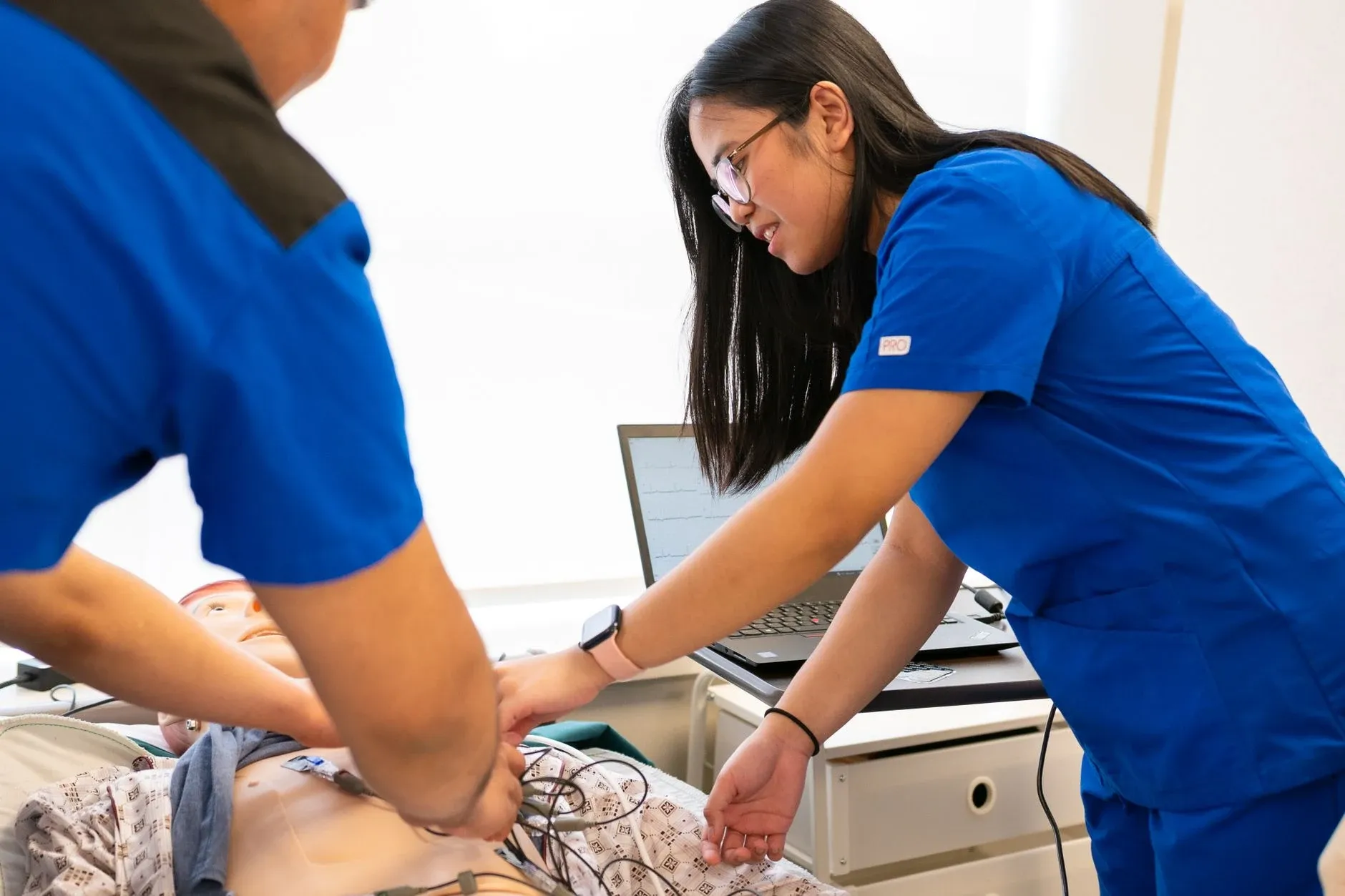
In 2020, COVID-19 rules capped each simulation room at six people, but the emergency medicine residency at the University of California San Diego decided its learning objectives could not be met fully online. So it ran a live simulation session with some learners in the lab and some watching on Zoom.
- What they did: Three in-room pan-tilt-zoom cameras streamed the case together with the manikin's vital signs, so remote learners could "see and hear the entire simulation". Learners chose their mode. The team ran two practice sessions first, placed high-quality microphones around each room and coached people to speak "slightly louder than their normal speaking volume". At the end of each case, "the live feed was ended", and separate faculty debriefed the room in person and the remote group on Zoom. The two debriefers texted each other during the case.
- Evidence and result: In the pilot on 21 July 2020, 14 residents ran the cases in the room and 12 people watched remotely: six residents and six medical students. In Austin and colleagues' 2021 report in AEM Education and Training, 10 of the 12 remote learners rated the adult case, 6 as better than live simulation and 4 as neutral. For the paediatric case, 11 responded: 2 better and 9 neutral.
- Limitation: One session at one site, written up by the faculty who ran it. It measured remote learners' satisfaction only, with no test of skill or knowledge, and the remote group watched rather than ran the cases.
- Lesson: Rehearse the set-up, put good microphones in the room, and stop the shared feed for discussion so each group gets its own small, facilitated debrief.
4. Send the pre-work and materials before the day
Pre-work does a specific job in a hybrid session: it gives everyone the same starting point, wherever they sit. It also stops the live session being spent on content people could read alone. Our comparison of asynchronous and synchronous learning covers which content suits each.
- What to do: Send the joining link, the agenda and every handout a week before. Put the core content into a short online module with a check at the end, so you can see who arrives prepared. If you use an AI tool for employee training to build it, give it your own checklist word for word and read every page it produces.
- In the irrigation session: About 20 minutes of pre-work teaches the 8 checklist items, with one short explanation of why each is asked, then a 6-question check that includes short scenarios.
- The check: Can a remote person open every handout and do every activity from their own laptop, without anything that exists only on paper in the room?
5. Run every activity remote-first
The simplest rule for a hybrid session is to go to the remote group first. Wang, Quek and Hu's design principles say "The instructor must pay a balanced attention to the online and classroom students", and the Blended Synchronous Learning handbook's teachers made a habit of "explicitly asking distance students whether or not they have any questions". Mixed small groups help too: Raes and colleagues report that people feel more like one group (what researchers call co-presence) when the room and remote people are mixed in breakout rooms. Cunningham concluded that her course would have gone better with clear rules for discussion agreed with the group at the start.
- What to do: Explain at the start how remote people ask a question and who speaks first. Ask the remote group first in every discussion, repeat in-room comments into the microphone, and put room and remote people in the same breakout rooms with everyone on a headset.
- In the irrigation session: Mel opens each whole-group discussion for the remote group. In the breakout case, five breakout rooms (four of 4 people and one of 5) each mix room and remote staff. Their task: a citrus grower near Leeton wants to convert 40 hectares from flood to drip irrigation from a channel, with a 30-year-old pump on single-phase power, and has sent an aerial photo of the blocks. Each group works out which items are complete (5 and 7), which are partial (1, 6 and 8), and which are missing (2, 3 and 4) and what to ask the grower before quoting, including the draw estimate, peak crop water need and details of the equipment to reuse.
- The check: Count who spoke in each discussion. If the remote group was quieter, change the order next time.
Many video tools offer live captions. If yours does, turn them on for every hybrid session: they help remote people follow speakers who are far from the microphone, and they help anyone who is hard of hearing or working in a second language.
6. Record attendance and follow up for both groups
The session ends, but the training does not. Both groups need the same follow-up task, the same deadline and the same record, or the remote group drops off the list. Coursebox, which is our product, can hold the pre-work and the practice in one course. A learner group can post the session as an event on a calendar with the date, the time, the attendee list and reminders, and the group's attendance can be exported to CSV next to participation. The call itself still runs on your own video tool, so the producer still takes attendance on the call.
- What to do: Have the producer record attendance for both groups during the session. Send one follow-up task to everyone, with a due date, and track completion in one place.
- In the irrigation session: Tom exports attendance for both groups at 11.30. Within 2 weeks, each person submits an online practice quote, and their branch manager confirms the gauge and flow-meter reading at a real pump.
- The check: A week later, can you see the same information for a remote learner as for one who sat in the room?
The run sheet for the irrigation session
A run sheet puts the live session on one page, minute by minute, with columns for the facilitator, the producer, the room and the remote group. The last column does the most work. If it repeats the room column, the plan has no instructions for the remote group.
| Time | Segment | Facilitator (Priya) | Producer (Tom) | In the room | Remote |
|---|---|---|---|---|---|
| 9.30 | Tech check | Lapel microphone on, slides open | Joins from a laptop in another office and checks room audio from the far seat | Arrive, join the call muted, laptop microphones and speakers off | Join early and test your headset with Tom |
| 10.00 | Welcome and how today works | Names the roles and explains the chat, raised hands and who speaks first | Posts the agenda and the checklist in the chat and starts the attendance list | Say your name in turn after the remote group | Mel greets first, then each person says their branch |
| 10.05 | Pre-work poll | Reads the results aloud | Launches a 3-question poll for all 21 | Answer the poll on your laptop | Answer the poll on the call, or type your answer in the chat if it does not load |
| 10.10 | Why quotes fail | Walks through two re-quoted jobs and the checklist items they missed | Watches the chat and flags remote questions to Priya by name | Listen and note the missing items | Stay on camera, raise your hand on the call or type in the chat for Tom to read out |
| 10.25 | Whole-group discussion | Asks the remote group first, then the room, and repeats room comments into the microphone | Reads chat comments aloud if Priya misses them | Speak after the remote group | Respond first, unmuting one at a time when Priya names your branch |
| 10.40 | Breakout case: the citrus grower | Sets the task and visits each breakout room | Opens 5 breakout rooms mixing room and remote people and posts the case sheet | Headsets on, join your breakout room on your laptop | Join the breakout room Tom assigns, headset on, with room people in your group |
| 11.00 | Report back on the shared whiteboard | Calls groups in turn, alternating remote-led and room-led | Keeps time and unmutes each reporter | Add your group's points to the online whiteboard | When your group is remote-led, lead the report-back and add the points to the whiteboard |
| 11.15 | What happens next | Explains the branch sign-off and the practice quote due in 2 weeks | Posts the link to the practice section of the course | Ask questions out loud | Post questions in the chat for Tom to read out, and Mel closes for the remote group |
| 11.25 | Exit question | Asks "Which checklist item will you now ask first, and why?" | Launches the exit question and saves the chat | Answer on your laptop | Answer in the chat before you leave the call |
| 11.30 | Close | Thanks everyone and ends the session | Exports attendance for both groups and saves the whiteboard | Leave the call | Stay on the call until Tom confirms your attendance is recorded |
The downloadable run sheet has this session filled in, a blank run sheet for your own session, a 30-minute pre-flight checklist and a box for what to do when the audio fails.
A planning template for one hybrid training session: session details and roles, a run sheet with separate columns for the room and the remote group, a 30-minute pre-flight checklist and a plan for when the audio fails. It is filled in for the irrigation quote session and includes a blank version for yours. It is a planning aid, not a validated instrument, and it gives no score. It is an editable Word file, and no email is required.
Building the online parts with an AI course tool
On 23 October 2026 I asked the Coursebox course agent to build the online half of the irrigation programme. Coursebox is our product, so weigh my account with that in mind. The brief gave the 8-point checklist in its exact words, the Leeton citrus case and the three parts of the programme, with 8 people in the Wagga Wagga room and 13 remote. It asked for seven sections in this order: a short "Before you start", pre-work, a six-question check, a facilitator's run sheet as a table with separate "In the room" and "Remote" columns, an open-text practice quote, a branch sign-off and a closing wrap-up. It also told the agent that the video call runs on the business's own tool.
The first outline had all seven sections in the briefed order, with the wrap-up last. The agent then checked its pages against the brief and revised them itself, including a one-page checklist it had paraphrased, which came back in the exact 8 briefed items. On the rendered pages, the opening section named the three parts, the Tuesday 10.00 to 11.30 session and the 8 in the room and 13 joining remotely. The pre-work check had six questions, four of them scenarios, each with an answer and a reason. The run sheet came back as a real table with all six columns, every briefed time and row, and Mel speaking first for the remote group. The citrus practice stayed open text, with the briefed model answer in a reveal. Keeping the briefed answer did not establish that the answer was complete.
Then I read the Remote column, and most of it said nothing remote. In 6 of the 10 rows it repeated the room column word for word or close to it: "Respond to the poll." in both columns at 10.05, "Work in mixed groups on headsets." twice at 10.40, and "Finish the session." twice at 11.30. A remote person reading it would not know how to answer the poll, ask a question, find their breakout room or confirm they had attended. The remote group was in the table but not in the plan, which is the failure hybrid sessions are known for.
So I rewrote the eight Remote cells that were copies or too generic, in the page editor. Each now says what a remote participant does: answer the poll on the call or type the answer in the chat, raise a hand on the call or type in the chat for Tom to read out, respond first and unmute one at a time when Priya names your branch, join the breakout room Tom assigns with room people in the group, lead the report-back when the group is remote-led, post questions in the chat, answer the exit question in the chat, and stay on the call until Tom confirms attendance.
The product log also records the citrus model answer as "have 1, 5, 6, 7; missing 2, 3, 4, 8". It needs a further content correction: the source alone does not give the permitted or estimated draw, naming citrus does not give peak water need, and a pump's age supplies only part of the existing-equipment information. The article's worked answer treats items 1, 6 and 8 as partial. That additional repair was not part of the recorded product test. I checked the outline and specified pages, not a live training session; Coursebox did not run the video call.
After the fix, I reloaded the learner view and read the run sheet again. None of the 10 rows repeated the room column.
Putting hybrid learning to work
Hybrid learning is one live session with some people in the room and some on the screen, and it has the best chance of working when you plan it for the screen first. Use it when a spread-out team needs the same discussion at the same time, and you have a second person to run the call. Use another format when equipment, supervision, privacy or the available facilitation support would leave one group unable to meet the objective.
Your next step: write the next session's run sheet with a separate Remote column. Explain how a remote participant joins, answers, asks and reports back in each row, then rehearse it from a remote laptop before the session.
Frequently Asked Questions
Hybrid learning is a live training session in which some participants are in the room with the facilitator and others join remotely at the same time, taking part in the same activities through video, audio and chat. Some universities and older sources use "hybrid" for a course that mixes online work and classes over time, which this guide calls blended learning.
Hybrid learning puts different people in different places during the same live session. Blended learning moves the same people between online and face-to-face parts over the course of a programme. A blended programme can include a hybrid session, such as online pre-work, a live session with some people remote, and practice afterwards.
Remote participants tend to become spectators, poor audio cuts them out of the discussion, and one facilitator struggles to teach two groups and run the technology at once. People in the room can also feel neglected when the facilitator spends time fixing the call. A second person to run a busy call, good room audio and activities planned for the remote group can address these problems.
A sales team trains on a new quoting checklist in a 90-minute session, with eight people in the head office training room and thirteen joining from regional branches on video. A facilitator teaches both groups, a producer runs the chat, polls and breakout rooms, and mixed breakout groups work through a customer case together.
In online learning everyone is remote, whether the session is live or self-paced. Hybrid learning is a live session with a physical room as well, so part of the group is together in person while the rest joins on video. The room gives in-person learners advantages that the session has to make up for on the remote side.
Carolina Martin
Carolina is a highly experienced learning designer with tech start-up experience. She is based in Sydney and previously designed courses alongside Coursebox founder Travis in a previous job. She is passionate about delivering engaging learning experiences and brings the same perspective to customer experience too. She manages our customer support documentation and product testing processes.

