

Training Audit Checklist: Free Excel Template and Example
Run a training audit with a free Excel workbook: 25 checks, a records test that flags expired training, a findings register and a worked example.

A training audit compares your training with the requirements of your regulator, contracts, standards or policy. It checks the training, evidence of competence and supporting records.
- Check a completion report against individual records and relevant work evidence. Finishing a course does not necessarily mean the training is current or the person can perform the task.
- Show essential gaps separately. A high completion rate cannot cancel out an unmet requirement, and the workbook's summary is not regulatory approval.
- Give each finding evidence, an action, an owner and a due date. Close it after checking the result, and update the original checklist rating only after reviewing the new evidence.

Set up your branded LMS and deliver training with AI
A training audit checks whether your organisation provides the training its staff need and its rules require. It looks at the training itself, the evidence that people can do their jobs, and the records you keep. Download the free Excel checklist below, with a completed example and adaptations for vocational training, quality management and workplace safety.
I'm an instructional designer at Coursebox, and I also work in support, where training providers ask us what an auditor will want to see. Coursebox makes compliance training software that records who completed what.
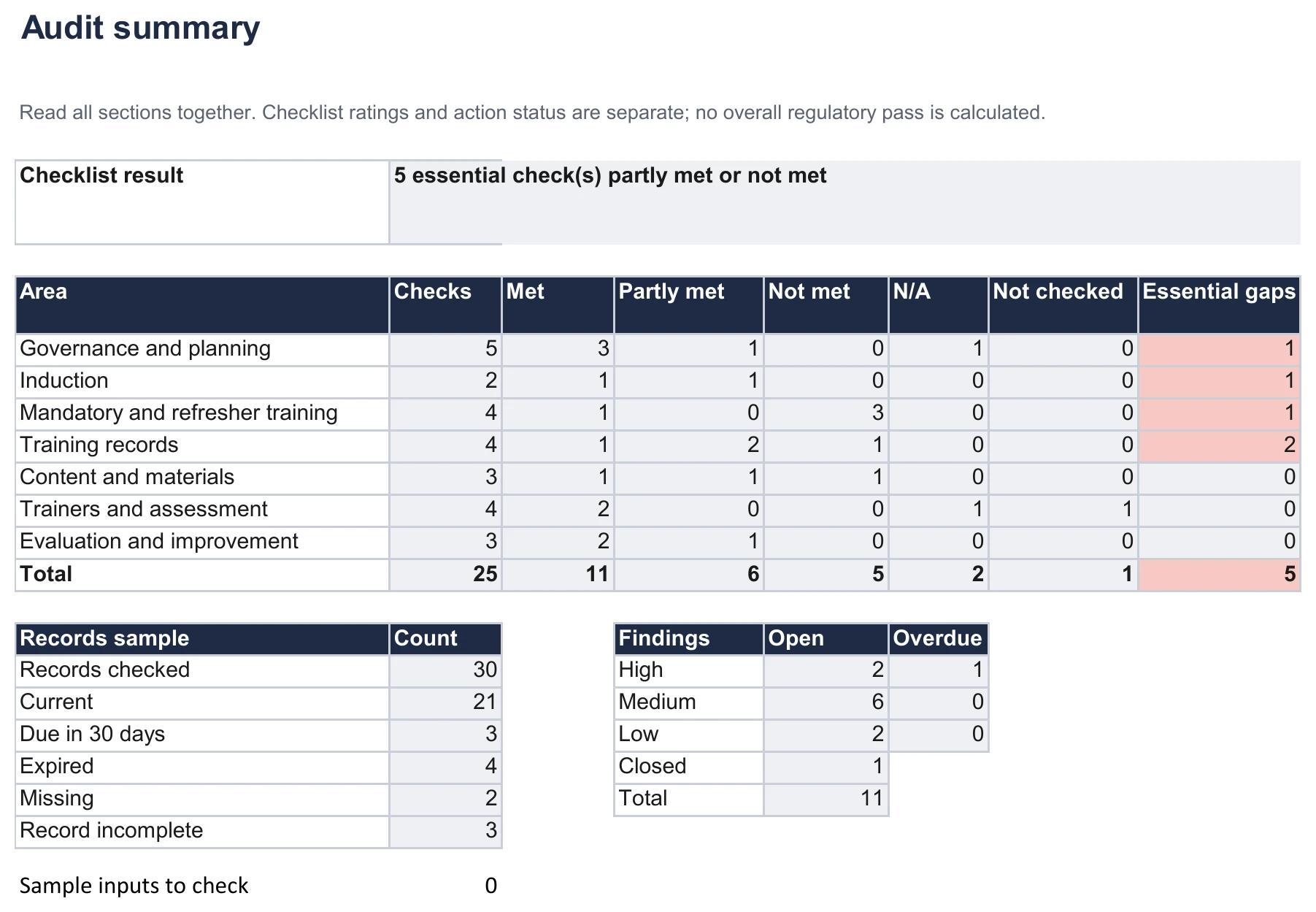
The completed example follows a fictional home care provider in England with two branches and 140 care staff. Its audit identifies five essential checks that are partly met or not met. In a sample of 30 training records, four have expired and two are missing. We'll follow those findings through to the actions the provider needs to take.
The workbook calculates record expiry dates and summarises your checklist ratings and findings. You decide which requirements apply and what the evidence supports.
Get the blank Excel workbook, a completed Excel example or a PDF of the example. The example includes the home care audit and three adaptation sheets. No email or account required.
Open the audit summary at full size
What a training audit is
A training audit compares what should happen with what actually happens. The requirements might come from a regulator, a contract, a professional standard or your own policy. The auditor gathers evidence, records where requirements are not met and agrees what needs to change.
For example, a policy may require a new care worker to be observed before making visits alone. A course completion record tells you they finished the course. An observation record tells you whether someone checked their work. The rota then shows whether lone visits started before or after that check. Reading the three together gives you a better answer than any one record.
What a training audit checks
| Area | What it checks | Example from the home care provider |
|---|---|---|
| Governance and planning | Who owns training, the list of required training for each role, and whether it matches the law and your contracts | The new senior carer role had no list of required training |
| Induction | New starters trained, and supervised until they are assessed as competent | 2 of 6 new starters did lone visits before a recorded sign-off |
| Mandatory and refresher training | Required training is current, with task restrictions applied where required | 4 of 30 sampled records had expired |
| Training records | Records identify the person, training, date, result and assessor where required; leaver records follow retention rules | 3 sign-offs had no assessor name |
| Content and materials | Material matches the current procedure, and you can show which version someone took | Course files carried no version or date |
| Trainers and assessment | Trainers meet the requirements for their work; assessment checks the skills the role needs | Medication rounds are observed and signed off |
| Evaluation and improvement | Training is checked for its effect on the job, and last year's findings are closed | All 4 findings from 2025 were closed |
A training matrix lists the training required for each role. A skills matrix records the abilities people need or already have. Use a skills matrix to identify those abilities, then check that your training requirements reflect them. The audit needs a clear requirement to compare each record against.
Types of training audit
| Type | Checked against | Who runs it | When |
|---|---|---|---|
| Internal compliance audit | Your regulator's rules, your contracts and your own policy | Your quality, HR or training lead | At intervals set by your requirements and risk, and after relevant changes |
| Pre-inspection check | What a specific regulator will test | Your team, sometimes with a consultant | Before an expected inspection |
| Certification audit preparation | A standard such as ISO 9001 or ISO 45001 | Your internal auditor | Before the certification body's audit |
| Programme quality review | Whether courses are current, well designed and effective | Learning and development team or course owners | When a programme is reviewed |
| Records audit | Whether records meet the applicable evidence and retention requirements | Training administrator | Before any of the above |
In our fictional example, the provider chooses to run its internal audit each October. It checks the regulator's requirements, its training policy and two council contracts. That annual timetable is an example, not a rule for every organisation.
Training audit, audit training, needs analysis or evaluation?
A training audit checks the training system. The following activities have different purposes, even when they use some of the same evidence.
| Term | The question it answers | What it produces |
|---|---|---|
| Training audit | Is our training what we are required to provide, and can we prove it? | Findings with owners and due dates |
| Audit training | How do we train people to become auditors? | A course for auditors |
| Training needs analysis | What should people be trained on, and is training the fix? | Training priorities and non-training actions |
| Training evaluation | Did a programme change how people work? | Evidence of results |
If you need to work out what training people need, use a training needs analysis. If you want to know whether a programme worked, evaluate its effectiveness. An audit draws on both, but it answers a different question.
Why essential checks are kept separate
A current training policy and positive course feedback cannot cancel out an unmet requirement for safe medication handling. Record that gap separately so it remains visible when you summarise the audit.
The workbook's Essential column lets you identify these checks. A Partly met or Not met rating on an essential check appears separately in the summary. In this example, 11 of 25 checks are met, but five essential checks still need attention. This is a checklist result, not a regulator's decision or an overall audit pass.
Checklist ratings and action status are separate. Finding F2 is closed in the example, but the checklist retains the original Partly met rating for induction. After checking the new evidence, the reviewer can update that rating and record the review date. Entering a closure date alone does not change it.
When this workbook is the wrong tool
- Signing off one person's training: use a training checklist for that person and that task.
- Hundreds of staff and a live record of every certificate: a tracking system does that better than a sample. See the options in this guide to training tracking software.
- Certification or regulatory approval needs the relevant body's own assessment. This workbook can support preparation; it cannot grant approval.
How to run a training audit
The example provider delivers care in people's homes. Its quality lead checks training for care workers, senior carers and care coordinators across both branches. The Care Quality Commission (CQC), which regulates health and social care services in England, supplies one part of the criteria. The provider's own policies and contracts supply the rest.
Step 1: Decide what you are auditing against
Write down the rules you are checking against before you look at any evidence. For the home care provider, that's three things: the regulator's rules, its own training policy and two council contracts.
CQC Regulation 18 requires staff to receive the training and support necessary for their work. Its guidance also calls for appropriate supervision until staff can demonstrate competence. The example turns that requirement into check I2: are new starters supervised until they are signed off for lone visits?
Next, set the scope: the sites, roles, courses and period you will review, plus any exclusions. This audit covers 1 October 2025 to 30 September 2026 and checks current records and action status as at 19 October 2026. Office staff and the training budget are outside its scope. The example refresher intervals and deadlines come from its fictional policy, not from CQC's guidance.
Step 2: Choose a records sample
A completion percentage can help you decide where to look. To understand a gap, follow selected people through the underlying records: what training was required, what they completed and what evidence remains.
The provider selects 10 current staff across the branches and roles, with three required courses each: 30 training records. It separately checks retention for five people who have left. New starters help it test induction; leavers help it test whether records remain available. Choose a sample that covers your risks, record why you chose it and expand it if the findings suggest a wider problem. This sample size does not establish the position of all 140 staff.
Step 3: Work through the checklist with evidence
For each of the 25 checks, look at the evidence and choose a result:
- Met: the evidence supports the requirement.
- Partly met: only part of the requirement is met, or it is met for some of the people checked.
- Not met: the evidence shows a failure, or required evidence cannot be produced.
- Not checked: the review has not been completed. Don't use Not met just because you haven't looked yet.
- N/A: the check does not apply. Record the reason so another reviewer can understand the exclusion.
Use documents, interviews and observation together where relevant. A manager can explain how the induction process works; the sign-offs and rota let you check that account. Write enough detail for someone else to follow your conclusion, such as: 'Two of six new starters made lone visits before the sign-off date; induction records and September rota checked.'
Four of the six new starters had been signed off before lone visits; two had not. The provider records Partly met for the induction check. Because it has marked this check as essential, that partly met check also appears in the essential-gap count.
Step 4: Test the records
Enter each person's required training, completion date and refresher interval from your applicable rules or policy. The workbook calculates currency against the audit date. Enter 0 only when no scheduled renewal applies; leaving the interval blank prompts Check interval. Neither Current nor a completed certificate establishes competence on its own.
The records sample as at 19 October 2026
Example: Fictional England home care provider: 30 training records for 10 current staff.
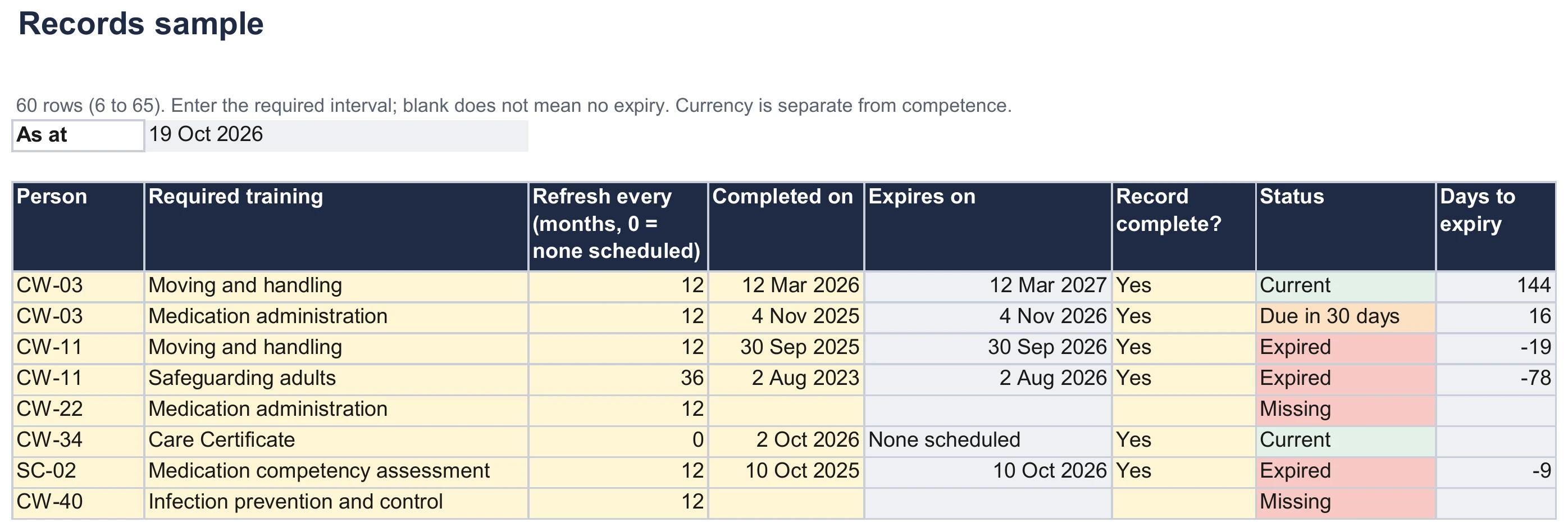
- 1. Expired: CW-11's safeguarding training ran on a 36-month cycle and expired on 2 August, 78 days before the audit.
- 2. Missing: CW-22 has no medication training record. The example's evidence notes that they were kept off medication rounds.
- 3. Due in 30 days: Three records are due for renewal within 30 days. Arrange the required refresher before expiry.
- 4. No scheduled renewal: The example uses 0 for the Care Certificate to show no scheduled renewal. It still checks competence separately.
Open the records preview at full size
Across all 30 records, 21 are current, three are due within 30 days, four have expired and two are missing. Counting completion alone would show 28 of 30 done while concealing the four expired records. Separately, three records are marked incomplete. A record can have a current date and still lack an assessor's name, so that count overlaps with the currency results.
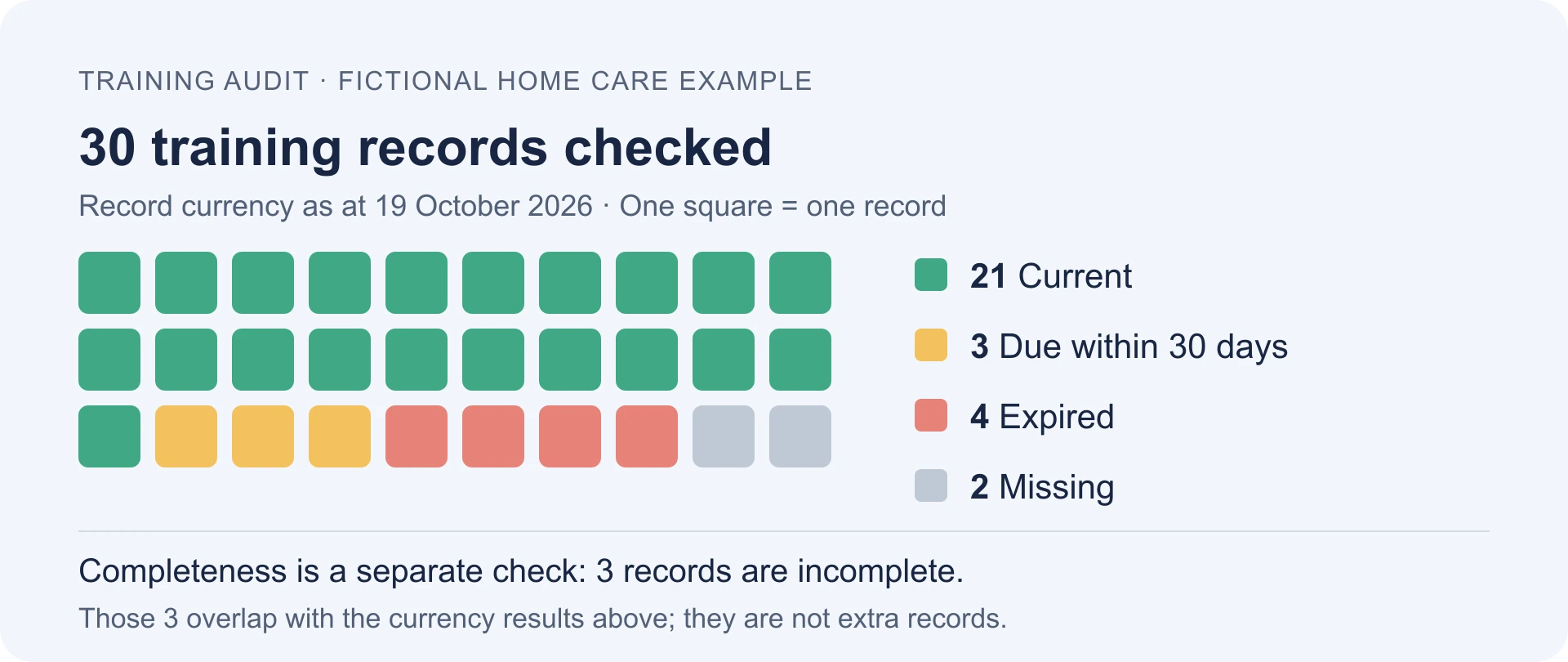
Open the records summary graphic at full size
Before removing a learner or closing an account, check how the system treats their history. Export the required records and verify that you can open and reconcile them. End access without losing evidence you must retain, then apply your retention and deletion rules.
In one support case, a training provider removed learners after they finished to end their access. Their history then disappeared from the reports the provider needed for an audit. That is a reason to test the leaver process, rather than assume a saved completion total will remain available.
Check the learner and certificate reports available on your plan against the evidence you need. Before changing enrolments or archiving accounts, verify what will remain in reports and keep the required exports. Use the workbook to check refresher dates against your policy; it does not import Coursebox data or send reminders.
Step 5: Record the findings and agree actions
Link each Partly met or Not met check to a finding. A finding says which requirement was not met, what evidence supports that conclusion and who will act. The following severity labels are suggested internal priorities; judge the actual risk and any required response time.
| Severity | Meaning | Example |
|---|---|---|
| High | A serious risk or unmet requirement needing urgent attention | No retraining records after the July medication policy change |
| Medium | A weakness needing a planned response, with urgency assessed from its consequences | 3 sign-offs with no assessor name |
| Low | A lower-risk improvement in this example | Missing version dates where current content can still be verified |
Investigate why the problem occurred before choosing the action. Finding F1 covers six expired or missing training records affecting five people. The provider needs to verify the missing evidence, arrange training where needed and apply its task restrictions. Its longer-term action is a monthly expiry check with a named owner. Rebooking training alone would leave the missing checking process unchanged.
The findings register as at 19 October 2026
Example: Fictional home care audit: 11 findings covering the gaps in the checklist.
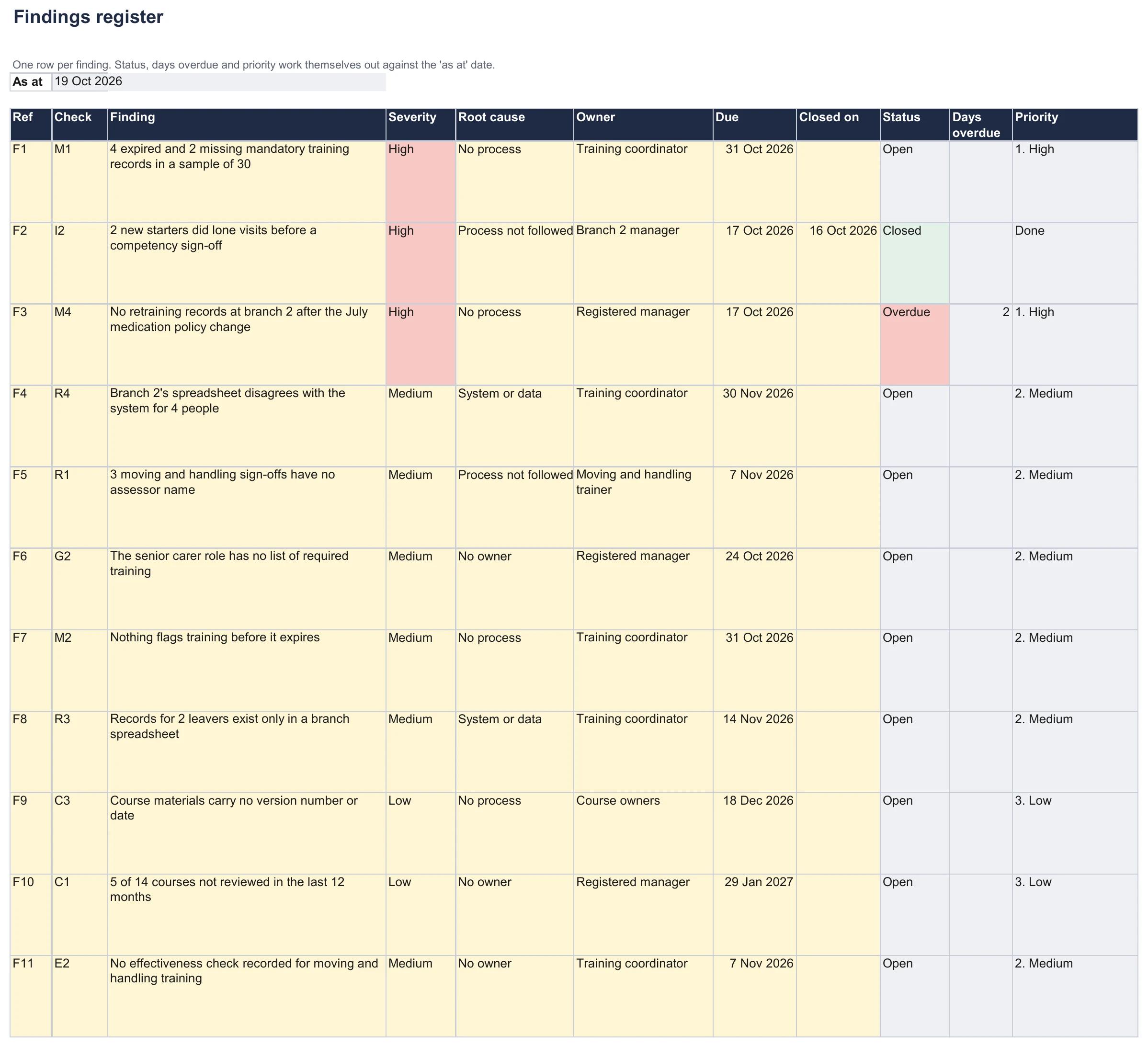
- 1. Overdue: F3, retraining branch 2 on the July medication policy, was due on 17 October and is 2 days late.
- 2. Closed: F2, the lone visits before sign-off, was fixed the day before its due date.
- 3. Priority: High, Medium and Low sort the findings by severity. Set each due date from its risk and requirements; the labels do not prescribe a fixed deadline.
Open the findings preview at full size
Step 6: Report, then follow up
The Audit summary brings together the checklist, record sample and findings. This example shows five essential checks partly met or not met, 10 open findings and one closed finding. Two open findings are high severity, and one of those is overdue. The counts answer different questions; none is an overall compliance score.
Give the summary and findings register to the manager responsible for training. Agree any immediate controls for serious risks, then check actions by their due dates. To close a finding, record the evidence that the action worked, not just that someone completed a task. Recheck affected checklist ratings separately.
Training audit samples for other situations
In the 180 days to 19 October 2026, at least 16 people asked our AI course builder for training to prepare for an audit, inspection or accreditation. Their requests included ISO 9001 certification, ASQA, the Joint Commission and workplace safety inspections. The examples below show three ways to adapt the checklist; they are not complete audit programmes.
Each adaptation has its own tab in the completed Excel file and a page in the example PDF. Replace the generic checks with the requirements that apply to your organisation.
An RTO before an ASQA audit
A registered training organisation (RTO) is an Australian provider registered to deliver nationally recognised vocational training. For an ASQA-regulated RTO, start with the 2025 Standards for RTOs and the requirements of each qualification or unit. ASQA's assessment guidance covers the quality of evidence and validation of assessment, not just record completion.
| What the auditor tests | Evidence to have ready | Checklist ref |
|---|---|---|
| Assessment evidence is valid, sufficient, authentic and current | Marked assessments, with proof the work is the learner's own and when it was done | T4 |
| Assessment tools cover what each unit requires | The mapping document for each unit, with the date it was last checked | C2 |
| Trainers and assessors hold the required credentials and current industry skills | Trainer files: credentials, industry experience and recent professional development | T1 |
| Assessment practice and judgements are validated | Validation schedule, and what each validation checked and changed | Adapt C1 for assessment validation |
| Learner records are complete and match the student management system | Enrolments, results and certificates, reconciled with the system | R1, R4 |
Authenticity means being able to establish that the submitted work is the learner's own. An RTO support case raised this problem with workbooks completed online before class. Early access to a workbook does not, by itself, prove a breach; the assessment process still needs evidence supporting the judgement. Also adapt C1 specifically for assessment validation: reviewing course content once a year is a different activity.
HITsa: keeping enrolments and results consistent
HITsa, an Australian vocational training provider, used Coursebox alongside its JobReady student management system. Its team had been reconciling records between the two systems manually.
A custom integration now synchronises enrolments, outcomes and learner access. If your records also sit in two systems, identify which system holds the authoritative record and check that transfers preserve the details you need.
An ISO 9001 certification audit
ISO 9001 is the quality management standard. ISO 9001:2026 is now published; confirm the edition and transition requirements with your certification body. This adaptation uses the ISO/IAF guidance on competence under the 2015 edition as its starting point. It is a set of example evidence checks, not a complete checklist for the new edition.
| What the auditor tests | Evidence to have ready | Checklist ref |
|---|---|---|
| The competence needed for each role is defined | Role descriptions or the training matrix | G2 |
| People are competent through education, training or experience | Training records, qualifications and practical sign-offs | R1, T2 |
| Gaps are closed and the action is checked for effect | Training plans and a check after training, such as fewer errors | E2 |
| Documented information is kept as evidence of competence | Evidence of competence retained under applicable requirements and documented retention rules | R3 |
| People understand their role in the quality system; check the awareness requirements of your edition | Interviews and work examples, supported by relevant induction records | I1 |
Attendance shows that someone was present. To evaluate whether an action addressed a competence gap, choose evidence suited to the task: an observation, a work sample or a review of errors. Record what was checked and what the result means for the person's work.
A workplace safety inspection
For a safety inspection, choose checks from the laws, task requirements and procedures that apply to the site. An ISO 45001 certification audit has its own criteria; it is not interchangeable with a regulator's inspection. The table illustrates the evidence you might organise, rather than prescribing licences or renewal periods.
| What the inspector tests | Evidence to have ready | Checklist ref |
|---|---|---|
| Workers were trained before doing hazardous tasks | Induction and task sign-offs dated before the first task | I2 |
| Required licences, authorisations and refresher training are current | Task- and jurisdiction-specific evidence; completion alone may not authorise the work | M1 |
| Training covers the current procedure and equipment | Compare procedure and course versions; check training after changes that affect the task | M4, C2 |
| Records include the information required for the task and jurisdiction | Trainer, learner, result, dates and any required official record format | R1, T1 |
| Contractors meet the requirements for the work they perform | Contractor induction records (add a row for this check) | New row |
Check the order of events as well as expiry dates. If a worker needed a licence, authorisation or practical sign-off before operating equipment, establish that it was in place before the work began. A certificate obtained later does not explain how the earlier work was controlled.
What your training audit report should include
Keep it short enough that the person who owns the fixes will read it.
- Scope: what you audited against, the period, and what was in and out.
- Checklist result: essential gaps and unfinished checks, with the requirements and evidence behind them.
- Results by area: the Audit summary table.
- Records sample: who and what you selected, the currency and completeness results, and the limits of the sample.
- Findings: each one with its severity, owner and due date, high severity first.
- Process changes: what will address the cause, such as checking sign-offs before assigning lone visits and reviewing expiry dates each month.
- Follow-up: immediate controls, action deadlines and the evidence needed to close each finding.
When the workbook is not enough
- A sample workbook supports an audit at a point in time. Managing training for the whole workforce needs an ongoing record and someone responsible for checking it. Compare reporting and renewal features in this guide to compliance training software.
- To schedule the refreshers the audit finds due, put them in a training calendar.
- For evidence of changes in performance, choose relevant training measures such as task errors or observed performance.
The workbook is version 1.1 (20 October 2026), checked in Microsoft Excel on Windows. It supports 25 starting checks plus eight extra rows, 60 record rows and 40 findings. Use the supplied areas for extra checks; adding rows beyond those ranges requires updating the formulas and validation. It does not import records or send reminders.
Running your next training audit
Start with the requirements, follow the evidence and make the next action clear. Before the next review, check that the action addressed the cause and that the evidence is still available. If you need to record completions, quiz results and certificates as people train, explore Coursebox's compliance training software.
Frequently Asked Questions
A training audit compares your organisation's training with applicable requirements. It uses records, interviews and observation to identify gaps in training, competence or evidence, then records actions and follow-up.
Include the requirements for each role, induction, required refresher training, records, course materials, trainers, assessment and effectiveness. For each check, record its evidence, rating and any linked finding. Adapt the supplied checks to your organisation.
Confirm what each record must contain, including the person, training, date, result and assessor where required. Reconcile records with the people and courses in scope, check renewal dates and verify how leaver records are retained under your applicable rules.
Set the timetable from applicable requirements, risk and the findings of earlier reviews. An annual internal audit is one option, not a universal rule. Review relevant changes and urgent findings sooner, and monitor expiry dates between audits.
Choose someone who understands the requirements and can evaluate the evidence objectively. A quality lead, a suitably experienced colleague from another team or an external auditor may be appropriate. Use an independent reviewer where the applicable rules require it, and manage conflicts when people review their own work.
Carolina Martin
Carolina is a highly experienced learning designer with tech start-up experience. She is based in Sydney and previously designed courses alongside Coursebox founder Travis in a previous job. She is passionate about delivering engaging learning experiences and brings the same perspective to customer experience too. She manages our customer support documentation and product testing processes.

