

Sample Training Agenda Template (Free Excel and PDF)
A free sample training agenda template and format in Excel and PDF, with a completed half-day example and how to time it for your group.

A training agenda is a timed plan for a training session. It lists the activities in order, how long each takes and who leads them.
- The free Excel download includes a blank agenda and six completed samples. It calculates start and end times and flags an overrun.
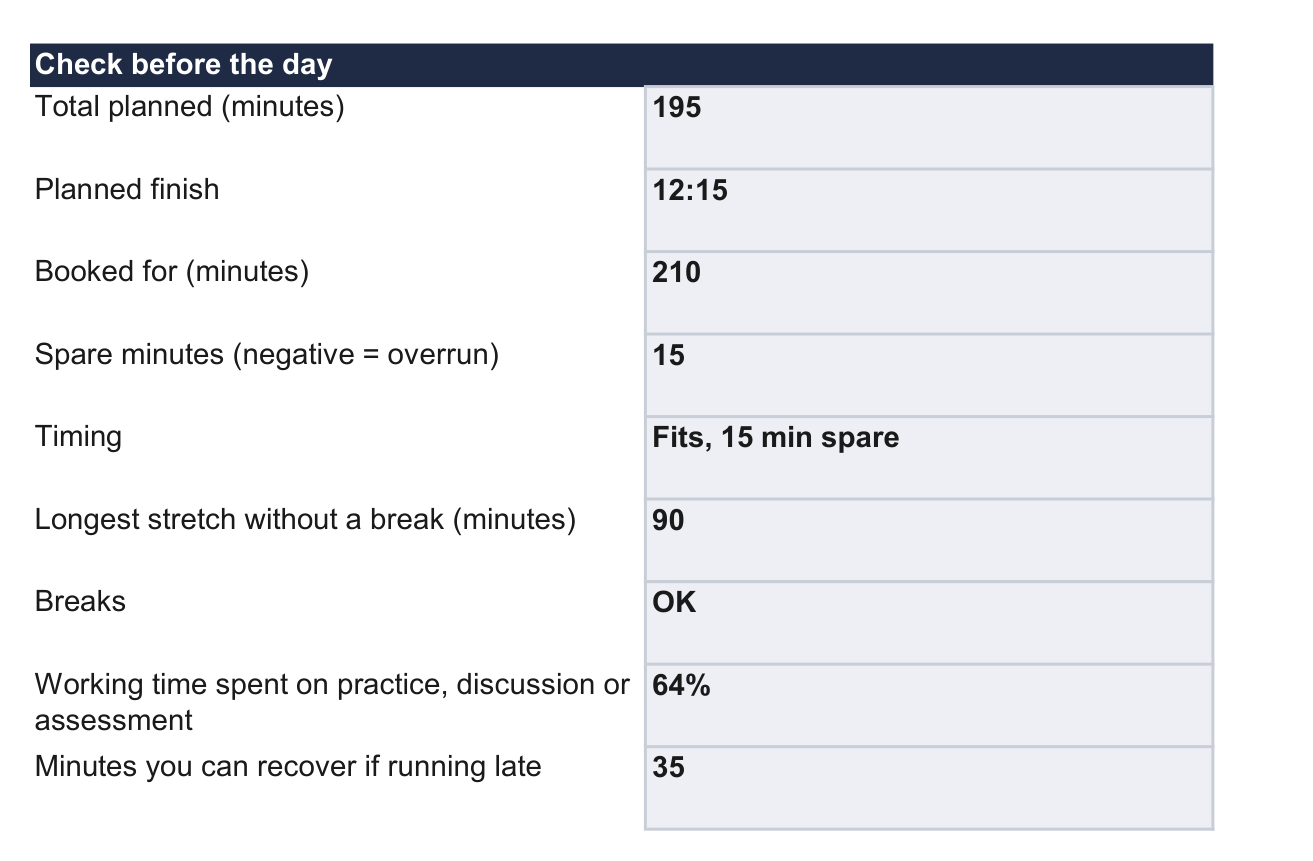
- Include setup and every participant’s turn when timing practice. In the sample, three 10-minute rotations plus five minutes of setup take 35 minutes.
- Decide which activities you can shorten before the session. The worked example shows how to recover lost time without shortening the final skill check.

Train teams faster and more effectively with AI
A training agenda is a timed plan for a training session. It lists the activities in order, how long each takes and who leads them. Below is a complete sample you can copy, five more for other kinds of session, and a free Excel template that works out the times for you.
I'm an instructional designer at Coursebox, where we make employee training software, and I test every release of our product.
If you've run a training session, you'll know how quickly the timings can change. Someone asks a question you need to answer, or an exercise takes longer than you allowed. An agenda helps you decide what to shorten while keeping time for participants to practise.
Here's a sample for a half-day workshop where 12 call-centre agents learn to handle complaint calls. The session is planned for 09:00 to 12:15, with the room booked until 12:30. You'll need cards describing example complaints, a checklist for each person watching a practice call, and a flip chart. Send the 15-minute online module on the complaints policy the day before.
| Start | Minutes | Block | What happens | Say or ask |
|---|---|---|---|---|
| 09:00 | 10 | Welcome | Goal for the morning, the plan, phones away | "By midday, each of you will handle a complaint call from start to finish." |
| 09:10 | 15 | Warm-up | Pairs share their hardest complaint call | "What made that call hard?" |
| 09:25 | 20 | Teach | The four steps: acknowledge, clarify, resolve, confirm | "Which step do you skip when the queue is long?" |
| 09:45 | 10 | Demonstrate | The coach plays the caller and the team leader plays the agent | "Tick each step on your checklist when you hear it." |
| 09:55 | 35 | Practice | Groups of three take turns as the agent, customer and person checking the call | "Observers: one thing that worked, one thing to change." |
| 10:30 | 15 | Break | Morning tea | "Back at 10:45." |
| 10:45 | 15 | Group feedback | Phrases that calmed callers go on the flip chart | "What did the caller say just before they calmed down?" |
| 11:00 | 10 | Teach | When agents can approve a refund and when they must pass the complaint to someone else | "Would you pass this complaint to the team leader? Why?" |
| 11:10 | 30 | Practice | Harder calls, including a complaint that must be passed to someone else | "Use a phrase from the flip chart in every call." |
| 11:40 | 20 | Final check | Each agent handles one final practice call | "Use the checklist to check each step of the call." |
| 12:00 | 15 | Wrap-up | One commitment each, then a two-question feedback form | "What will you do on your next complaint call?" |
The session finishes at 12:15, leaving 15 minutes before the room booking ends.
For the final practice, participants work in four groups of three. One plays the customer, one handles the complaint and one uses the checklist to check how they did. They swap roles so everyone handles a call.
Allow six minutes per turn, including feedback and swapping roles, plus two minutes to get started and finish. The coach listens to part of a call in each group. Participants use the checklist for every call.
Download the blank template to plan your own session. The example file has the half-day agenda above and the five samples below, one per tab, plus a PDF you can print.
What makes the sample work
- The final check comes after practice. Every block before 11:40 prepares people for the final practice call.
- The demo comes right before practice. Participants try the demonstrated steps in the next activity, using the same checklist.
- Practice gets the most time. Four groups of three need three 10-minute turns each, plus 5 minutes to set up: 35 minutes.
- Feedback comes between attempts. The group feedback sits between the two practice rounds, so people use it straight away.
- Reading happens before the day. The policy is in a 15-minute online module, so the teaching block stays at 20 minutes.
Sample agendas for other sessions
These samples are built from the sessions people most often ask Coursebox to build. In the 180 days to 13 October 2026, 337 people described a live or blended workplace session in their first request to our AI course builder. The most common topics were leadership and management, communication and people skills, using AI at work, workplace safety and compliance.
We created these sample agendas around those topics; they aren't records of customer sessions.
Choose the sample that fits your session, then adjust the activities and timings for your group.
60-minute session: using an AI assistant for one task
For one everyday task, such as drafting a reply to a customer with your company's AI assistant.
| Start | Minutes | Block | Purpose |
|---|---|---|---|
| 10:00 | 5 | Welcome | The task, and what a good result looks like |
| 10:05 | 10 | Demonstrate | Write one prompt live, then check the output against the source |
| 10:15 | 25 | Practice | Everyone does the task on their own real work |
| 10:40 | 10 | Review | Compare outputs and point out the errors the AI made |
| 10:50 | 10 | Check and close | Each person shows one checked result; agree what must never be pasted in |
Have people practise on their own real work, and make checking the output part of the task. A reply drafted by AI still needs someone to catch the wrong price or the invented policy before it goes out.
Full-day workshop
For new team leaders learning to give feedback and coach their team, with eight people and two facilitators.
| Start | Minutes | Block | Purpose |
|---|---|---|---|
| 09:00 | 15 | Welcome | Goals for the day and the plan |
| 09:15 | 30 | Teach and demonstrate | Giving feedback on one specific behaviour |
| 09:45 | 45 | Practice | Pairs give each other feedback on prepared situations |
| 10:30 | 15 | Break | Morning tea |
| 10:45 | 15 | Group feedback | What made feedback land, and what made people defensive |
| 11:00 | 30 | Teach and demonstrate | Running a coaching conversation with questions, not answers |
| 11:30 | 45 | Practice | Pairs run short coaching conversations |
| 12:15 | 45 | Break | Lunch |
| 13:00 | 75 | Practice | Practise complete conversations that combine feedback and coaching |
| 14:15 | 15 | Break | Afternoon tea |
| 14:30 | 60 | Final check | Each leader practises a 10-minute conversation with a facilitator playing the team member |
| 15:30 | 30 | Wrap-up | Feedback and a plan for each leader's first conversation with a team member |
The morning gives leaders separate practice in feedback and coaching. In the afternoon, they use both in a conversation with a team member. With two facilitators, the final checks run in two groups of four. Each leader has a 10-minute turn, leaving 20 minutes per group for feedback and changing places.
Site safety induction: a new worker's first morning
For a new operator's first morning on site.
| Start | Minutes | Block | Purpose |
|---|---|---|---|
| 07:00 | 15 | Welcome | Introductions, the plan and the emergency assembly point |
| 07:15 | 30 | Hazards | Walk the site and stop at each main hazard |
| 07:45 | 30 | PPE and permits | Fit personal protective equipment (PPE) and explain how permission to carry out a task is issued |
| 08:15 | 15 | Break | Morning tea |
| 08:30 | 45 | Shadowing | Watch an experienced operator do a task under a permit |
| 09:15 | 30 | First try | Try an approved part of the task under the operator's supervision |
| 09:45 | 15 | Close | Questions, who to ask on site, and the plan for day two |
Don't try to cover every procedure in the first morning. Lloyds Metals & Energy, which is training new operators for an iron ore plant in India, turns each procedure into smaller courses and delivers them in stages. These courses sit alongside three days of on-site behavioural safety training. Mark Jones, their production manager, describes the approach: "Let's get stage 1 delivered. The team understands it. We talk about it."
90-minute virtual session: handling difficult conversations
For training on Teams or Zoom.
| Start | Minutes | Block | Purpose |
|---|---|---|---|
| 10:00 | 10 | Welcome | Audio and camera check, then the plan |
| 10:10 | 15 | Teach | Opening a difficult conversation: name the issue, listen, agree a next step |
| 10:25 | 10 | Demonstrate | Two facilitators role-play a conversation on screen |
| 10:35 | 25 | Practice | Breakout rooms in pairs; each person opens one conversation |
| 11:00 | 10 | Group feedback | Back in the main room |
| 11:10 | 10 | Check | Each person writes the opening line for a real conversation they need to have |
| 11:20 | 5 | Wrap-up | One commitment each in the chat |
The 25-minute practice block includes five minutes for opening the small-group video rooms, moving participants in and bringing them back. That leaves each person ten minutes to practise. Adjust this allowance if your group needs longer.
60-minute data protection refresher
For an annual update on handling personal information.
| Start | Minutes | Block | Purpose |
|---|---|---|---|
| 14:00 | 5 | Welcome | What has changed since last year |
| 14:05 | 15 | Scenarios | Pairs discuss three real situations, such as a customer asking what data you hold |
| 14:20 | 15 | Rules | Walk through the rules that apply to each situation |
| 14:35 | 15 | Quiz | Scenario questions, answered alone |
| 14:50 | 10 | Close | Questions, and who to contact if data goes to the wrong person |
Keep each person's quiz answers as your training record. The answers show how they handled the example situations; an attendance list only records who was there. Check the scenarios against your current policy with your privacy or compliance team before the session.
How to build your own
Choose the sample closest to what participants need to do, then adjust it for your group. In the complaint-call workshop, four groups practise at the same time. With equipment training, people may have to wait for a turn on one machine, so allow enough time for everyone to use it. Experienced staff may need less demonstration and more time on difficult cases. After changing the activities, check that the session still fits the booking.
- Write down the task people must be able to do by the end, and put it near the end.
- Work backwards: show the task, let people practise, give feedback, then let them practise again.
- Time practice from the activity: count the turns, time one turn, then add set-up time.
- Put a break at least every 90 minutes. This is a rule of thumb, so use a shorter gap on screen.
- Leave time for questions or delays. The half-day sample keeps 15 minutes spare.
- Decide which blocks you could shorten if you run late, while keeping time for the final check.
- Move reading into short pre-work before the day.
How short should pre-work be? When people building a course with Coursebox say how long it should be, the most common answer is 15 minutes or less.
These are self-paced courses, not live sessions, so the figure doesn't tell you how long a workshop should run.
OPTVSN Journey uses short modules between live sessions across an 8-session bootcamp, with quizzes set to a 100% pass mark, so the live hours can go on harder problems.
When I built the sample's pre-work in Coursebox, the course left out the quiz from its own outline. I added it with the AI quiz writer and checked the answers against the policy.
The lessons also missed the credit limit and rules for recording and closing the call. One assignment told agents to pass on a complaint for a reason the policy didn't allow. Those sections still needed editing before the module could be sent.
If you run late
Say the first practice round runs 20 minutes over. The session would finish at 12:35, five minutes after the room booking ends. Shorten the group feedback by five minutes and you finish at 12:30, keeping the full time for the final practice calls.
| Block | As planned | Running 20 minutes late |
|---|---|---|
| Morning tea | 10:30 to 10:45 | 10:50 to 11:05 |
| Group feedback | 10:45 to 11:00 | 11:05 to 11:15 (5 minutes cut) |
| Teach | 11:00 to 11:10 | 11:15 to 11:25 |
| Practice | 11:10 to 11:40 | 11:25 to 11:55 |
| Final check | 11:40 to 12:00 | 11:55 to 12:15 |
| Wrap-up | 12:00 to 12:15 | 12:15 to 12:30 |
Choose what to shorten before the session starts. In this example, taking five minutes from group feedback keeps the final practice calls and wrap-up in place.
In the template, enter what each block could lose in the "Can cut if late" column. It adds them up, so you know before the day how far behind you can fall.
What to send participants
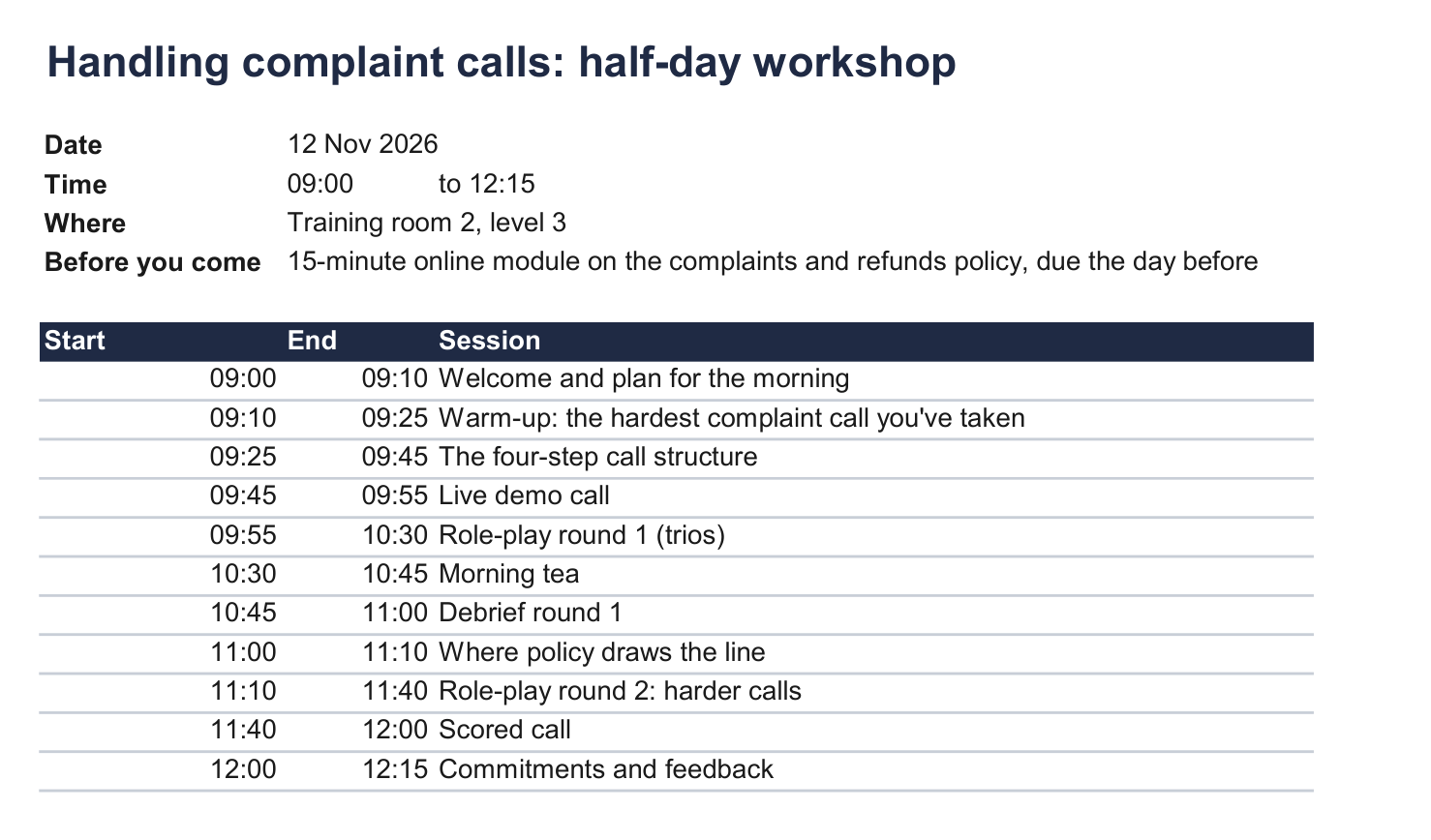
Send the start time, the finish time, the breaks and the pre-work. Leave out your notes and cut plan. The template's Participant copy tab does this for you, and you can send it with this email.
Copy it, fill in the brackets and attach the participant copy.
Subject: [SESSION TITLE] on [DATE]

Hi [FIRST NAME],

You're booked into [SESSION TITLE] on [DATE], from [START TIME] to [FINISH TIME], at [LOCATION].

Before you come, please complete [PRE-WORK]. We'll build on it from the first block, so please don't leave it until the morning.

By the end of the session, you'll be able to [OBJECTIVE]. The agenda is attached.

If you can't make it, please let me know by [REPLY DATE].

Thanks,
[YOUR NAME]
- [FIRST NAME]
- : the participant's first name (for example, Priya)
- [SESSION TITLE]
- : the session title from the agenda (for example, Handling complaint calls)
- [DATE]
- : the session date (for example, Thursday 12 November)
- [START TIME]
- : when the session starts (for example, 09:00)
- [FINISH TIME]
- : the planned finish, not the end of the room booking (for example, 12:15)
- [LOCATION]
- : the room, or the video link (for example, Training room 2, level 3)
- [PRE-WORK]
- : what to do beforehand, and how long it takes (for example, the 15-minute online module on our complaints policy)
- [OBJECTIVE]
- : what they will be able to do by the end (for example, handle a complaint call from start to finish)
- [REPLY DATE]
- : when to tell you if they can't come (for example, Tuesday)
- [YOUR NAME]
- : your name (for example, Sam)
The participant copy for the sample workshop
Example: The half-day sample above, as sent to the 12 agents.
When an agenda isn't enough
- For a series of sessions, use a training calendar. For a whole course, use a course outline template.
- If someone else will run the session, they need a facilitator's guide with the full script.
- To find out whether it worked, see how to evaluate the effectiveness of a training programme.
The template is version 1.0 (13 Oct 2026), tested in Excel 365 on Windows.
Planning your next session
Download the template, choose the closest sample and adjust it for your group. If the session includes policy reading, you can build a short pre-work module in Coursebox and send it with the participant agenda.
Frequently Asked Questions
An agenda covers one session, minute by minute. A schedule covers many sessions across days or weeks.
Not from us. The template is in Excel, because Excel can recalculate the times when you change a block. To get a Word version, copy the table into Word once your times are final.
It should, but we haven't tested it there yet. After importing it, change one block's minutes and check that the later times move.
Long enough for everyone to practise the task and get feedback at least once. If time is short, move reading into pre-work before you cut practice.
Carolina Martin
Carolina is a highly experienced learning designer with tech start-up experience. She is based in Sydney and previously designed courses alongside Coursebox founder Travis in a previous job. She is passionate about delivering engaging learning experiences and brings the same perspective to customer experience too. She manages our customer support documentation and product testing processes.

