

Rapid Prototyping Instructional Design: Process and Examples
Rapid prototyping in instructional design: Tripp and Bichelmeyer's five steps, when to use it, real examples, its risks and two free templates.

Build one small piece of the training first and watch real learners use it before you build the rest.
- In Tripp and Bichelmeyer's 1990 model the steps overlap, so design and testing run side by side.
- Prototype evidence can refine objectives; do not lower required performance or safety standards to make a test pass.
- Small formative rounds can reveal useful problems; sample size and coverage must match the question and risk.
- Prototyping doesn't replace analysis. Its authors warned it can turn into design-by-repair.
Five prompts to guide a review of one project. This is an unvalidated editorial check, not a certification of model fit, completeness or learning effectiveness. Check each answer as well as the total.

Go from storyboard to an interactive course in minutes
Take a hypothetical sales team of 300 reps moving to a new CRM. The training team spends two months building a polished 90-minute course from the vendor's manual. In the first week of go-live, reps log deals against the wrong accounts, because two customers with similar names sit side by side in the search results. The course covered every field on the screen. Nobody had watched a rep try the real task before the course was built.
Rapid prototyping in instructional design means building a rough version of a learning experience, testing a specific uncertainty with relevant learners, and revising before the full build. Steven Tripp and Barbara Bichelmeyer described an overlapping design-and-research approach in 1990. I’m an instructional designer at Coursebox, where we make instructional design software.
What is rapid prototyping in instructional design?
Rapid prototyping is an instructional design approach in which you build a working model of the training early, put it in front of learners, and use what you observe to shape the design. It treats the first design as a guess you test.
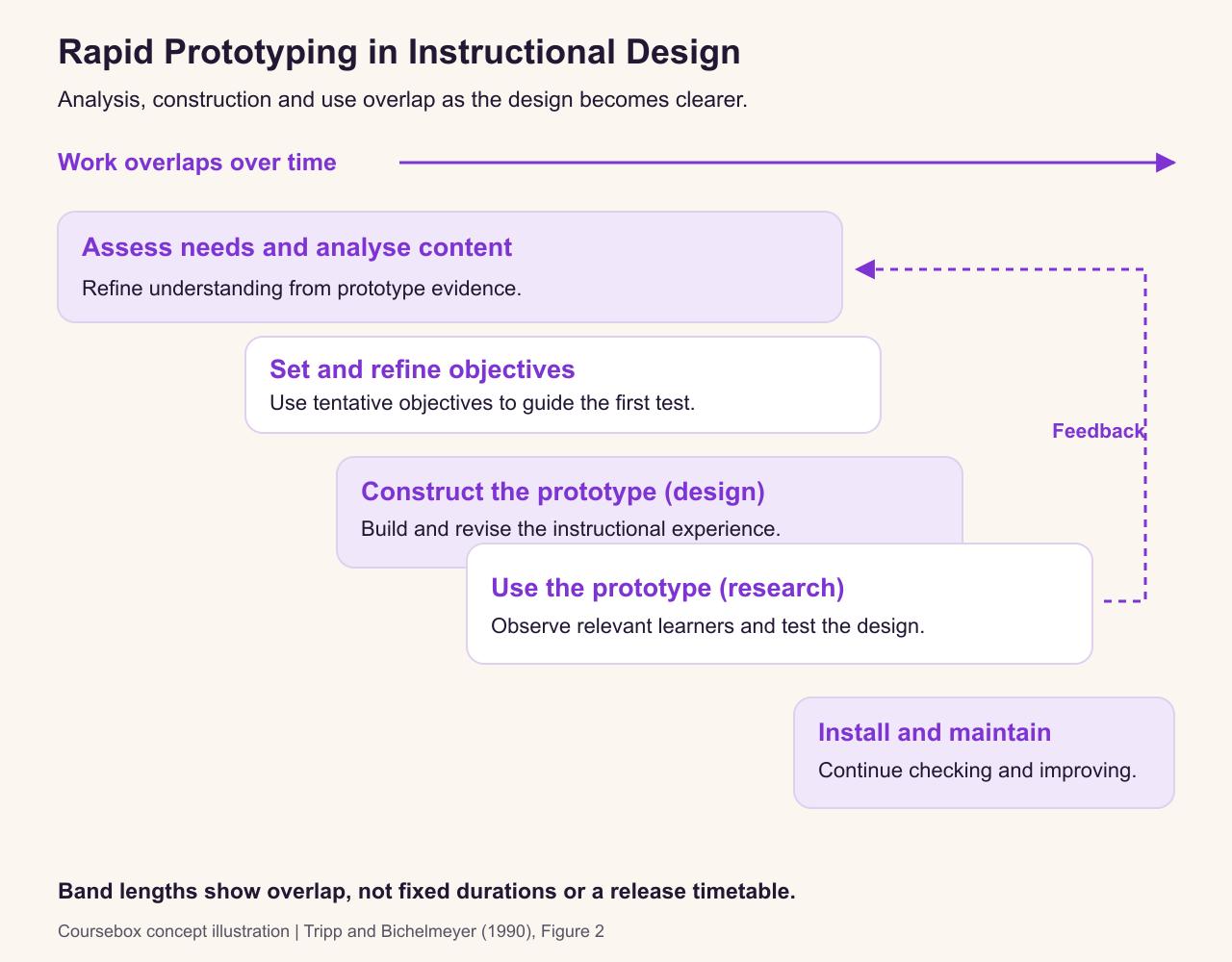
The method came to instructional design from software engineering. In their 1990 paper in Educational Technology Research and Development, Tripp and Bichelmeyer argued that instructional designers face the same problem software developers did: people cannot say what they need until they see something working. Their model assumes that "full understanding of needs, content, and objectives is a result of the design process and not an input into it."
The five steps of the Tripp and Bichelmeyer model
Tripp and Bichelmeyer drew their model as five overlapping boxes. The overlap is the point: "the various processes do not occur in a linear fashion." You go back and forth between building, testing and rethinking, with analysis continuing throughout.
The table applies those activities to a hypothetical sales team of 300 reps moving to a new CRM, the system they use to record customers and deals. Reps are choosing the wrong customer when account names look similar. We will prototype a short lesson on selecting the correct account and logging a deal from a call summary. Testing that one task early can reveal the problem before the team builds the full course.
| Step (Tripp and Bichelmeyer's label) | What you do | In the CRM example |
|---|---|---|
| Assess needs and analyze content | A short, focused look at the task, the learners and the content | Watch three reps log a deal in the new CRM; collect the vendor guide and the sales manager's must-haves |
| Set objectives | Refine the objective from evidence, keeping required performance and safety standards | "Log a new deal after a discovery call, against the right account, with all required fields" |
| Construct prototype (design) | Build a rough version of one part of the training | One 10-minute lesson on logging a deal, with one practice task and a short check |
| Utilize prototype (research) | Have learners use it while you watch and ask questions | Five reps work through it and think aloud; you note where they hesitate or go wrong |
| Install and maintain system | Build out the full training, launch it, and keep improving it | Build the remaining lessons the same way, launch, then revise from real use |

Case study: A two-week rapid development studio in New Zealand
A New Zealand university used a Rapid Development Studio to move a one-week, face-to-face course for in-service teachers online. The reported ten-working-day schedule ran from stakeholder sessions to quality assurance, involving six learning designers, two project assistants and two partner lecturers.
Developer survey respondents regarded the approach as effective. That is evidence about the team’s experience, not a measured improvement in student learning. The study was small and largely qualitative, and the approach combined several development methods.
For your own prototype, copy the useful mechanism: get the decision-makers together early, test a defined part of the learning experience, and reserve time for quality assurance. Do not copy ten days as a universal delivery target.
Assess needs and analyse content
Return to the sales course: the learner must choose the correct customer account and record a new deal in the CRM. Each activity below shows how evidence from that task can change the prototype.
Analysis still happens, but it is short and it never really stops. In the CRM example, an hour watching reps use the system shows something no manual would: the account search lists similar names side by side, and that is where errors start. The rest of the analysis happens through the prototype.
Set objectives
Tripp and Bichelmeyer call the objectives at this stage "simply the definition of a plan for instructional design". You write them so you have something to test against, and you expect to rewrite them. After the first round of testing, the CRM objective gains a condition it was missing: choosing the right account when two names are similar.
Construct prototype
Build the smallest thing that can answer your biggest question. Wilson, Jonassen and Cole describe two shapes a prototype can take: shallow, where "the entire look of a product is replicated minus some functionality", or narrow, where "a small segment is completed with all functionality". For training, narrow is usually more useful: one complete lesson, with its practice and check, tells you more than a clickable shell of the whole course.
Utilize prototype
This is the research step. In Tripp and Bichelmeyer's words, "the designer observes the learner and asks questions to discover strengths and weaknesses of the prototype." Watch what people do. Whether they liked it tells you little.
Nielsen’s five-user guidance concerns formative usability testing, not proof that a course teaches effectively. Choose participants who represent the tasks and access needs you are testing, and test distinct learner groups separately where necessary. One report can reveal a critical safety, accuracy or accessibility defect; do not postpone it only because other testers missed it. Small rounds help you find and revise problems, but cannot certify that all problems have been found.
Install and maintain system
Build out the rest when the prototype answers the agreed design question and meets its acceptance criteria. Those checks include task performance, accuracy, accessibility and any required approval. Record unresolved risks and decide who owns them. A quiet test round is not proof that the design has no defects. In my projects, the prototype usually becomes the first lesson of the final course. Continue watching and revising after launch.
Plan what one prototype round tests, who takes part and what would change the design, with a 25-minute session script, using the CRM example. Editable Word file, no email required.

Case study: Two workplace training projects
Jones and Richey’s 2000 study followed two workplace projects using rapid prototyping. Its published abstract reports concurrent design tasks, customer involvement, shorter development than expected under traditional techniques, and satisfied customers. This was a two-project developmental study, not a controlled comparison of learner outcomes. For your own project, record customer decisions and revision evidence alongside delivery time; speed alone cannot establish learning quality.
Benefits of rapid prototyping
The case for prototyping is the CRM story at the top of this guide. A problem found in a 10-minute prototype is fixed in one lesson; the same problem found at go-live sits inside a finished course.
- Problems surface before the full build. Watching three reps log a deal showed that similar account names were where errors started, before anyone built 90 minutes of training.
- Objectives are refined through evidence. Tripp and Bichelmeyer treat full understanding of needs and objectives as a result of the design process. Begin with provisional objectives, then revise them when testing shows what learners need.
- Learners shape the design. Five reps thinking aloud show where people hesitate or go wrong, something a document review cannot show.
- A usable prototype can carry into the final course. In my projects it usually becomes the first lesson; a prototype that tested the wrong approach may need to be discarded.
When to use rapid prototyping
Tripp and Bichelmeyer were specific. They recommended it for:
- cases "that involve complex factors which make prediction problematical", such as management and other soft skills;
- cases "where we have experience but lack satisfaction with results derived from conventional methods";
- "new situations where there is not an abundance of experience from which to draw", such as a new system or a new audience.
A new CRM rollout ticks the third box. A short annual compliance refresher that has worked for years ticks none of them, and a conventional build is probably fine.
They also said rapid prototyping needs tools with "modularity and plasticity": you must be able to build pieces separately and change them cheaply. In 1990 they concluded that "it is probable that only in the context of computer-based instruction is rapid prototyping a viable methodology." Modern authoring tools, and now AI course builders, give ordinary workplace training that plasticity.
Building the CRM prototype in Coursebox
On 6 October 2026 I built the sales example as a prototype in Coursebox, the course builder we make. I gave it what a designer would have after a short analysis: the five steps for logging a deal, the three mistakes reps make most often, and a tight brief. The brief asked for three pages for a 10-minute test with five reps: one page showing the steps, one interactive scenario where the rep logs a deal from a call summary, and a three-question check.
The first outline followed the brief closely: three sections, three pages and about seven minutes of learning. The steps page came first, then a practice page with a workflow diagram and a five-turn scenario called "Logging a New Deal". The check page was there, but it did not have a quiz yet.
Two short chat messages fixed that. I asked for page 3 to be a three-question quiz on the five steps. The quiz first arrived as an extra page in section 2, so I asked for it to replace the final page. The result was the prototype I had asked for: the steps, the scenario and the quiz, in about seven minutes of learning.
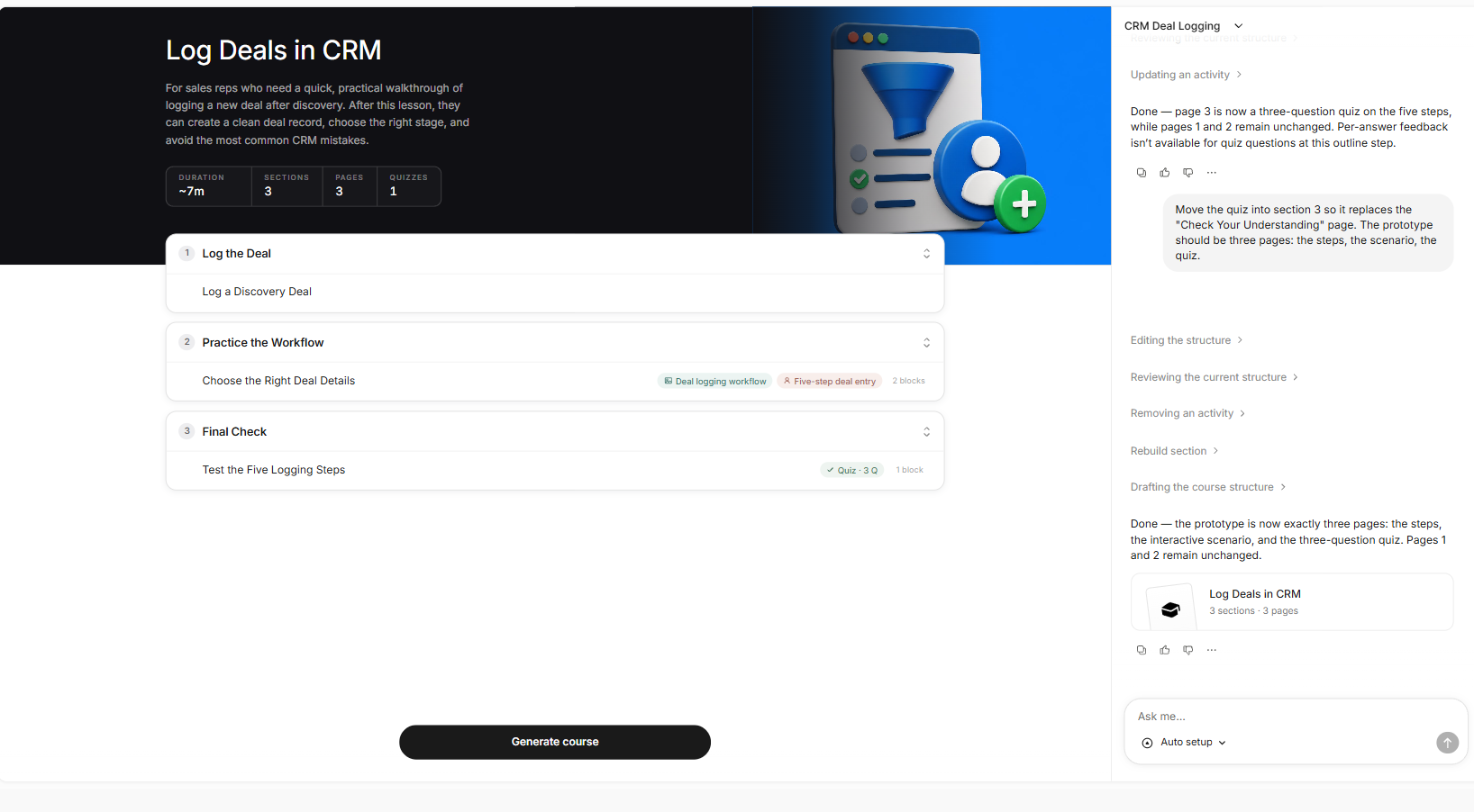
I then generated the course and opened the scenario. Its first decision tests the step reps skip most: several similar accounts appear in search, and the rep has to decide whether to search first or create a new deal. That is the realistic task the five testers need to try, built in minutes, so the session time goes on watching reps rather than building.
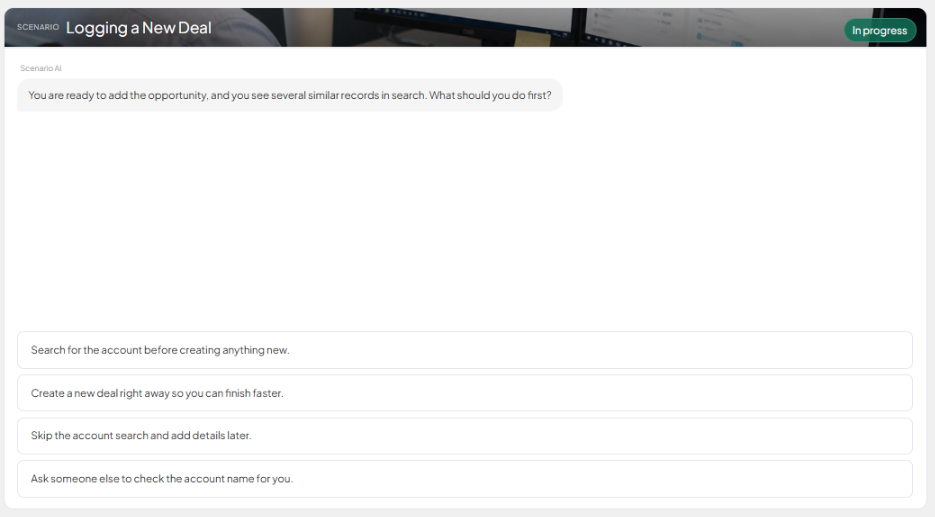
The assistant also told me that feedback for each quiz answer is added after the outline stage, in the quiz editor. That goes on my checklist before the test session, along with checking each step against the real CRM screens.
Record what each tester did, rate how serious each problem is, track the change made in each round and know when to stop and build. Editable Word file, no email required.
After the session, I log what each tester did and revise the prototype the same way: one short chat message per change, then a check of the outline against what I asked for.
Publishing speed does not tell us whether a course was prototyped, tested or effective. The practical opportunity is to make a small draft for review before investing in the whole programme. An online trade school planning a roughly 171-hour pharmacy technician programme sent our support team a course map and one sample module. We suggested building that module first, as an estimated two-hour exercise, so they could review the approach before committing to the rest. That estimate was advice for one project, not a delivery guarantee.
Rapid prototyping vs ADDIE, SAM and Agile
Rapid prototyping is a method, and it sits comfortably inside other models, from ADDIE to the Successive Approximation Model, which builds a whole project process around prototypes, and agile instructional design, which works in sprints. In the Detroit study, the firm's prototyping process still followed the traditional analysis, design, development and evaluation phases. What changed was how often the design got tested.
| Approach | What it is | How prototyping fits |
|---|---|---|
| ADDIE | A five-phase process: analysis, design, development, implementation, evaluation | Prototyping can run inside design and development to test ideas before full build |
| Tripp and Bichelmeyer rapid prototyping | The model on this page | Prototyping is the whole method |
| SAM | Michael Allen's named process with a Savvy Start and alpha, beta and gold releases | A structured, repeated version of prototyping for whole projects |
| Agile instructional design | A management approach using frequent feedback and usable increments; some versions use sprints | Sprints deliver usable parts; prototypes test ideas before they are finished |
Limitations and common mistakes
Tripp and Bichelmeyer were frank about the risks. Their main worry was "a tendency to encourage informal design methods which may introduce more problems than they eliminate." From their list:
- Design by repair. "Prototyping can lead to a design-by-repair philosophy, which is only an excuse for lack of discipline." Fixing whatever testers trip over is not the same as designing.
- Skipping analysis. "Prototyping does not eliminate the need for front-end analysis." The Detroit study found the firm did more analysis with prototyping, not less, spread across the project.
- Committing too early. "Prototyping may lead to premature commitment to a design if it is not remembered that a design is only a hypothesis."
- Creeping featurism. Adding "bells and whistles" can produce designs that get out of control.
- Less creativity. Prototyping "can reduce creativity by eliminating the urge to find better designs." Testing one prototype can stop you from trying a second, quite different idea.

Case study: Three teams interpreted the same prototyping model differently
Botturi’s 2006 study examined three teams developing e-learning units. Although they declared that they used the same fast-prototyping model and had similar roles, the teams interpreted and adapted it to their projects. This was a process study, not an evaluation of student learning. Agree how reviews, revisions and decisions will happen in your project; naming a model does not make everyone follow the same process.
Give the prototype a question to answer
Rapid prototyping is useful when building a small part of the training can resolve an important uncertainty before the full investment. The prototype needs a question, relevant testers and a decision that their performance can inform. A fast build and a favourable reaction are not enough to show that the design works.
For the CRM example, test whether learners can choose the correct account and complete the required task, then revise what caused the errors. Set acceptance criteria before the session, treat critical problems seriously even when only one person finds them and retest the changes. Build out when the question has been answered and the relevant checks pass. Keep analysis and maintenance in the process so the prototype does not become a series of unrelated repairs.
Frequently Asked Questions
It is an approach where you build a quick, working version of the training early, test it with a few real learners, and revise the design based on what you observe, before building the full course.
In Tripp and Bichelmeyer's 1990 model: assess needs and analyse content, set objectives, construct the prototype, utilize the prototype with learners, and install and maintain the system. The steps overlap rather than running in sequence.
Choose the number and learner groups from the question and risk. A few participants can reveal formative usability problems, but five is not a guarantee of coverage or learning effectiveness. Retest revisions and address critical issues even if only one participant reports them.
No. Rapid prototyping is the general method; SAM is Michael Allen's named model built around it.
The advantages are that you find problems while they are cheap to fix, stakeholders react to something real instead of a document, and objectives sharpen as you see learners use the training. The disadvantages, which its original authors list, are a drift into informal design and fixing problems one by one, skipped analysis, committing to a design too early, and feature creep.
Carolina Martin
Carolina is a highly experienced learning designer with tech start-up experience. She is based in Sydney and previously designed courses alongside Coursebox founder Travis in a previous job. She is passionate about delivering engaging learning experiences and brings the same perspective to customer experience too. She manages our customer support documentation and product testing processes.

