

Observation Checklist: Free Template and Examples
Download a free observation checklist in Excel, with a completed example, clear result definitions and practical steps for recording evidence.

An observation checklist records specific actions while someone performs a task, with results and notes that show what the observer actually saw.
- Start from the required procedure. Write observable actions and mark every requirement that must be met as essential.
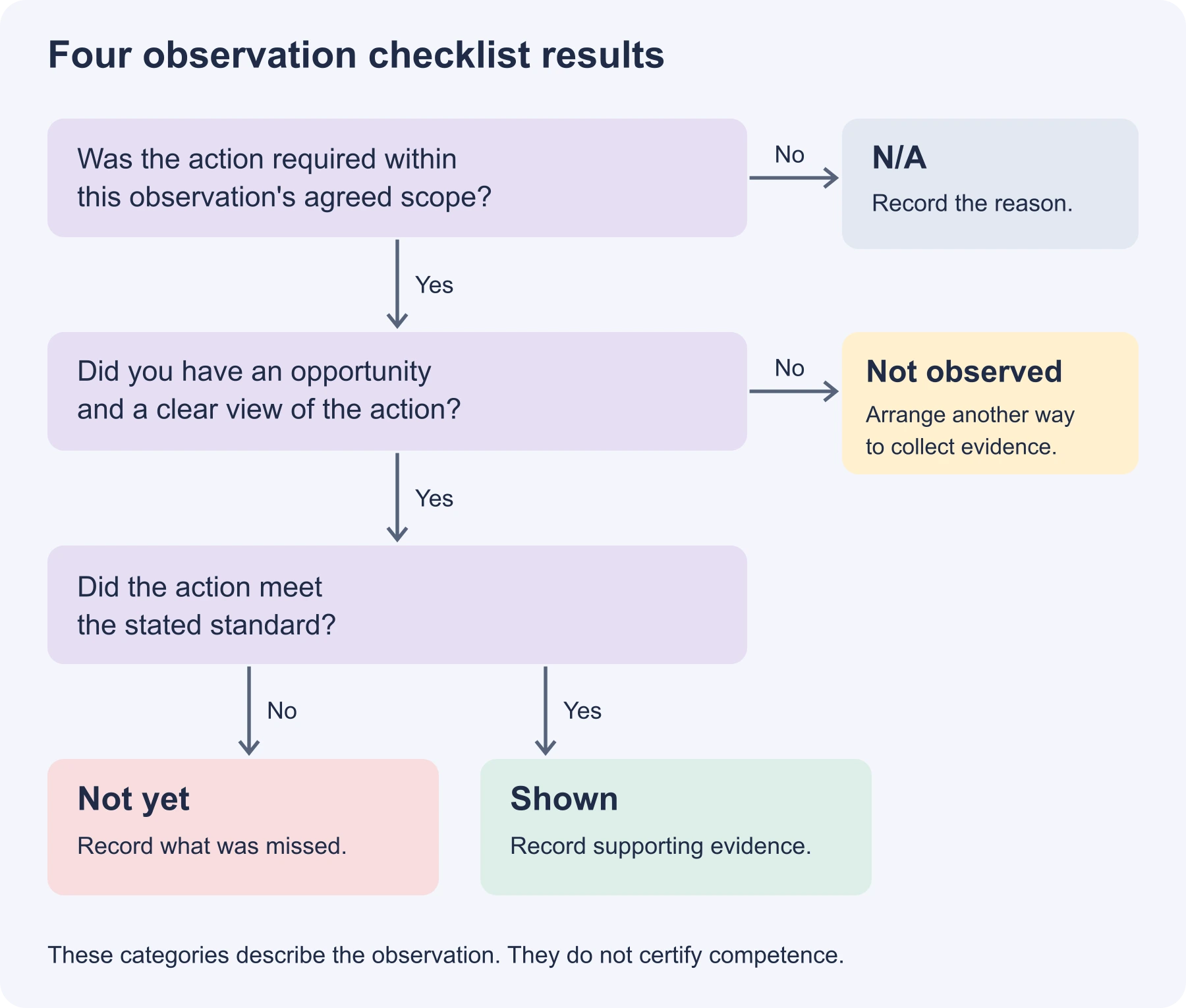
- Not yet means an opportunity occurred but the standard was not met. Not observed means there is not enough evidence to judge. N/A excludes an item from this record and needs a reason.
- A high shown count cannot cancel a missed essential action. The spreadsheet summarises the record; an authorised assessor makes any competence decision.
- When observers disagree, compare their evidence and viewing conditions before changing the wording.
Five questions to help you choose what to review in a completed record. This reflection score does not assess competence or compliance.

Train teams faster and more effectively with AI
An observation checklist is a list of specific actions an observer watches for while someone does a task, with each one marked as seen or not. Below is a free template that keeps "not yet", "not observed" and "not applicable" apart, with a completed workplace example. There are also samples for care, security and research, and steps for using one well.
I'm an instructional designer at Coursebox, and I also work in support, where assessors ask how to record practical assessments. Coursebox makes an AI rubric generator for writing assessment criteria.
The completed example follows a fictional loader operator during a pre-start check and controlled practice session. The observer records nine items as shown, but the operator skips the horn test. That missed essential action still needs attention, even though most items were completed.
Use the free template to keep a record of what happened, what you could not observe and what needs another attempt. Its automatic summary helps you review the record; the competence decision stays with the authorised assessor.
Download the blank checklist to observe your own tasks. The example file has the plant operator's completed checklist with a second observer, a guide to writing items, and three samples, one per tab.
What an observation checklist is
An observation checklist turns a task or behaviour into a set of actions you can look for. It gives the observer a place to record the result and the evidence behind it. A supervisor might use one to give feedback on a practical task; a teacher might use one to record classroom behaviour. For formal assessment, it is one part of the evidence the assessor considers.
Checklist, rating scale, rubric or anecdotal record?
| Tool | What it records | Best for |
|---|---|---|
| Observation checklist | Whether each action happened: shown or not | Practical tasks with clear steps, such as a pre-start check |
| Rating scale | How well each item was done, on a scale such as 1 to 4 | Skills that vary in quality, such as presenting |
| Rubric | What each level of quality looks like, described in words | Complex work, such as a report or a project |
| Anecdotal record | A written note of what happened, with no list | Unexpected behaviour or early observations |
Use a checklist when you need to know whether an action met a stated requirement. If several actions sit in one item, explain that all must happen or split the item. If you want to describe degrees of quality, use a rubric with descriptions of each level.
Four results, kept apart
| Result | Means | Example from the loader check |
|---|---|---|
| Shown | You saw it done to the standard | Fastened the seatbelt before starting the engine |
| Not yet | You saw the moment, and it wasn't done or wasn't done right | Tested the brakes and lights, but not the horn |
| Not observed | You had no opportunity to see it, or your view was blocked | No near miss happened, so reporting one couldn't be seen |
| N/A | The action was not required within the agreed scope of this observation; record why | No defect was found, so nothing needed tagging out |
Open the four-results diagram at full size
A blank result leaves the next reader guessing. Use Not yet when an opportunity occurred but the requirement was missed. Use Not observed when you do not have the evidence to judge it. N/A excludes an item from this record; it does not demonstrate that the person can do it.
Essential items
Mark an item essential when it is a required condition of the task or assessment. Agree this with the procedure owner. In the fictional loader example, this includes the machine checks, safe access, seatbelt, travel, stopping and parking requirements. The checklist is an illustration, not a complete loader assessment or operating procedure.
An essential action marked Not yet is flagged even when the shown count is high. In one Coursebox support test, an Australian registered training organisation found that a deliberately weak answer received 66% under a points-based rubric. That test concerned automated written marking, not this observation form. It illustrates why a total alone cannot tell an assessor which requirement was met.
ASQA's assessment practice guide explains how assessment decisions depend on appropriate evidence and clear guidance for assessors. Use the required assessment conditions and evidence rules when adapting a checklist for an Australian registered training organisation.
Observation checklists in research
For research, decide exactly what behaviour you are studying, what counts as an occurrence and how long each observation lasts. A checklist may record whether something happened; an event log can record each occurrence and its time. The workplace template below does not collect those events automatically.
- Record frequency and timing, not only presence. "Asked a question that checks understanding" might happen four times in a lesson; the count is the data.
- Check how observers apply the definitions. Pilot the same observation with two independent observers, compare their evidence and resolve differences before collecting the main data. The workbook's matching-category count is a simple comparison, not a validated reliability test.
When a checklist is the wrong tool
- The quality of the work varies more than the steps do: use a rating scale or a rubric.
- You want to know why someone did something: an observation can't show reasoning. Add a short conversation after the task.
- Signing off a new starter across many tasks: use a training checklist that tracks each task over the first weeks.
How to use an observation checklist
The steps use the fictional loader example. A supervisor observes the operator while a second observer records the same session independently. Before using a checklist at work, decide who may assess the task, what reference procedure applies, and what evidence you need from this particular observation.
Step 1: Pick the task and the standard
Start with a defined task and the standard it must meet, such as an approved pre-start procedure. Tell the person what will be observed and what resources or support they may use. Record the procedure and version, the person, observer, date and place so someone reading the checklist later can understand the conditions.
Step 2: Write items you can see or hear
Each item should be something two observers would agree they saw. If an observer would have to infer it, rewrite it.
Rewriting items so they can be observed
Example: The writing guide from the blank and example workbooks.
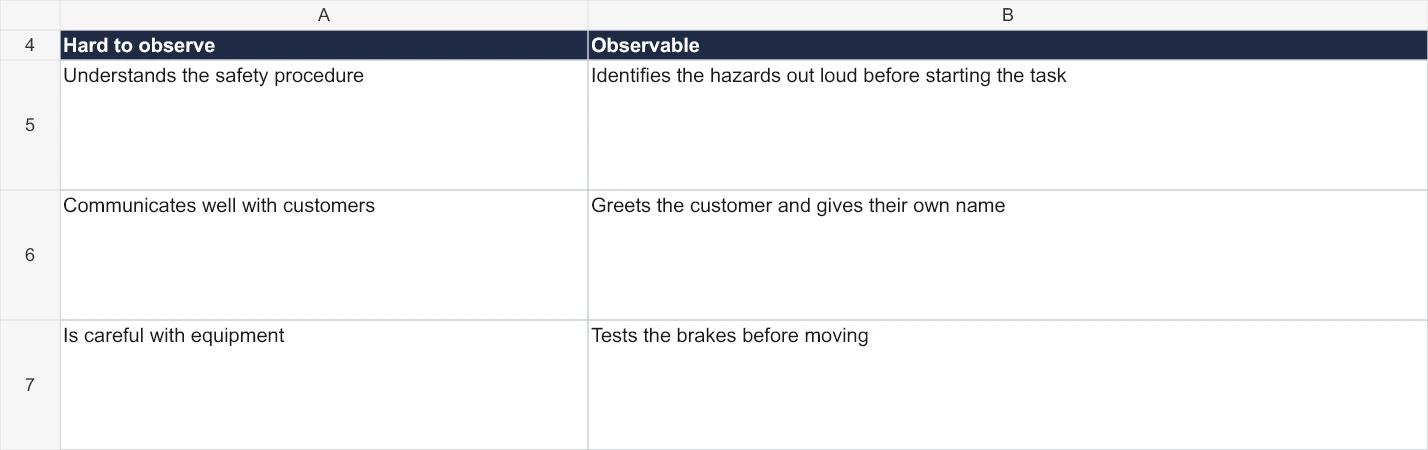
- 1. Hard to observe: qualities such as "careful" or "communicates well" need the observer to guess.
- 2. Observable: actions with a clear moment, such as greeting the customer and giving their own name.
Open this workbook preview at full size
Step 3: Mark the essential items
Go through the list with the procedure owner and identify every requirement that must be met. Do not reduce the number of essential items to make the form shorter. A hazard-control step remains essential even if the observation needs several sessions to cover it.
Step 4: Observe and record during the task
Stand where you can see safely without interfering with the task. Record results as the task proceeds and add specific notes, particularly for Not yet and N/A. If your view was blocked, record Not observed rather than guess. Stop an unsafe activity through the site's normal process; completing a checklist is never a reason to let danger continue.
Never create a near miss to fill a checklist. In the fictional example, the stopping response is practised with an agreed signal while people remain outside the operating zone. Use a simulation only where the assessment requirements allow it, and label the evidence accordingly.
The missed horn check in the completed example
Example: Fictional loader pre-start and controlled practice session.
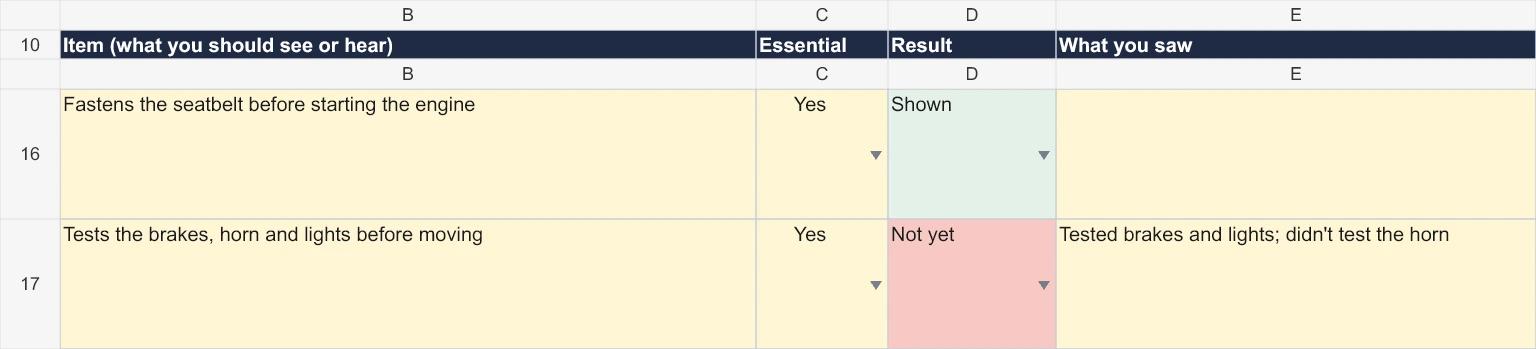
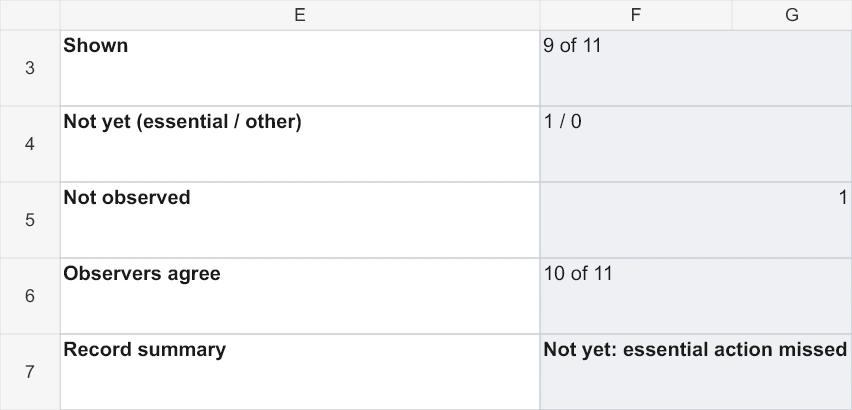
- 1. Not yet: brakes and lights were tested, but the horn was not. All three checks are required for this item to be Shown.
- 2. Not observed: near-miss reporting was not observed and remains a follow-up evidence need. Nobody needs to create a near miss.
- 3. Observers agree: the full workbook matches on 10 of 11 paired ratings. Review the fluid-check evidence and viewing positions before changing the criteria.
Open this workbook preview at full size
The full example has 12 items. One is N/A because no defect needed tagging out, leaving 11 in the shown count: nine Shown, one Not yet and one Not observed. The separate 10-of-11 observer comparison uses the 11 rows that both observers rated, including the N/A row.
Write exactly what you saw, such as "tested brakes and lights; didn't test the horn". The checklist counts a Not yet with no note as unfinished, because the note is what makes the feedback and the record useful.
Step 5: Compare with a second observer
Have the second observer record the same event before comparing notes. A disagreement can come from different viewing positions, timing, interpretation or a missed action. In the example, one observer saw the fluid check and the other could not read the level. Check what each person could see, clarify the individual checks and repeat the observation.
Step 6: Decide, then give feedback
Read the automatic summary alongside the item-level results and notes. The workbook can flag the following states:
- Not started: the checklist is still empty.
- Incomplete: a result, evidence note, observation detail or essential observation is missing. Check the flagged rows.
- Not yet: an essential action was missed. Give feedback and collect further evidence.
- Observation recorded: plan follow-up. An action needs improvement or has not been observed.
- Observation recorded: assessor review. The recorded items have no flagged gaps; the assessor must still judge the evidence.
An all-N/A record says No actions observed. The form never turns that into a sign-off. An authorised assessor records any final decision using the full evidence and the organisation's process.
The loader example is flagged Not yet because the horn test was missed. The supervisor explains and demonstrates the required check, then arranges another supervised attempt. Near-miss reporting also remains unobserved and needs a permitted way of collecting evidence; the high shown count does not settle either gap.
You can set up a practical assessment as an assignment with several criteria, each marked Satisfactory or Not Yet Satisfactory by an assessor. The learner can upload evidence such as photos or a third-party report. AI marking can be switched off, or held until the assessor approves it. Coursebox doesn't score video, and the assessor's judgement stays in charge.
Observation checklist examples for other settings
Those requests most often concerned trades and heavy industry, followed by care and health. The following fictional samples show how the criteria change between settings; the classroom sample also explains where a research event log would be needed.
Each sample is a tab in the example file.
Hand hygiene for a care worker
Observed on shift, using WHO's five moments for hand hygiene.
| Item | Essential | What counts as Shown |
|---|---|---|
| Cleans hands before touching a resident | Yes | Before any contact, including helping someone stand |
| Cleans hands before a clean or aseptic task | Yes | Before a wound dressing or handling a catheter |
| Cleans hands after a risk of body fluid exposure | Yes | After any task that could involve body fluids, even with gloves |
| Cleans hands after touching a resident | Yes | Before moving to the next resident or task |
| Cleans hands after touching a resident's surroundings | Yes | After touching the bed, table or call bell |
| Covers all surfaces of both hands, including thumbs and fingertips | Yes | Follow the approved technique, including all hand surfaces; timing alone is insufficient |
Use the approved care-setting procedure to define the observation opportunities and the required technique. Mark a moment Not observed if it did not occur during the observation. The sample is a learning aid based on WHO's five moments, not WHO's compliance observation form or a complete clinical protocol.
A security officer at a site entrance
This fictional example focuses on pass checks and visitor refusals. Check the actual site procedure and escalation arrangements before using it.
| Item | Essential | What counts as Shown |
|---|---|---|
| Greets each person and asks for their pass | No | Every person, including staff they recognise |
| Checks the pass matches the person before letting them in | Yes | Looks at the photo, not only the card |
| Explains a refusal calmly and says what the person can do next | Yes | Points to reception or the visitor process |
| Calls the supervisor when a person won't leave | Yes | Doesn't try to remove them alone |
| Logs every refusal with the time and reason | Yes | In the entry log before the end of the shift |
If no refusal occurs, mark the response items Not observed. Arrange further evidence through an authorised scenario or another observation. Do not provoke a confrontation to see the response.
A classroom or research observation
These are sample criteria for teaching feedback. They are not a validated research instrument. For a study, define the behaviours and observation period, pilot the method, and use a separate event log if frequency or timing is part of the question.
| Item | Essential | What counts as Shown |
|---|---|---|
| States the lesson objective in the first five minutes | No | Said or written where students can see it |
| Asks at least three questions that check understanding | No | Count them; research use records how often |
| Gives specific feedback on a piece of work | No | Names what was good or what to change |
| Redirects off-task behaviour without stopping the lesson | No | A look, a name, moving closer |
| For research: use a separate event log | No | Record the time, behaviour, count and context for each occurrence |
For teaching feedback, discuss the observed actions and their context. Use the purpose of the observation to decide which criteria are mandatory and which are prompts for discussion.
What to do with the results
- Give feedback the same day, starting with the items shown, then each "Not yet" and its note.
- Plan the next observation. A "Not yet" means coach and observe again. A "Not observed" means arrange a chance to see it.
- Keep the record with the date, procedure version, observer names, conditions and notes. Store it through your organisation's approved process, including any consent and privacy requirements for photos or recordings.
- Review disagreements. Compare the evidence and viewing conditions first, then clarify the wording or practise using the criteria where needed.
The Writing items tab also helps you investigate unclear results. For example, everybody meeting the criteria could mean the task was straightforward, the group performed well or the items were too vague. Look at the evidence before deciding which explanation fits.
When the template is not enough
- To sign off a whole role over several weeks, use a training checklist.
- For licensed tasks in Australian workplaces, read about verification of competency.
- To decide between checking during training and at the end, see formative vs summative assessment.
- For a customer service skill, observe a role play before the real thing.
The template is version 1.1 (20 October 2026). Its Excel calculations have been checked in Microsoft Excel on Windows. The PDF is a printable example with no automatic checks. Check the items against your approved procedures before use; other spreadsheet apps have not been tested.
Using your next observation checklist
Write actions you can see or hear, define the standard and record the conditions. Keep Not yet, Not observed and N/A separate, then use the evidence to decide the next observation or feedback. Coursebox's AI rubric generator can help draft criteria for an assessor to review.
Frequently Asked Questions
A list of specific actions an observer watches for while someone does a task, with each one marked as shown or not and notes on what was seen. It's used to assess practical skills, observe teaching and collect research data.
A structured list of behaviours recorded using agreed definitions and an observation period. It may record presence or count occurrences. Researchers pilot the definitions, train observers and choose a suitable way to assess observer agreement.
A checklist records whether an action happened. A rating scale records how well it was done, on a scale such as 1 to 4. Use a checklist for clear steps and a rating scale for skills that vary in quality.
Start from the approved procedure and describe actions an observer can see or hear. Define what counts as Shown, identify essential requirements and add space for evidence notes. Pilot the form with two observers, compare their evidence and clarify any ambiguous criteria.
Use Not observed when you had no opportunity to see an action or your view was blocked. Use Not yet when an opportunity occurred but the standard was not met. Arrange another permitted way to collect any required evidence; do not create an unsafe event.
Carolina Martin
Carolina is a highly experienced learning designer with tech start-up experience. She is based in Sydney and previously designed courses alongside Coursebox founder Travis in a previous job. She is passionate about delivering engaging learning experiences and brings the same perspective to customer experience too. She manages our customer support documentation and product testing processes.

