

Computer-Based Training (CBT): Benefits, Types & Examples for 2026
Learn what computer-based training is, explore its key benefits, types, and real-world examples. See how CBT helps organisations train teams faster in 2026.


Train teams faster and more effectively with AI
Computer-based training (CBT) has become a cornerstone of how organizations develop their people. Instead of relying on physical classrooms and printed manuals, companies use digital tools—videos, quizzes, simulations, and interactive modules—to deliver training employees can access at their own pace, from anywhere.
The numbers reflect this shift. The global e-learning market is projected to surpass $336 billion by 2026, growing at a 9.1% compound annual rate. Meanwhile, 93% of businesses worldwide now use or plan to adopt digital learning for employee training.
Whether you’re onboarding new hires, upskilling your team, or delivering compliance courses, CBT offers a flexible and scalable solution. Here’s everything you need to know.
So, read on to discover what makes CBT so impactful, what its benefits are, and how it’s being used across industries today.
What is Computer-Based Training?
Computer-based training (CBT) is a modern learning method that uses computers and digital platforms to deliver educational content. Unlike traditional classroom-based training, CBT allows individuals to access training materials anytime, anywhere, through devices like laptops, tablets, or smartphones.
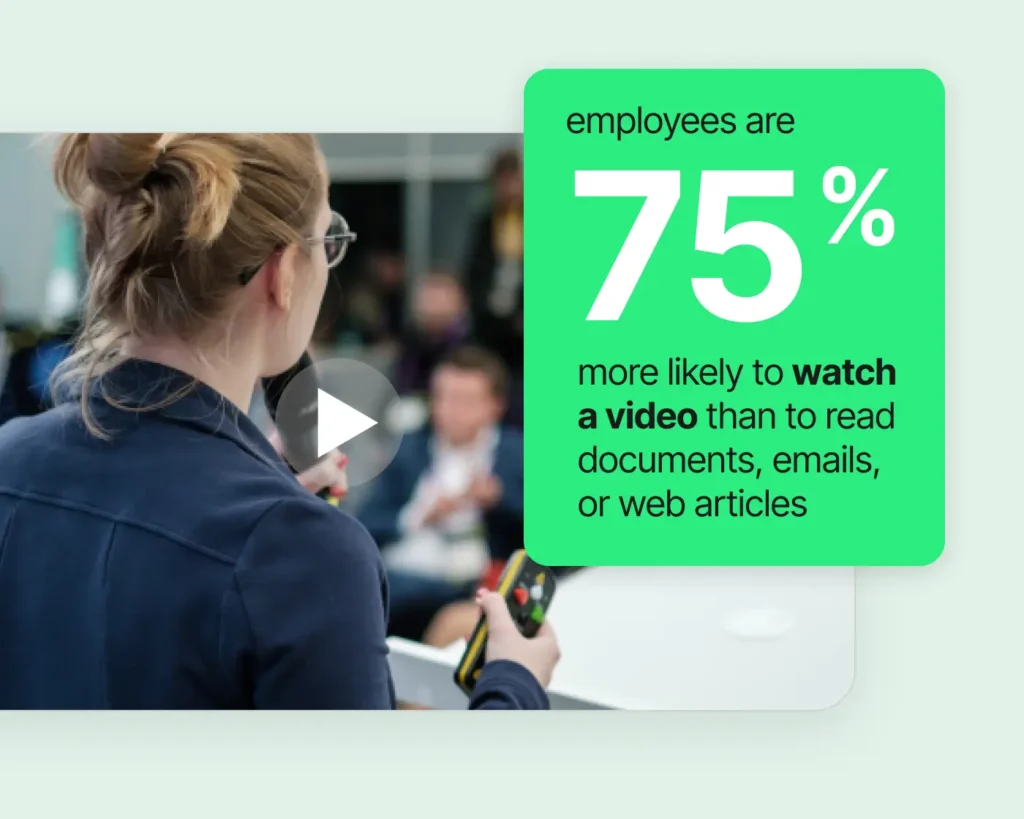
It combines videos, quizzes, simulations, and other interactive elements to create a more engaging and flexible learning experience. Research from Panopto shows that 75% of employees are more likely to watch a video than read a document when learning new information.
This method has gained immense popularity recently due to its efficiency and convenience. Additionally, it is highly adaptable to various industries, from healthcare and IT to retail and education. Even leading companies like Amazon committed over $700 million to retrain 100,000 U.S. workers — roughly $7,000 per employee — through its Upskilling 2025 initiative, which included computer-based training across technical and non-technical roles.
4 Key Features of Computer-Based Training
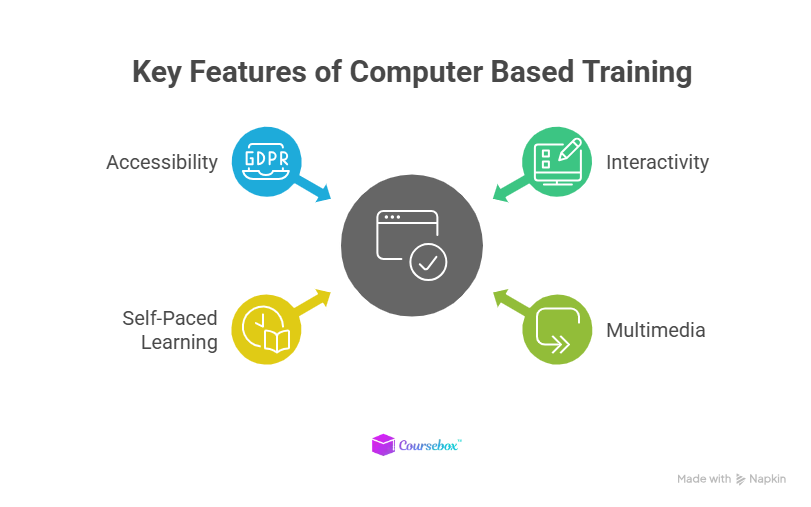
CBT stands out primarily because of its unique features. These features ensure that educational coursework is engaging, effective, and adaptable for individuals and organizations. Let’s explore the key elements that make CBT so impactful.
1. Interactivity
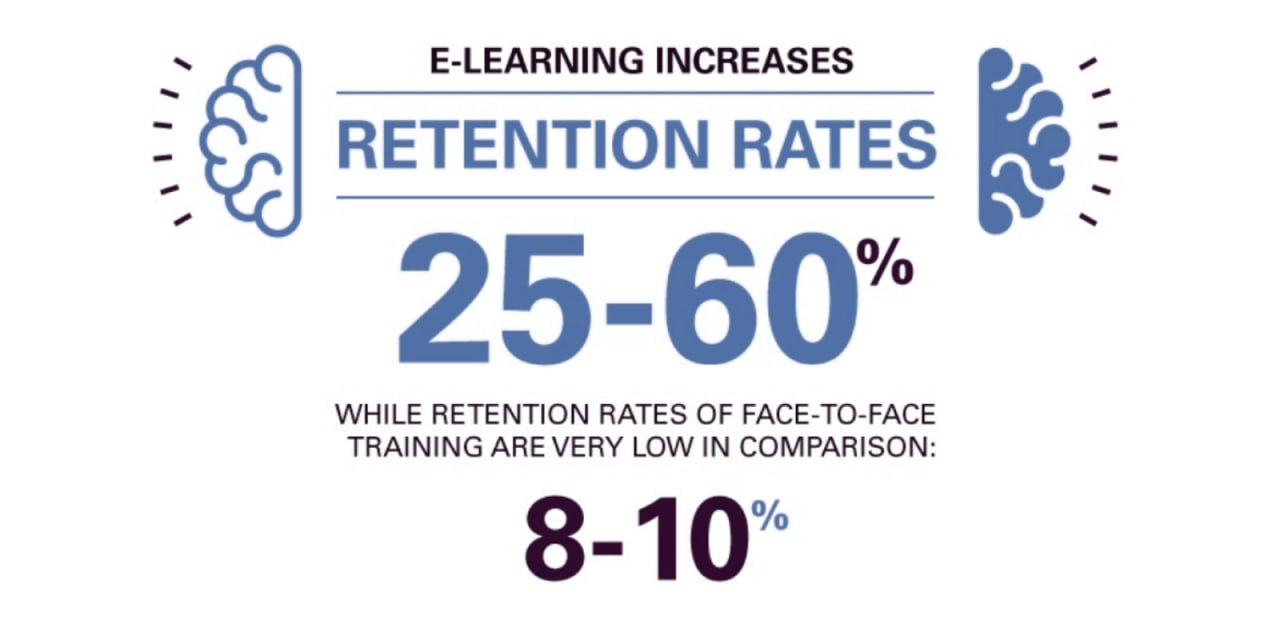
Computer-based training is designed to actively engage learners through interactive modules and quizzes. These features keep learners focused and help them retain information more accurately. For instance, a quiz after each lesson reinforces key points. This makes CBT a go-to solution for compliance training courses where knowledge retention is crucial. Studies show that e-learning can increase information retention rates by 25–60%, compared to just 8–10% with traditional classroom instruction.
Source: EducateMe
2. Multimedia Integration
Videos, graphics, and audio are integral parts of CBT as they enhance the overall learning experience. A complex concept can become much easier to understand when it is paired with an engaging video or animation. For instance, safety training software often uses videos to simulate real-life scenarios, which makes the content more engaging and relatable for learners.
A latest study found that 3 out of 4 employees are more likely to watch a video than read a document, proving the importance of multimedia in training.
Source: Panopto
3. Self-Paced Learning
One of the biggest advantages of CBT is its flexibility. Learners can study at their own pace, which eventually allows them to balance learning with other responsibilities. A report by LinkedIn Learning reveals that 74% of employees want to learn during their spare time. This makes self-paced learning a perfect fit for busy professionals.
4. Accessibility
Computer-based training is accessible across multiple devices, such as computers, tablets, and smartphones, making it convenient for learners to learn regardless of location. This global accessibility is crucial for remote employees or students who need flexible learning solutions.
Mobile-based learning continues to grow, with research showing it strengthens learner comprehension and enhances motivation to study independently.
What are the Different Types of Computer-Based Training?
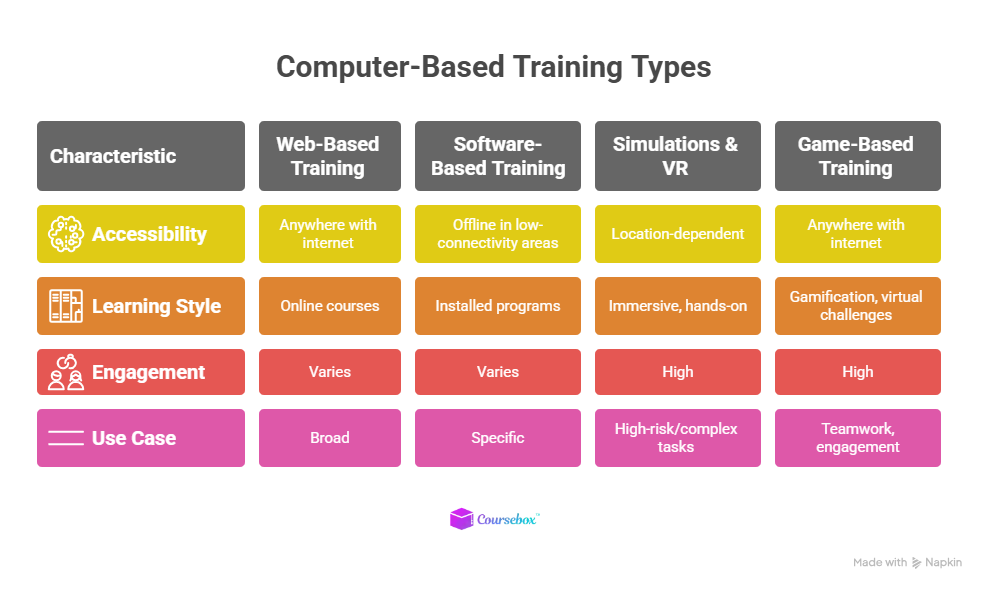
CBT comes in various formats, each suited to different learning needs. Understanding the different types of training modules helps you choose the right approach for your team. With that, let’s talk about these types.
1. Web-Based Training (WBT)
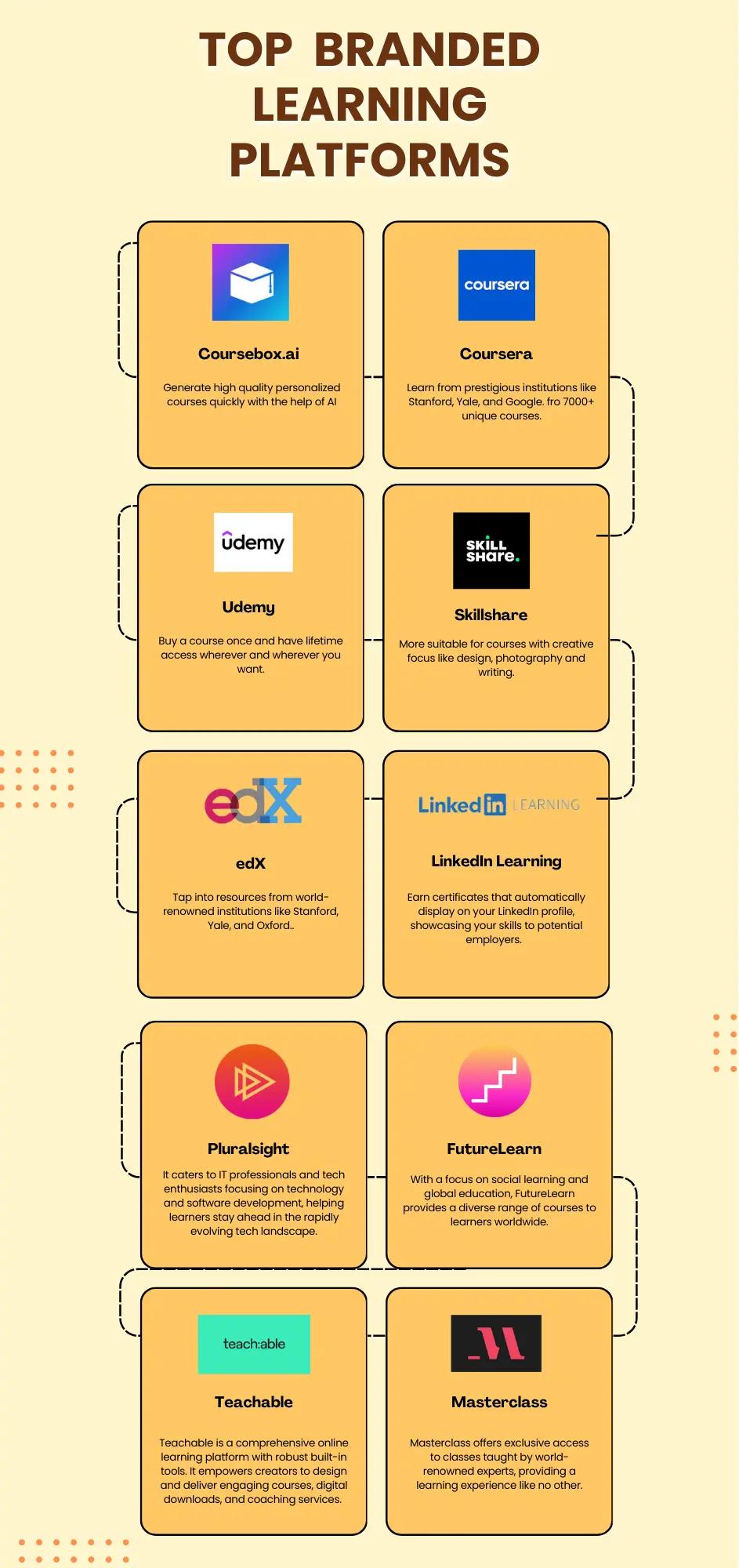
Web-based training uses internet platforms to deliver educational content. This type of training is ideal for remote learners, as it allows them to access materials from anywhere with an internet connection. Platforms like Coursera and Udemy are popular examples. They are often utilized to upskill employees with product knowledge training and other specialized skills.
2. Software-Based Training
Software-based training primarily relies on installed programs to deliver content offline. This type of CBT is beneficial for environments with limited internet access, such as rural areas or secure workplaces. For instance, an organization might install safety training software on company computers to consistently deliver content to the entire team.
Since the content is pre-installed, there are no disruptions caused by poor connectivity. An estimated 6–8% of Americans still lack reliable home broadband, making offline-capable training software a practical option for some workforces.

Source: Statista
3. Simulations and Virtual Reality
Simulations and Virtual Reality (VR) offers immersive and practical training experiences. They are widely used in industries where hands-on practice is crucial. For example, pilots use flight simulators to practice emergency scenarios without risk.
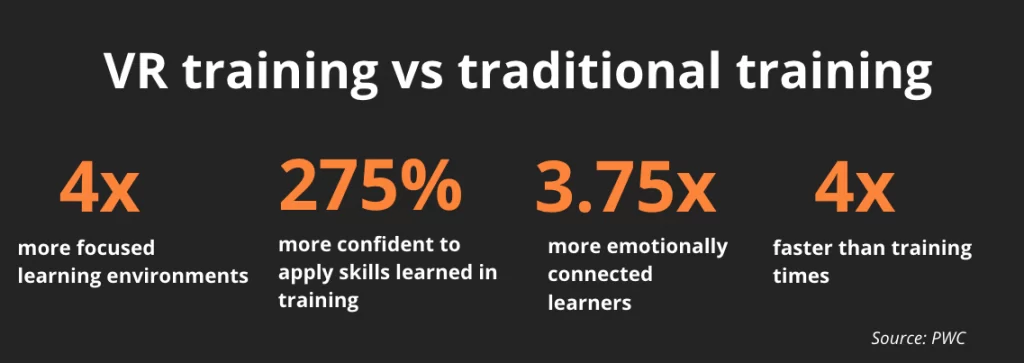
PwC research found that VR learners completed training four times faster than classroom learners and felt 3.75 times more emotionally connected to the content.
Source: FEFO Consulting
4. Game-Based Training
Game-based training uses gamification to make learning fun and engaging. An example of this game is Minecraft, which can be used in a firm to teach project management, teamwork, and design principles.
In the game, players can build complex structures of cities and solve challenges in a virtual world, encouraging creativity and collaboration. Such gamification techniques for corporate training can boost employee productivity by 12%.
4 Benefits of Computer-Based Training
Here’s a closer look at some of the key benefits of CBT:
1. Cost-Effectiveness
One of the most significant benefits of CBT is its ability to save costs. By eliminating the need for physical classrooms, printed materials, and travel expenses, companies can allocate resources more efficiently.
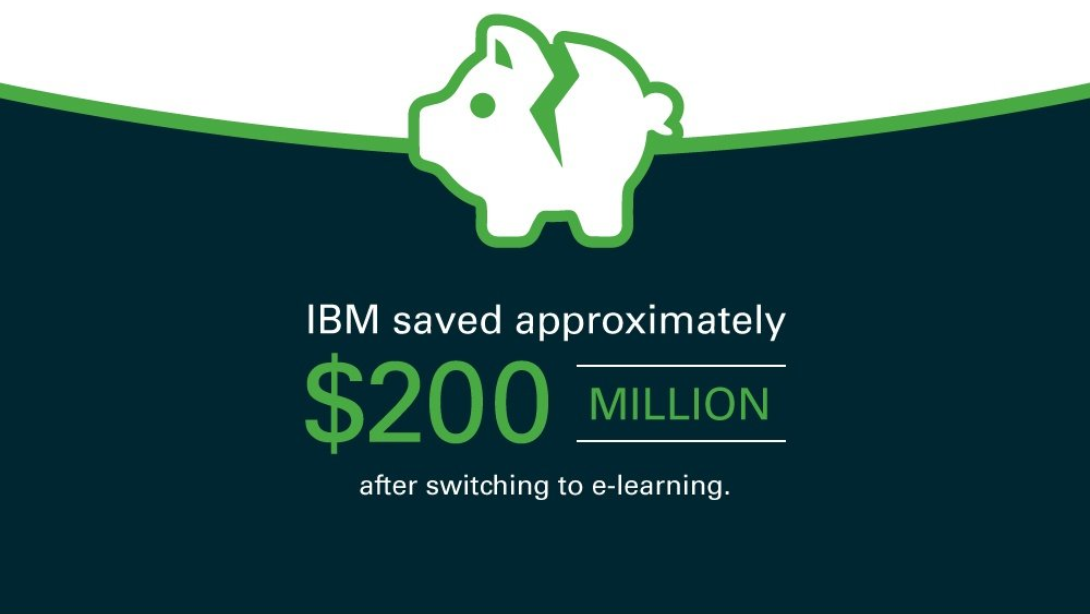
For instance, a study by IBM famously saved an estimated $200 million after shifting to e-learning, demonstrating how digital training can reduce costs tied to physical classrooms, printed materials, and travel. It also allows employees to balance training with work responsibilities.
Source: Coursebox
2. Scalability
Computer-based training is designed to grow with an organization's needs. Whether training a new team or deploying learning programs across global offices, CBT can handle it all. This flexibility is why large enterprises such as Google and Amazon rely on it to train thousands of employees.
3. Consistency
Uniform training content ensures that all learners, regardless of location, receive the same quality of education. This is particularly beneficial for companies with multiple branches or remote teams. An example of this could be a global retail chain that uses CBT to deliver standardized customer service training to employees in different regions.
4. Analytics and Progress Tracking
Advanced analytics and program tracking features are also the benefits of computer-based training. They allow instructors and learners to monitor overall training performance in real time.
With these features, instructors can identify areas where learners need additional support and adjust content accordingly. Organisations that use data-driven approaches to L&D consistently report stronger training outcomes and faster skill adoption, making analytics a core feature of any modern CBT platform.
Top 5 Computer-Based Training Examples
Below are some practical examples of computer-based training:
1. Webinars
Webinars are a popular form of CBT, where individuals or companies offer live or recorded sessions that can cover any topic. These sessions allow participants to learn from experts in real time and even ask questions if they’re confused.
For instance, Coursera conducts live webinars with course instructors to give students the chance to clarify doubts and gain additional insights. Similarly, LinkedIn Learning offers webinars on career development and professional skills from time to time.
2. Mobile Learning Apps
CBT is primarily delivered through mobile apps, allowing learners to access content anytime, anywhere. Apps like Udemy for Business provide a vast library of courses on topics ranging from project management to leadership development.
These apps are specifically designed for corporate training needs and allow companies to offer their employees a flexible and personalized learning experience.
3. E-Learning Platforms
E-learning platforms like Udemy and Skillshare utilize CBT to offer courses on various subjects, from coding to creative writing. These platforms include video lectures, quizzes, and assignments, making the learning process interactive and detailed.
4. Gamified Training
Game-based CBT uses challenges, points, and rewards to make learning fun and engaging. For example, sales teams might use a gamified module to improve negotiation skills while competing with colleagues.
5. Interactive Tutorials
Interactive tutorials, such as those used in software training, guide users through tasks step-by-step. For instance, Adobe offers tutorials that teach designers how to use Photoshop tools effectively.
Where is Computer-Based Training Used?
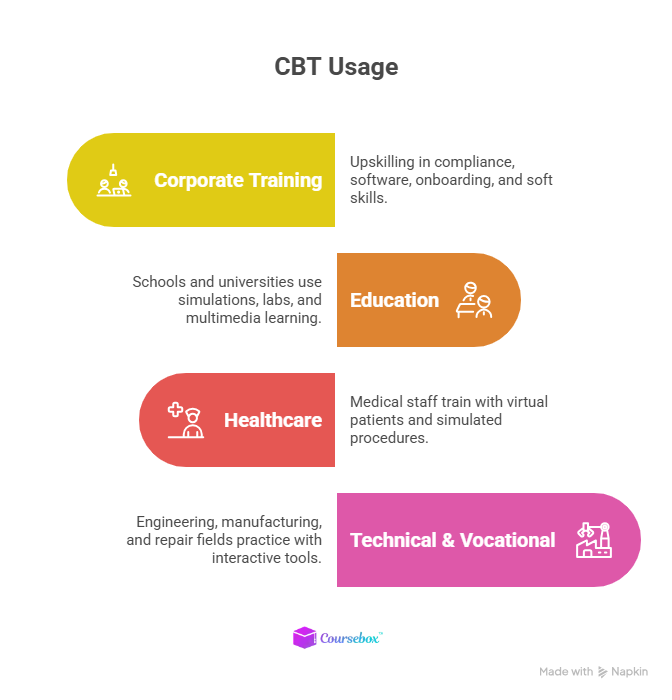
Computer-based training is versatile and widely used across different industries. Here are the primary applications of CBT in various business sectors.
1. Corporate Training
CBT is extensively used in corporate environments to upskill employees. It covers diverse areas such as HR compliance, software proficiency, and soft skills development.
Before launching a CBT program, it helps to map your team’s existing capabilities. Learning how to create a skills matrix can reveal exactly which competencies need development.
Example: Organizations use CBT to onboard new hires, teach workplace safety protocols, or train teams on the latest software.
2. Educational Institutions
Schools, colleges, and universities integrate CBT to complement traditional classroom teaching. With help from interactive modules, virtual labs, and multimedia content, learning can be made more engaging and accessible for students.
Example: A university might use computer-based training to teach complex subjects like physics through simulations to help students visualize concepts.
3. Healthcare and Medical Training
Computer-based training courses also play a crucial role in healthcare and medical fields. They provide simulated environments for learners to practice and become certified. Additionally, CBT allows medical professionals to rehearse surgeries, diagnose conditions, and practice emergency procedures without real-world risks.
Example: Nursing students use virtual patient simulators to refine their skills before entering clinical settings.
4. Technical and Vocational Training
Technical and vocational fields, such as engineering, manufacturing, and automotive repair, rely on computer-based training to develop hands-on experience. Simulated tools and interactive tutorials offer practical learning experiences perfect for specific situations.
Example: Automotive technicians can use CBT to learn how to troubleshoot and repair modern vehicles equipped with advanced technology.
Turn eLearning into Fun and Interactive Training Courses
Computer-based training is an effective strategy to deliver interactive, flexible, and scalable learning. With rich media, immediate feedback, and robust tracking, CBT elevates both learning outcomes and efficiency. If you want to build CBT with interactive modules, quizzes, and analytics, all within a single platform! Coursebox makes it simple and effective.
Want to see it in action?
Book a free demo today and experience how Coursebox transforms CBT and eLearning workflows.
How AI Is Transforming Computer-Based Training in 2026
The biggest shift in CBT right now is the integration of artificial intelligence. AI-powered platforms can automatically generate course content from existing documents, create assessments, provide real-time tutoring, and grade learner responses — tasks that previously required hours of manual work.
The AI education market is growing at a compound annual growth rate of over 45%, from $5.88 billion in 2024 to a projected $32.27 billion by 2030. This growth reflects how quickly organisations are adopting AI to make their training faster, more personalised, and more cost-effective. If you’re evaluating platforms for community-based learning alongside CBT, our comparison of the best Skool alternatives covers options that combine course delivery with community engagement.
Platforms like Coursebox put this into practice by letting you upload documents, videos, or links and automatically converting them into structured courses with lessons, quizzes, and interactive elements. The platform’s AI tutor provides real-time learner support, while AI grading gives instant feedback based on your marking criteria.
FAQs
Frequently Asked Questions
Computer based training (CBT) is learning delivered through computers or digital devices. It usually includes interactive lessons, videos, quizzes, and simulations that learners complete independently at their own pace.
CBT is a specific type of eLearning focused on training delivered via computer programs or modules, often in self contained formats. eLearning is broader and covers mobile learning, web based training, and virtual classrooms in addition to CBT.
Examples include compliance modules with interactive assessments, software simulations for IT staff, healthcare training scenarios, onboarding programs, and retail customer service tutorials. These can be self paced or combined with instructor support.
Yes. Research shows CBT improves retention through interactive content and allows learners to revisit materials as needed. It also ensures consistency across teams and is scalable for large organisations.
Advantages include flexibility, self pacing, scalability, and reduced long term costs. Disadvantages can include high initial setup costs, the need for strong design to keep learners engaged, and limited personal interaction compared to classroom settings.
CBT provides a cost effective way to standardise employee training across multiple departments and locations. It supports compliance, professional development, and role specific learning, making it an essential strategy for modern organisations.
Well designed CBT can adapt to different skill levels, provide branching scenarios, and offer multiple content formats. Platforms like Coursebox make this process easier by integrating interactive modules, quizzes, and analytics to personalise learning journeys.
Travis Clapp
Educational technologist and instructional designer

