

ChatGPT Prompt Templates for Employee Training (Free Prompt Pack)
Ten ChatGPT prompt templates for employee training, a real output and what had to change, and a free Excel prompt pack you fill in once.

A good ChatGPT prompt for employee training names the learners, pastes your own material, sets the format and length, and says "use only this material".
- Ask the chatbot to identify missing information as questions. Check that it has done so and take unresolved procedure decisions to the document owner.
- Check every rule, number and name in AI-drafted training against your source before staff see it, because chatbots add and merge things even when told not to.
- Keep names, staff records, customer details and health information out of prompts, and use roles or placeholders instead.
- Prompt templates draft training content. A learning platform and your team’s delivery settings handle enrolment, access and completion records.

Train teams faster and more effectively with AI
ChatGPT prompt templates for employee training are reusable prompts that turn your own material, such as a policy, a schedule or a handbook, into training: a module, an onboarding guide, role plays, a refresher or the emails around a course.
Below are ten prompt templates, one for each common training job, and a real output from the main one with what had to change before staff could see it. There's also a free Excel prompt pack: fill in your organisation and learners once, and all ten prompts fill themselves in.
I work in marketing at Coursebox, and I use AI chatbots heavily in my own work. I ran the main prompt for real and checked the output line by line. Coursebox also makes AI employee training software that builds a full course from your documents.
Of the 368 who wanted a module built from a policy or procedure, 336 supplied the document and 128 stated what learners should be able to do afterwards. These are first requests from the 180 days to 20 October 2026, not complete records of their design work.
The worked example uses a fictional seven-step visitor sign-in procedure. Its actual Claude output includes useful explanations but also broadens who a rule applies to and adds an unconfirmed contractor requirement. The review shows what needs checking before staff use it.
Download the blank prompt pack and fill in your details once. The example file has the visitor sign-in module: the prompt as sent, the output word for word, and the review that found what to fix. Both include a privacy guide on what never to paste.
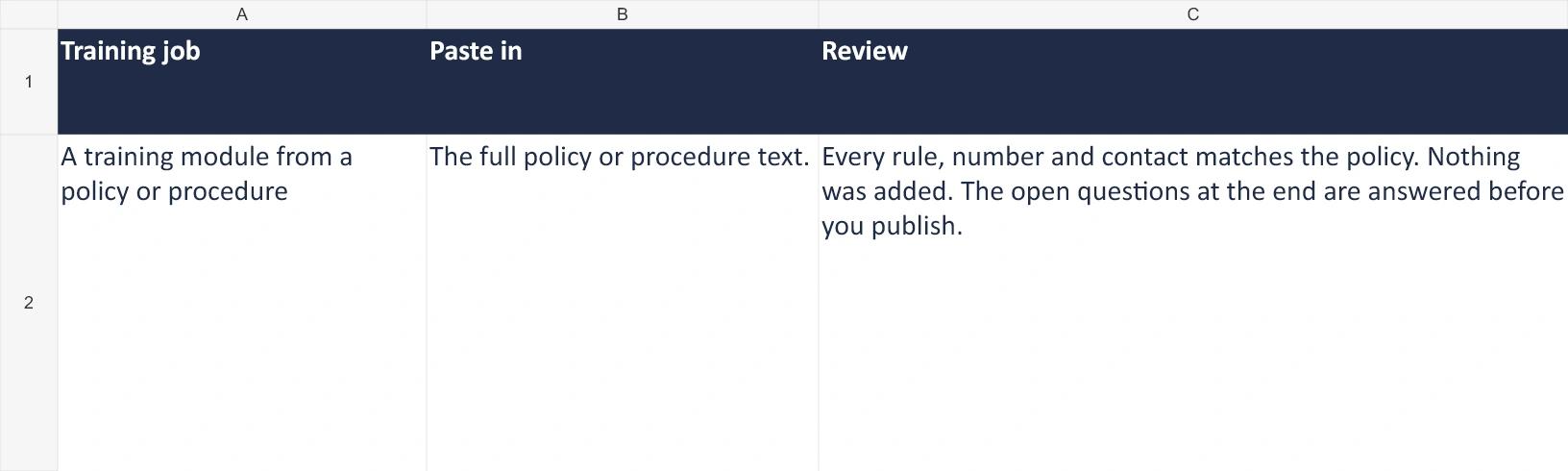
Open the example workbook preview at full size
What every training prompt needs
| Part | Why | In the main prompt |
|---|---|---|
| Who the learners are | The same policy reads differently for a new starter and a supervisor | New warehouse and dispatch staff |
| Your material, pasted in | Without it, the chatbot writes a generic module with generic rules | The visitor sign-in procedure, in full |
| "Use only this material" | Sets a source boundary that you still need to verify | Do not add facts, rules, names or numbers that are not in it |
| What to do about gaps | Asks the model to identify gaps for the document owner | List it as a question for me at the end |
| The format and length | Sets the shape and length of the draft | 3 to 5 sections, a checklist, 3 questions, under 700 words |
| Tone and spelling | Keeps it sounding like your organisation | Plain and friendly, Australian English |
The main prompt: a training module from a policy
This is the pack’s first prompt. Replace the capitalised setup words and the bracketed source instruction before running it. The example workbook shows the exact populated prompt and the full output from the recorded run.
A training module from a policy or procedure, from your own material.
- The full policy or procedure text.
You are an experienced workplace trainer at ORGANISATION. Turn the policy below into a short training module for LEARNERS.

Use only the material below. Do not add facts, rules, names or numbers that are not in it. If something the training needs is missing, list it as a question for me at the end instead of guessing.

Structure it as:
- What this module covers and how it applies to the learner's job, in 2 or 3 sentences.
- 3 to 5 sections, each with a heading, the steps in plain words and one short workplace example.
- A checklist the learner can use on the job.
- 3 questions the learner should be able to answer at the end.

Write in a TONE tone, in SPELLING, for someone reading on a phone. Keep it under 700 words.

Policy:
"""
[paste the policy or procedure]
"""
- ORGANISATION
- : Your organisation, or a description of it (for example, a regional logistics company)
- LEARNERS
- : Who the training is for, in the words you'd use at work (for example, new warehouse and dispatch staff)
- TONE
- : The tone (for example, plain and friendly)
- SPELLING
- : The spelling (for example, Australian English)
Example output (written by hand, not a live run)
Run in Claude (claude-sonnet-5) on 21 October 2026, with the example visitor and contractor sign-in procedure pasted in. Two parts of the output, word for word:

The forklift zone rule
No visitor or contractor goes into the forklift zone unless the forklift has stopped and the escort has personally confirmed it's safe to enter.

*Example:* A visitor's escort sees a forklift still moving near the zone entrance. They wait, get confirmation it's stopped, then walk the visitor through.

On-the-job checklist
- [ ] Visitor/contractor/driver signed in at reception with photo ID
- [ ] Numbered pass issued and worn visibly
- [ ] Escort assigned (must have completed site induction)
- [ ] Contractor's induction card checked, or 15-minute induction completed
- [ ] Forklift zone entry only after forklift stopped + escort confirms safe
- [ ] In an emergency, escort takes visitor to assembly point and reports to warden
- [ ] Pass returned and sign-out completed before visitor leaves
- Every rule, number and contact matches the policy.
- Nothing was added.
- The open questions at the end are answered before you publish.
How to use the prompts
The worked example is a fictional regional logistics company training new warehouse and dispatch staff. Its supplied visitor and contractor procedure is material for demonstrating the prompt, not an approved procedure for another site.
Step 1: Fill in the setup once
Enter your organisation, the learners, the tone and the spelling on the Setup tab. Every prompt in the pack picks them up, so they're ready to copy.
The main prompt’s source and review requirements
Example: The example setup: a regional logistics company, new warehouse and dispatch staff, plain and friendly, Australian English.
- 1. Source: Supply the relevant approved procedure.
- 2. Review: Compare the complete output with the source and resolve gaps.
Open this workbook preview at full size
Step 2: Paste your material
Copy the prompt into your approved chatbot and replace the source placeholder with the relevant, current policy or procedure. Include the sections needed to explain the task and any exceptions. Use only documents authorised for that service; long or unrelated material can make the output harder to check.
Step 3: Run it
I ran the prompt in Claude (claude-sonnet-5) on 21 October 2026. It came back with five sections, each with a short example, a seven-point checklist, three questions for learners, and three questions for me about things the procedure doesn't say. It was 572 words, under the 700 I asked for.
Step 4: Check it against the source
Read the output next to the procedure, line by line.
Where the recorded output changes the procedure
Example: Claude (claude-sonnet-5), 21 October 2026, run once on the example procedure.
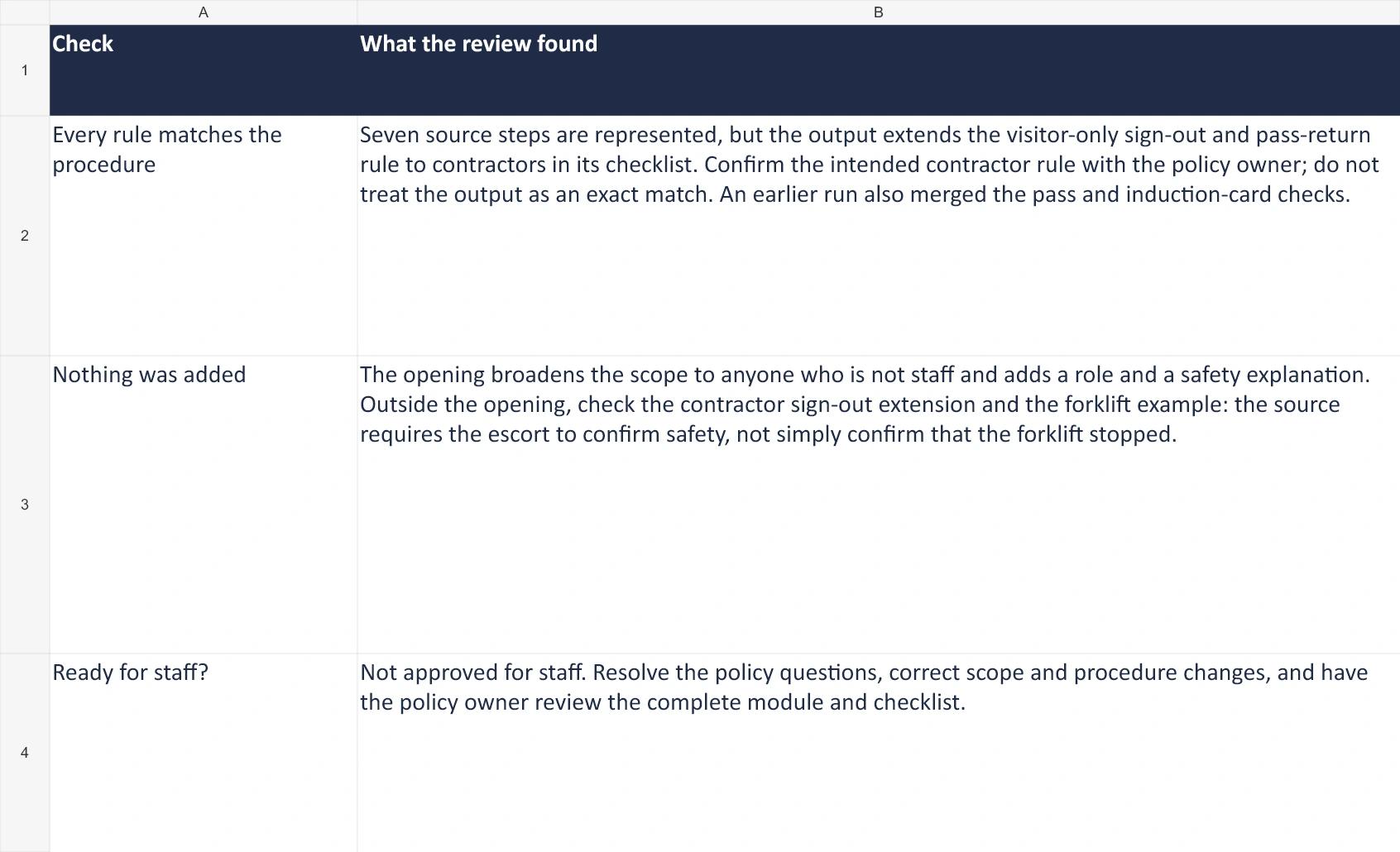
- 1. Scope: The opening is broader than the supplied procedure.
- 2. Contractors: The output adds an unconfirmed sign-out and pass-return requirement.
- 3. Before staff use it: Resolve the questions and review the whole corrected module.
Open this workbook preview at full size
The opening adds three details: “anyone who isn’t staff”, a contractor-supervision role and a safety explanation. There is another change later: the checklist extends the visitor-only sign-out and pass-return rule to contractors. That may be sensible, but the source does not establish it. Ask the policy owner rather than letting the chatbot make the decision.
The output also changes from run to run. An earlier run, with one line of the prompt worded differently, merged the pass and the induction card into one checklist line, which made the card sound like a replacement for the pass. That's why the check is a step, not an option.
Step 5: Fix it and fill the gaps
Restore the procedure’s scope, check the checklist against each source step and ask the policy owner about the unresolved contractor and escort questions. Also check the forklift example: the escort must confirm that entry is safe, not merely that the forklift has stopped. Have the owner approve the complete revised module before it goes to staff.
Names, staff records, customer details and health information don't belong in a prompt. Use roles ("the team leader") or placeholders ("Customer A") instead, and follow your organisation's AI policy on which tools you can use.
Australia's privacy regulator, the OAIC, recommends that organisations don't enter personal information, "and particularly sensitive information", into publicly available generative AI tools, and warns that their output can be inaccurate (OAIC guidance on commercially available AI products).
Step 6: Put it where staff will see it
Turn the module into a course in your learning platform, assign it, and track who has finished. For a quiz at the end, use the prompts in our guide to ChatGPT prompts for quiz writing, which also checks the questions.
Lloyds Metals: specify the audience
The Lloyds Metals case describes adjusting the audience and skill level to reduce a draft from 25 sections to 15 or eight. It is an example of how a clearer brief changes the draft, rather than proof that audience is always the most influential prompt input. Read the case study.
Upload the policy or procedure as a PDF, Word or PowerPoint file and Coursebox builds a course from it. You can then enrol staff by CSV with invitation emails, track completion and export reports. It works best with one document of about 10 to 30 pages per course, and you still check the result against the source, because the AI can drop passages from long documents.
Nine more prompt templates for employee training
Each one uses the same setup and the same rule: use only the material you paste.
2. An onboarding guide for the first week
An onboarding guide for the first week, from your own material.
- The first-week schedule, the roles to contact, what to bring and wear.
You are helping ORGANISATION welcome LEARNERS. Write a first-week guide a new starter can read before day 1.

Use only the material below. Do not add facts, rules, names or numbers that are not in it. If something the training needs is missing, list it as a question for me at the end instead of guessing.

Include: what happens each day of the first week, who to ask for what (use the roles given, not names), what to bring and wear, and the 3 things to get right in the first month.

Write in a TONE tone, in SPELLING. Use short headings and lists.

Our onboarding details:
"""
[paste the first-week schedule, roles to contact, dress and safety requirements]
"""
- ORGANISATION
- : Your organisation, or a description of it (for example, a regional logistics company)
- LEARNERS
- : Who the training is for, in the words you'd use at work (for example, new warehouse and dispatch staff)
- TONE
- : The tone (for example, plain and friendly)
- SPELLING
- : The spelling (for example, Australian English)
- Days, times and roles match your schedule.
- No names or phone numbers were invented.
- A current staff member reads it before it goes out.
3. Role-play scenarios
Role-play scenarios, from your own material.
- The procedure or service standard the scenarios test.
Write [5] role-play scenarios for LEARNERS at ORGANISATION to practise [the skill, for example handling a complaint].

Use only the material below. Do not add facts, rules, names or numbers that are not in it. If something the training needs is missing, list it as a question for me at the end instead of guessing.

For each scenario give: the situation (2 or 3 sentences), what the other person says first, the brief for the person playing the other role, and 3 things an observer should look for. Make the scenarios realistic for this job, from easy to hard.

Write in SPELLING.

The procedure or standard they should follow:
"""
[paste it]
"""
- ORGANISATION
- : Your organisation, or a description of it (for example, a regional logistics company)
- LEARNERS
- : Who the training is for, in the words you'd use at work (for example, new warehouse and dispatch staff)
- SPELLING
- : The spelling (for example, Australian English)
- Each scenario can be handled using your procedure.
- The observer points match the standard.
- No scenario uses a real customer or colleague.
4. A 5-minute refresher
A 5-minute refresher, from your own material.
- The policy section, or a summary of what went wrong (without names).
Write a 5-minute refresher for LEARNERS at ORGANISATION on [the topic].

Use only the material below. Do not add facts, rules, names or numbers that are not in it. If something the training needs is missing, list it as a question for me at the end instead of guessing.

Start with a mistake documented in the supplied material, then the relevant rules that address it. If no mistake is documented, ask me for an example before drafting, then one short scenario with the right action. End with one question to check understanding, with the answer.

Write in a TONE tone, in SPELLING, under 300 words.

Material:
"""
[paste the policy section or the incident summary, without names]
"""
- ORGANISATION
- : Your organisation, or a description of it (for example, a regional logistics company)
- LEARNERS
- : Who the training is for, in the words you'd use at work (for example, new warehouse and dispatch staff)
- TONE
- : The tone (for example, plain and friendly)
- SPELLING
- : The spelling (for example, Australian English)
- The mistake is documented in the supplied material.
- The rules match the policy.
- Under 300 words.
5. An announcement of new training
An announcement of new training, from your own material.
- The course name, the reason, the length, the deadline and the link.
Write a short message from ORGANISATION telling LEARNERS about new training.

Use only the material below. Do not add facts, rules, names or numbers that are not in it. If something the training needs is missing, list it as a question for me at the end instead of guessing.

Say what the training is, why it's happening now, how long it takes, the deadline and how to start. One paragraph and a short list, no hype.

Write in a TONE tone, in SPELLING.

Details:
"""
[paste the course name, reason, length, deadline and link]
"""
- ORGANISATION
- : Your organisation, or a description of it (for example, a regional logistics company)
- LEARNERS
- : Who the training is for, in the words you'd use at work (for example, new warehouse and dispatch staff)
- TONE
- : The tone (for example, plain and friendly)
- SPELLING
- : The spelling (for example, Australian English)
- The deadline and link are right.
- The reason is the real one.
- No promises about the training you can't keep.
6. A facilitator script for a session
A facilitator script for a session, from your own material.
- The agenda and the content to cover.
Write a facilitator script for a [length] session for LEARNERS at ORGANISATION on [topic].

Use only the material below. Do not add facts, rules, names or numbers that are not in it. If something the training needs is missing, list it as a question for me at the end instead of guessing.

For each part of the session give: the time, what the facilitator says (in their words, not a summary), the activity and the materials. Include an opening that links the topic to the learners' work, and a close that asks each person what they'll do differently.

Write in a TONE tone, in SPELLING.

Session plan and content:
"""
[paste the agenda and the content to cover]
"""
- ORGANISATION
- : Your organisation, or a description of it (for example, a regional logistics company)
- LEARNERS
- : Who the training is for, in the words you'd use at work (for example, new warehouse and dispatch staff)
- TONE
- : The tone (for example, plain and friendly)
- SPELLING
- : The spelling (for example, Australian English)
- The timings add up to the session length.
- The facilitator could say every line out loud.
- Every fact is in your content.
7. A summary of training feedback
A summary of training feedback, from your own material.
- The open comments from your survey, with names removed.
Below are anonymous comments from LEARNERS at ORGANISATION after a training session. Summarise them for the trainer.

Group the comments into themes. For each theme give the number of comments, one typical comment in the learners' own words, and one change the trainer could make. Allow a comment to fit several themes and say that theme counts can overlap. Do not expose a distinctive single-person comment; summarise it without identifying details. Don't invent comments or numbers.

Write in SPELLING.

Comments:
"""
[paste the comments, with names and other identifying details removed]
"""
- ORGANISATION
- : Your organisation, or a description of it (for example, a regional logistics company)
- LEARNERS
- : Who the training is for, in the words you'd use at work (for example, new warehouse and dispatch staff)
- SPELLING
- : The spelling (for example, Australian English)
- Count comments once per theme; a comment may fit several themes, so totals can exceed the number of comments.
- Quoted comments are real.
- Small groups can't be identified from the summary.
8. A course description for the LMS
A course description for the LMS, from your own material.
- The course outline, objectives and length.
Write a course description for ORGANISATION's learning platform, for a course for LEARNERS.

Use only the material below. Do not add facts, rules, names or numbers that are not in it. If something the training needs is missing, list it as a question for me at the end instead of guessing.

Give: a title of 8 words or fewer, a one-sentence summary, 3 to 5 things the learner will be able to do, who it's for, how long it takes and any prerequisites.

Write in a TONE tone, in SPELLING.

Course outline:
"""
[paste the outline, objectives and length]
"""
- ORGANISATION
- : Your organisation, or a description of it (for example, a regional logistics company)
- LEARNERS
- : Who the training is for, in the words you'd use at work (for example, new warehouse and dispatch staff)
- TONE
- : The tone (for example, plain and friendly)
- SPELLING
- : The spelling (for example, Australian English)
- The 'able to do' list matches the course objectives.
- The length is right.
- The title fits your platform's character limit.
9. Enrolment and reminder emails
Enrolment and reminder emails, from your own material.
- The course name, why staff need it, the length, the deadline and the link.
Write 3 short emails from ORGANISATION to LEARNERS about a course: the enrolment email, a reminder halfway to the deadline, and a final reminder 2 days before.

Use only the material below. Do not add facts, rules, names or numbers that are not in it. If something the training needs is missing, list it as a question for me at the end instead of guessing.

Each email: a subject line, 3 to 5 sentences, the deadline and the link. Keep the reminders shorter than the first email and never guilt-trip.

Write in a TONE tone, in SPELLING.

Details:
"""
[paste the course name, why staff need it, the length, the deadline and the link]
"""
- ORGANISATION
- : Your organisation, or a description of it (for example, a regional logistics company)
- LEARNERS
- : Who the training is for, in the words you'd use at work (for example, new warehouse and dispatch staff)
- TONE
- : The tone (for example, plain and friendly)
- SPELLING
- : The spelling (for example, Australian English)
- Dates and links are right in all 3 emails.
- Your platform's merge fields replace any names, not the chatbot.
10. FAQs from a handbook section
FAQs from a handbook section, from your own material.
- The handbook section.
Turn the handbook section below into 8 to 12 questions LEARNERS at ORGANISATION actually ask, with short answers.

Use only the material below. Do not add facts, rules, names or numbers that are not in it. If something the training needs is missing, list it as a question for me at the end instead of guessing.

Use the learners' words for the questions, not the handbook's headings. Answer each in 1 to 3 sentences and say which part of the section it comes from.

Write in a TONE tone, in SPELLING.

Handbook section:
"""
[paste it]
"""
- ORGANISATION
- : Your organisation, or a description of it (for example, a regional logistics company)
- LEARNERS
- : Who the training is for, in the words you'd use at work (for example, new warehouse and dispatch staff)
- TONE
- : The tone (for example, plain and friendly)
- SPELLING
- : The spelling (for example, Australian English)
- Every answer is in the section.
- Questions that the section doesn't answer go to the owner of the handbook, not into the FAQ.
Can ChatGPT replace an LMS?
A prompt pack helps draft material; it does not provide the learning platform, enrolment permissions or reporting configuration needed to deliver a training programme. Use your LMS to assign courses, manage access and keep completion records, and check its settings before launch.
Prompts 8 and 9 draft course descriptions and emails. Your team still needs to put those into the appropriate systems, verify dates and links, and configure delivery and reporting.
What not to paste into a chatbot
| Don't paste | Use instead |
|---|---|
| Names of staff, customers or patients | Roles or placeholders: "the team leader", "Customer A" |
| Email addresses, phone numbers, staff IDs | Leave them out; your learning platform or email tool fills them in |
| Performance, disciplinary or health information | Describe the situation in general terms |
| Survey comments that identify someone | Remove names and anything that points to one person |
| Confidential documents | Use only documents authorised for the specific service and account under your organisation’s AI policy. |
Common mistakes with training prompts
| Mistake | What happens | What to do |
|---|---|---|
| No source material | A generic module with rules your organisation doesn't have | Paste the policy, procedure or handbook section |
| No "use only this" line | Plausible additions that nobody notices | Keep the grounding line in every prompt |
| Asking for everything at once | A long, thin draft that's hard to check | One prompt per training job |
| Publishing the first output | Merged or invented rules reach staff | Check line by line against the source |
| Pasting staff names and records | Personal information leaves your organisation | Use roles and placeholders |
Where to go next
- Before you write anything, find out what people need with a training needs analysis questionnaire.
- To plan the course, start with a course outline and SMART learning objectives.
- For onboarding, see how to train new hires.
- For a live session, pair prompt 6 with a facilitator guide and a training agenda.
- After the training, ask the right training survey questions, then use prompt 7 to summarise the comments.
The pack is version 1.1, reviewed on 22 October 2026 and tested in Excel for Windows. Its main prompt was run in Claude on 21 October 2026; the recorded output remains unedited for comparison. Other prompts, models and spreadsheet applications need their own output review.
Using ChatGPT for employee training
Pick the prompt for the job, paste your own material, and tell the chatbot to use nothing else and to ask about gaps instead of guessing. Then check every rule against the source, fill the gaps with the person who owns the policy, and keep personal information out of every prompt.
To turn your documents into a full course with quizzes, try Coursebox's AI employee training software.
Frequently Asked Questions
Yes, for drafts. Give it your policy or procedure, who the training is for and the format you want, and tell it to use only your material. Check every rule against the source before staff see it.
One that names the learners, pastes the full policy, says "use only this material", asks for missing information as questions, and sets the format and length. The main prompt above does all five.
Follow your organisation’s AI and data policies and use only material authorised for the specific service and account. A business account alone is not approval to upload a document. Keep personal or sensitive records out of this example workflow.
A prompt pack does not replace the systems and settings needed to assign courses, manage access and keep completion records. Draft the material here, then configure and test delivery in your learning platform.
Supply approved source material, ask the model to identify gaps and compare its complete output with the source. In the recorded run, the opening added information and the checklist extended a rule to contractors; both needed human review.
Parshad Desai
Parshad is a full stack technical marketer based in our Perth office. He began his Coursebox career as a marketing intern. After impressing the founders with his incredible work, he later transitioned into a full time position coordinating digital marketing. His focus lies in managing our website, product analytics, and email marketing. Recently he has taken a keen interest in applying AI to digital marketing and growth.

