

15+ AI Prompts for Project Management to Boost Productivity
ChatGPT can help you optimize your workflow and boost your productivity. Here are 15+ best AI prompts for project management that you can try today.


Build high quality courses that actually sell.
Managing projects can feel like juggling a dozen balls at once. From planning timelines to managing risks, project managers have a lot on their plates.
Over the years, I’ve found one tool that makes this process far less stressful: AI prompts.
Instead of spending hours creating reports or brainstorming solutions, I can give AI a structured prompt and get actionable outputs instantly. It helps me generate project roadmaps, perform risk analysis, and develop stakeholder communication plans with minimal input.
Project management prompts can even help you generate training or educational content. With an AI course creator, you can transform prompt-generated outputs into structured lessons, modules, quizzes, and training videos.
In this post, I’ll share 15+ AI prompts for project management, along with helpful tips for turning them into engaging online courses.
How AI Prompts Help Project Managers
AI prompts are instructions you give an AI tool to perform a task or generate insights. The more specific the prompt, the more useful the output.
For instance, compare these two prompts: “Help me manage a project” and “Act as a project management consultant and create a 6-week timeline for a software development project with deliverables, milestones, and team responsibilities.”
The second prompt produces structured, actionable results.
As a project manager, you can use AI prompts to draft project plans and create risk and mitigation strategies. It can also help you assign tasks, prepare meeting agendas and summaries, and track KPIs and progress reports.
Using AI in this way allows PMs to focus on decision-making instead of repetitive tasks.
AI Prompts for Project Planning
A solid plan sets the foundation for every successful project. I use the following prompts with ChatGPT to quickly create structured project timelines and plans.
#1: Create a Project Timeline
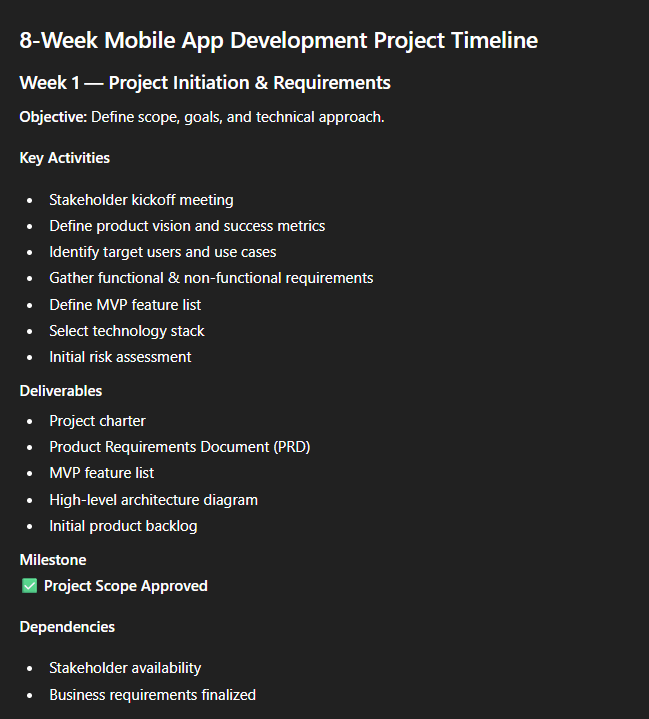
With this prompt, you can quickly draft a detailed timeline, so your team knows what to accomplish each week.
“Act as a project management consultant. Create a detailed 8-week project timeline for developing a mobile app. Include milestones, key deliverables, and dependencies.”
#2: Generate a Gantt Chart Outline
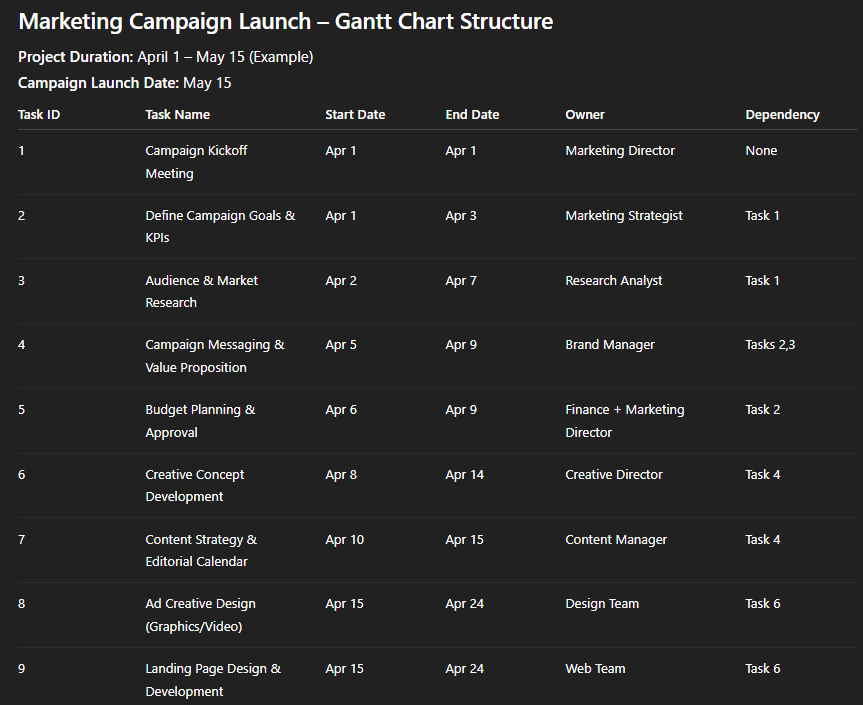
Use this prompt to structure your project visually and clarify task dependencies:
“Act as a project scheduler. Provide a Gantt chart structure for launching a marketing campaign, including start/end dates, task owners, and dependencies.”
#3: Draft a Project Charter
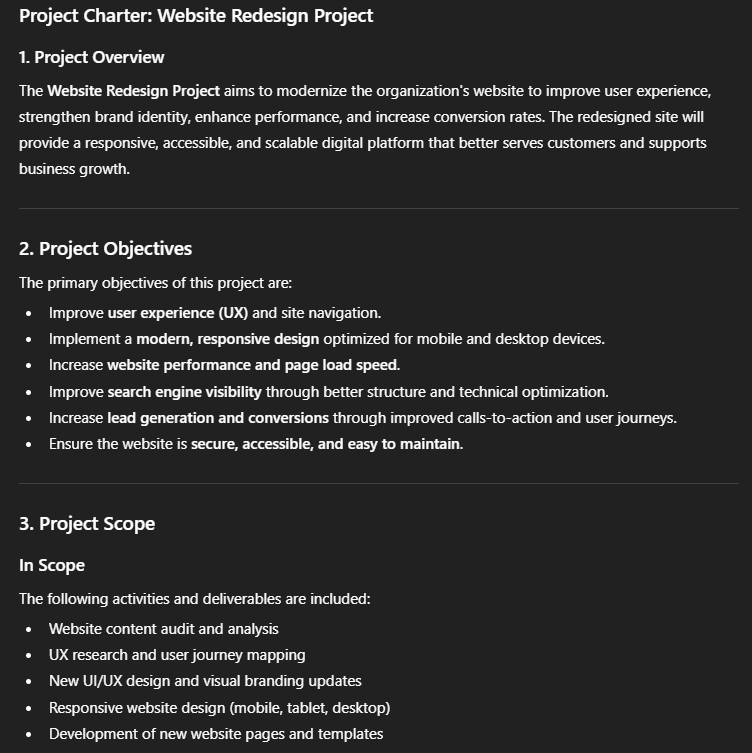
I use this prompt to define the purpose, scope, and objectives of my project in one document:
“Act as a project manager. Write a project charter for a website redesign project, including objectives, scope, stakeholders, and success criteria.”
AI Prompts for Task Management
Effective task management ensures work gets done on time. These AI prompts help me assign, prioritize, and track tasks efficiently.
#4: Assign Team Tasks
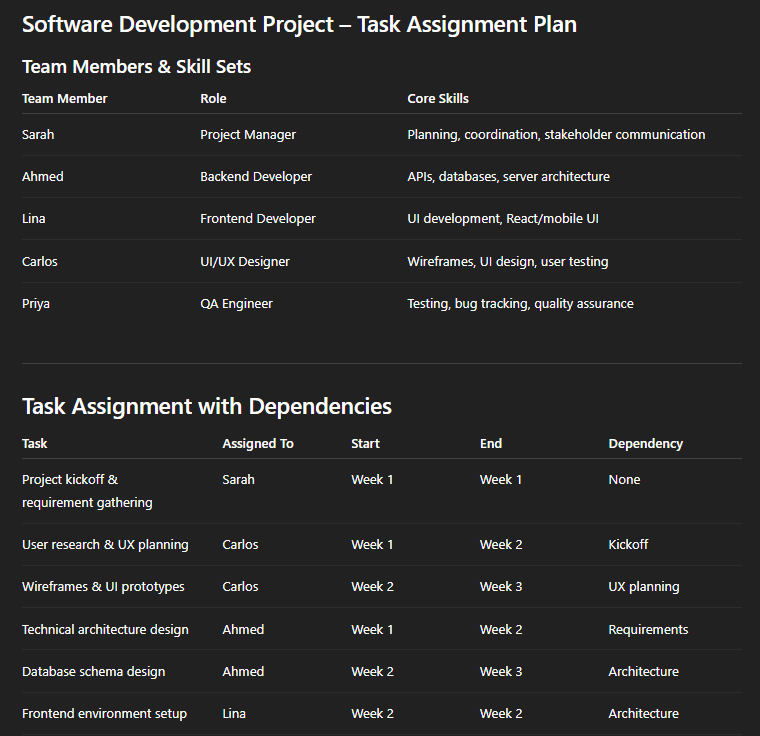
To quickly distribute responsibilities among team members, enter this prompt in ChatGPT:
“Act as a project coordinator. Assign tasks for a software development project to a 5-member team based on skill sets, deadlines, and dependencies.”
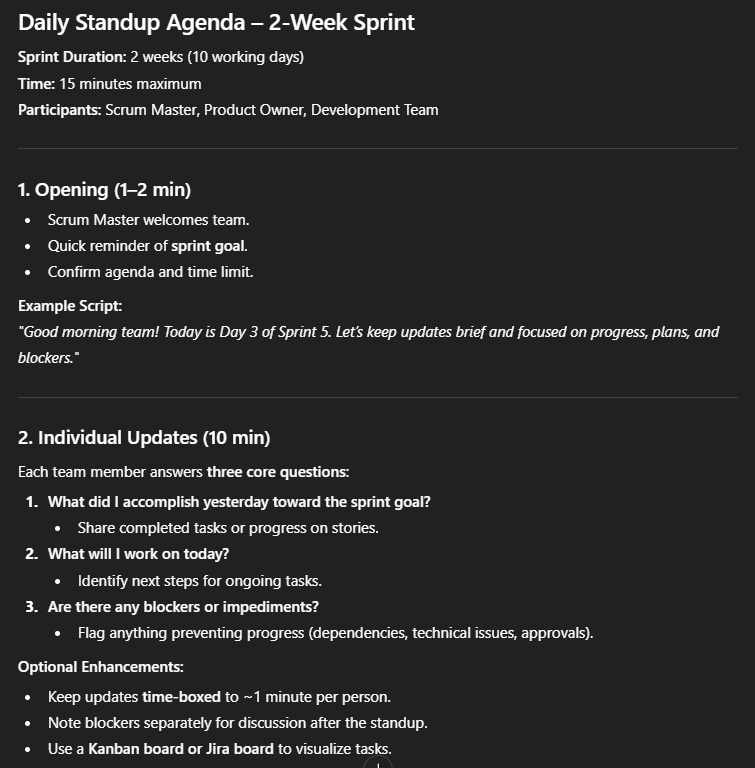
#5: Daily Standup Agenda
ChatGPT also helps me keep my team aligned by generating a structured agenda for daily standup meetings. Use this AI prompt for project management:
“Act as a Scrum master. Generate a daily standup agenda for a 2-week sprint. Include questions for team updates, blockers, and progress.”
#6: Task Prioritization
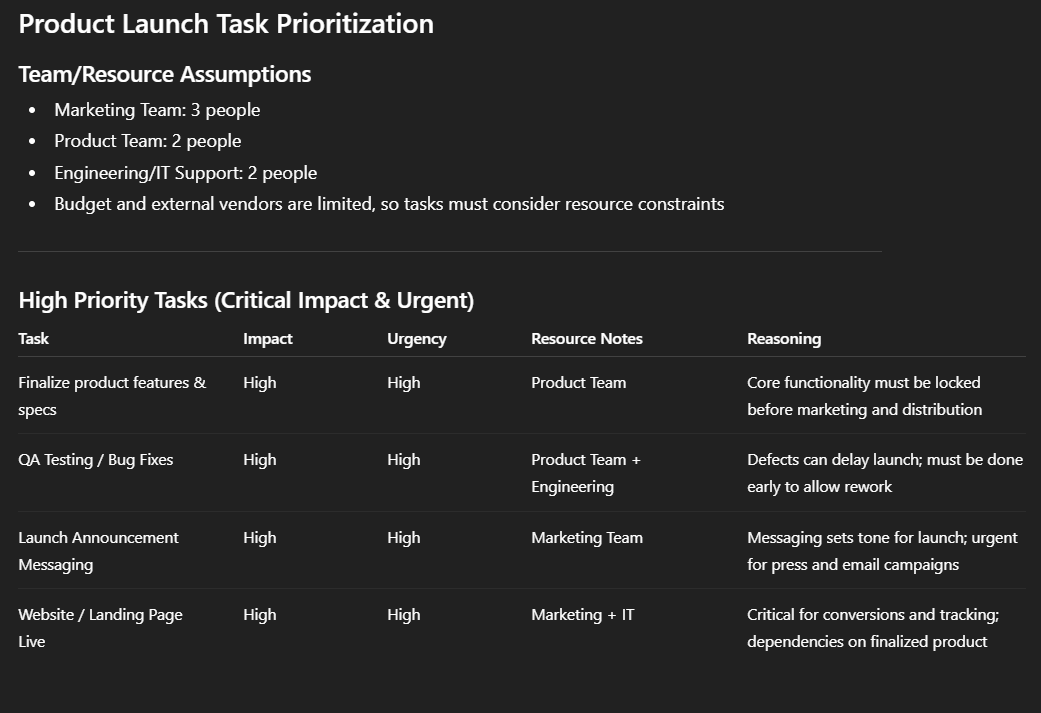
This prompt works well in ranking tasks based on urgency, impact, and available resources.
“Act as a project strategist. Prioritize a list of tasks for a product launch based on impact, urgency, and resource availability.”
AI Prompts for Risk Management
Managing risks is critical to prevent surprises during a project. I use these prompts to identify, assess, and mitigate risks effectively.
#7: Identify Project Risks
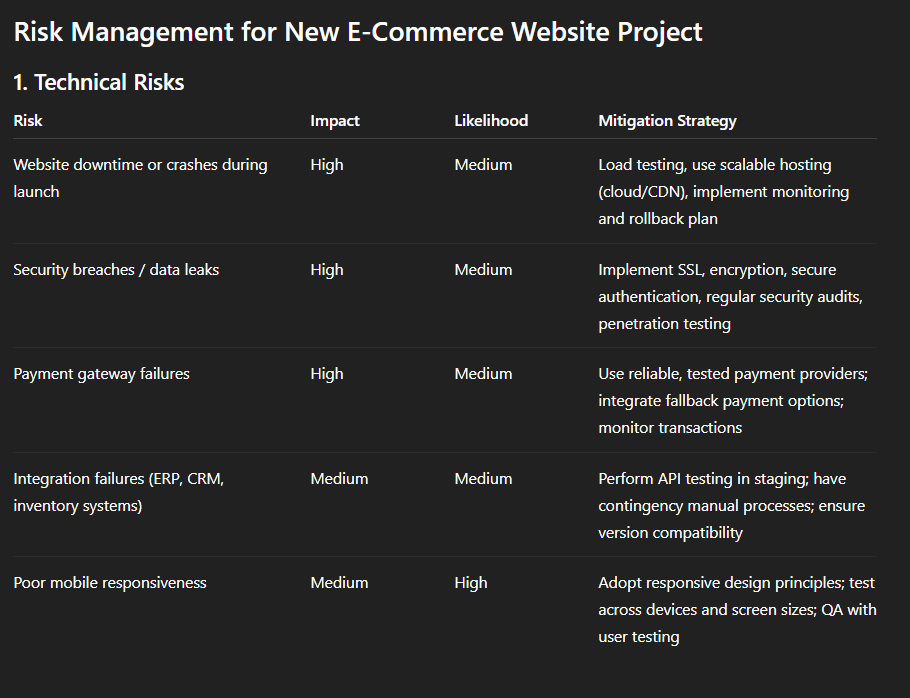
This prompt helps me spot potential challenges before they occur and also develop mitigation strategies.
“Act as a risk management consultant. List potential risks for a new e-commerce website project and suggest mitigation strategies for each.”
#8: Risk Assessment Matrix
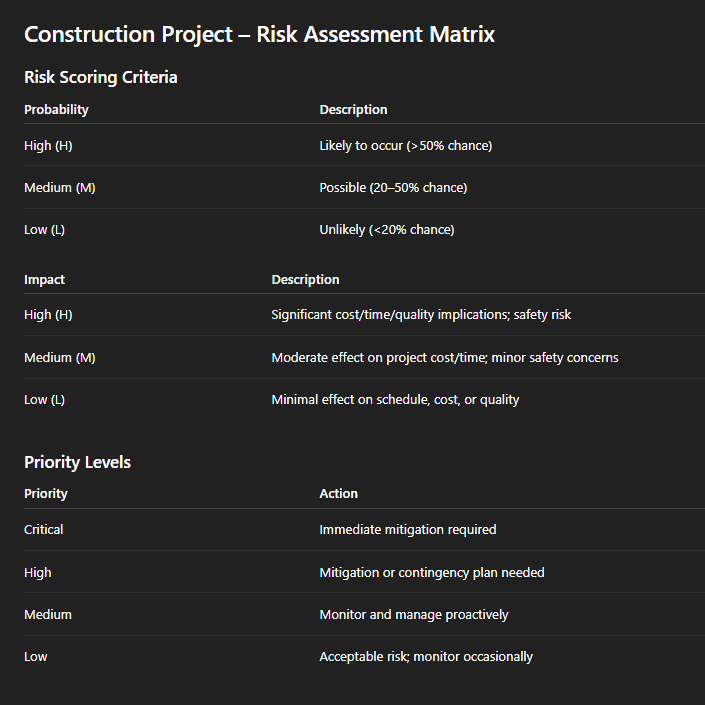
To find out which risks require the most attention, feed this structured matrix prompt to ChatGPT:
“Act as a project risk analyst. Create a risk assessment matrix for a construction project, including probability, impact, and priority levels.”
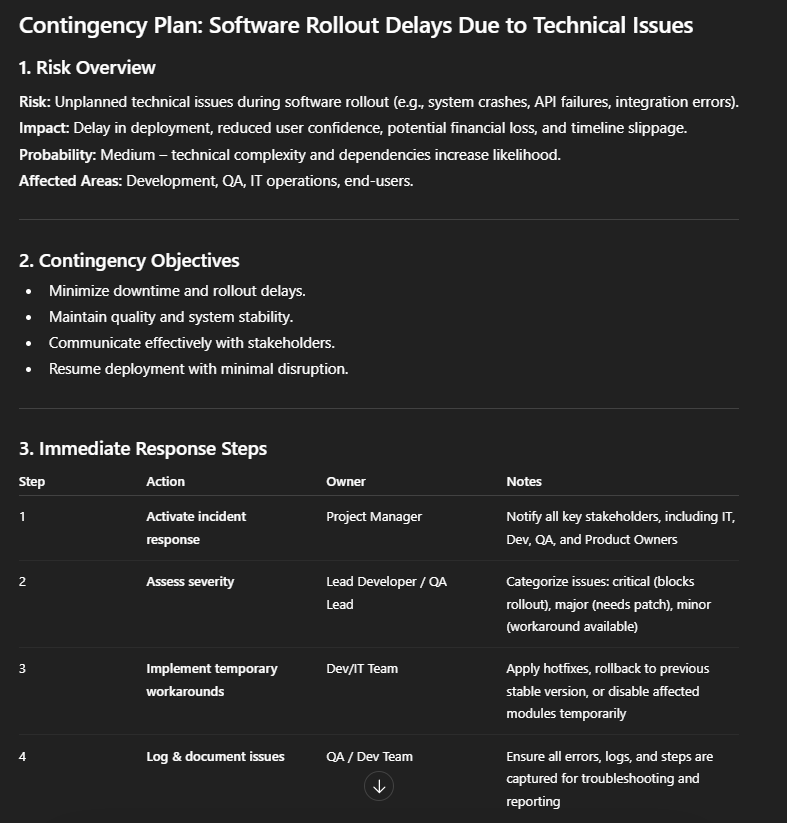
#9: Contingency Planning
ChatGPT can even prepare you for unexpected delays or obstacles by outlining backup plans. Use this prompt to get the best results:
“Act as a project management advisor. Develop a contingency plan for delays in a software rollout due to unexpected technical issues.”
AI Prompts for Communication and Reporting
Clear communication keeps everyone on the same page. These prompts assist me in creating updates, meeting agendas, and reports.
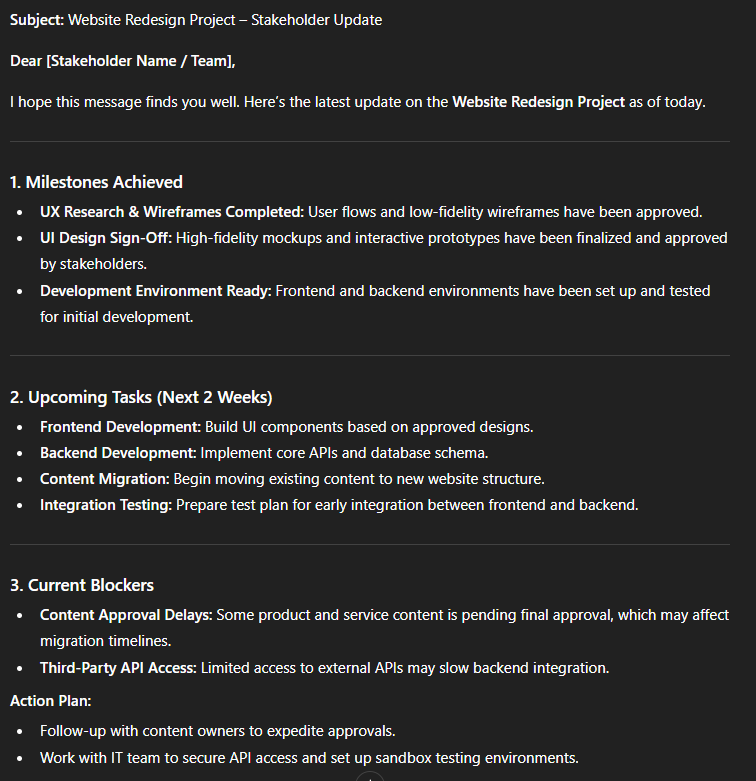
#10: Stakeholder Update Email
Whenever I have to keep stakeholders informed, I use this prompt to write a concise, structured email summarizing the progress.
“Act as a project manager. Draft an email update for stakeholders on the progress of a website redesign project. Include milestones achieved, upcoming tasks, and blockers.”
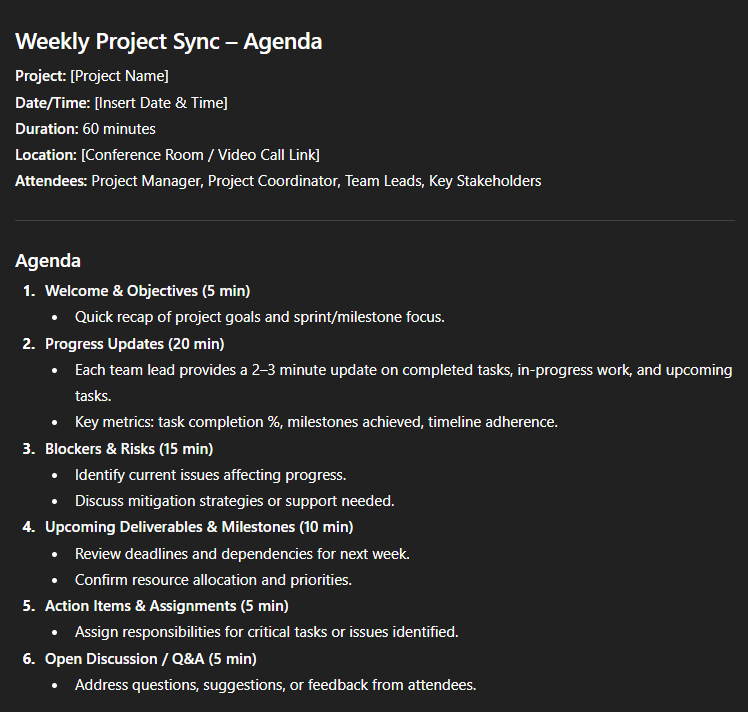
#11: Meeting Agenda and Minutes
To save my time in meetings, I rely on this AI prompt for project management to generate agendas and record key points efficiently.
“Act as a project coordinator. Prepare a meeting agenda for the weekly project sync and summarize minutes after the meeting. Include action items and owners.”
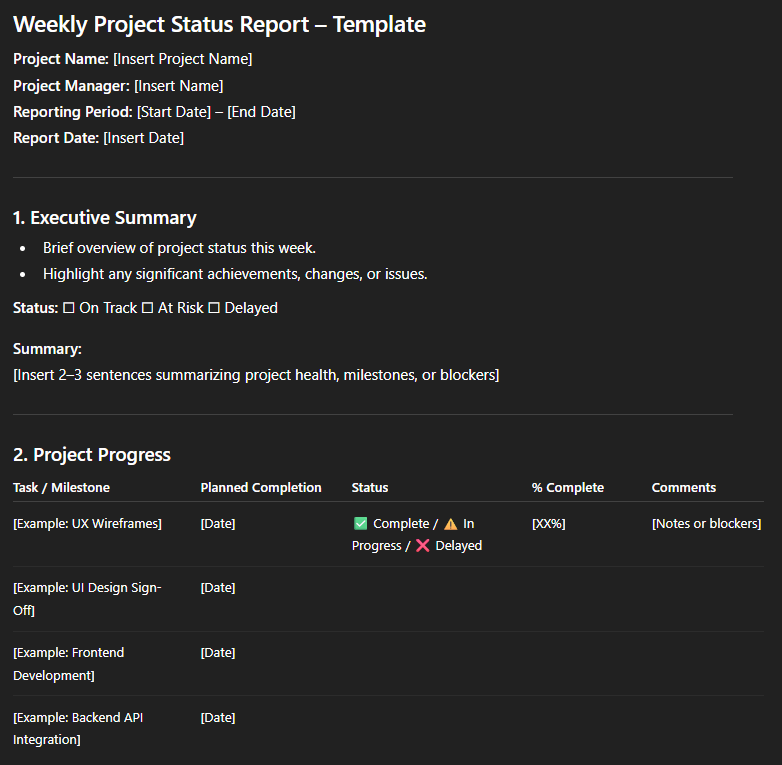
#12: Status Report Template
AI prompts can also help you standardize weekly status reports for easier progress tracking. Use this one:
“Act as a project management consultant. Create a weekly project status report template that includes project progress, budget status, risk updates, and next steps.”
AI Prompts for Productivity and Workflow Optimization
Optimized workflows help teams work smarter, not harder. These prompts help me improve efficiency and processes:
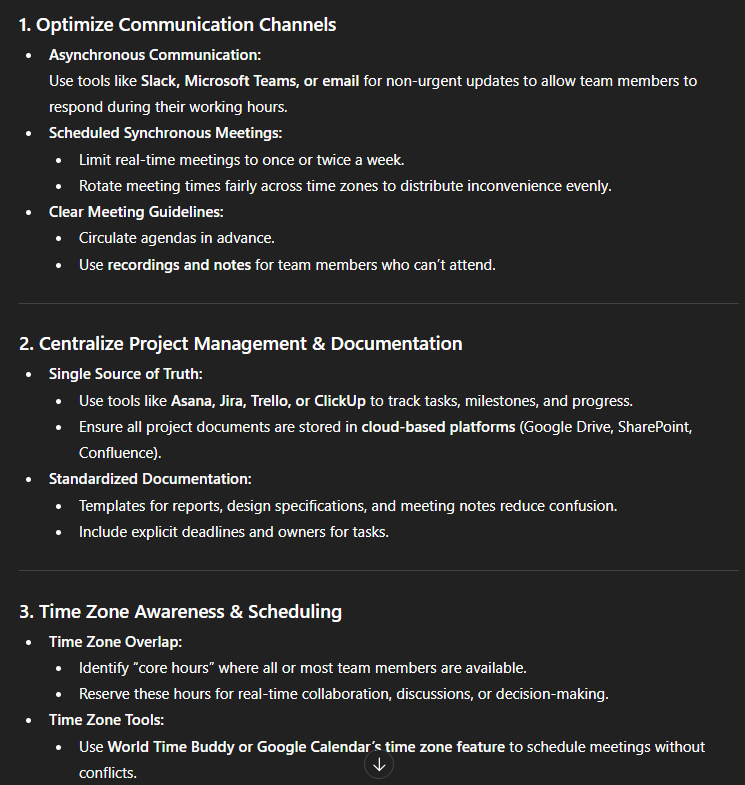
#13: Optimize Team Workflow
This prompt works best for identifying bottlenecks and improving collaboration.
“Act as a business operations consultant. Suggest ways to improve collaboration and productivity for a remote project team working across different time zones.”
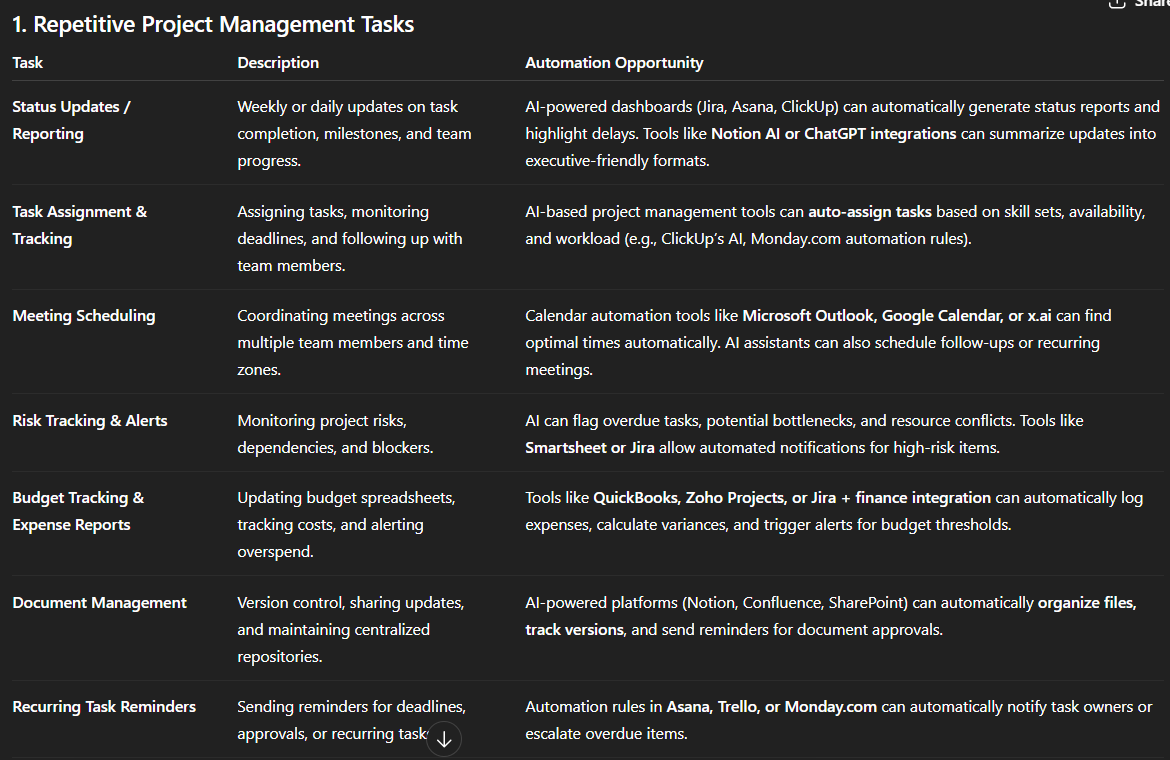
#14: Automate Repetitive Tasks
I use this prompt to automate my repetitive tasks:
“Act as a process improvement specialist. Identify repetitive project management tasks and suggest ways to automate them using AI tools or project management software.”
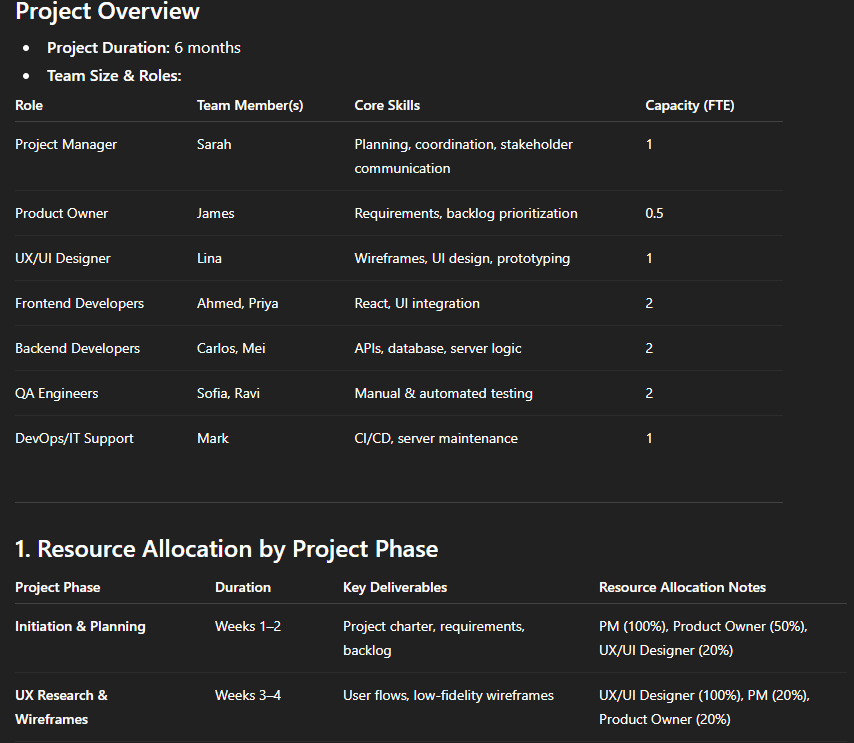
#15: Resource Allocation Plan
To allocate resources to the right team, this prompt gives the best results:
“Act as a project strategist. Create a resource allocation plan for a 6-month software development project, balancing team capacity, deadlines, and skill sets.”
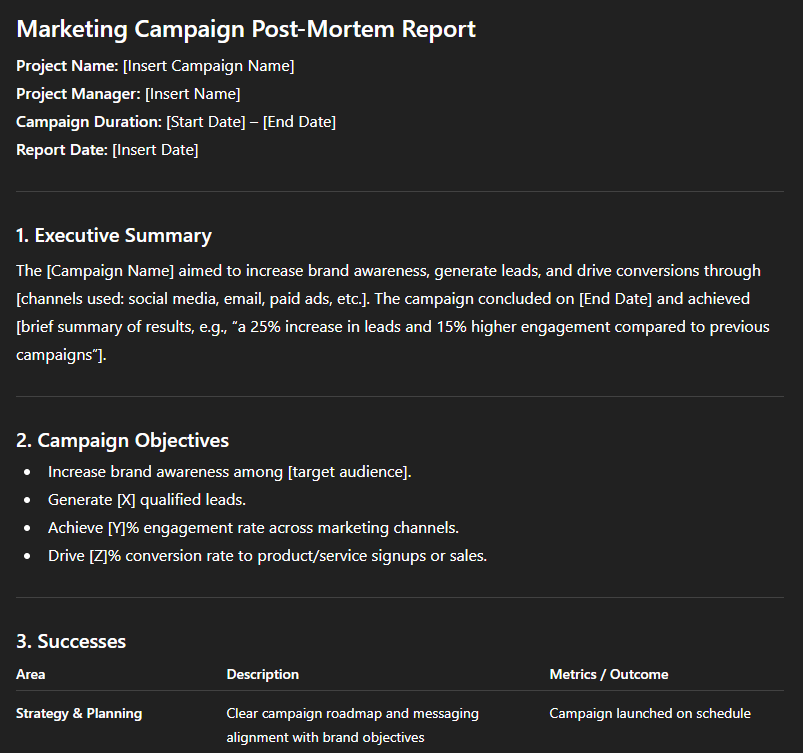
#16: Post-Mortem Analysis
With ChatGPT, you can learn from completed projects by summarizing successes, challenges, and lessons learned. Enter this prompt in the tool:
“Act as a project management consultant. Write a post-mortem report for a completed marketing campaign project, highlighting successes, challenges, and lessons learned.”
Tips for Writing Effective AI Prompts for Project Management
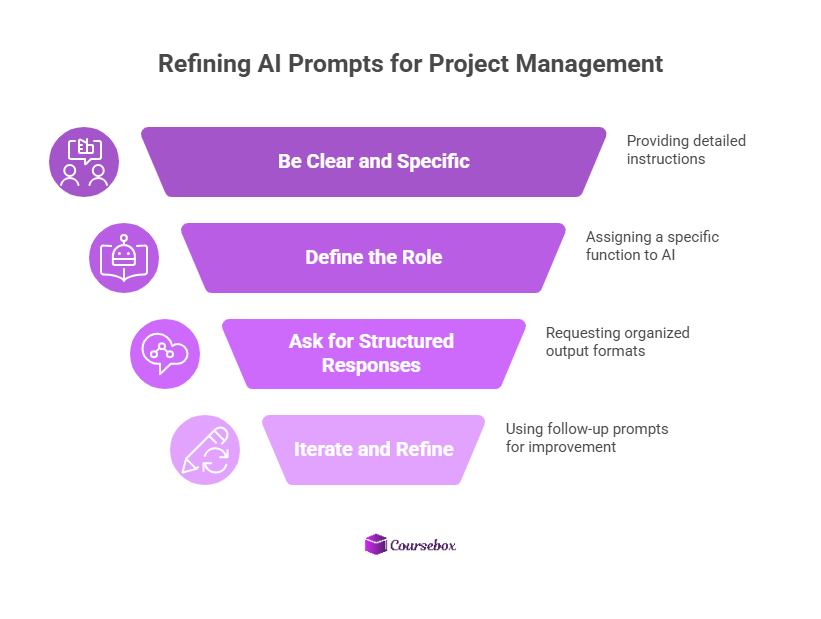
After using AI prompts for project management for a long time, I’ve learned a few best practices:
- Be clear and specific: Detailed prompts produce better outputs. Instead of: “Help me with a project,” try: “Create a 6-week timeline for launching a new product, including tasks, owners, and dependencies.”
- Define the role: Having AI act as a project manager, risk analyst, or Scrum master makes the output more structured.
- Ask for structured responses: Request tables, bullet points, step-by-step lists, or matrices rather than long paragraphs.
- Iterate and refine: Use follow-up prompts to clarify or expand outputs. AI often improves with each iteration.
How to Turn AI Prompts Into Project Management Courses
Beyond supporting project execution, AI prompts can be used to generate training materials for teams or clients.
Prompts about planning, risk management, or workflow optimization typically produce structured outputs that can be transformed into lessons, case studies, and exercises. An AI course generator like Coursebox allows you to take these outputs and create online courses.
Here’s a workflow I use:
- First, generate lesson ideas on ChatGPT and ask it to explain the concept with examples and use cases.
- Next, collect all your PDFs, docs, or slides on that topic.
- Finally, upload all content to Coursebox.
- Coursebox’s AI course creator will structure the content into modules, lessons, assessments, and also add training videos, interactions, and images.
Coursebox acts as an efficient AI course builder, allowing you to organize lessons, generate training videos with AI avatars, and publish the course quickly. This allows project managers, trainers, and consultants to turn prompt-generated insights into structured training programs with minimal effort.
FAQs About AI Prompts for Project Management
Frequently Asked Questions
AI prompts are instructions that guide AI tools to produce structured outputs for project tasks, planning, or strategy. They can help generate project timelines, risk assessments, meeting agendas, and more. Clear, specific prompts often save hours of manual work.
AI prompts can streamline routine project management tasks such as status reports, task allocation, or risk analysis. This allows teams to focus on decision-making and problem-solving instead of administrative work. It also helps standardize workflows and improve collaboration, especially in remote teams.
No, you don’t need coding or technical expertise. Most prompts are written in plain language, describing the task you want the AI to perform. With a little practice, project managers can structure prompts to generate more actionable and organized results.
Yes, AI prompts can generate structured content like lesson outlines, examples, exercises, and case studies. Trainers and consultants can refine these outputs into modules or learning materials. Platforms like Coursebox can then efficiently organize them into online courses.
Coursebox is an AI course creator that transforms AI-generated content into structured lessons, quizzes, and training videos. You can paste outputs from project management prompts into the platform, and it will organize them into modules and interactive courses. Acting as an AI course generator, Coursebox makes it easy to launch educational programs based on AI-generated insights.
Travis Clapp
Educational technologist and instructional designer

