

AI in Instructional Design: Uses, Limits and Examples
How AI changed my course-building process from three months to a first draft in about an hour, ten ways AI is reshaping instructional design, and the risks designers still need to manage.

AI in instructional design means using AI tools to draft course structure, lesson text, quizzes and media, to personalise and adapt learning, and to support assessment, while a subject matter expert still checks every page against the learning outcomes.
- In my experience, AI cuts the time to a complete first draft from months to about an hour, though the expert review still takes real time.
- A meta-analysis of 50 controlled evaluations found intelligent tutoring raised test scores by a median 0.66 standard deviations.
- Unrestricted GPT-4 access improved practice grades by 48% in one field experiment, but those students did worse once access was removed.
- Generative AI can state wrong facts confidently, so every AI-assisted course needs a subject matter review built into the project.

Go from storyboard to an interactive course in minutes
Artificial intelligence (AI) has changed how elearning courses get built. This article compares the process I used before AI with the one I use now, then covers ten ways AI is reshaping instructional design and the risks to manage. The faster process I describe uses AI instructional design software that drafts course structure, pages and quizzes from existing material, with a subject matter expert reviewing every page.
Traditional Instructional Design: A Glimpse into the Past
My journey in elearning and blended training programs began at Workstar in Sydney in 2010, coinciding with my pursuit of a master's degree in interactive multimedia at UTS. Our conventional methodology encompassed:
- Collaborating with clients to gather requirements and content.
- Establishing clear learning objectives and assessment criteria.
- Analysing content for high-level course design and structure.
- Developing content treatments with mockups and drafts for each module.
- Crafting a 'look and feel' design document for client approval.
- Coordinating with SCORM developers for the integration of designs, media, and content.
- Finalising and deploying the course for client approval and LMS integration.
Typically, this process spanned approximately three months. AI has since made it possible to shorten this substantially.
How will AI influence the future of instructional design?
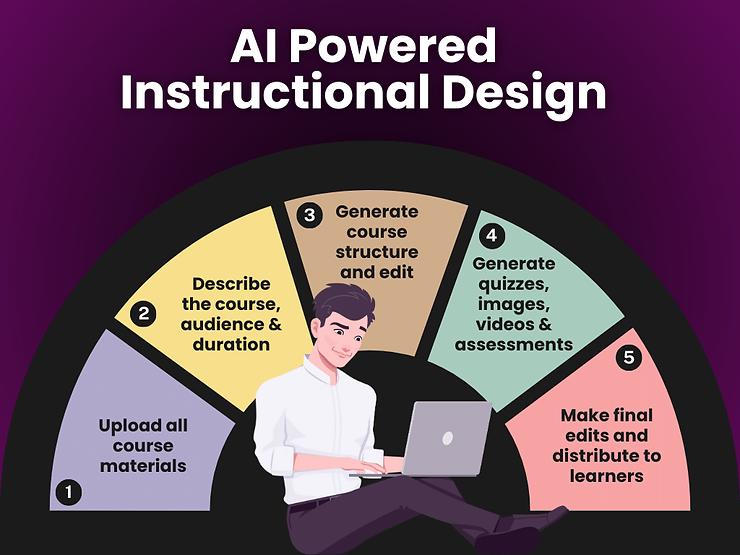
With AI, the process is much shorter:
- Upload all course materials, including videos and web content, to an AI course builder such as Coursebox.
- Provide a comprehensive course description, target audience, and duration.
- Use AI to generate draft content pages, quizzes, assessments, and images.
- Review and edit every page, question and image with a subject matter expert.
- Publish the course, ready for deployment.
In my experience, this AI-assisted process cuts the time to a complete first draft from months to about an hour. The review with subject matter experts still takes real time, and it is where most of the quality comes from.
The 10 ways in which AI is reshaping instructional design
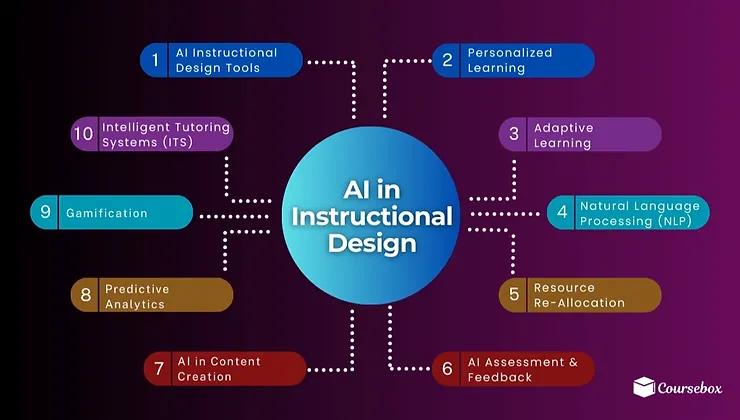
1. AI Instructional Design Tools
AI now supports most stages of course development. This shift is not new: tools for speech recognition, image description, plagiarism detection, and more have been evolving for years, and they also help with accessibility, such as captions and image descriptions. Generative AI adds fast drafting, which saves time as long as someone checks the output.
2. Personalised Learning
Personalisation starts from who the learner is: their role, experience and goals. AI can use a short intake survey or HR role data to choose which modules, examples and case studies each learner sees, so a nurse and a pharmacist taking the same medication-safety course get examples from their own work.
3. Adaptive Learning Enhanced by AI
Adaptive learning responds to what the learner does during the course. When someone keeps missing questions on one topic, the system serves extra practice or a simpler explanation before letting them move on; when they answer correctly first time, it skips ahead.
4. Intelligent Tutoring Systems (ITS)
ITS offer step-by-step guidance and feedback, a little like a human tutor. A meta-analysis of 50 controlled evaluations found that the median effect of intelligent tutoring was to raise test scores 0.66 standard deviations over conventional levels, although gains were much larger on locally developed tests than on standardised ones.
5. Natural Language Processing (NLP) in Instructional Design
NLP is what lets a course-grounded chatbot answer lesson questions in the learner's own words. The useful part for designers is the question log: when many learners ask the same thing, that lesson needs a clearer explanation or an extra example.
6. Gamification in AI-Driven Learning
Game-style practice is now cheaper to prototype, because AI can turn source material into quiz challenges and scenario questions for gamification. Check that the game practises the skill rather than only rewarding clicks.
7. Predictive Analytics in e-learning
Predictive analytics use data such as quiz attempts, missed objectives, time on task and the point where learners drop off. When a learner matches the pattern of people who failed or quit before, the system can alert a tutor or assign a remedial activity, and a designer can see which lesson needs revising.
8. AI Content Creation and Drafting
AI tools generate first drafts of course content such as lesson text, quizzes and simulations, which speeds up development. The drafts are fast but not reliable: generative AI can state wrong facts confidently, so every page needs a subject matter expert's check against the learning outcomes.
9. AI-Enhanced Assessment and Feedback
Rubric-based marking with immediate feedback is now practical at scale, and the same data shows instructors where learners need additional help. Spot-check a sample of AI marks against your own before relying on them.
10. AI in Resource Allocation
AI can triage the routine load: answering common learner questions, doing a first-pass mark, and flagging the submissions it is least sure about for an instructor. The instructor's time then goes to the flagged work, the learners who are stuck, and the modules where the data shows most people struggle.
Risks and Limits of AI in Instructional Design
The biggest risk is not that AI writes a weak course. It is that learners let AI do the thinking. In a field experiment with nearly a thousand high school maths students, access to a standard GPT-4 interface improved grades on practice problems by 48%, but when access was taken away, those students did worse than students who never had it. A tutor version with safeguards largely avoided that harm.
Other limits to plan for:
- Accuracy: AI drafts can contain confident errors, so build a subject matter review into every project.
- Bias and privacy: check generated examples for bias, and do not upload learner data or confidential material to tools your organisation has not approved.
- Human connection: chatbots can answer questions, but feedback conversations, coaching and discussion still need people. Decide which parts of a course stay human.
- Cost of advanced tools: VR and AR simulations remain expensive to build, so smaller teams usually get more from AI-drafted scenarios and practice questions first.
Conclusion
AI is now built into most course development tools, and it has changed how fast a first draft can be produced. I believe instructional designers and educators will always be needed, but the job is shifting toward designers who can direct AI, check its output, and design the practice that AI cannot do for the learner. If you are starting out, take one existing course, let AI draft the structure and quizzes from your source material, and have a subject matter expert review every page before you compare the time against your usual process.
Frequently Asked Questions
AI drafts course structure, lesson text, quizzes, simulations and images from source material, personalises which modules and examples each learner sees, adapts practice to how a learner is doing, powers course chatbots and tutoring, supports rubric-based marking, and flags learners at risk of failing or dropping out. A designer or subject matter expert still reviews the output.
I do not think so. AI has changed how fast a first draft can be produced, but the job is shifting toward designers who can direct AI, check its output and design the practice that AI cannot do for the learner. Feedback conversations, coaching and discussion still need people.
My traditional process, from requirements to a deployed course, typically took about three months. With an AI course builder, the time to a complete first draft drops to about an hour. The review with subject matter experts still takes real time, and it is where most of the quality comes from.
Confident factual errors in AI drafts, bias in generated examples, privacy risk if learner data or confidential material goes into unapproved tools, and learners letting AI do the thinking. In a field experiment with high school maths students, unrestricted GPT-4 access improved practice grades by 48%, but students did worse once access was removed.
Personalised learning starts from who the learner is, such as their role, experience and goals, and chooses which modules and examples they see. Adaptive learning responds to what the learner does during the course, serving extra practice when they keep missing questions on a topic and skipping ahead when they answer correctly first time.
Carolina Martin
Carolina is a highly experienced learning designer with tech start-up experience. She is based in Sydney and previously designed courses alongside Coursebox founder Travis in a previous job. She is passionate about delivering engaging learning experiences and brings the same perspective to customer experience too. She manages our customer support documentation and product testing processes.

