

Moodle vs Blackboard: What’s the Difference and Which One Should You Choose?
Make your LMS search easy with this Moodle vs Blackboard comparison. Explore how both platforms differ in content delivery, customization, cost & more.


Run your own branded LMS with unlimited learners
When searching for an AI LMS, you might be looking for a platform that streamlines your content delivery, tracking, and scaling. Moodle and Blackboard are both built for the same purposes. While they are commonly used in higher education and corporate training, they differ in cost structure, flexibility, customization, and administrative control.
If you're evaluating which LMS fits your organization, this Moodle vs Blackboard comparison will help you make the right choice. Let’s dive into it.
What Is Moodle?
Moodle is an open-source LMS used by universities, schools, and organizations worldwide. Institutions can host the platform themselves or choose a certified Moodle hosting partner. This gives them full control over customization, data, and integrations.
What makes Moodle great is its wide range of features. This LMS supports structured course creation, grading systems, and quizzes, along with competency frameworks, discussion forums, certificates, and detailed analytics. Its flexibility makes it popular in higher education and compliance-driven corporate environments.
However, Moodle requires setup, hosting, maintenance, and administrative management. While the software itself is free, implementation costs vary depending on scale and technical needs.
What Is Blackboard?
Blackboard by Anthology is a commercial LMS widely used in universities and large institutions. It offers a cloud-hosted solution, meaning institutions don’t have to manage servers or infrastructure themselves.
Blackboard provides course management, virtual classrooms, grading tools, analytics dashboards, accessibility features, and content authoring capabilities. It is designed for large-scale deployments and institutional governance.
Unlike Moodle, Blackboard operates under a licensing model. Institutions pay subscription fees that typically cover hosting, maintenance, updates, and support services.
Moodle vs Blackboard: 6 Key Differences Explained
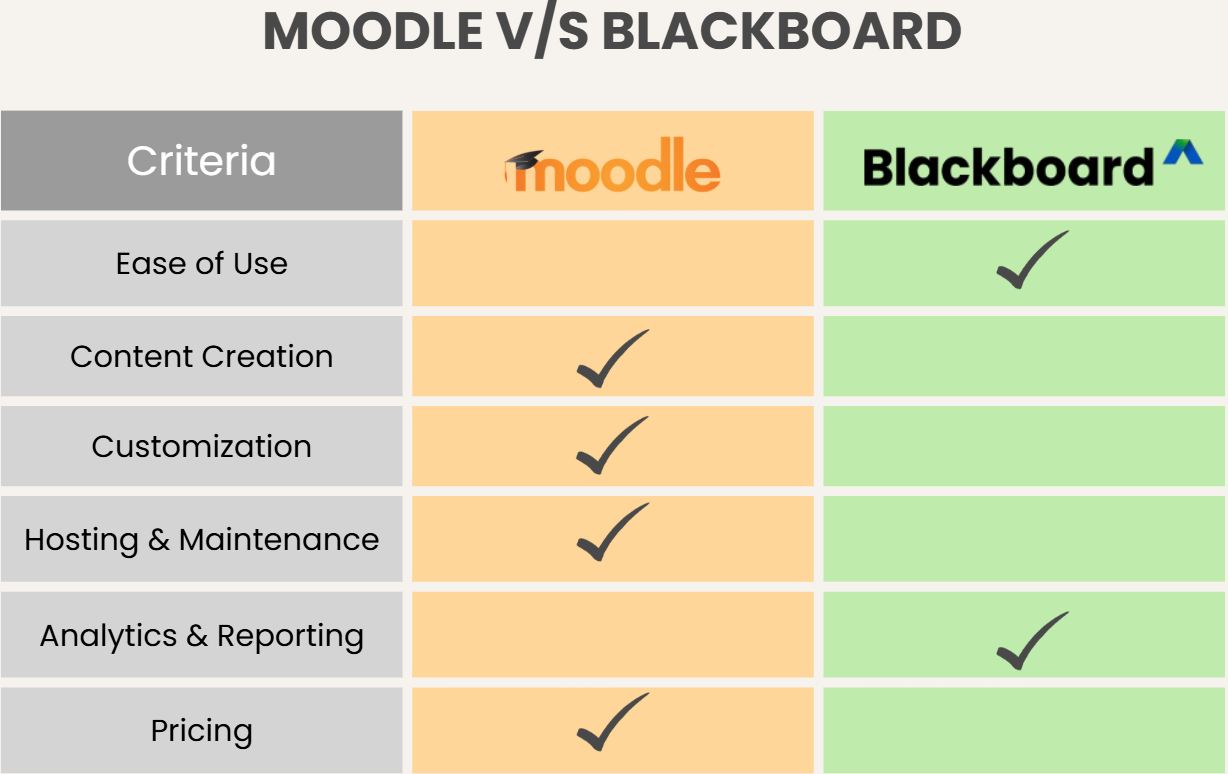
Moodle and Blackboard are dedicated LMS platforms for learners and educators of all experience levels. However, your right choice depends on your specific learning needs and preferences. Here is a detailed breakdown of Moodle vs Blackboard to help you explore where these two platforms truly differ.
1. Ease of Use & Interface
Ease of use varies depending on the user role.
Blackboard offers a more standardized and polished interface. Since it is centrally managed and cloud-hosted, updates and UI improvements are rolled out consistently. Many users find Blackboard’s navigation structured and predictable, especially in institutional settings where training is provided.
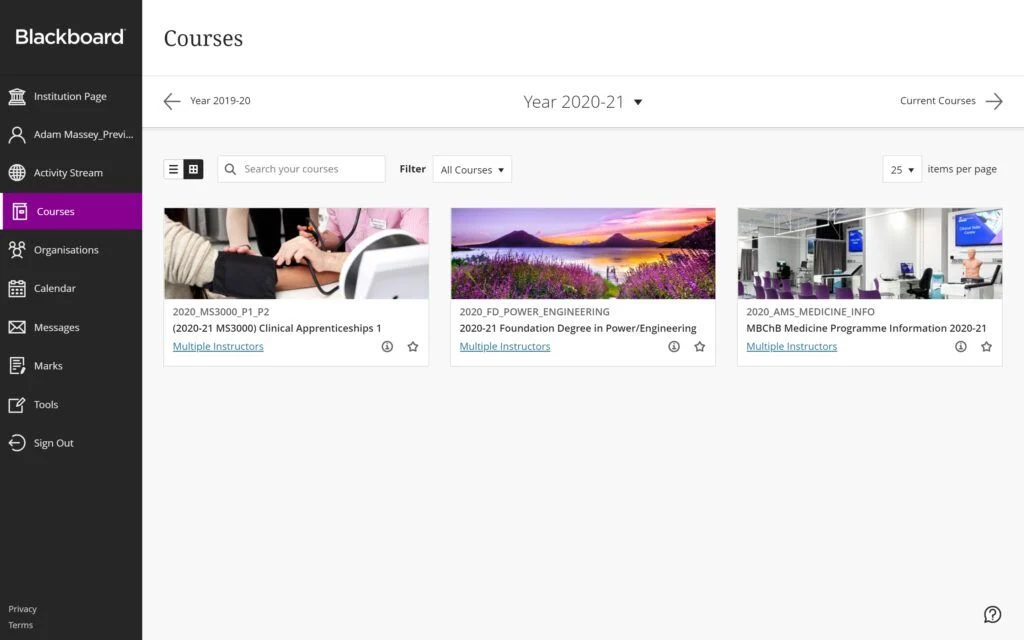
Moodle’s interface can vary depending on themes and customization choices. While it is highly flexible, that flexibility can sometimes lead to inconsistent user experiences across institutions. New users may need training, particularly if advanced features are enabled.
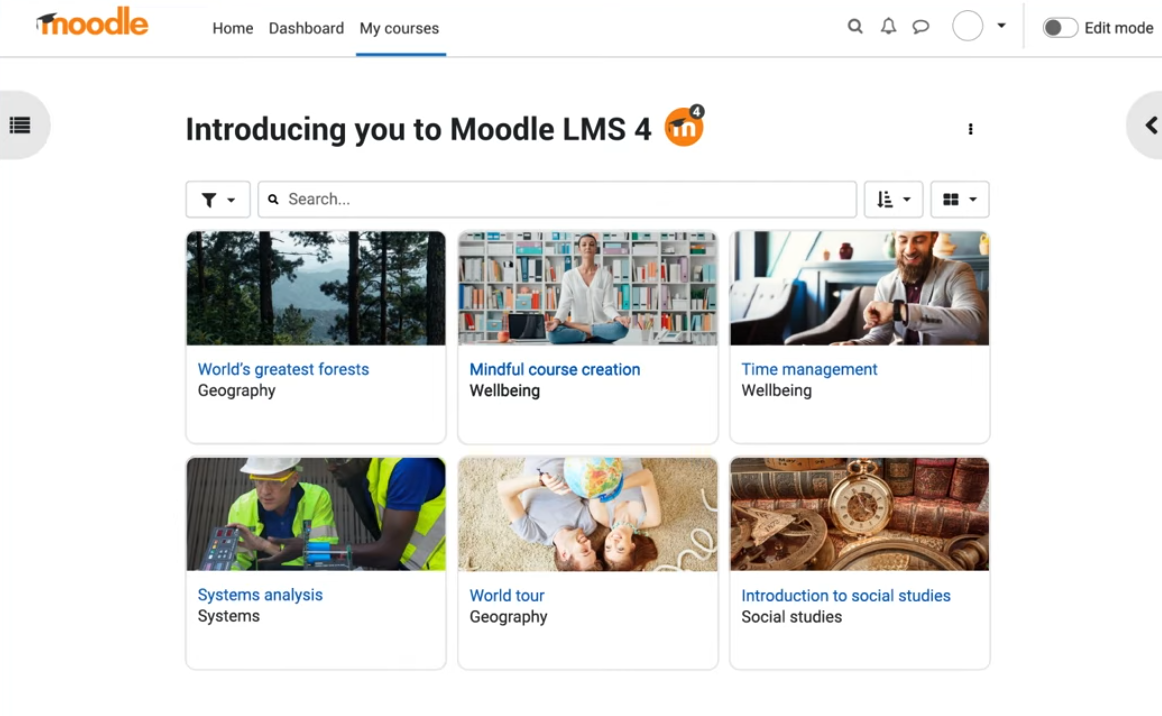
Source: Moodle
Blackboard tends to feel more streamlined out of the box, while Moodle prioritizes adaptability.
2. Course Creation & Content Structure
Both platforms allow full course creation, but their approach differs.
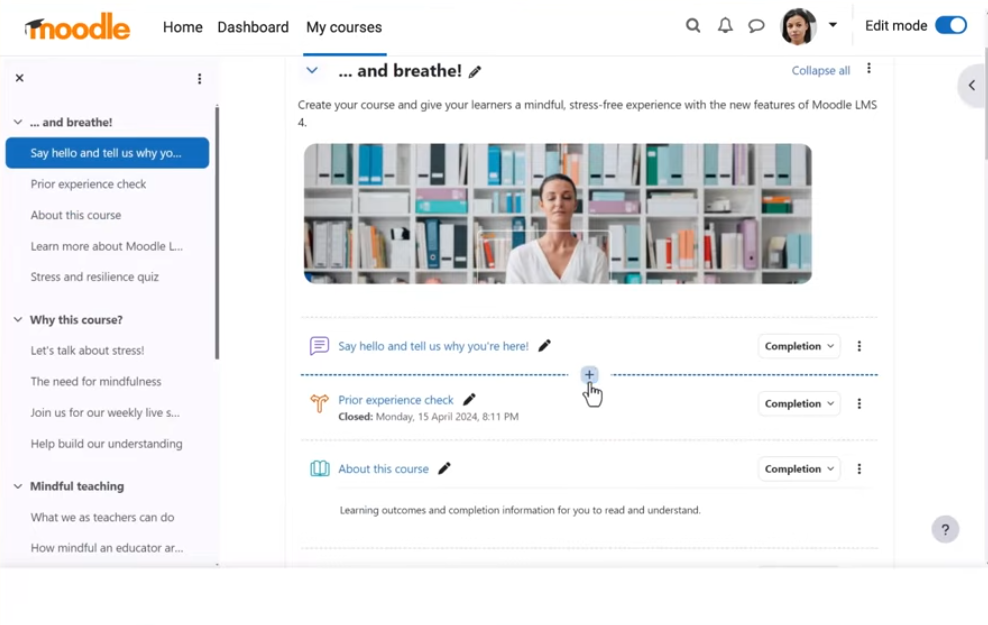
Moodle gives educators deep control over course architecture. Instructors can build modular learning paths, apply conditional release rules, set completion tracking, and integrate SCORM packages. Its plugin ecosystem enables extensive content enhancement.
Blackboard also supports structured courses with modules, assignments, assessments, gradebooks, and rubrics. Its built-in tools often feel more integrated, requiring no additional configuration.
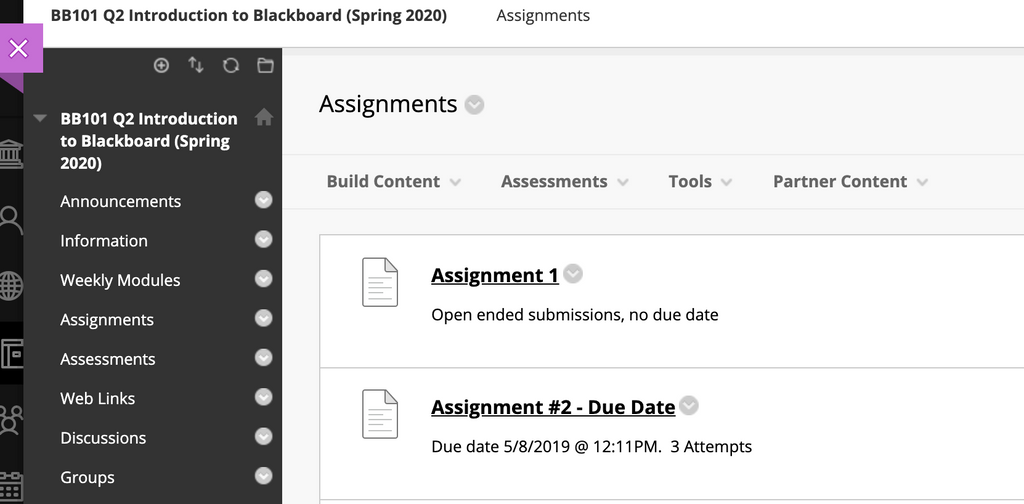
Source: Boston University
The key difference lies in flexibility vs a managed structure. Moodle allows deeper customization of learning logic, while Blackboard delivers a more standardized framework.
3. Customization & Control
Customization is where Moodle stands out. Since it is open source, Moodle can be modified extensively. Institutions can change themes, develop custom plugins, and adapt workflows to meet specific academic or regulatory requirements.
Blackboard offers configuration options, but does not allow the same level of code-level customization. Institutions operate within Blackboard’s controlled ecosystem.
Those seeking maximum flexibility lean toward Moodle, while those preferring vendor-managed consistency may favor Blackboard.
4. Hosting & Maintenance
Moodle requires institutions to manage hosting unless they choose a managed Moodle partner. This means handling server performance, security updates, backups, and technical support.
Blackboard is typically cloud-hosted under a subscription model. The vendor handles maintenance, security updates, and infrastructure management.
For institutions without strong IT resources, Blackboard’s managed approach may reduce operational burden.
5. Reporting & Analytics
Both platforms offer reporting tools, but their strengths differ.
Moodle provides customizable reports and analytics plugins that track engagement, completion, and assessment performance. Because it is open source, you can extend reporting capabilities with third-party tools.
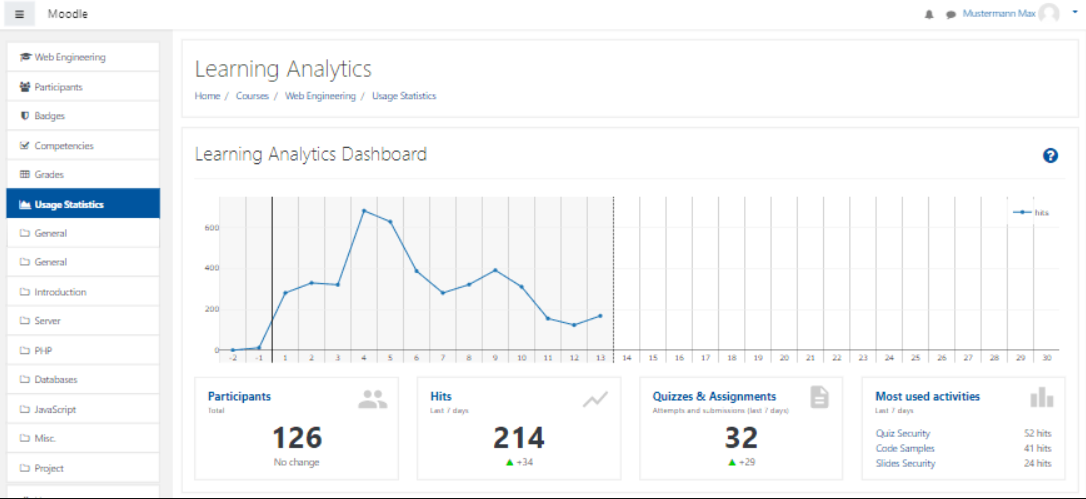
Source: Moodle
Blackboard includes built-in analytics dashboards and institutional reporting features. These tools are designed to help administrators monitor course effectiveness and learner performance at scale.
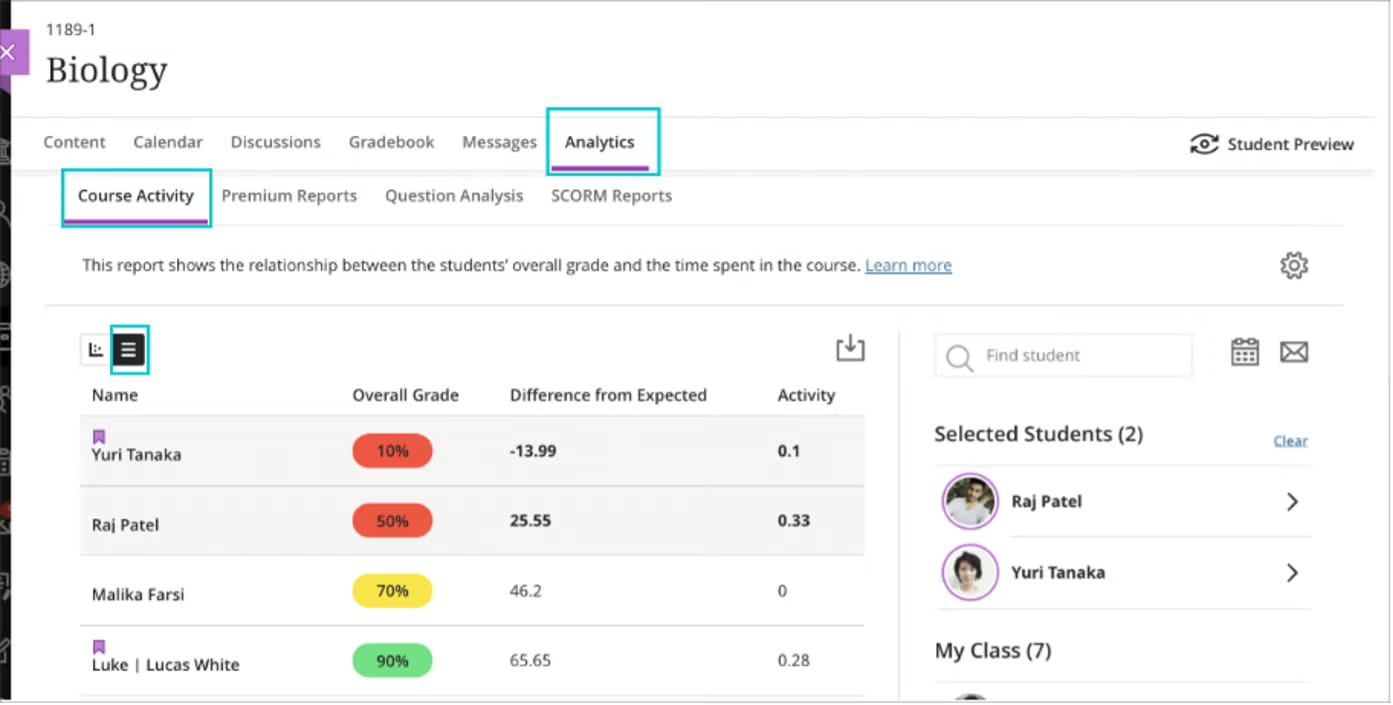
Source: Anthology
In large enterprise or university environments, Blackboard’s standardized analytics can feel more immediately accessible, while Moodle offers flexibility for tailored reporting.
6. Pricing
Pricing structures represent a major distinction.
Moodle Pricing
Moodle’s core software is free, but institutions must budget for hosting, implementation, customization, and support. Total cost varies significantly depending on institutional size and technical needs.
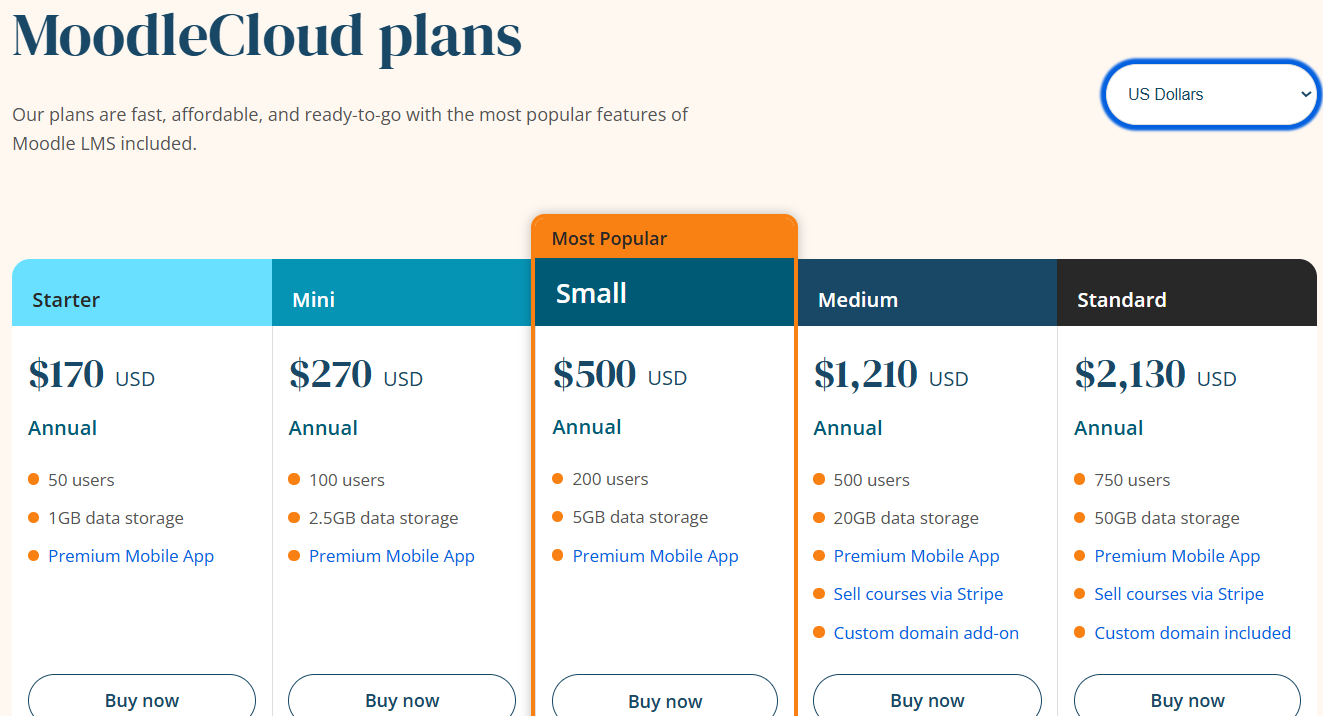
Alt Text: Moodle pricing
The platform offers five plans with annual payment, including:
- Starter: $170 for 50 users
- Mini: $270 for 100 users
- Small: $500 for 200 users
- Medium: $1,210 for 500 users
- Standard: $2,130 for 750 users
Blackboard Pricing
Blackboard operates on a licensing model. Institutions pay subscription fees that typically include hosting, updates, and support services. While this can be more expensive upfront, it reduces the need for internal technical management.
The platform offers custom enterprise quotes. However, you can avail of its 30-day free trial without having to provide any credit card details or make commitments.
Moodle may offer lower base software costs, but Blackboard provides bundled infrastructure and support.
Moodle vs Blackboard: Which Is Better?
When it comes to LMS capabilities, there’s no universal winner between Moodle and Blackboard. Both are efficient platforms on their own, so the better pick depends on your learning and institutional priorities.
Here is a quick overview of Moodle vs Blackboard:
| Feature | Moodle | Blackboard |
|---|---|---|
| Best For | Institutions needing full customization | Large universities want managed solutions |
| Ease of Use | Flexible but variable | Structured and consistent |
| Customization | Highly customizable | Moderately configurable |
| Hosting | Self-hosted or partner-hosted | Vendor-hosted (cloud) |
| Maintenance | Institution-managed | Vendor-managed |
| Pricing | Free software + hosting costs | Subscription-based licensing |
- Choose Moodle if you want full control over customization, data ownership, and learning structure. It works well for institutions with technical resources and specific workflow requirements.
- Choose Blackboard if you prefer a managed, enterprise-level solution with bundled hosting, consistent updates, and centralized support.
Where an AI LMS Like Coursebox Fits In
Whether you choose Moodle or Blackboard, one challenge remains consistent: course development takes time. An AI LMS like Coursebox helps institutions accelerate course creation using AI-driven content generation, structured learning paths, and automated assessments.
Coursebox eliminates the need to build courses from scratch. Instead, educators can generate outlines, modules, and quizzes in minutes. With these capabilities, Coursebox can easily complement Moodle or Blackboard by simplifying content creation before deployment.
The platform reduces the workload of instructional design while maintaining academic structure. If your institution wants to improve efficiency without replacing its LMS, an AI LMS layer can dramatically streamline the process.
Try Coursebox today to make your course creation easier!
FAQs About Moodle vs Blackboard
Frequently Asked Questions
Moodle is better for institutions that prioritize flexibility, customization, and open-source control. Blackboard is often preferred by large universities seeking a vendor-managed solution with consistent support. The better choice depends on your technical capacity and governance needs.
Moodle’s software is free, but hosting and maintenance costs can add up depending on scale. Blackboard requires subscription licensing, which may appear more expensive upfront but includes hosting and support. Total cost depends on institutional size and infrastructure needs.
Yes, both Moodle and Blackboard are used by large universities worldwide. Moodle scales effectively with proper hosting infrastructure. Blackboard is specifically designed for enterprise-level deployments and institutional governance.
Moodle offers deeper customization because it is open source and supports plugins and code modifications. Blackboard allows configuration within its ecosystem but does not offer full code-level flexibility. Institutions seeking tailored workflows often choose Moodle.
Yes, Moodle typically requires IT support for hosting, maintenance, and customization. While managed hosting options exist, institutions still need administrative oversight. Blackboard reduces this requirement through vendor-managed infrastructure.
Moodle and Blackboard both support integrations with video conferencing tools, plagiarism detection software, and content libraries. Moodle uses plugins for extended integrations, while Blackboard provides built-in enterprise connections. Integration depth depends on institutional configuration and licensing.
Yes, an AI LMS can complement both Moodle and Blackboard rather than replace them. Platforms like Coursebox help educators generate structured courses, quizzes, and learning materials using AI before publishing them into an existing LMS. This means you can keep your current system while dramatically reducing course development time and improving content scalability through AI-powered automation.
Travis Clapp
Educational technologist and instructional designer

