

How to Write an SOP (Standard Operating Procedure), With a Worked Example
How to write an SOP: purpose, scope, roles, numbered steps, a flowchart and a review, shown on a 5-page sample SOP I then turned into a training course.

To write an SOP, define one task and its scope, name the responsible roles, then write the actions, decisions and exceptions in order. Have suitable users check it, get approval and share the current version.
- Use numbered steps for a sequence, sub-steps for detailed checks and a flowchart where a decision changes the route. My receiving example combines a numbered procedure with a flowchart.
- Put each limit beside the action it controls. State the boundary, who can approve an exception and what record to complete.
- My 5-page sample SOP became an AI-checked 7-page training draft in about 20 minutes. Writing and formatting the SOP and checking the learner experience afterward are excluded from that time.
- When an SOP changes, update the related training yourself and check it again. Keep superseded versions in an archive, separate from the current instructions.

Build, launch and sell quality courses in minutes
A delivery looks routine until the seal number doesn't match the paperwork. That's where an instruction like “check the load” needs a lot more detail. I wrote a 5-page receiving procedure for a fictional food warehouse, then used it to turn a document into a course for new staff.
I work at Coursebox, where I write the help centre. Building the training exposed two gaps in my example: an unclear direction and a form field the procedure didn't explain. I'll use that SOP to show you how to write the steps, get them reviewed and help people learn them.
What goes in an SOP
An SOP records the agreed way to do a task: who does it, which steps to follow and what to do when a check fails. Mine combines numbered steps, a decision flowchart and a checklist. These are the sections I used; adapt them to the task and your organisation's requirements.
| Section | What it answers | In my sample |
|---|---|---|
| Title and document control | Which version is this and who owns it? | SOP number, version, effective date, owner, approver, review date |
| Purpose | Why is this task done? | Stop warm product reaching a customer |
| Scope | What is in and out? | Chilled and frozen inbound deliveries; not ambient or returns |
| Roles and responsibilities | Who does what? | Receiving officer, shift lead, inventory controller, manager |
| Definitions and equipment | What words and tools will I meet? | Reefer, seal number, core temperature; the calibrated probe |
| Procedure | What do I do, in order? | 7 numbered steps and a flowchart, with the temperature limits in the section before |
| Exceptions | What if something goes wrong? | Broken seal, faulty probe, a driver who won't wait |
| Training and sign-off | How does someone qualify? | Two supervised deliveries, then the shift lead signs |
| Records and revision history | What do I write down, and what changed? | Form KF-RC-01 and the change log |
For a short task with a fixed order, use a simple numbered list. Add sub-steps when an action needs several checks; this is often called a hierarchical format. Use a flowchart where the answer changes what happens next. I combined the last two in my receiving example.
Keep it to one task. My SOP covers receiving chilled and frozen deliveries only, and points to separate SOPs for ambient stock and returns.
What you need before you start
- Someone who knows the task. Write with them, observe the work and check your draft against the approved process. My fictional example follows a delivery from arrival at the dock through acceptance or rejection and the paperwork.
- A document tool with heading styles, numbered lists and suggested edits. I built my SOP as a Word file and opened it in Google Docs for formatting and review.
- The rules and records the task relies on. Gather the relevant policies, equipment instructions, limits and forms. Note any training or authorisation someone needs before starting.
- An account if you want to build online training. I used Coursebox for the optional training steps below. Free includes 3 mini courses of up to 5 pages each; my 7-page example needed paid features. Upload your SOP as a docx or pdf.
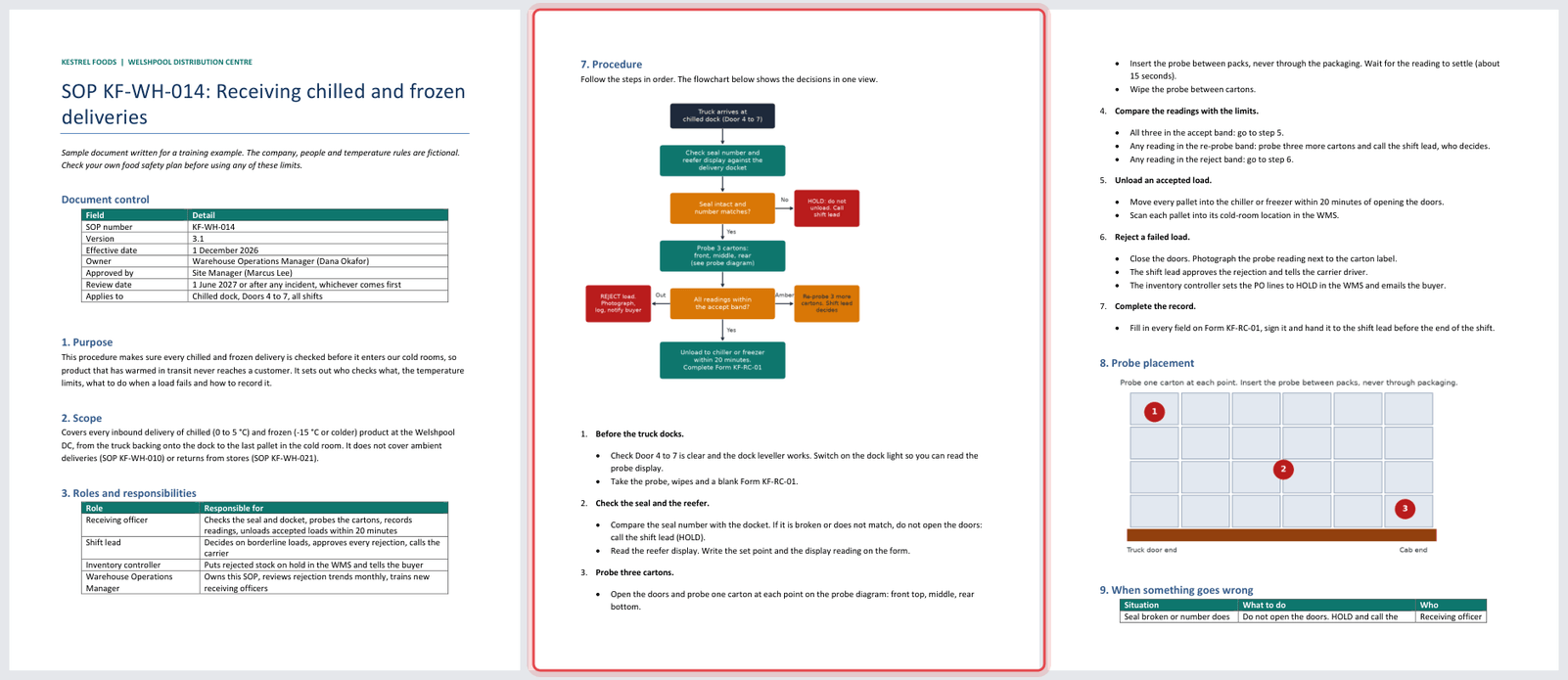
You can download my worked example below. The company, people and temperature rules are fictional. It retains the two gaps discussed later, so use it to study the structure, rather than as an approved food-handling procedure.
The 5-page fictional SOP used in this guide, with editable text and tables. Diagrams are images. Version 3.1 retains the two gaps discussed below; it is not an approved operational procedure.
Choose where to write and share your SOP
Write and store the approved procedure where people can find it during the job. Then choose how you'll teach it and record any checks or sign-off.
| Route | What you get | Training records | Best when |
|---|---|---|---|
| A document in a shared drive | An approved document; version history depends on your setup | Use a separate acknowledgement or sign-off | A small team that works beside the author |
| An intranet or wiki page | A searchable page staff can bookmark | Views or acknowledgements, depending on the system | Staff need to look it up mid-task |
| A short course built from the SOP | Lessons, practice decisions and a quiz | Quiz and course results; practical sign-off is separate | New starters must show they can follow it |
| A printed copy at the workstation | The steps where the work happens | Use a separate acknowledgement or sign-off | A task done at one fixed spot |
I'd keep the approved SOP as the source for every training version. When it changes, update the course or briefing too; uploading the SOP doesn't create an automatic sync. The PDF-to-course guide shows another document-based example.
How to write an SOP, step by step
Step 1: Give it a title, purpose and scope
Name the task in the title. Then explain why the procedure exists, where it starts and ends, and what it excludes. I opened my Word draft in Google Docs. To format a section heading, click its line, open the paragraph style menu on the toolbar and choose Heading 1. Use Title for the document name.
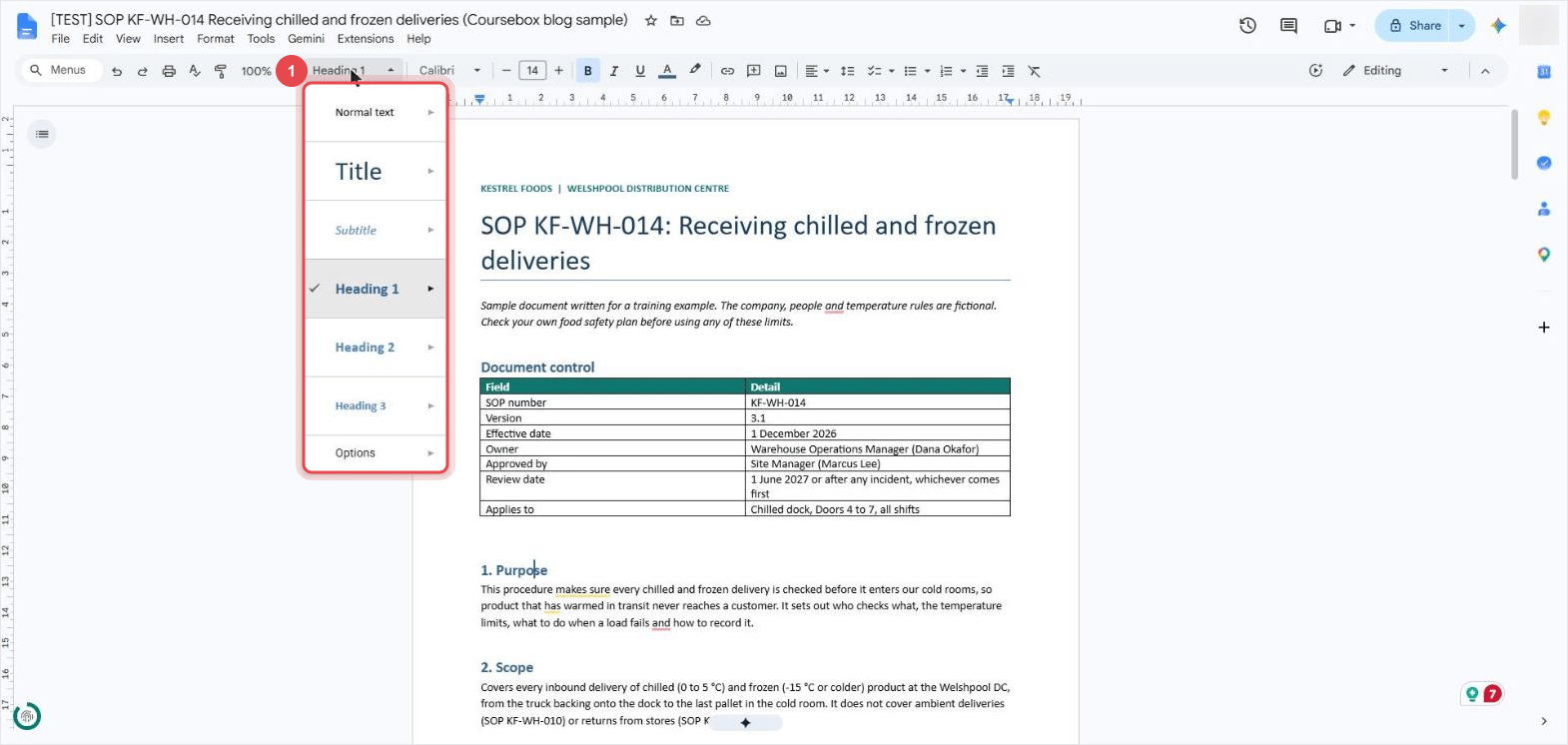
My purpose is two sentences: why every delivery gets checked and what the SOP covers. The scope names what is out, so nobody uses this SOP for ambient stock or store returns.
Step 2: Use one format, with a heading for every section
Keep the section order familiar so people know where to look. In Google Docs, click the outline icon at the top left to open Document tabs. Check that your headings appear there. Mine runs from Document control and 1. Purpose to Revision history.
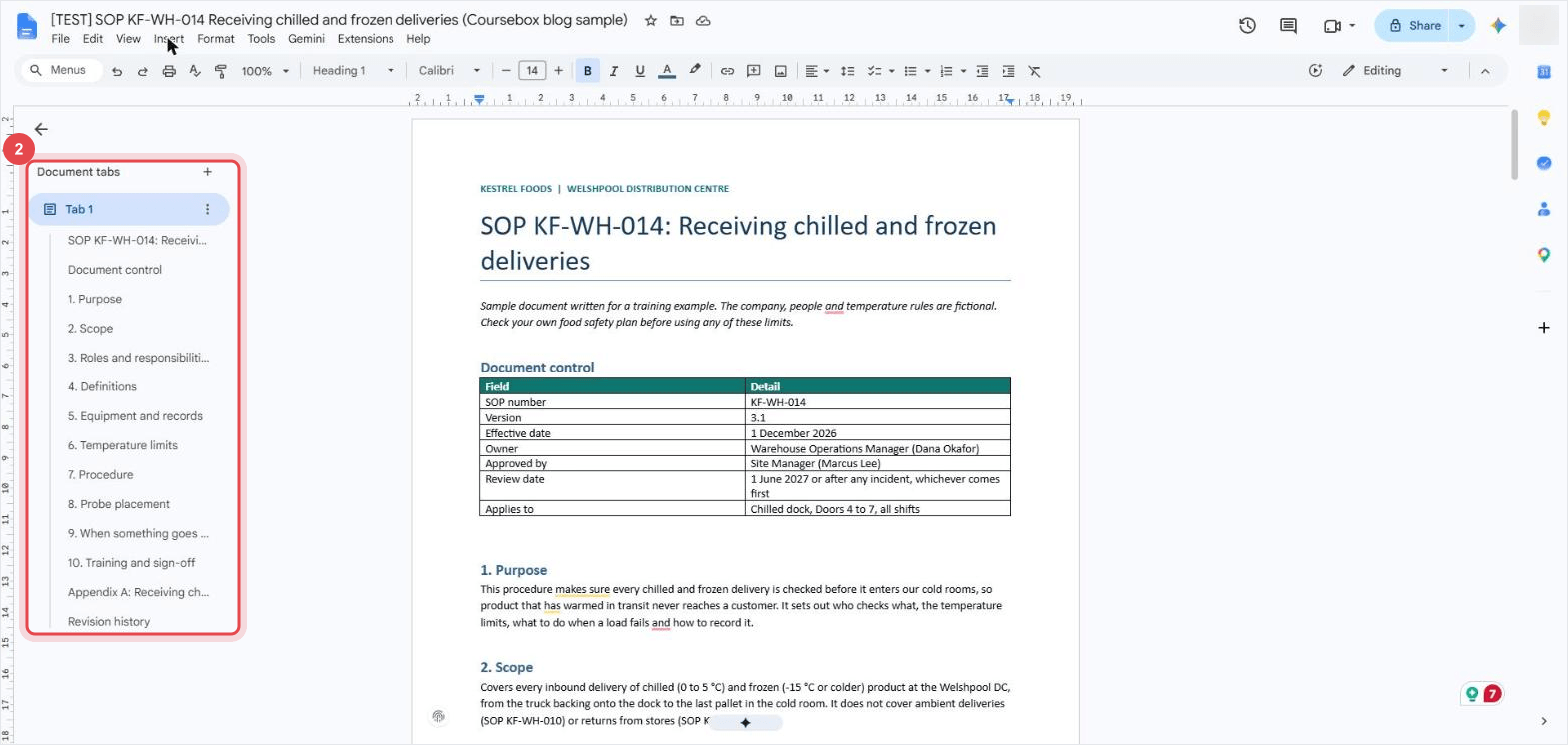
For a long SOP, add a contents list from Insert, Page elements, Table of contents. It builds from the same headings.
Step 3: Name who does what
List each role and what that person is responsible for. I used a two-column table headed Role and Responsible for. Check that every approval, handover and exception in the procedure has an owner.
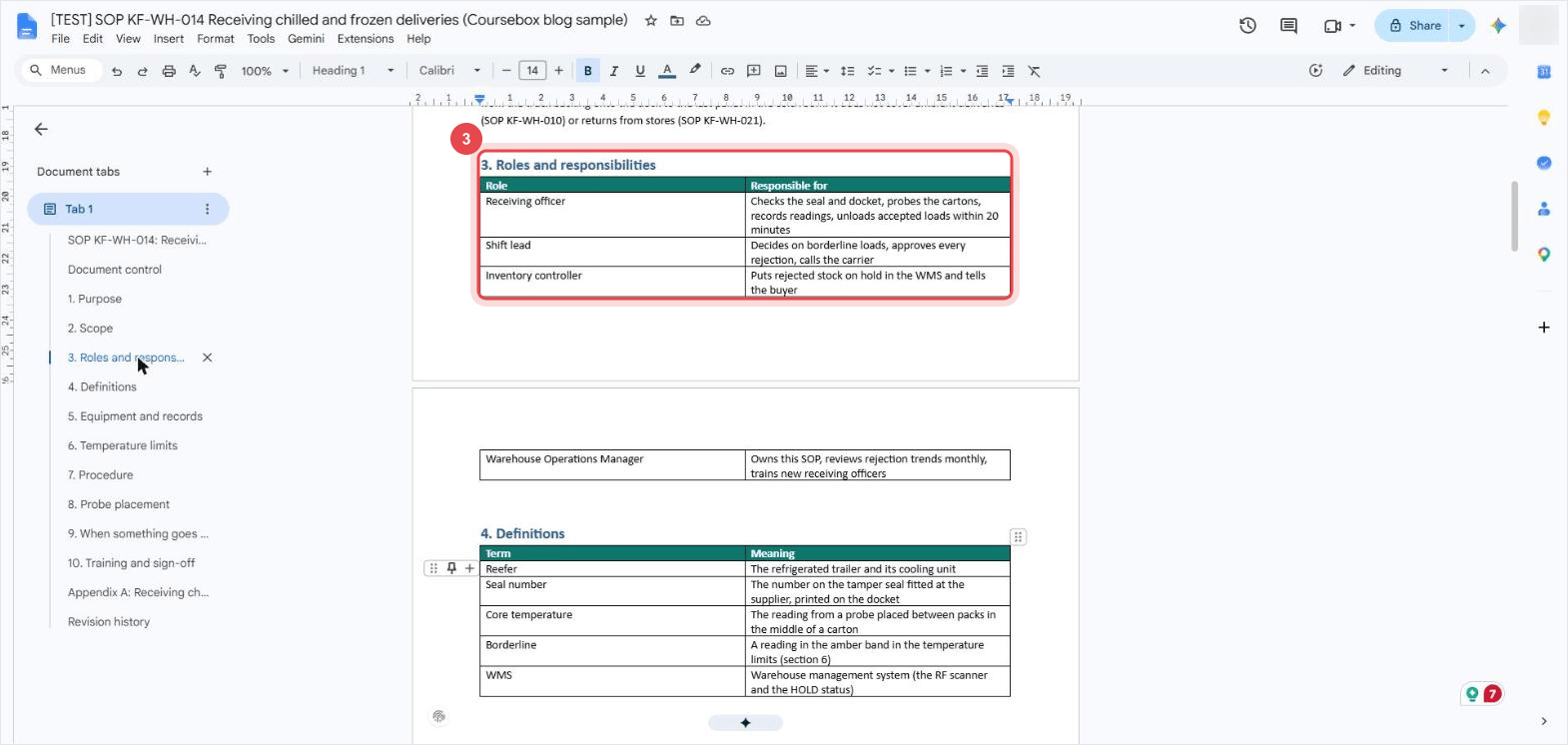
In mine, the receiving officer probes and records. The shift lead approves every rejection, and the inventory controller puts rejected stock on hold. The course later built its driver role-play around that split.
Step 4: Write the procedure as numbered steps
Write the actions in the order someone does them. Use the numbered list button, then add sub-points for checks or detail within an action. My seven steps run from Before the truck docks. to Complete the record., with separate routes for Unload an accepted load. and Reject a failed load.
Put a limit beside the action it controls, including when the clock starts. My sample says “within 20 minutes of opening the doors”. Use the limits from your approved procedure, not the fictional figures in this example.
Step 5: Draw the decisions as a flowchart
Use a flowchart when a check sends people down different paths. Write the check as a question, label each answer and show the next action. I made mine as an image and placed it under 7. Procedure, before the numbered steps.
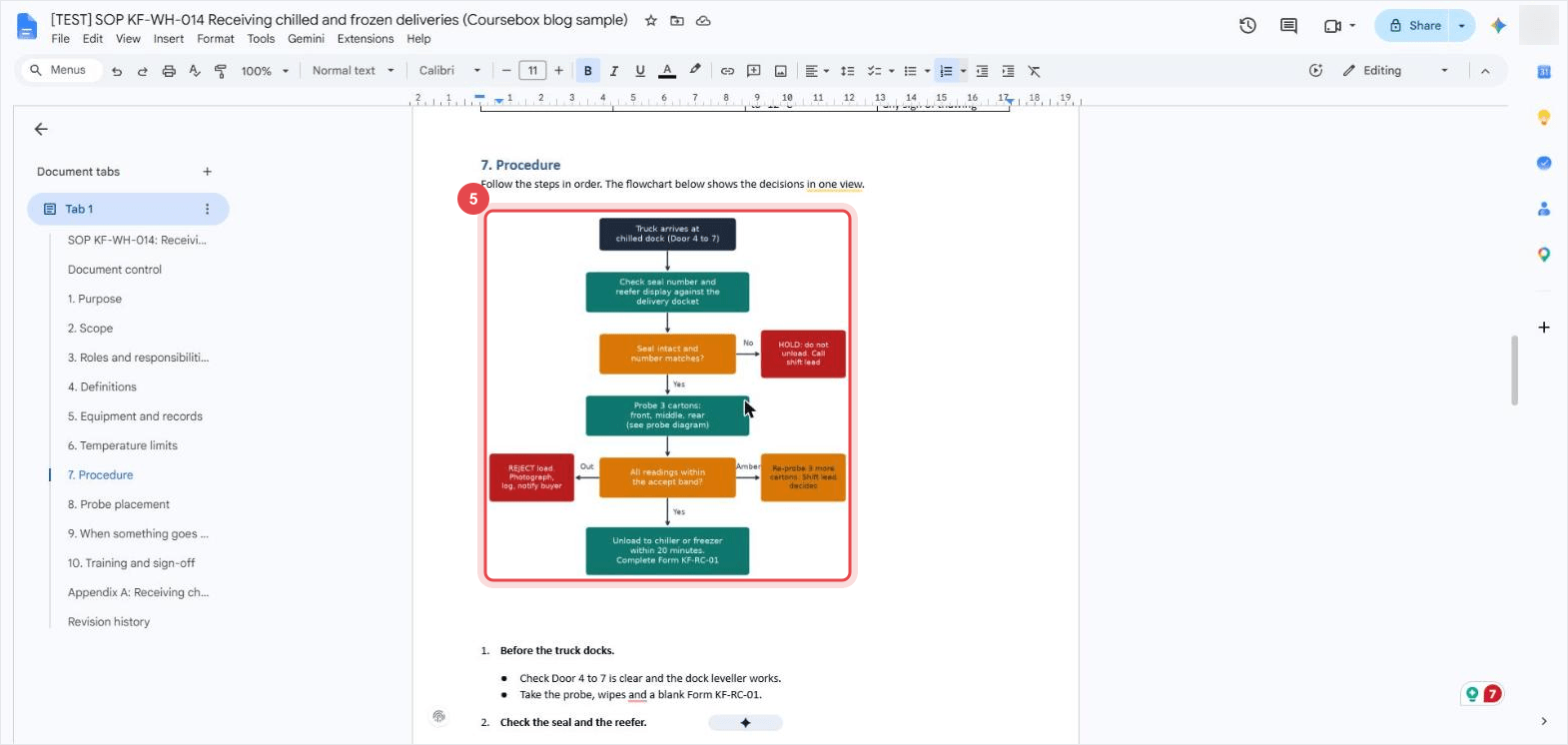
Trace every route to an end point. In my chart, a seal mismatch leads to holding the load and calling the shift lead; an accepted load follows the unloading route. Check that the chart and the written steps give the same instructions.
Step 6: Have the people who do the job review it
Ask someone who does the job to review the draft. In Google Docs, they can open the mode menu at the top right and switch from Editing to Suggesting. Proposed changes appear beside the text. The reviewer can explain a change, and you can accept it with the tick or reject it with the X.
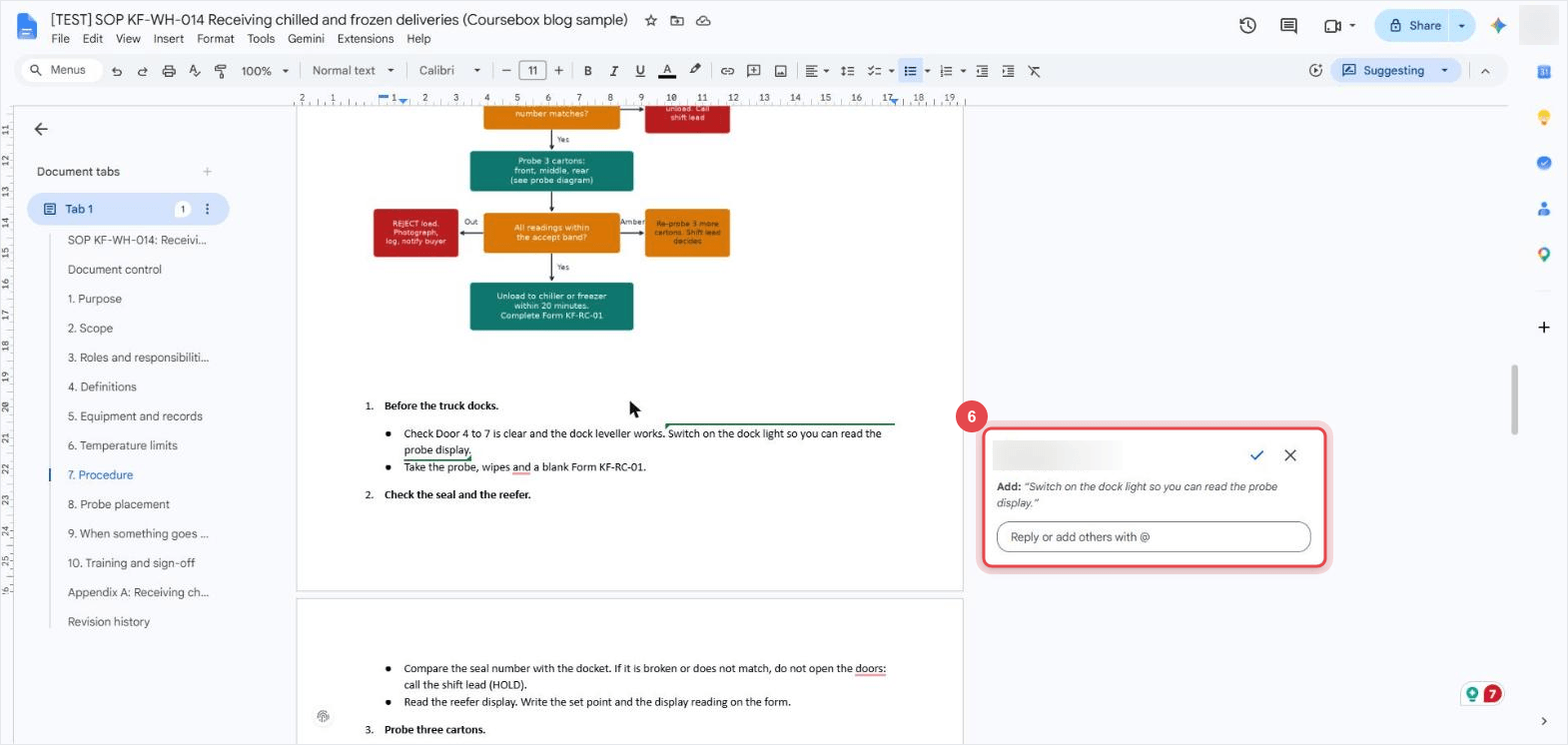
I demonstrated this by suggesting “Switch on the dock light so you can read the probe display” and accepting it myself. That shows the editing control; it wasn't an independent workplace review. Before approving a real SOP, have a suitable user walk through it under appropriate supervision. Resolve the questions, get the authorised approver's sign-off and fill in the version, effective date and review date. Steps 7 and 8 show an optional way to build online practice afterward.
Step 7: Build training from the SOP (optional)
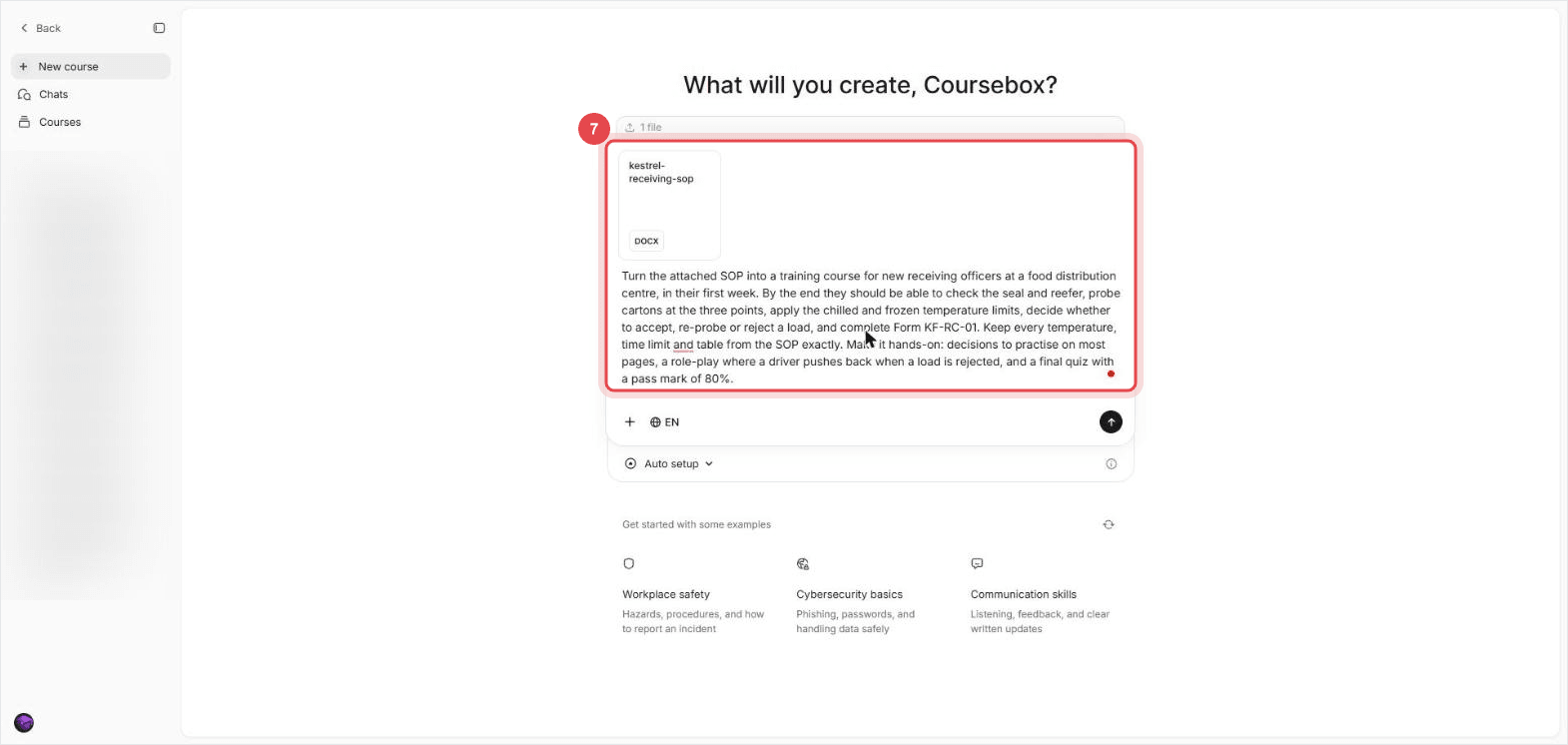
For my example, I wanted new starters to practise the decisions before supervised work. In Coursebox, click New course, then +, Add files and choose your SOP. Check that the DOCX card appears. Describe the learners and the decisions they need to practise, then click the send arrow. An online course supports the workplace walkthrough; it doesn't replace it.
Attach your SOP with Add files first, then paste this and swap in your own learners, outcomes and numbers.
- Your SOP as docx or pdf
- Who the learners are and when they start
- What they must be able to do at the end
Turn the attached SOP into a training course for new receiving officers at a food distribution centre, in their first week. By the end they should be able to check the seal and reefer, probe cartons at the three points, apply the chilled and frozen temperature limits, decide whether to accept, re-probe or reject a load and complete Form KF-RC-01. Keep every temperature, time limit and table from the SOP exactly. Make it hands-on: decisions to practise on most pages, a role-play where a driver pushes back when a load is rejected and a final quiz with a pass mark of 80%.- The plan names your learners
- Most pages are labelled Practice
- The plan ends with an Assessment page
In the product data below, about 36% of recorded AI-generation start events included an uploaded file. That counts files of any type, not SOPs alone.
Step 8: Check the training plan against the SOP
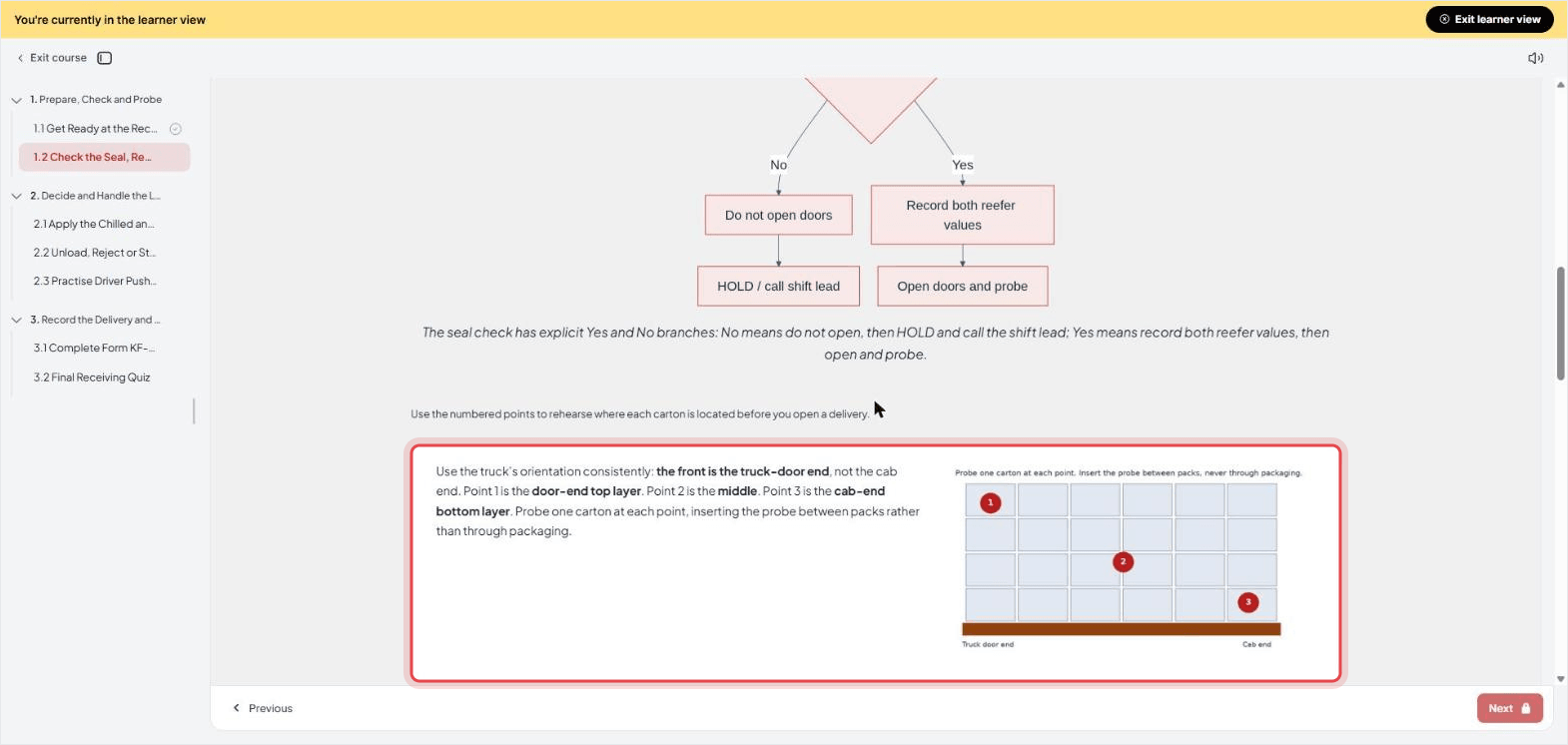
The AI reads the file and may ask you to clarify something. Mine first asked whether this was practice-only training, since the SOP's rules were fictional. It then spotted that “front” and “rear” in my steps could refer to different ends of the truck.
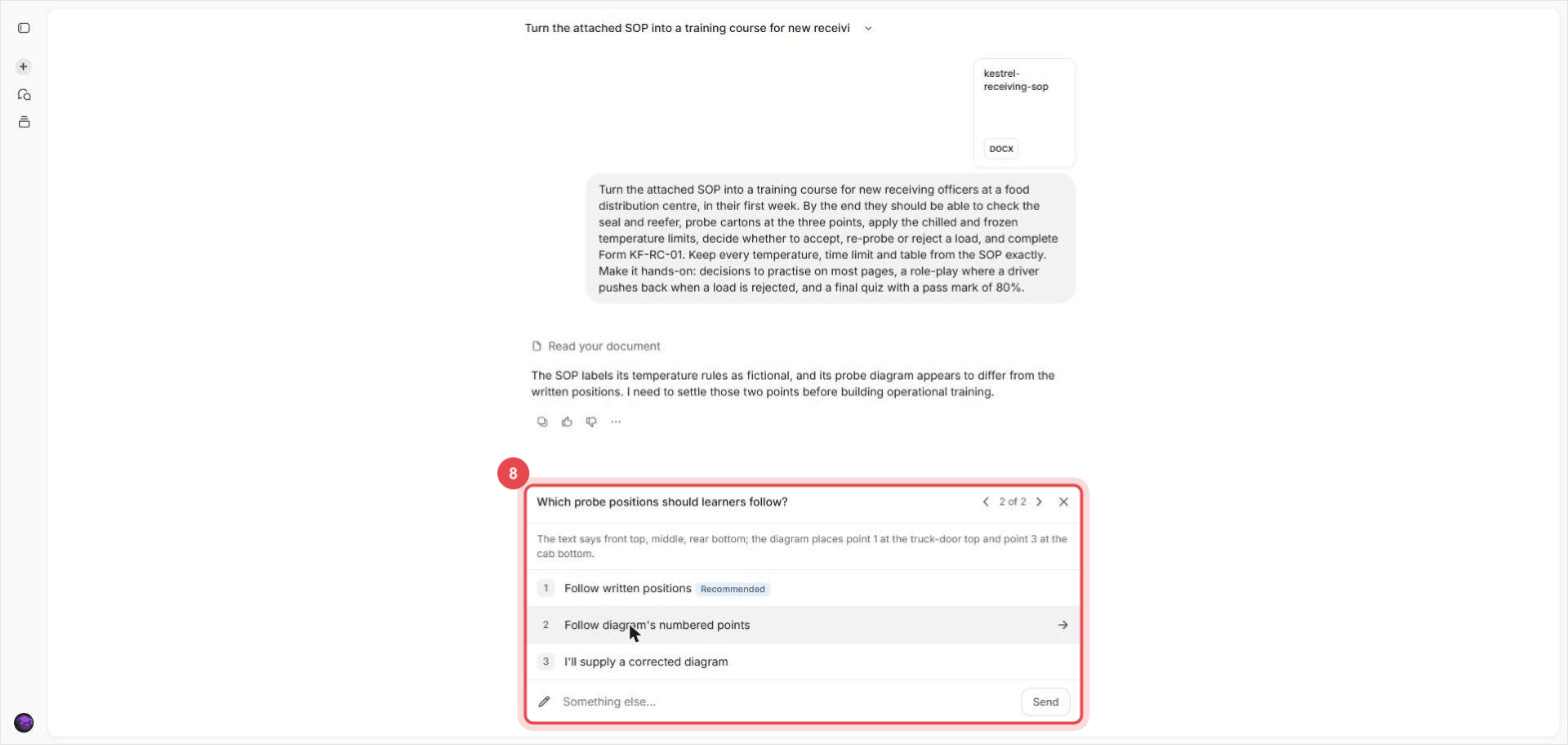
I used Something else... to specify the intended points, then clicked Send. For a real SOP, confirm the answer with its owner and correct the source document too. Answering the chat changes the course's instructions, not the uploaded SOP.
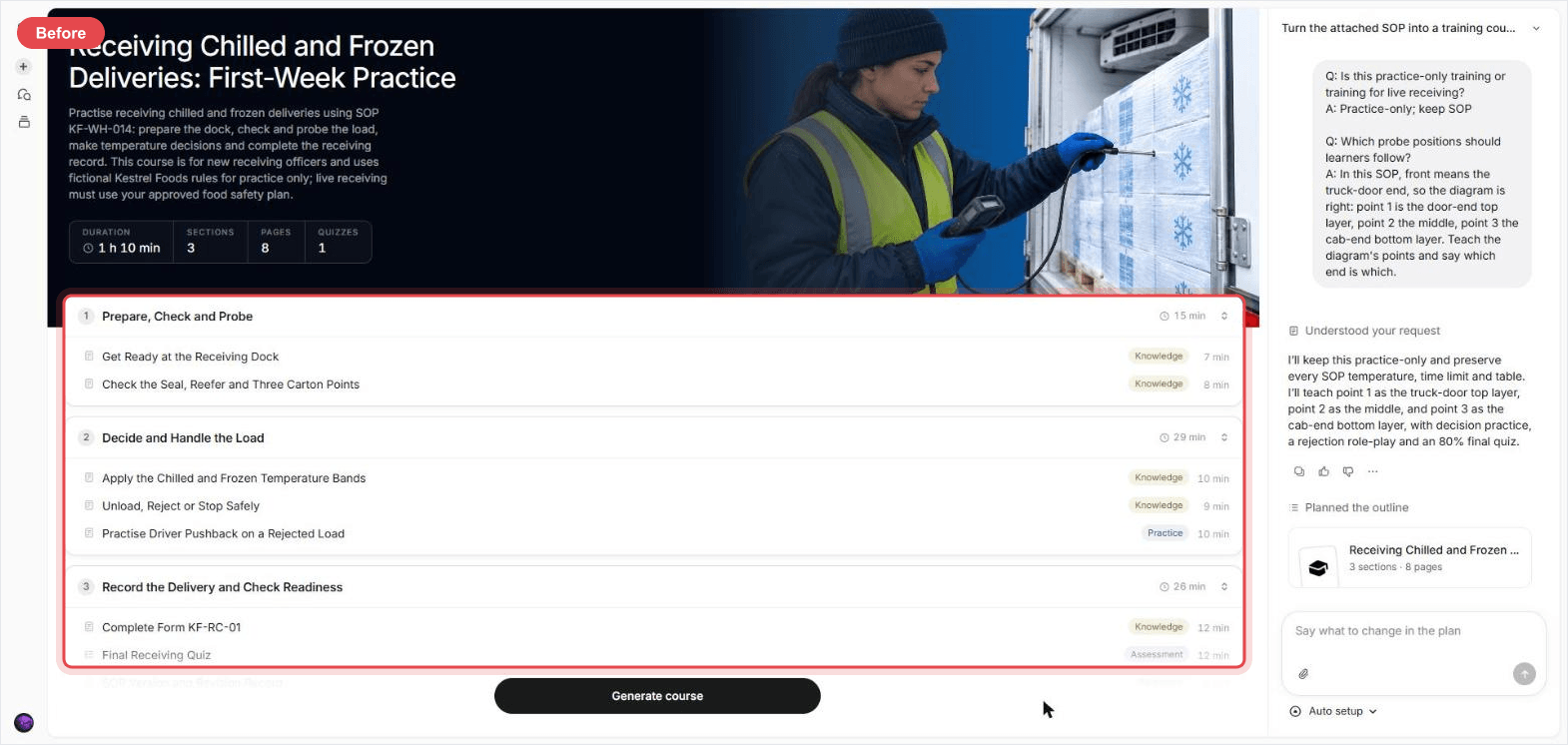
Read the outline before generating. Each page has a label such as Knowledge, Practice or Assessment. Check that every SOP action and decision is covered; several steps can share a page. Mine had one Practice page out of eight. I used Say what to change in the plan to ask for decision practice on four more pages. About 4.5 minutes later, the revised plan was ready, and I clicked Generate course. Writing and checking the pages took about 9 minutes.
Use it when the plan labels pages Knowledge where learners should be making decisions. Swap in the page titles from your own plan.
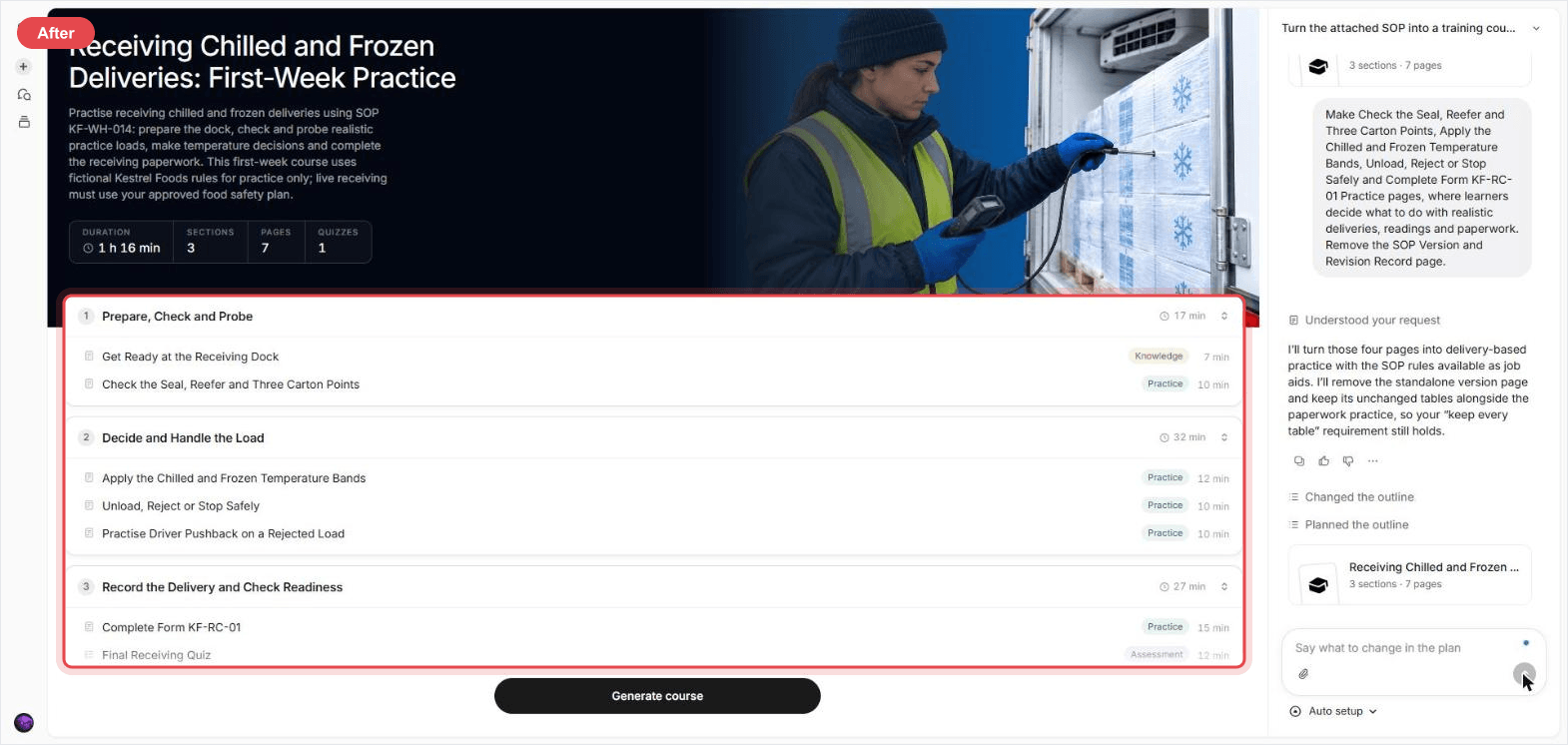
Make Check the Seal, Reefer and Three Carton Points, Apply the Chilled and Frozen Temperature Bands, Unload, Reject or Stop Safely and Complete Form KF-RC-01 Practice pages, where learners decide what to do with realistic deliveries, readings and paperwork. Remove the SOP Version and Revision Record page.- The pages you named say Practice
- Pages you asked to drop are gone
Read the AI Editor summary, then check the actual pages. My summary flagged an unanswered paperwork question. From my first prompt to the AI-checked draft was about 20 minutes; writing the SOP, formatting it and testing the course afterward aren't included.
Write the steps people will follow
Formatting helps people find a step. The wording tells them what to do when they get there. These are the checks I'd make against a draft like mine.
- Take the steps from the person who does the job. Watch them, write each action down in order, then read it back to them.
- Start with an action. “Compare the seal number with the docket” names the task. Put related checks underneath it rather than hiding them in a long paragraph.
- Numbers inside the step. "Within 20 minutes of opening the doors" beats a separate timing section.
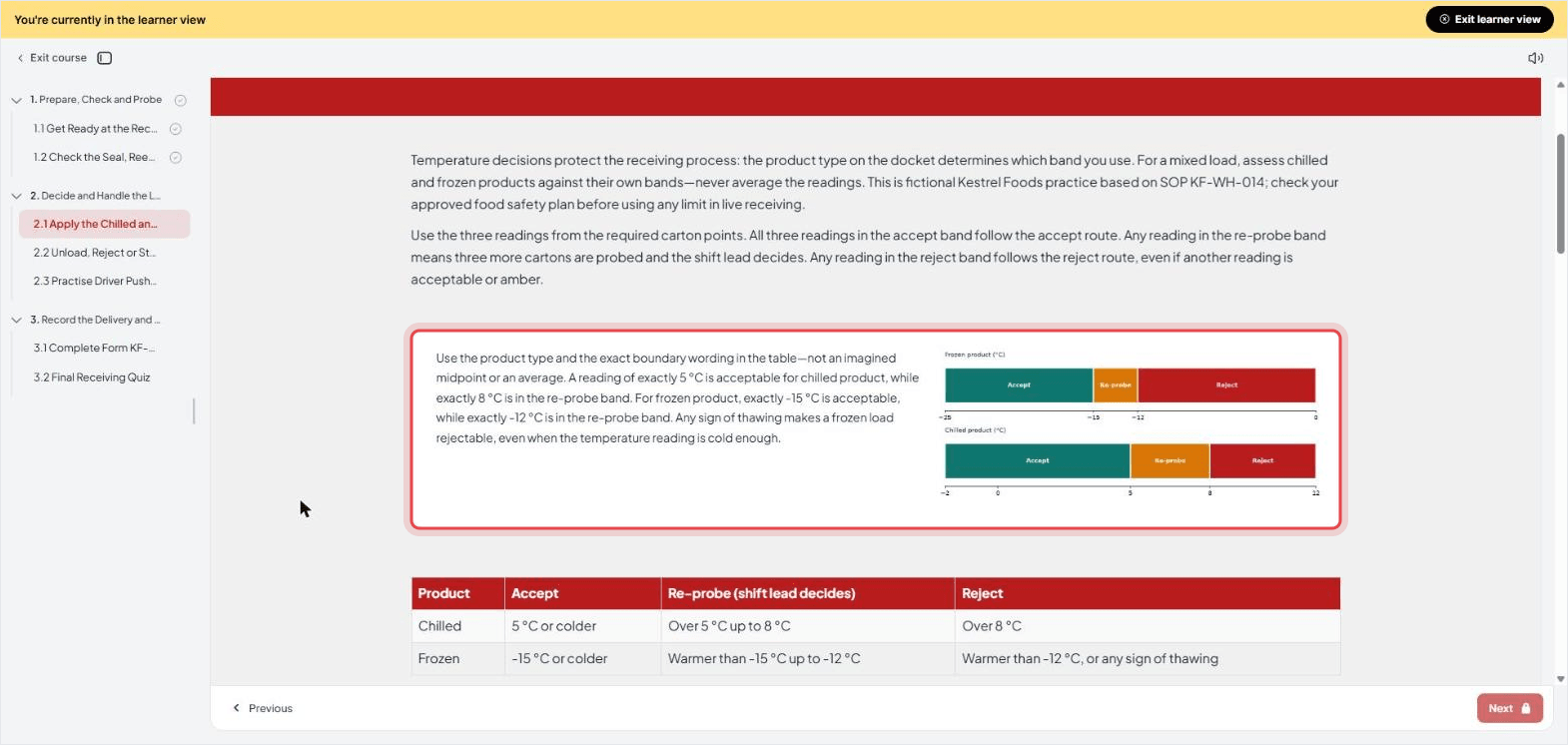
- State the boundary. In my fictional rules, “5 °C or colder” and “over 5 °C up to 8 °C” make clear where exactly 5 °C belongs. The training course used those boundaries in its questions.
- Name the decision-maker. My sample assigns borderline-load decisions to the shift lead. Say who can approve an exception, rather than leaving the reader to guess.
- Cover the exceptions. My table names who responds to a broken seal, a faulty probe or a driver who won't wait.
- Check every word that depends on where you stand. "Front", "left", "top": my "front" was the word the training run caught.
- Check it with another user. Ask someone with the required training, but unfamiliar with your draft, to walk through it. Use supervision or a simulation where the task requires it. Note every point where they need an explanation.
- Set a review date. Put it in the document control table and check the SOP again when the task, the equipment or the limits change.
What I got
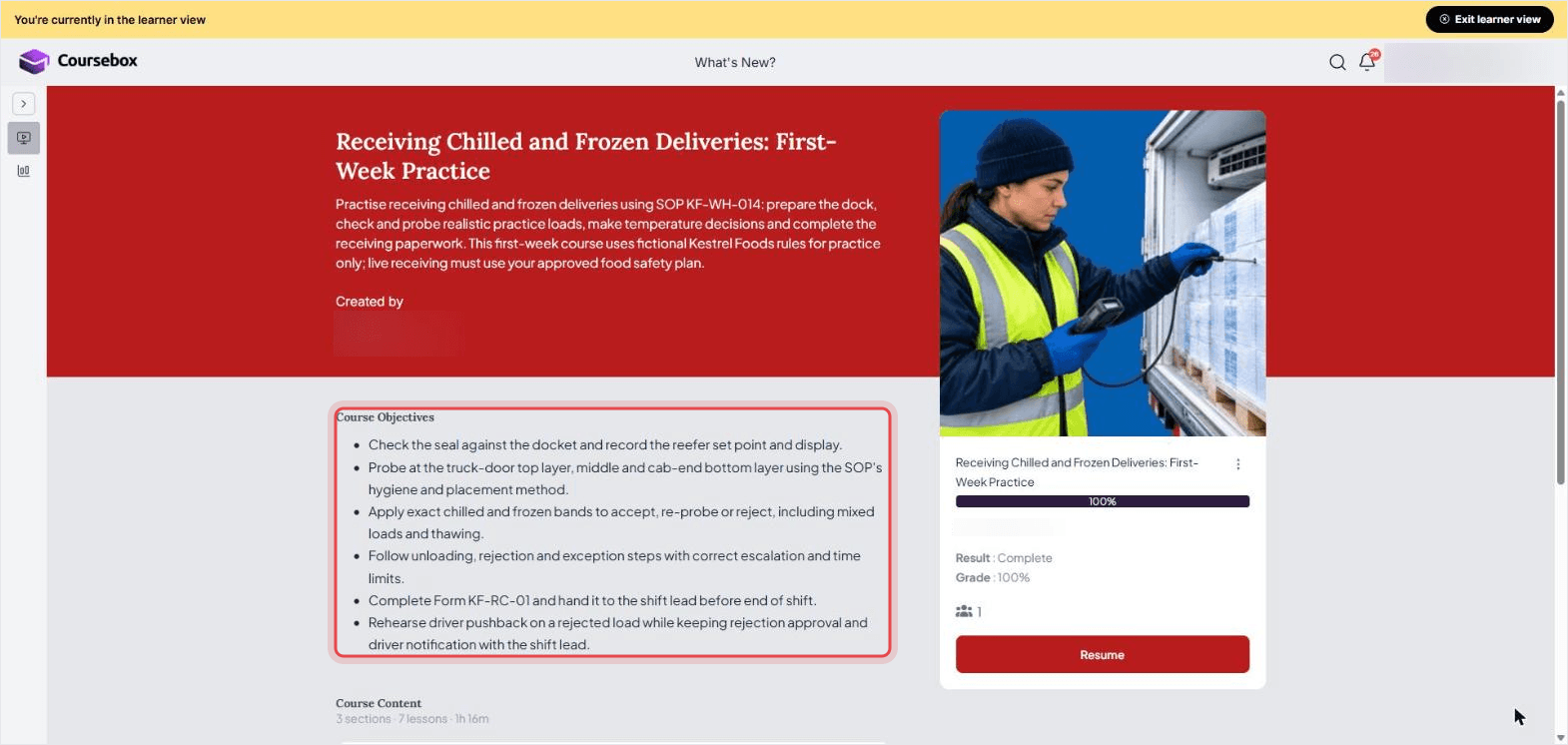
My 5-page SOP became a 3-section, 7-page course with five Practice pages and a 20-question quiz set to an 80% pass mark. I checked the roles, definitions, limits and exceptions tables against the source. Those matched, and the probe diagram and temperature chart were kept. The full flowchart became a simpler Yes/No seal chart, so it needed a separate check against the procedure.
The course also included a labelled illustration of the receiving bench and filled examples of the blank checklist, Form KF-RC-01. The dock-light instruction I added in Google Docs appeared on the first page.
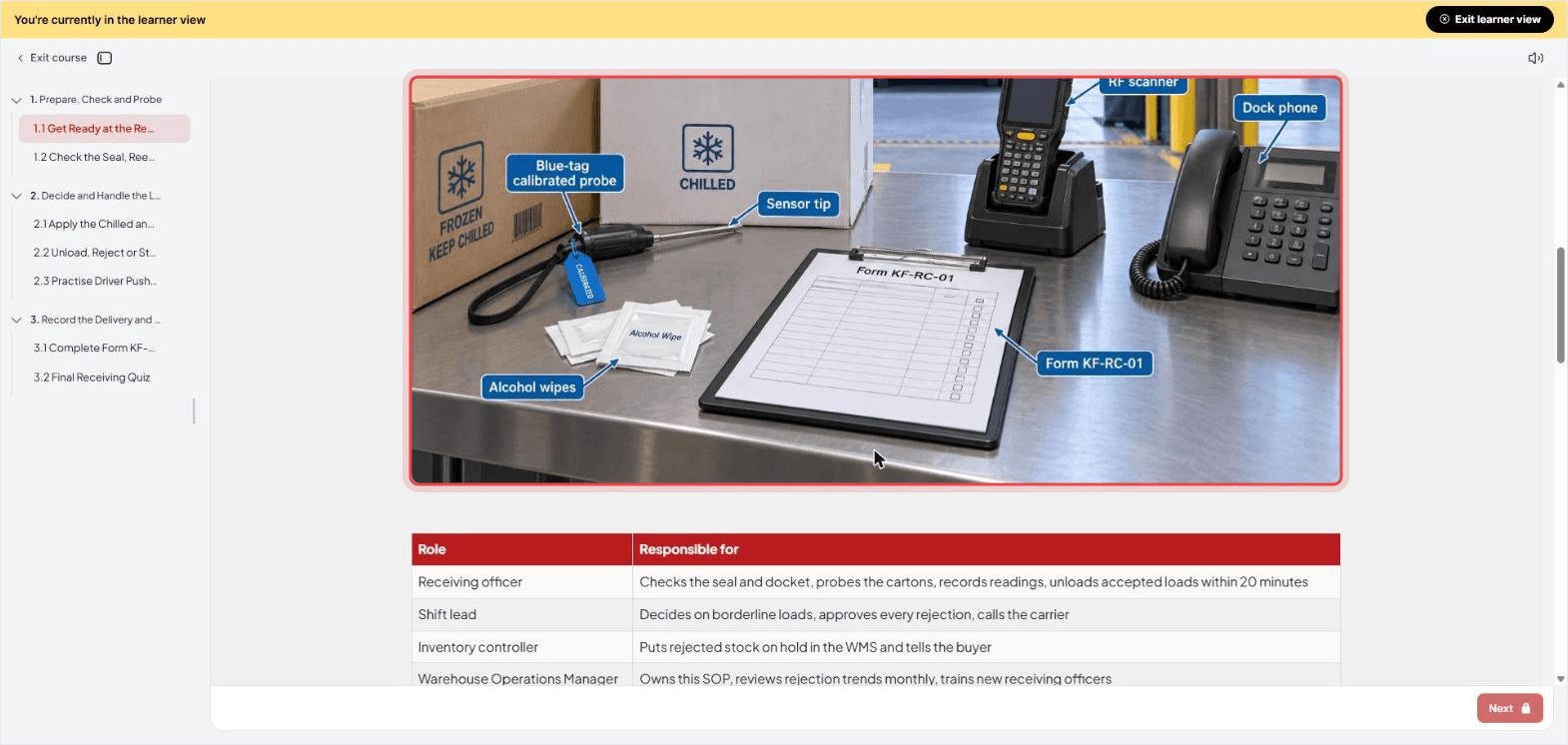
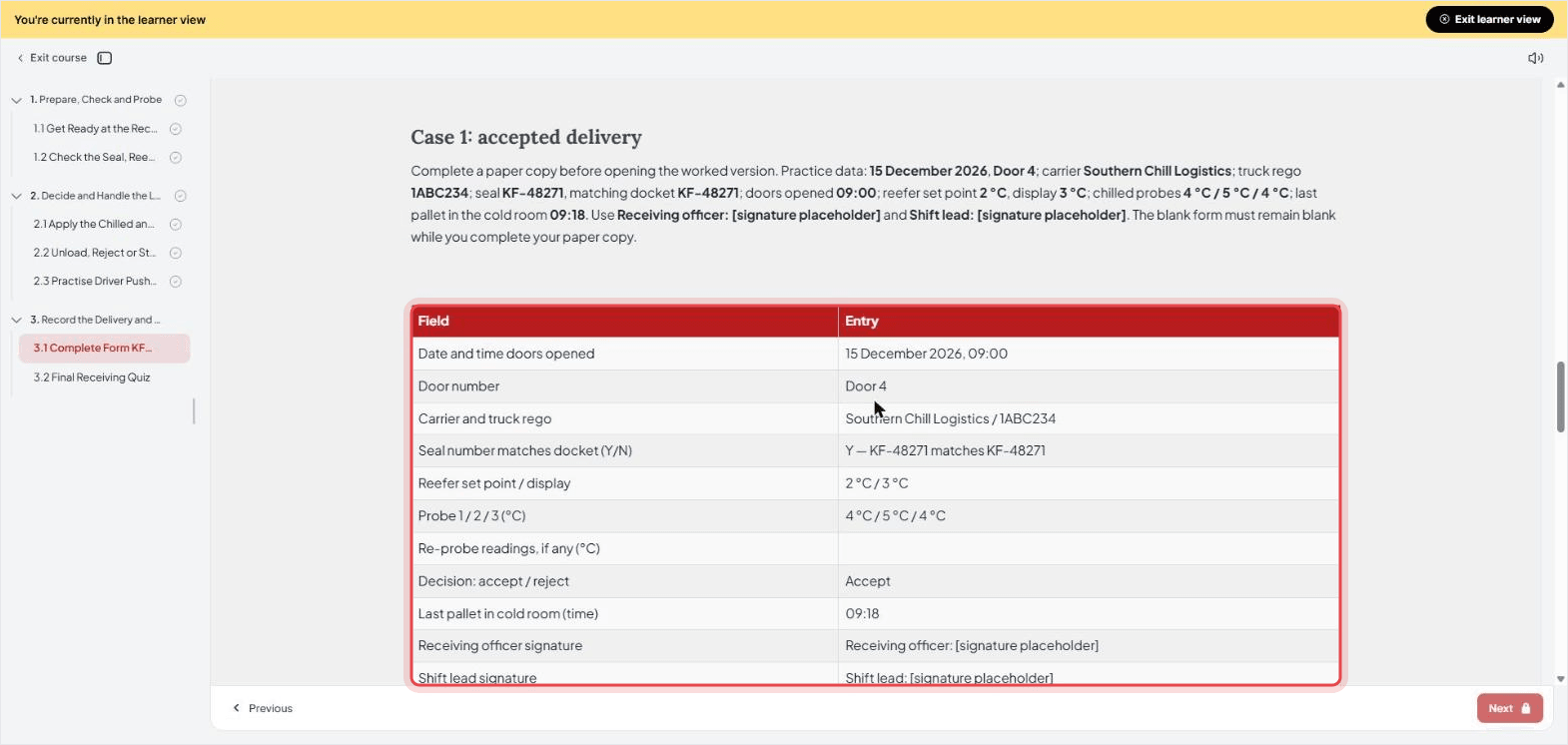
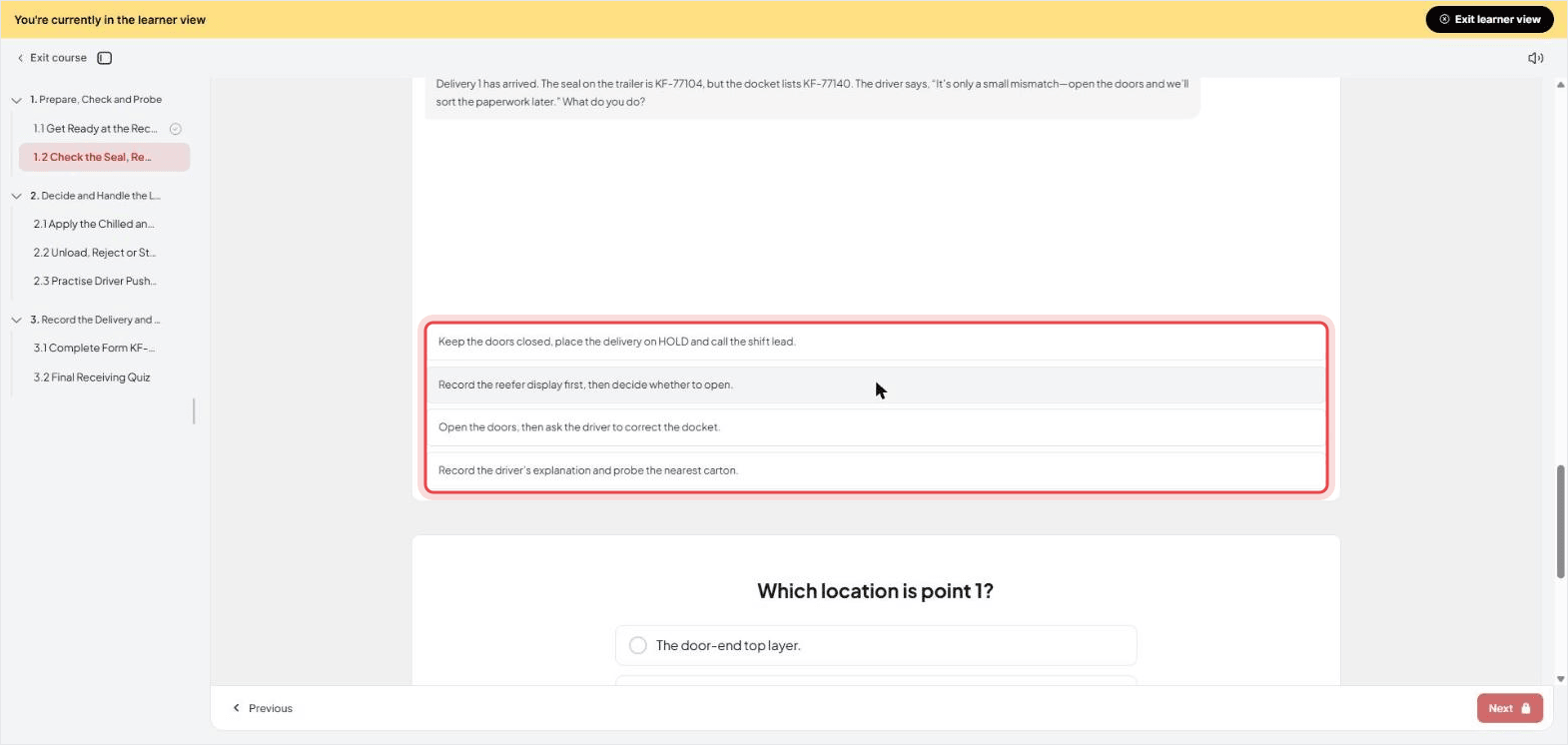
To see what a new starter gets, click the play icon to switch to the learner view and work through every page. One scenario opens with a transposed seal number and a driver who wants the doors open now.
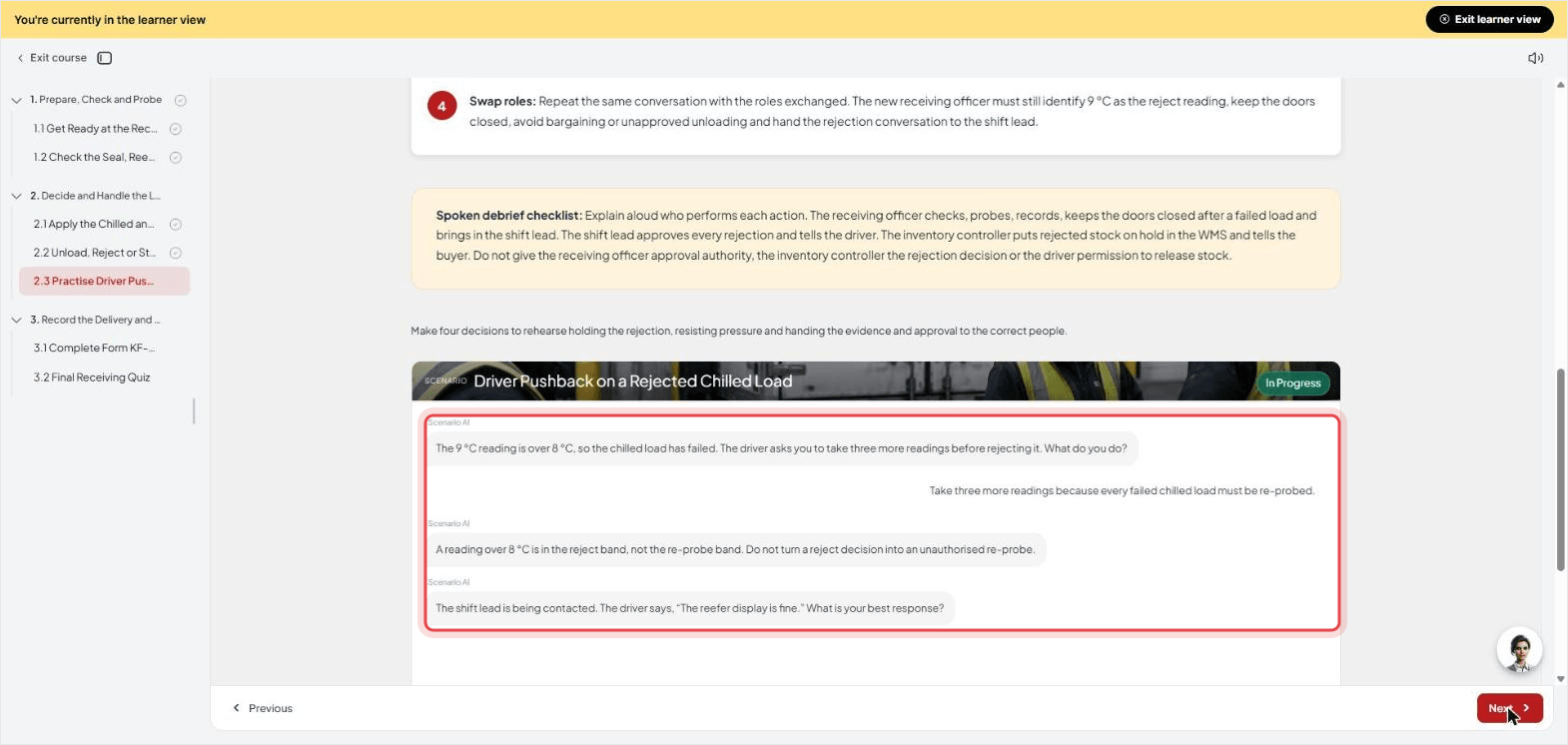
In the driver role-play, I deliberately chose to re-probe a load with a 9 °C reading. The feedback pointed out that my fictional SOP puts readings over 8 °C in the reject band. That was a useful check of whether the activity followed the supplied rules.
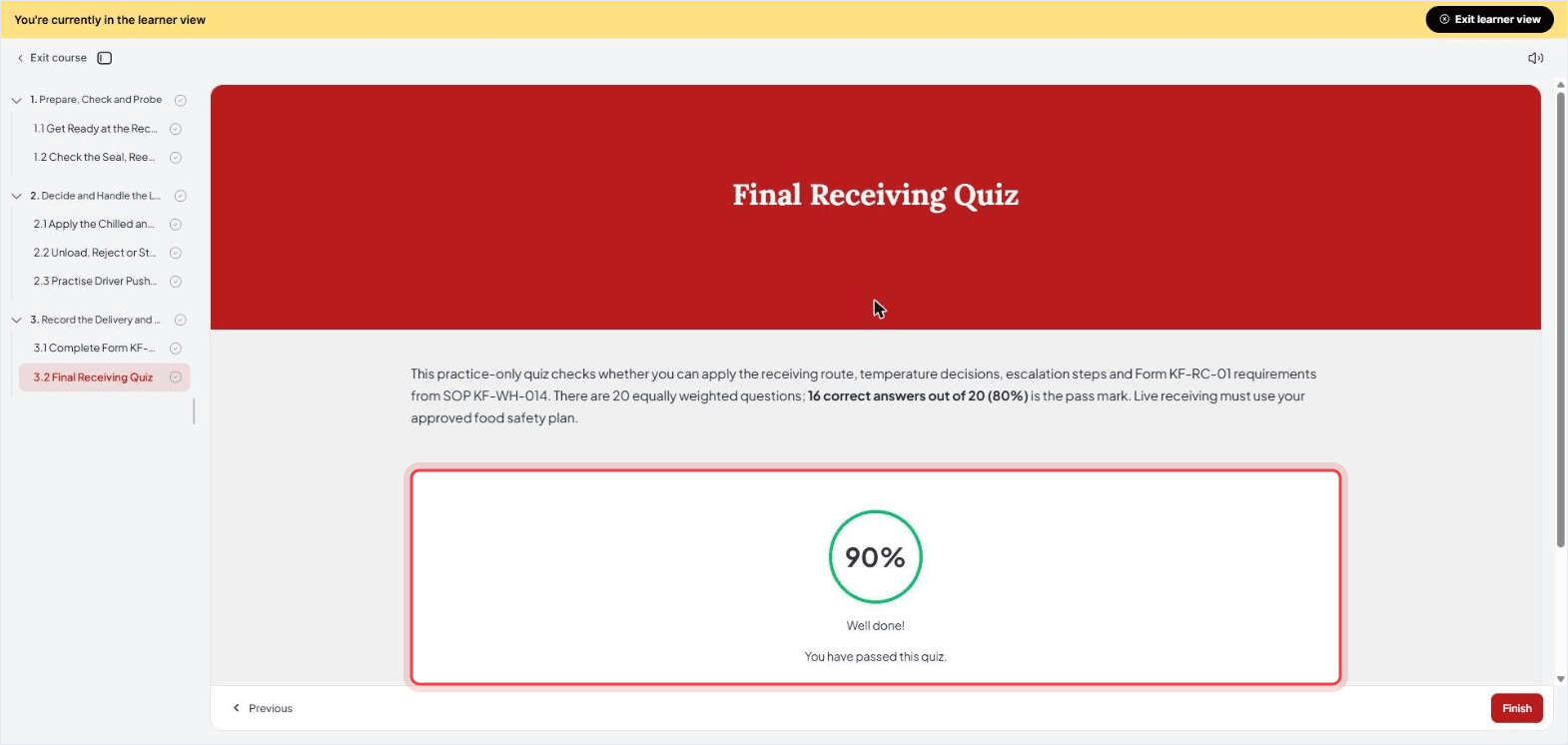
The final quiz reported 90%, and the course showed Result : Complete. I checked those in the learner view; I didn't run a pilot with new receiving staff.
What the training run caught in my SOP
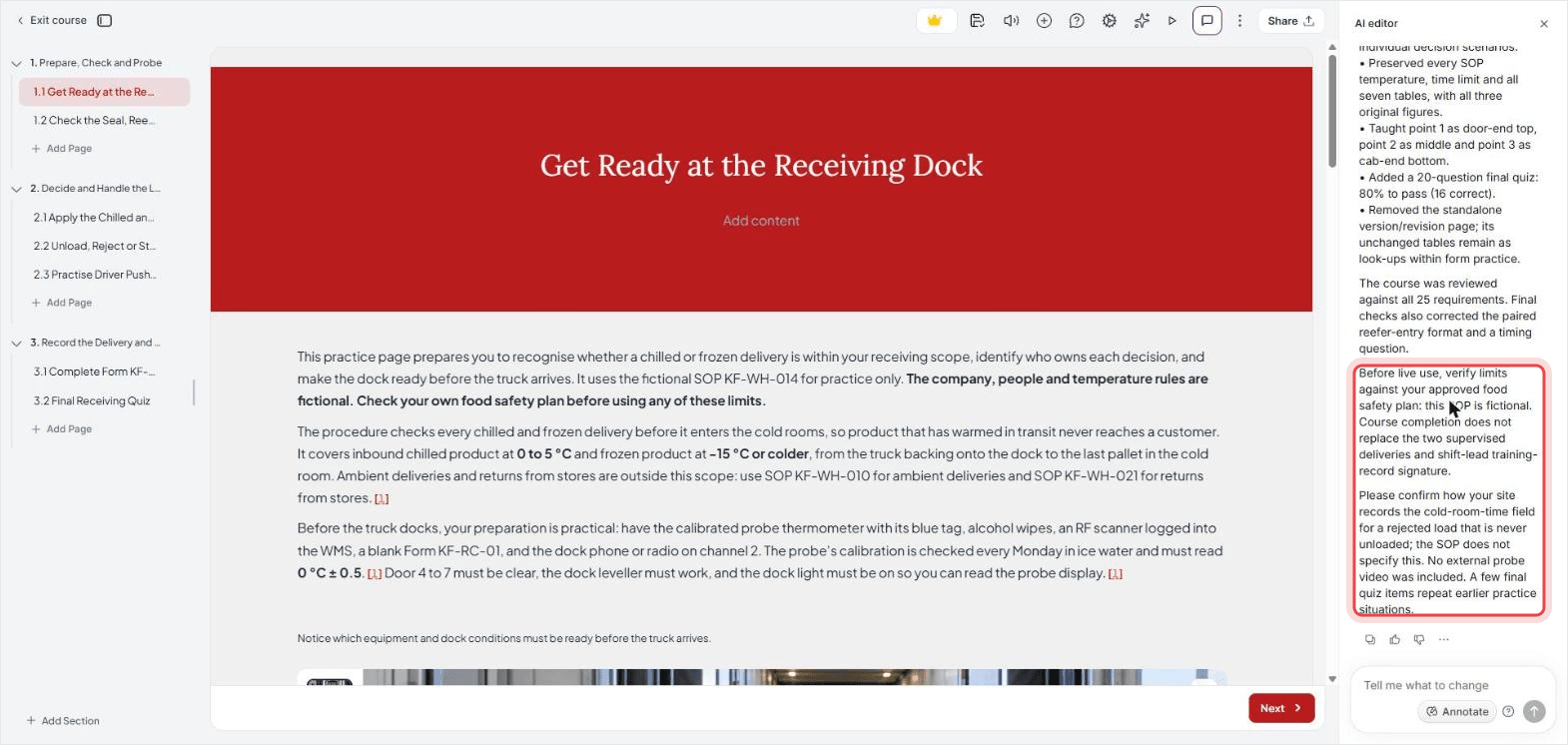
My first gap was the word “front”. The written step said “front top, middle, rear bottom”, while the diagram showed the truck-door end and the cab end. I hadn't explicitly tied the numbered points to those ends in the instructions.
I clarified the intended positions in the chat, and the course explained them beside the diagram. I'd also replace the SOP's wording with “door-end top, middle, cab-end bottom”. The downloaded example retains the original wording so you can see what prompted the question.
The second gap was on the form. It asks for the time the last pallet reaches the cold room, but a rejected load is never unloaded. The SOP owner needs to specify what to record in that case. I left that decision unresolved in the sample rather than inventing a site rule.
I also adjusted the training plan. I wanted learners to make receiving decisions, so I asked for more practice on those pages. One message changed the plan from one Practice page out of eight to five out of seven. The page labels alone don't establish training quality; I still worked through the activities.
Share the SOP and train people on it
Keep the approved SOP in a place staff can reach during the task. Record its version and owner, tell people what changed and archive superseded versions so they're retained without being mistaken for current instructions. My sample also requires two supervised deliveries and a shift lead's signature before someone works alone. Finishing its online course doesn't replace that sign-off.
I used AI for employee training to build practice around the SOP's decisions. When the procedure changes, update the source, revise the affected lessons and questions, and check them again. For other delivery options, see these employee training methods.
From SOPs to a training manual
A training manual can bring together the procedures and background someone needs for a role: what the job involves, who can help and where to find each approved SOP. I'd link to the current procedures rather than copy them into several manuals. That gives the owner fewer versions to maintain.
If you need course results alongside workplace sign-off, compliance training software is one way to organise the online part. Keep the assessment results and any required practical sign-off as separate records. I'd decide what evidence the task needs before choosing the software. The guide to employee training materials covers other material you might include.
Limits of building training from an SOP with AI
- The AI builds from what the SOP says. It flagged my gaps but did not invent the missing rule; you still decide it.
- Scenario feedback can be generous. Both scenarios where I chose wrongly corrected me on the spot, then gave five stars at the end anyway. Read the feedback before you rely on it.
- Check every activity. My readiness checklist gave no visible feedback when I clicked Check readiness. A timing question also told me to stop unloading after the last pallet was already in the freezer. I left both findings unresolved; I'd correct or replace those activities before using the course with staff.
- The course card showed Grade 100% although my quiz score was 90%. Check scores in the quiz itself.
- Use a supported source file. A PNG attached through Add files without a warning, but I removed it without sending it. That doesn't establish whether image-only course generation works. Use the documented docx or pdf route for an SOP.
- My build continued after a reload. I reloaded while two of the seven pages were being written, and all seven were completed.
- Uploads are limited to 20 documents per course chat, up to 50 MB per upload, counting all the files you pick at once.
How to train people on an SOP without a course builder
For a small team working with a supervisor, I'd start with the approved SOP and a supervised demonstration. Let the new starter explain the decisions and practise the task in suitable conditions, then record the required sign-off. My fictional example calls for two supervised deliveries and the shift lead's signature.
Use a few questions from the procedure to check the decisions that are easy to miss. Keep the answers with the training record, and ask which instructions needed explaining. This takes supervisor time for each person, but it lets you see how they carry out the work.
Write it, review it, then train on it
The word that tripped up my example was “front”. It looked clear on the page until the training builder asked which end of the truck I meant. That's the check I'd take from this: review the draft with someone who doesn't already know what you intended, before you approve it.
Start with one real task and its owner. Write the actions and decisions, check the exceptions, and watch a suitable user work through them. When online practice would help, turn a document into a course and check that it teaches the approved procedure.
Frequently Asked Questions
No single five-part format fits every SOP. A useful core is document control, purpose and scope, responsibilities, the procedure, and records. Add definitions, equipment, exceptions, review dates and training requirements where the task needs them.
Choose one task and work with someone who knows it. Record where it starts and ends, the actions in order and the decisions that need an explanation. Check those notes against the approved process before polishing the document.
Use a consistent structure that suits the task. A simple sequence can use numbered steps; detailed checks can sit under them as sub-steps. A flowchart helps when decisions lead to different actions. Keep ownership, version and approval details with the procedure.
An AI tool can help turn verified notes into a first draft. It still needs the task, roles, limits and exception rules from you. Have the process owner check the result and test the instructions with a suitable user. The hands-on AI test in this guide built training from an SOP, rather than testing ChatGPT as an SOP writer.
Carolina Martin
Carolina is a highly experienced learning designer with tech start-up experience. She is based in Sydney and previously designed courses alongside Coursebox founder Travis in a previous job. She is passionate about delivering engaging learning experiences and brings the same perspective to customer experience too. She manages our customer support documentation and product testing processes.

