

How to Conduct a Heuristic Evaluation: A Step-by-Step Guide for Course Creators
Heuristic evaluation enables course creators to assess the user-friendliness of their products. Learn how to conduct a heuristic evaluation on your next course.


Build, launch and sell quality courses in minutes
If you're developing or delivering digital learning experiences, you’d know that usability matters a lot. Whether it's an online module or an interactive course, a smooth, intuitive interface keeps learners engaged and helps them achieve their goals.
But how do you know if your course or product is truly user-friendly? That’s where heuristic evaluation comes in. This practical method helps you catch usability issues before they frustrate your users.
In this post, you’ll learn exactly what this assessment is, why it’s so important, and how to conduct a heuristic evaluation for your e-learning projects.
What Is Heuristic Evaluation?
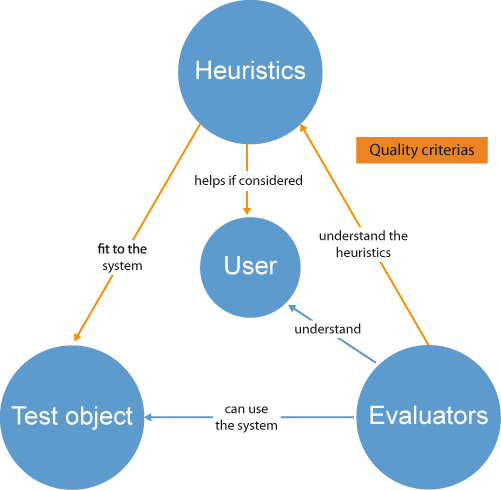
A heuristic evaluation is a structured method for assessing how user-friendly a product, website, app, or digital course is. It doesn’t require large groups of test users or expensive research labs. Instead, a handful of experts or evaluators walk through and review the interface using a checklist of well-established usability guidelines (called “heuristics”).
As a result, course designers and trainers get a prioritized list of issues backed by expert recommendations. This helps make projects clearer, smoother, and more rewarding for everyone.
Jakob Nielsen and Rolf Molich coined the term "heuristic evaluation" in the early 1990s — a time when usability testing tools were still rare and costly. Their approach proved so effective and accessible that it remains a go-to for UX designers, developers, and course creators today.
Why Use Heuristic Evaluation?
Heuristic evaluation is popular for good reason:
- It’s quick and cost-effective. You don’t need to recruit a large number of users or set up elaborate labs. Three to five evaluators are ideal.
- You get expert insight. Evaluators are usually designers, usability experts, or people familiar with your industry.
- It identifies core issues early. Catching navigation glitches, workflow snags, or accessibility gaps in prototypes is far easier than fixing them after launch.
- It’s flexible and repeatable. You can use it for full products, feature rollouts, prototypes, updates, or even learning modules.
- It complements user testing. Heuristic evaluation is effective for identifying usability problems that learners may not articulate, but it’s not a replacement for genuine learner feedback.
Common Heuristics Frameworks
Heuristic evaluation is most effective when you select the appropriate usability guidelines to apply. Nielsen’s 10 Usability Heuristics are the gold standard, including:

1. Visibility of System Status
Keep users informed about what’s happening through clear visual cues, like progress bars or loading indicators, so they feel confident and in control.
2. Match Between System and Real World
Use familiar language and concepts that reflect real-world experiences, making interfaces intuitive. For example, a shopping cart icon that resembles a real basket.
3. User Control and Freedom
Provide easy options for users to undo or redo actions, helping them recover from mistakes without frustration, like a cancel button on forms.
4. Consistency and Standards
Maintain uniformity in terminology, design, and navigation so users don’t get confused by different labels or inconsistent actions across your platform.
5. Error Prevention
Design your system to minimize the chances of errors, such as disabling submit buttons until all required fields are filled, reducing user frustration.
6. Recognition Rather Than Recall
Simplify tasks by displaying options and information visually, so users don’t have to remember details. For example, showing thumbnails for image selection.
7. Flexibility and Efficiency of Use
Enable experienced users to shortcut repetitive actions with features like keyboard shortcuts, speeding up processes while keeping beginner-friendly paths.
8. Aesthetic and Minimalist Design
Avoid clutter by focusing only on essential elements, making interfaces cleaner and easier to navigate, which improves overall user satisfaction.
9. Help Users Recognize, Diagnose, and Recover from Errors
Provide clear, constructive error messages to guide users in fixing issues quickly, rather than leaving them stranded or confused.
10. Help and Documentation
Ensure that help resources are accessible and easy to understand when needed, such as FAQs or support links, to support users in completing their tasks.
You might see others, like Shneiderman’s “Eight Golden Rules,” or specialized lists for accessibility and mobile UX. The key is to pick heuristics relevant to your learners and context.
How To Conduct a Heuristic Evaluation
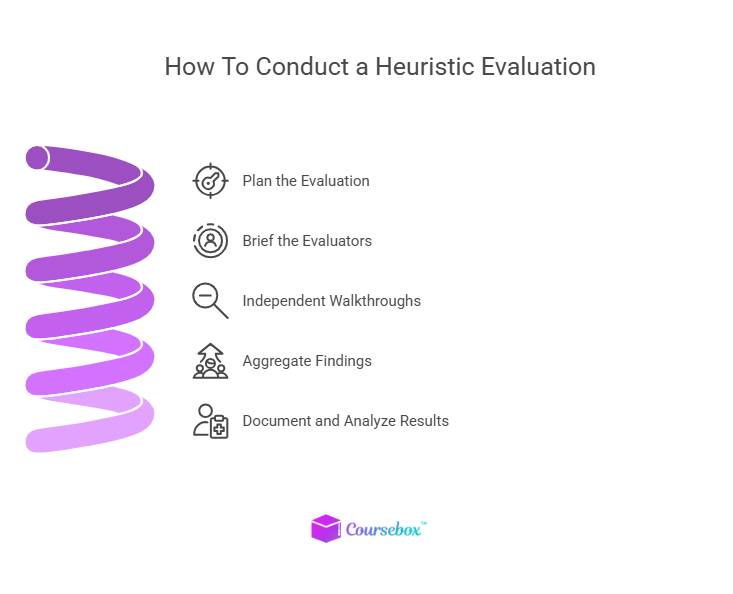
Here is how to conduct a heuristic evaluation in 5 steps:
Step 1: Plan Your Evaluation
It all starts with defining your goals and scope. Decide what you want to assess. Is it the entire course? Just the learner dashboard? A single interactive quiz? Narrowing your scope helps evaluators focus and gets you more usable insights.
Then, select evaluators. You’ll typically want three to five experts. These could include UX designers, digital learning specialists, or domain experts who possess both usability expertise and knowledge of your target audience. Avoid end users for this step: you need evaluators who’ll bring professional knowledge and a fresh perspective.
Now, select a usability framework that best suits the product. For an e-learning platform, Nielsen’s heuristics work well, but you can add criteria for accessibility, content clarity, or mobile experience.
Finally, prepare tools and templates. Provide each evaluator with forms to document issues, specify the heuristic violated, rate severity, and suggest improvements. Digital tools, such as spreadsheets, Miro boards, or custom templates, make this process more efficient.
Step 2: Brief the Evaluators
After the planning, gather all evaluators for a standardized briefing. Explain the scope, share the heuristics, and let them know if there are specific user flows or tasks they should examine. The objective is to make sure everyone is “on the same page” without biasing their reviews.
Step 3: Independent Walkthroughs
Each evaluator explores the interface independently, documenting any usability issues they find. This prevents groupthink and ensures a broad perspective on potential problems. During their walkthrough, evaluators should pay attention to navigation, feedback, consistency, accessibility, and content clarity.
Step 3: Optional Observation
You can have a neutral observer take notes as the evaluator walks through the system and describes findings aloud. This works especially well for complex workflows or new evaluators.
Step 4: Aggregate Findings
Once evaluators finish, gather everyone for a debriefing session. Review the list of issues, compare notes, discuss severity, and prioritize usability problems. Aggregating insights helps create a richer, more complete assessment, often revealing critical issues that individual evaluators might miss.
Step 5: Document and Analyze Results
Good documentation is the key to actionable recommendations. Record each issue with screenshots and clear descriptions, and assign a severity rating (e.g., cosmetic, minor, major, critical) to help teams prioritize and address fixes effectively.
Make sure to note which heuristic the issue violates. Then, summarize key findings in a team report with clear recommendations. This makes it easier to take action and track progress against usability issues in future evaluations.
Example Heuristic Evaluation Checklist for Course Creators
For course creators, here’s a focused heuristic checklist to use when evaluating e-learning modules or digital platforms:
- Can learners easily get started and move between sections?
- Do users get instant confirmation after completing a quiz or submitting an assignment?
- If a learner makes a mistake, is the error message helpful and actionable?
- Is terminology consistent across the course?
- Do all learners, including those with disabilities, have equal access?
A simple template for your evaluators might include these columns:
- Heuristic Violated
- Issue Description
- Screenshot or Reference
- Severity Rating
- Recommended Solution
You can create similar lists for mobile modules, video courses, or interactive activities, based on your audience.
How Coursebox Simplifies Heuristic Evaluation for Course Creators
Heuristic evaluation is a practical and accessible way to ensure your courses, platforms, and learning apps deliver what your users need. Many AI platforms, like Coursebox, come with intelligent features and collaborative tools, which make it easy to conduct effective heuristic evaluations.
For instance, Coursebox offers customizable evaluation templates that you can use to easily set up forms and checklists within Coursebox or integrate with external review tools for seamless documentation. The platform also enables evaluators to share findings, aggregate issues, and discuss solutions in real-time.
Coursebox also integrates with popular LMSs, websites, and HR platforms to support seamless workflows. You can implement improvements directly in Coursebox, assign follow-up testing, and track progress to completion.
By incorporating heuristic evaluation into your regular workflow, you’ll identify issues early and optimize your courses for every learner. Sign up for free on Coursebox and start building courses your learners will love.
FAQs: How to Conduct a Heuristic Evaluation for Course Creators
What is a heuristic evaluation, and why should I use it?
A heuristic evaluation is a usability inspection method in which experts review a digital product against established usability principles, known as heuristics. It helps identify common user experience issues early, before they affect real users. Using this technique saves time and money on fixes and leads to smoother, more enjoyable courses or platforms for learners.
How to conduct a heuristic evaluation?
It’s best to select three to five evaluators who have experience in user experience, course design, or digital learning. They’ll independently review the product and flag any usability problems they see. This mix of perspectives helps catch a wide variety of issues and produces a more balanced report.
What are the most important heuristics to consider?
The most widely used are Nielsen's 10 Usability Heuristics, which include principles such as clarity of feedback, error prevention, consistency, and minimalist design. These guidelines help assess if users can understand navigation, recover from mistakes, and complete tasks efficiently. Adapting these for course content ensures learners stay focused and engaged.
How can Coursebox help me conduct and act on heuristic evaluations?
Coursebox offers customizable templates and collaborative tools for collecting, sharing, and prioritizing usability findings. Its dashboards make it easy to track issues, assign fixes, and monitor progress as you upgrade your course or platform. Plus, AI features can help automate documentation and flag common usability problems, making the evaluation process more efficient and actionable for busy teams.
Travis Clapp
Educational technologist and instructional designer

