

Facilitator Guide: How to Write One, With a Free Template
What a facilitator guide is, what goes in one and how to write it step by step, with a free Word template and a completed 2-hour example run sheet.

A facilitator guide tells the trainer how to prepare for and run a session, including timings, activities, key messages and follow-up.
- Write for the trainer who will use it. Explain the purpose of each activity and provide the instructions, materials and answer guidance they need.
- Allow time for briefing, practice, feedback and moving between activities. Rehearse the plan; a correct total alone does not make it workable.
- Identify approved wording that must stay consistent and explain what the trainer can adapt. Include shorter activity options and arrangements for unfinished work.
- Check the guide alongside its slides and learner handouts, then maintain one current version with a named owner.

Set up your branded LMS and deliver training with AI
A facilitator guide explains how to prepare for and run a training session. It gives the trainer a timed plan, instructions for activities, key messages and notes for handling questions. Below, you can download a free Word template and see how a completed guide supports a two-hour session.
I'm an instructional designer at Coursebox, where we make employee training software, and I write our knowledge base.
The example follows a fictional bus operator preparing a complaints refresher for drivers at four depots. Each depot trainer needs the same core messages and practice activities, with room to respond to their group. The completed guide shows what to say, what drivers do and how to adjust the plan if time runs short.
The blank template has the same structure. These downloads contain the guide and sample instructions; prepare your own slides, learner forms, policy references and feedback link before delivery.
Get the blank facilitator guide and completed example in Word, plus a PDF of the example. The example includes four adaptations. Slides and separate learner handouts are not included.
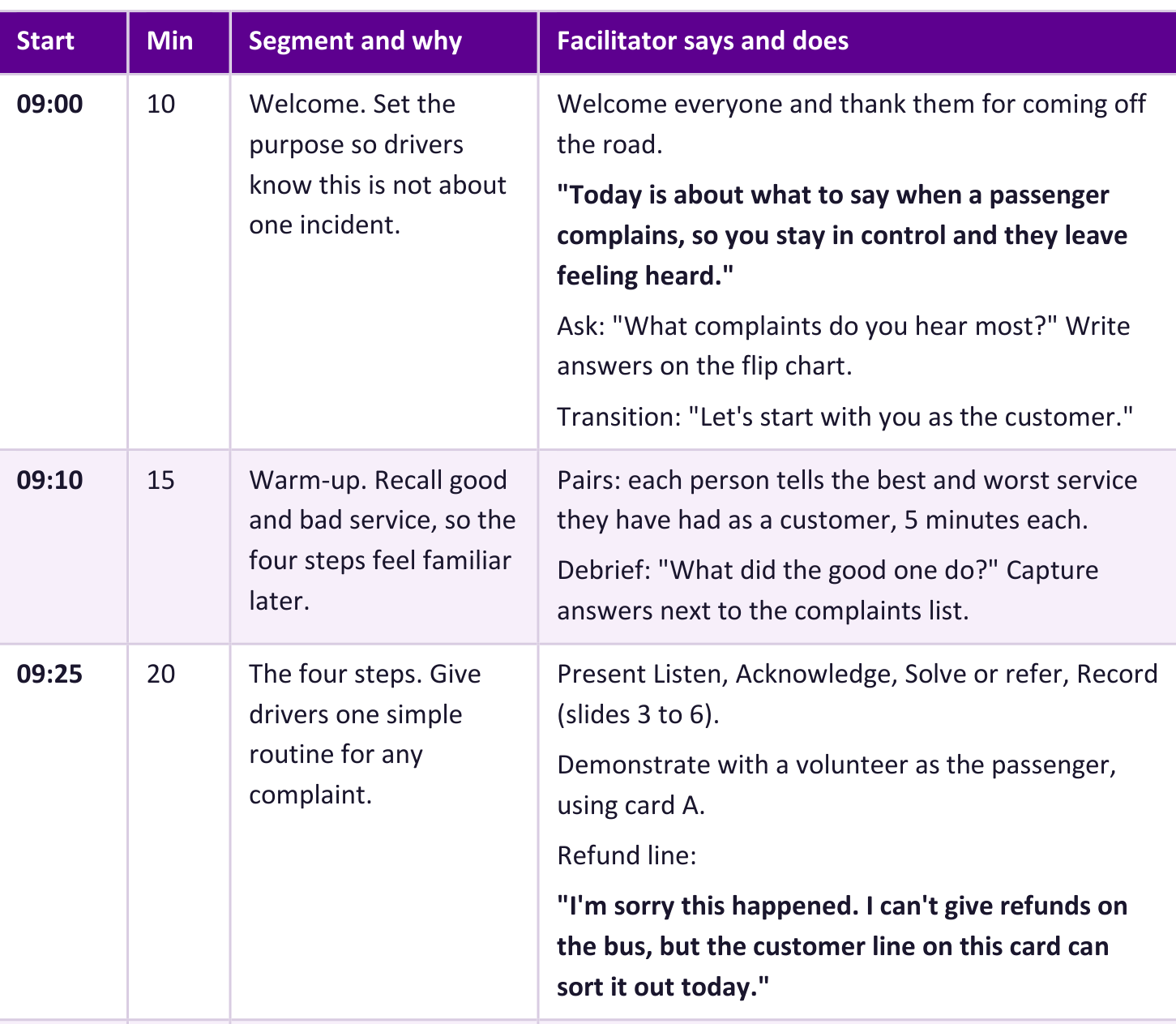
View the completed run-sheet preview at full size.
The bus operator, complaint scenarios and sample policy lines in the downloads are fictional. Replace them with approved material for your own organisation.
What a facilitator guide is, and what it is not
A guide makes the session designer's decisions available to the person delivering it: what learners need to practise, which messages must stay consistent and what can be adapted. This helps when another trainer takes over. You may also see it called a trainer guide, leader guide or instructor guide.
The guide is written for the training facilitator, who is often not the person who designed the session. It is the delivery document for a programme you have already designed.
Facilitator guide, participant guide, agenda or lesson plan?
A facilitator guide brings together the information the trainer needs during delivery. The other documents support different parts of the session:
| Document | Who reads it | What it answers | Scope |
|---|---|---|---|
| Facilitator guide | The trainer | How to run the session: preparation, timed run sheet, what to say, activities, notes, close | One session |
| Participant guide | Learners | What learners read, fill in and keep: exercises, worksheets, job aids | One session |
| Training agenda | Learners and organisers | What happens when, at headline level | One session or day |
| Lesson plan | The teacher or trainer | Plan objectives, teaching and checks; detail can overlap with a facilitator guide | One lesson or session |
| Slide speaker notes | The presenter | What to say on each slide | Slide by slide |
| Trainer manual | The training team | The rules for a whole programme, plus a guide for each session | A programme |
| Training plan | L&D lead or sponsor | Why train, what to train, and how to measure it | A programme or year |
Here's how the complaints refresher looks in each.
The training agenda says "09:25 The four steps". The participant guide holds the four steps and a blank incident card. The speaker notes say what to say on slide 3.
The facilitator guide adds the instructions behind that agenda. It tells the trainer to set out the scenario cards before drivers arrive, identifies the approved refund wording and provides an answer to a possible question about driver identification. It also explains how to shorten the second practice activity while keeping the first.
What goes in a facilitator guide
These are the parts of a complete guide, each with the line it holds in the complaints refresher.
| Part | What it holds | Example from the refresher |
|---|---|---|
| Session snapshot | Title, audience, group size, length, mode, pre-work | 12 drivers, 2 hours, in person, after a 15-minute online module |
| Why the session exists | The problem it solves and how success is checked | Review complaint handling, volume and severity after three months |
| Learning objectives | What each person can do by the end, in observable terms | Say the refund line word for word |
| Preparation checklist | What to do before the day and before people arrive | Confirm the 12 names with the roster team |
| Materials and setup | What to bring, how many, and how the room is laid out | Tables of three, so every role-play has an observer |
| Run sheet | One row per segment: start, minutes, why, what to say and do, what participants do, materials | 09:45, 25 minutes, role-play round 1 |
| Word-for-word lines | Wording that must not change, marked in bold | The safety line about calling control |
| Cut if late | What to drop or shorten when time runs out | Shorten the warm-up to 10 minutes |
| Facilitator notes | Likely questions, watch-outs, and the reason behind an activity | Some drivers expect a blame session |
| Close and evaluation | Check questions, commitments, feedback and a follow-up date | Complaint log checked in January 2027 |
| Version log | What changed after each delivery, and who changed it | Version owner records changes after rehearsal and delivery |
Learning objectives should describe something you can watch someone do. These measurable learning outcomes show how to word them. Keep the room logistics in a training checklist if they grow beyond a few lines.
Adapting the guide for different sessions
- In person: includes the room layout, printed materials, equipment and how learners will work together.
- Virtual: adds the platform, room settings, chat prompts and responsibilities for technical support. Plan how to give instructions, check understanding and help someone who loses their connection.
- Blended: covers the live session and says what learners did before it online and must do after it.
- Train-the-trainer: prepares other trainers to run a session, including how to use its guide.
- Workshop: the group produces something, such as a plan or a decision. It has more prompts and less script.
- Scripted compliance session: identifies the messages the organisation requires trainers to deliver consistently and the records they must complete. Have the relevant policy owner approve any wording marked as mandatory.
How much to script
Choose the level of detail for the trainer and the task. A new trainer may need a worked example and complete activity instructions; an experienced trainer may need only a question and the key points to cover. Reserve exact scripts for wording you have deliberately agreed must stay the same.
| Level | What the guide says | When to use it |
|---|---|---|
| Full script | "Today is about what to say when a passenger complains, so you stay in control and they leave feeling heard." | Wording approved for consistent delivery, or extra support for a new trainer |
| Talking points | Purpose: what to say when a passenger complains. Not a blame session. Ask what complaints they hear most. | Experienced trainers who know the topic |
| Prompt | Open: purpose, then ask for common complaints. | Subject experts running their own session |
A real guide mixes all three. The example scripts three lines in full and leaves the rest as talking points.
When you don't need a facilitator guide
- Self-paced e-learning: there is no facilitator, so the course carries the instructions.
- A familiar session you run yourself may need only an agenda and notes. A detailed guide is more useful when the activities, subject or delivery requirements are new.
- For a short workplace demonstration, a job aid or task checklist may be sufficient. Add trainer instructions where the demonstration needs preparation, practice or a specific check.
- The rules for a whole programme: that is a trainer manual. The guide is one part of it.
How to write a facilitator guide
The steps follow the complaints refresher from the reason it exists to the version log.
Step 1: Start with why the session exists
Start with the work the session should help people do. In the fictional bus example, drivers need to respond to everyday complaints and recognise when to involve the control room. The guide should support appropriate handling and reporting; a lower escalation count alone would not show whether that improved.
Write objectives that can be checked during the session, such as responding to a complaint scenario using the agreed steps. Use the gaps identified in your training needs analysis to choose what to practise, rather than filling the guide with every topic connected to the role.
Step 2: Break the session into timed segments
List the activities in order and give each one a purpose and enough time to carry it out. Include instructions, practice, feedback, role changes and breaks. If you already have a training agenda, use it as the starting point, then add the detail a trainer needs.
Check the arithmetic. Each start time is the previous start plus its minutes, and the minutes must add up to the session length.
The refresher has eight segments that add up to 120 minutes, from 09:00 to 11:00. For the length of the whole session, see how long employee training should be.
Step 3: Write what the facilitator says and does
For each segment, write the opening question, what to show and when, and the transition into the next segment. Use talking points by default. Write a line in full only when the exact wording counts.
In the template, bold text means "say this word for word". The refresher has three bold lines: the opening line, the refund line and the safety line. Everything else the trainer can say in their own words.
Step 4: Write the activity instructions
For each activity, explain the group size, materials, instructions and timing. Include questions for the discussion afterwards, often called a debrief, and examples of what to listen for. In the refresher, four groups of three practise at the same time: two minutes to brief them, three six-minute turns including feedback and changing roles, then five minutes to discuss what they learned.
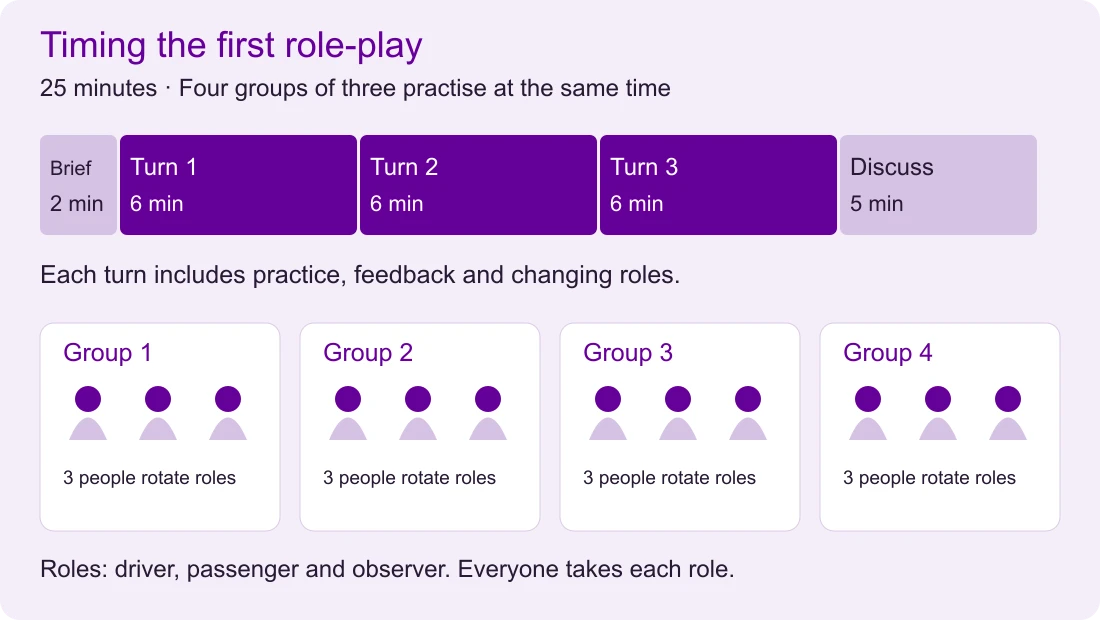
View the role-play timing diagram at full size.
Step 5: Mark what to cut if you run late
Decide which parts can be shortened and write a usable alternative beside them. For this example, the first practice activity and the closing checks are protected. The warm-up can be reduced, and the second practice can become a demonstration. Record any task moved to a later shift and name who will follow it up.
Cut if late, and a word-for-word safety line
Example: Illustrative two-hour complaints refresher for drivers at a fictional bus operator.
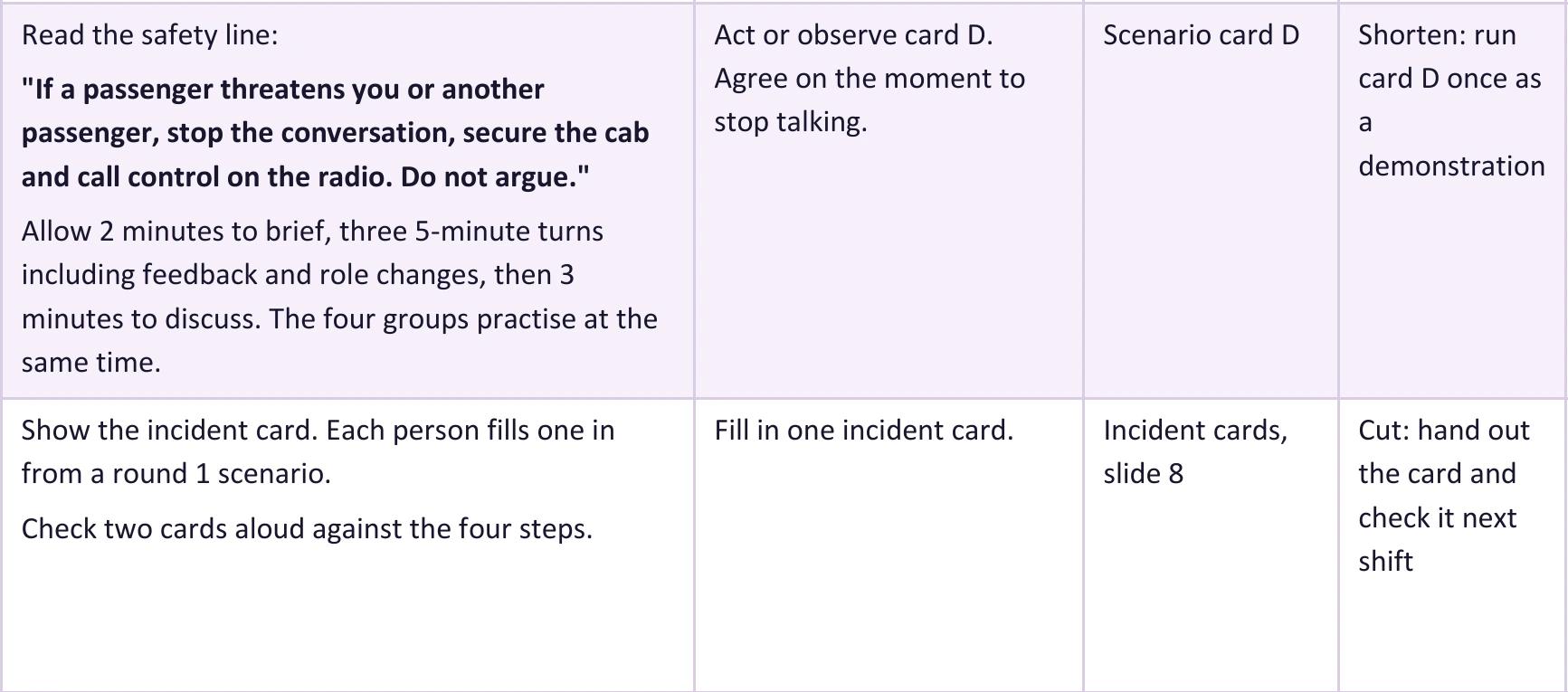
- 1. Bold line: The sample operator has marked this line as fixed wording. Replace it with approved local instructions before delivery.
- 2. Shorten: The second role-play becomes one demonstration instead of a round for every group.
- 3. Cut: Recording a complaint moves to the next shift, with the card handed out.
View the activity-adjustment preview at full size.
Protect the activities needed to meet the objectives. If a discussion runs long, use the shorter version already written in the guide. A task moved to another shift still needs an owner and a follow-up time.
Step 6: Add facilitator notes
Add the context that a trainer cannot get from the activity title: likely questions, a useful explanation, accessibility arrangements and where to find help. If you expect a difficulty, explain how to handle it. Avoid describing questions as common unless you have evidence from previous delivery.
The fictional refresher includes an option to observe the threatening-passenger scenario rather than act it out. It also gives the sample organisation's response to a request for driver identification. Before using the guide, have the operator approve those safety and policy instructions.
Step 7: Close, evaluate and keep a version log
Plan how learners will show what they have learned, what feedback you will collect and what happens afterwards. The example uses check questions, practice observations and a written commitment. A satisfaction form records participants' views; follow-up on the job needs separate evidence.
After delivery, record what ran over, which instructions needed explanation and what should change. Assign someone to review those notes and update the master guide. Keep the current version in one agreed place and tell trainers when it changes.
Check what learners can see before sharing a course or PDF. Keep assessment answers, facilitator notes and any sensitive scenario details in materials available only to the people who need them. Test access using a learner account; a course export is not automatically a suitable participant handout.
Facilitator guide samples for other situations
Our internal review estimated that at least 75 people requested live workplace training in their first AI course-builder request during the 180 days to 19 October 2026. Requests included workshops, classroom sessions and train-the-trainer courses. The examples below reflect those uses.
The example document includes these four illustrative adaptations. They show how the guide changes with the delivery task; they are not complete course packs.
Handing a session to a new trainer
How a new depot trainer gets ready to run the complaints refresher from its guide.
| Stage | What the new trainer does | What you check |
|---|---|---|
| 1. Read | Reads the whole guide and the activity cards, and lists their questions | They can explain why each segment exists |
| 2. Watch | Observes a full session, following along in the guide | They mark where the session left the guide, and why |
| 3. Co-deliver | Runs the role-plays and the close while you run the rest | Timing, and whether the bold lines were said word for word |
| 4. Solo | Runs a full session with you observing | Every segment against the run sheet, plus one thing to keep and one to change |
| 5. Update | Adds what they learned to the version log | The guide still works for the next new trainer |
A rehearsal gives the new trainer a chance to practise instructions and ask questions before running the session. Use the observation to agree what they can deliver independently and where further support is needed.
A one-day technical classroom course
Internal auditor training, 08:30 to 16:30, with a mock audit in the afternoon.
| Start | Min | Segment | Facilitator notes |
|---|---|---|---|
| 08:30 | 20 | Welcome and what an internal audit is for | Ask who has been audited before, and use their stories later |
| 08:50 | 60 | Audit principles and the audit process | Keep to the process; detail can wait for questions |
| 09:50 | 15 | Break | |
| 10:05 | 60 | Planning an audit and writing a checklist | Each pair drafts a checklist for a process they know |
| 11:05 | 55 | Asking audit questions | Practise open questions on those checklists |
| 12:00 | 45 | Lunch | |
| 12:45 | 90 | Mock audit interviews | Never cut: this is where people find out if they can do it |
| 14:15 | 15 | Break | |
| 14:30 | 45 | Writing findings | Shorten if late: one finding each instead of three |
| 15:15 | 45 | Presenting the mock audit report | Each pair has 5 minutes |
| 16:00 | 30 | Close, knowledge check and feedback | Protect time to review learning and record attendance separately |
For a technical day, include the subject guidance and answer examples the trainer needs to discuss participants' work. The sample timetable runs from 08:30 to 16:30, including breaks and lunch; adapt the number of presentations to the group size.
How Secure Meters combined expert-led sessions with online learning
Secure Meters relied on engineers to deliver classroom training, which made scheduling and repeated sessions difficult. The company trained its subject experts to create online courses, with Shafik Ahmad reviewing the material before publication. Classroom sessions continue for advanced and collaborative topics. For a blended programme, document what learners complete online and what the facilitator needs to lead live.
A first aid course: trainer guide and learner handbook
A first-aid example shows why trainers and learners need different information. The split below illustrates document planning, not a complete first-aid syllabus or assessment specification.
| Item | Trainer guide | Learner handbook |
|---|---|---|
| Steps for CPR | How to demonstrate them, the order to practise in, and common mistakes to correct | The steps, with diagrams, to keep |
| Practical assessment | The observation checklist and what counts as competent | What they will be asked to show |
| Equipment | Manikin cleaning between learners, and how many per pair | Safe use and cleaning instructions relevant to learners |
| Scenarios | The scenario script and the answers | The scenario prompt only |
| Timing | The run sheet | Start and finish times only |
Keep assessment answers and observation criteria in the trainer's materials where revealing them would undermine the check. Learners still need clear instructions about the task and the standard expected. Share practice explanations when they help learning.
A blended course with live sessions
Writing clear customer emails: three short online modules and two 60-minute live sessions. This is the run sheet for the first live session.
| Start | Min | Segment | Facilitator notes |
|---|---|---|---|
| 0:00 | 10 | Check the pre-work: one rewrite from module 1 | Ask two people to paste their rewrite in the chat |
| 0:10 | 15 | Live rewrite of a real complaint reply | Use a reply from your own team, with names removed |
| 0:25 | 25 | Breakout rooms of three: rewrite two emails | Pre-assign the rooms and visit each one once |
| 0:50 | 10 | Share one rewrite, then set module 2 | Never cut: say when module 2 must be done |
Use the opening to check the pre-work and give brief support where it is missing. In the live session, reserve time for practice and feedback rather than repeating every online explanation. Set out what learners need to do before the next meeting.
What to send a trainer who is taking over a session
Before another trainer takes over, check that the guide and its supporting materials agree. Send them the current versions together and arrange time for questions:
- The facilitator guide, with the version number.
- The slides, with the slide numbers the run sheet refers to.
- The participant handouts and activity cards, ready to print.
- The feedback form link.
- A date to talk it through before they run it.
Send it with the guide and the materials at least a week before their first session.
Subject: Your session pack for [SESSION]

Hi,

Thanks for taking on [SESSION]. Attached are the facilitator guide, the slides, the handouts and the activity cards.

Before your first session on [DATE], please:
1. Read the whole guide, including the facilitator notes.
2. Note anything that is unclear, and I'll go through it with you.
3. Check the bold lines. They must be said word for word.

After the session, add anything that ran over or confused people to the version log at the end of the guide.

Thanks,
- [SESSION]
- : The session title (for example, Handling passenger complaints on board)
- [DATE]
- : The date of their first session (for example, 10 November)
When a facilitator guide is not enough
- For a series of sessions, the training calendar shows who runs which session and when. The guide shows how.
- For a whole course, start from a course outline template, then write a guide for each live session.
- For delivery skill, give the trainer opportunities to rehearse, receive feedback and practise responding to the group. The guide supports that preparation.
The Word downloads are version 1.1, dated 19 October 2026. The example PDF is exported from Word. Times are entered manually; check the start times, activity instructions and total duration after editing.
Writing your first facilitator guide
Start with why the session exists and what people should be able to do at the end. Then time the segments, mark the lines to say word for word, and decide what to cut if you run late. If the session has online pre-work, you can build it with Coursebox's AI employee training software.
Frequently Asked Questions
A facilitator guide is for the person running the session. It holds the timings, what to say, the activity instructions and the answers. A participant guide is for learners. It holds what they read, fill in and keep.
A session snapshot, why the session exists, objectives, a preparation checklist, materials and room setup, a timed run sheet, activity instructions, facilitator notes, a close with evaluation, and a version log.
Use complete wording where the organisation has agreed it must stay consistent. For other sections, provide the key points and enough instructions to run the activity. Adjust detail after a rehearsal with someone who did not write the guide.
Yes. Add platform settings, group-work instructions, chat prompts, technical responsibilities and a connection-failure plan. Rehearse the online activities and adjust their timing to the group and platform.
In this template, a facilitator guide covers one session and a trainer manual holds programme-wide information and session guides. Organisations use these names differently, so define the scope and contents clearly.
Carolina Martin
Carolina is a highly experienced learning designer with tech start-up experience. She is based in Sydney and previously designed courses alongside Coursebox founder Travis in a previous job. She is passionate about delivering engaging learning experiences and brings the same perspective to customer experience too. She manages our customer support documentation and product testing processes.

